Who we serve
Auto Insurance Agent Website Design That Generates Leads
Lead-generating auto insurance agent website design engineers the site around one job: turning a click into a quote request. A brochure build stalls at the form. The fix is a fast, mobile-first page with a quote path above the fold, click-to-call everywhere, and source tracking on every lead.
Free · 15-minute teardown · no pitch deck
- We run our own final-expense book
- No pitch deck — we screen-share real numbers
- TCPA-aware · CMS/AEP-compliant · Meta Special Ad Category
- Core Web Vitals < 2.0s LCP
From our own book
- Target mobile LCP
- <2.5s
Illustrative
The quote form is where an auto insurance agent website earns or loses the traffic it paid for. The header looks clean, the carrier logos are lined up, the “About Us” page reads fine — and then a visitor who wants a price has to hunt for the one button that matters. Traffic arrives, bounces, and the agent blames the ad. The site was the leak.
A lead-generating auto insurance agent website design flips the priority. Looks serve conversion, not the other way around. Below is how we build it and what we measure.
What “lead-generating” actually means here
It means the site is engineered around a single conversion event — a quote request or a call — and everything else defers to that. We don’t sell leads on this page; we build the asset that produces them. (If your goal is to buy ready prospects instead, that’s a different product — you can buy leads direct from getinsureleads.)
The proof we lean on is mechanical, not promotional. The same conversion systems and ad discipline that work for our senior-market clients — where we run our own live lead campaigns — are the systems we apply to auto. We don’t claim final-expense lineage where it doesn’t fit; we claim transferable craft, because a quote form converts on the same physics whether the buyer wants burial coverage or full-coverage auto.
What the first page of this search is actually selling
Run the search and the results split into two halves, neither of which answers the question an agent arrived with. One half is insurance-specific website platforms — Zywave, EZLynx, AgentMethods, BrightFire — selling a monthly subscription. The other half is inspiration galleries: Dribbble, Pinterest, and roundups of screenshots. The galleries show finished surfaces with no information about what happened after launch, which is the part you would actually want to copy.
Price discovery is where the platforms diverge, and the contrast is worth knowing before you book a demo. BrightFire’s pricing page, read in September 2026, publishes its rates: an Insurance Agency Website at $170 per month, Reviews & Reputation Management at $110 per month, Local Listings Management at $50 per month, Search Engine Marketing at $160 per month per campaign with ad spend excluded, Social Media Marketing at $100 per month, and an Ultimate SEO Bundle of website, reviews and listings at $290 per month against $330 bought separately. The commercial terms sit on the same page: “No Contracts. No Setup Fees. No User Fees. 30-Day Money Back Guarantee.”
EZLynx takes the other route. Its agency websites page, read the same week, carries a demo request rather than a rate. What it does publish is the shape of the product: “over 60 design templates to choose from,” optional integration of its online quoting tool and client portal, custom-written insurance content, and click-to-call and get-directions buttons. That is a template library plus content, and it is a legitimate purchase. It is just not the same purchase as a build, and the difference only shows up once you are competing with a specific agency in a specific county.
The table below separates what a website subscription buys from what it leaves for you to decide, because the second column is where an auto program is won or lost.
| What you are buying | Subscription platform | What still has to be decided |
|---|---|---|
| Design and hosting | Included in the monthly fee | Whether the layout points at one action |
| Insurance copy | Supplied, shared across customers | Whether any line of it is specific to your state |
| Page count | A template set | Which coverage, specialty and town pages you need |
| Quoting | An optional rater or portal integration | What that embed costs you in load time |
| Quote path | A contact form | The fields, the follow-up, the tracking |
| Rankings | Not a deliverable of a website alone | Traffic strategy, reviews, local signals |
What an auto insurance agent website costs, three ways
The cost question has three honest answers, and which one is right depends on what the site has to survive.
The table below sets the three routes side by side with the trade each one makes, so the decision is made on constraint rather than on brochure quality.
| Route | Cost shape | Fits when |
|---|---|---|
| Subscription platform | Low hundreds per month, cancellable | You need a credible site quickly and are not fighting for rankings yet |
| One-time custom build | $2,500–$8,000 with us, paid once | You want to own the pages and the quote path, and can run it after |
| Managed program | $2,500–$5,500 per month with us | The site is one part of a traffic and conversion engine that needs maintaining |
Our numbers are published rather than quoted. A one-time website or landing-page build is $2,500–$8,000. Foundation is $2,500 per month and covers the optimized website or landing pages, local SEO and Google Business Profile, on-page SEO and monthly reporting. Growth is $3,500 and adds the ongoing SEO and content engine, AI-search visibility and reputation work. Full-Funnel is $5,500 and adds managed paid ads on Google and Meta, landing-page CRO and marketing automation. Ad spend sits outside the retainer, billed at cost straight to the platforms. The full breakdown is on the pricing page.
Set against a $170-per-month subscription those numbers are far apart, and the gap deserves naming rather than hiding. A subscription buys a template plus hosting. A build buys the page set, the quote path and the performance budget described below, on a domain you own. For an agent with no traffic, no appointments worth defending and no ad budget, the subscription is the rational purchase and we will say so on the call. For an agency being outranked in a county where it can actually bind the risk, the template is the constraint.
The auto insurance quote-page build checklist
Every auto insurance agency website we ship hits these:
- Quote path above the fold — a visible quote-request or click-to-call within the first screen, on every device.
- Mobile-first, not mobile-tolerant — auto shoppers arrive on phones; the form is thumb-friendly and short.
- Speed under 2.5s LCP — slow sites bleed leads silently; we pass Core Web Vitals before launch.
- Trust signals near the form — carrier logos, license number, real reviews, and a local address.
- Tracking on everything — call tracking, form events, and source attribution so each lead is traceable.
The page set an auto insurance agency website needs
We start an auto rebuild at the sitemap rather than the stylesheet. One page cannot answer a driver with a suspended license, a parent adding a sixteen-year-old, a homeowner who wants both policies quoted, and a rideshare driver whose personal policy excludes the miles they are paid for. Each of those needs a different first sentence, and each is a different search.
Each row below is a page with one job, one question it answers, and one action it ends in — which is the test for whether it deserves to exist at all.
| Page | The question it answers | Where it sends the visitor |
|---|---|---|
| Homepage | Can this agent quote me, and where | ZIP field or click-to-call |
| Personal auto coverage | What the policy covers and what the state requires | Quote form |
| SR-22 and non-owner | Whether you can file, and how fast | Phone, prominently |
| Teen and student drivers | What adding a driver does to the premium | Quote form |
| Specialty (classic, rideshare, motorcycle) | Whether the vehicle or use is even eligible | Quote form, flagged by type |
| Home and auto bundle | What both policies look like together | Quote form asking own-or-rent |
| Town page, one per town | Which carriers you can bind in that county | Local phone plus quote form |
| Claims help | What to do in the first hour after a crash | Phone |
| Producer bio | Who answers the phone, and their license | Call or booking link |
| Reviews | Whether other drivers were treated well | Quote form |
Town pages are the row we scope down most often, because forty pages that differ only by a swapped city name are a spam-policy problem rather than a ranking strategy. We would rather ship six pages carrying real carrier appetite and real local detail than forty that do not — the mechanics are in our guide to ranking an insurance agency website on Google. The SR-22 and non-owner segment has enough substance behind it to warrant its own treatment; the state-by-state filing detail sits on the auto insurance agent marketing pillar.
Page speed is a conversion lever
Load time isn’t a vanity metric, and the bar is published rather than a matter of taste. Google’s Web Vitals guidance sets the thresholds, and adds the measurement rule that catches people out: “a good threshold to measure is the 75th percentile of page loads, segmented across mobile and desktop devices.” A page that feels quick on your laptop can still fail, because a quarter of loads are allowed to be worse than the value that passes — and those are the loads on older phones over cell data, which is exactly where a driver shopping at a stoplight is sitting.
The table below is the passing bar for each Core Web Vital, and it is the standard any quoting widget you bolt on has to fit inside.
| Core Web Vital | What it measures | Threshold for “good” |
|---|---|---|
| Largest Contentful Paint (LCP) | Loading performance | Within 2.5 seconds |
| Interaction to Next Paint (INP) | Responsiveness to a tap or click | 200 milliseconds or less |
| Cumulative Layout Shift (CLS) | Visual stability while loading | 0.1 or less |
We build on lightweight stacks, compress assets, and defer anything that isn’t load-bearing. A pretty site that takes five seconds to paint is a slow site that loses quote requests — full stop.
The comparative rater needs a byte budget
Speed on an insurance site is not an abstraction; it is a fixed allowance you spend on images, scripts and embeds, and the median site has already spent it. The HTTP Archive’s 2024 Web Almanac reports that in October 2024 the median page weight was 2,652 KB on desktop and 2,311 KB on mobile, and that the median mobile page loaded 66 requests, including 16 images and 22 JavaScript files. Broken down by type, the median mobile homepage carried 900 KB of images, 558 KB of JavaScript, 111 KB of fonts, 73 KB of CSS and 18 KB of HTML.
For scale, the same chapter cites Alex Russell’s Performance Inequality Gap 2024 study and its proposed target of 365 KB for a page load under three seconds at the 75th percentile. The image bytes on a median mobile homepage are past that budget before a single script runs.
On an auto site the spenders are specific, and each one is a decision with a number attached:
- A comparative rater in an iframe. It is a third-party embed pulling its own scripts and styles onto a page that has 2.5 seconds to paint. Load it on interaction, behind a button, rather than on every page view — and keep a four-field form for the visitor who would rather leave a name and number than run a full rate.
- A hero photograph sized for a desktop. At the 90th percentile the Almanac records mobile JPEGs at 266 KB against AVIF at 46 KB. That is a format decision, not a design one.
- A chat widget on every page. One script installed sitewide is every page paying for it, including the town pages that exist to load fast for a local searcher.
- A tag manager loading further tags. The script you approved is rarely the only one that arrives.
None of that means shipping a plain page. It means the rater is a line item with a byte cost next to it, argued before launch rather than discovered in Search Console afterwards. The same budget discipline governs the paid-traffic side of the build, which is covered on insurance landing pages.
The quote form, field by field
The form is the part of the site that produces revenue, and it is where a build’s defects are cheapest to prevent and dearest to leave in. WebAIM’s 2026 WebAIM Million, an evaluation of the top 1,000,000 home pages run in February 2026, found home pages averaging 6.9 form inputs and reports that “One third (33.1%) of those form inputs were not properly labeled” via a label element, aria-label, aria-labelledby or title. Missing form input labels were detected on 51% of home pages in the same run.
An unlabeled field is not only a screen-reader problem. It breaks browser autofill, which is the mechanism that lets a driver complete a form on a phone without typing every character. On an auto quote form, autofill is doing real work on name, address, email and phone — the four fields a phone keyboard makes tedious.
What we ask for on an auto quote form, and why each field earns its slot:
- ZIP code. It decides the rating territory, the carriers you can offer and whether you can write the risk at all. We put it first because it is the least intrusive field that still decides eligibility.
- Name and phone. Enough to call back. We treat the call as the closing step, not the form receipt.
- Current carrier and renewal date, optional. These decide urgency and whether a re-shop is even viable. A shopper who knows them will supply them.
- One qualifying question you can act on. Number of drivers and vehicles is usually the one, because it changes which carrier you start with before price does.
What we leave off: a “how did you hear about us” dropdown, a pre-ticked marketing-consent box, a CAPTCHA on a four-field form, and any field whose answer you will re-ask on the phone anyway. Where the form promises a call or a text, the promise above the button and the consent language under it have to describe the same thing, and the record of that consent has to be retrievable later. The federal rules that shape that follow-up — consent, calling windows, revocation — are set out on the auto insurance agent marketing pillar rather than paraphrased here.
Accessibility is a build decision, not an audit finding
The 2026 WebAIM Million found detected WCAG 2 A/AA failures on 95.9% of the million home pages tested, an average of 56.1 detected errors per page, and low-contrast text on 83.9% of pages, with an average of 34 distinct instances per page. It found missing image alternative text on 53.1% of pages, empty links on 46.3%, empty buttons on 30.6% and a missing document language on 13.5%. Six categories account for 96% of all errors detected. Every one of them is a build-time decision on an agency site of thirty pages, not a retrofit project.
The study also publishes error averages by technology, and the pattern is uncomfortable for anyone shopping for a template with a rotating hero.
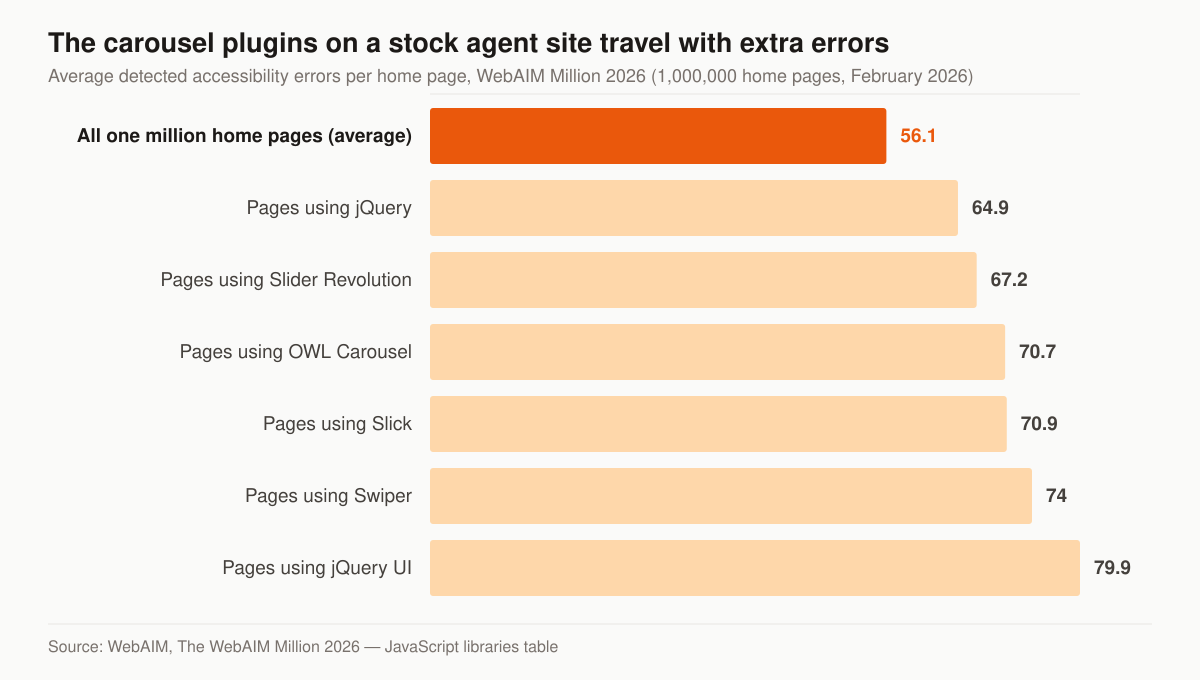
Average detected errors per home page, by JavaScript library present. Source: WebAIM, The WebAIM Million 2026, February 2026.
WebAIM attaches its own caveat to that table, and it belongs here too: “Note that correspondence of additional errors with a technology cannot always be attributed to that technology.” Pages carrying a slider library are also more complex pages. But the report is blunt about the direction — “The presence of nearly all of these popular JavaScript libraries was associated with an increase in detected accessibility errors” — and a carousel is a component an agent site rarely needs in the first place. The same run found that 9.6% of pages had ReCAPTCHA and those pages had 7.7 more errors than average, which is a second reason to keep the challenge off a four-field quote form.
Body text at a comfortable contrast, real label elements on the quote form, alt text on the carrier logos, a document language attribute and buttons with words in them cost nothing at build. They are expensive to add to a template you do not control.
What the auto shopper does before they reach your form
The site is being read by someone in the middle of a comparison, not at the start of one. The JD Power 2026 U.S. Insurance Shopping Study, based on 12,437 customers who requested an auto quote from at least one competitive insurer in the previous six months and fielded from January 2025 through January 2026, reports that the share of customers shopping for auto insurance declined from 57% to 53% year over year, that customers now receive an average of 3.5 quotes — the highest in the study’s history — and that 48% of new auto policies are purchased digitally, up from 36% five years earlier.
Read as a build instruction, that changes three things. Your page is one of three or four the shopper will open, so the first screen has to answer “can you quote me” rather than introduce the agency. The purchase is increasingly finished on a screen rather than at a desk, so the quote path has to work end to end on a phone. And the shopper arrived through a digital channel that can be measured, which is the argument for the attribution described further down.
The same study reports that among recent customers actively shopping an auto policy, 45% say they have a homeowners policy, but only 20% received a homeowners quote while shopping for auto insurance. That is one field on a form. An auto quote form that asks whether the visitor owns or rents, and a thank-you page that offers the home quote rather than filing it for a later call, converts a shopper who was already in the building. The home-side build is on home insurance agent website design, and running both lines as one book is covered on P&C insurance agency marketing.
Two other findings are worth building copy around rather than ignoring: 44% of customers who recently shopped say usage-based insurance is important in their shopping process, and 36% of recent shoppers say they are interested in embedded insurance sold through the dealer or manufacturer. A coverage page that explains telematics in plain language is answering a question 44% of recent shoppers told JD Power matters to them.
Where the website sits in the funnel
The table below assigns each layer of the build one job, because a page trying to do two of these is doing neither.
| Layer | Job | Built For |
|---|---|---|
| Homepage / site | Convert organic, direct, referral traffic | Trust + quote path |
| Landing pages | Convert cold paid-ad clicks | One offer, zero distraction |
| Tracking layer | Attribute every lead to its source | Stop guessing on spend |
The website converts traffic; it doesn’t create it. That’s why we pair the build with demand. For the engine that feeds it, see our approach to Facebook ads for auto insurance agents, the local surfaces covered by insurance local SEO, and the broader playbook on the auto insurance agent marketing pillar.
How this differs from a generic web shop
A generalist designer optimizes for award-show screenshots. We optimize for cost per quote. That comes from the global discipline behind our insurance web design service — the same standards we apply across every vertical, tuned here for auto-specific buyer behavior: price-driven, comparison-shopping, and impatient on mobile.
We also build the system to think about AI search from day one. When a prospect asks an assistant “best auto insurance agent near me,” the site needs clean structure, extractable answers, and real local signals — not just keywords. That structural rigor is what carries a small agency into AI-generated results that bigger, slower competitors miss, and it is the same work described on our AI search visibility service.
What to instrument before launch day
A site with no measurement can only be redesigned on opinion, never improved on evidence. Four things go in before traffic does.
Form starts and form completions as separate events, so a traffic problem can be told apart from a form problem. Click-to-call taps, because a real share of auto quote requests arrive as a phone call rather than a submission, and a site judged on form fills alone will undercount the channel that produced the call. Field Core Web Vitals from real visits rather than a lab score, since the 75th-percentile rule above only means anything on field data — and field data takes weeks to accumulate, which is the argument for switching it on at launch rather than at the first quarterly review. And a source parameter on every quote request, so an organic town page and a paid campaign are not sharing credit for the same driver.
Speed to lead is the fifth thing, and it lives outside the site: the form is only worth its build cost if someone works the submission while the shopper is still comparing. The timing evidence and what it does to contact rates is in our guide to how auto insurance agents win clients online.
Where auto insurance agent websites stall
Each row below is a build or process failure rather than a design opinion, and each has a fix that does not require starting over.
| Where it stalls | What it looks like | The fix |
|---|---|---|
| Carrier-supplied microsite | Pages sit on a shared carrier domain as one of many near-identical templates | Own the domain and the pages; write content specific to your book |
| One page for the whole book | Auto, home, umbrella and commercial share a services page | A page per line, each with its own intent and quote path |
| Rater bolted on last | A third-party embed pushes LCP past 2.5 seconds | Budget the widget; load it on interaction |
| Form asks the phone call’s questions | Eleven fields, two screens, then a callback that re-asks them | Four fields, then the call does the qualifying |
| Unlabeled inputs | Autofill fails on mobile; screen readers announce nothing | Real label elements on every field |
| Rotating hero carousel | The first screen changes before the visitor has read it | One fixed offer and one quote path |
| Reviews shown as a badge | A static five-star graphic with no source | A live count and a link a stranger can verify |
| No analytics installed | Every conversion on the site is invisible | Analytics and call tracking before launch, not after |
| Town pages differ by city name | Forty pages, one template, no local detail | Six pages carrying carrier appetite and local detail |
Questions to ask before you sign anything
Whether the answer is a subscription, a freelancer or us, four questions decide whether you are buying an asset or renting one. Who is the registrant on the domain, and can you move it without opening a support ticket? If you cancel, what do you leave with — the content, the images, the page URLs? Is the analytics property in your account or the vendor’s? And what does cancellation actually require, in writing?
Published terms are the shape of a good answer. BrightFire states on its pricing page that customers “are never under contract and are free to cancel at any time,” with a 30-day money back guarantee on each service. That is a checkable commitment, and it is the standard to hold any vendor to, including us. Ours is on the pricing page: month to month, no lock-in, ad spend billed at cost.
Start with numbers, not a mockup
We don’t open with a design comp. We open with your current site’s leak points — load time, form completion rate, and where mobile visitors drop. From there the build is a series of conversion decisions you can audit.
Want to see where your current auto insurance agent website is losing quotes? Grab a free marketing audit and we’ll show you the leaks before we talk about a rebuild. If you’d rather see the conversion discipline in context first, the final-expense operation we actually run is the book that discipline comes from. Prefer to talk through the page set and the budget before anything else? Get in touch.
A website should earn its keep in quote requests per month — measured, attributed, and improving. Anything less is a brochure with a hosting bill.