Service
Insurance PPC Management, Run to Cost Per Sold Policy
We turn your insurance clicks into a measured cost per sale, so paid search is scored on placed policies rather than on cost per click.
- We run our own final-expense book
- No pitch deck — we screen-share real numbers
- TCPA-aware · CMS/AEP-compliant · Meta Special Ad Category
- Core Web Vitals < 2.0s LCP
Google ads for insurance agents is the build and ongoing management of paid search — Google healthcare certification, keyword strategy, dedicated landing pages, conversion tracking, and budget control tuned to ROAS. Done right, it turns an expensive insurance click into a measured cost per sale instead of hopeful spend.
What you get
What your google ads for insurance agents program includes
- A built search account across your buyer-intent keywords, with Local Services Ads added where Google supports the insurance agency category in your state, and a negative-keyword list that blocks 'free', 'jobs', and 'definition' junk traffic
- Google healthcare certification handled before launch where your lines require it — the G2RS application path, the extra ACA keyword certificate, and the agency-relationship documentation Google asks for
- A dedicated landing page per offer (not your homepage), built for message match and Google Core Web Vitals speed
- Conversion and call tracking wired live before spend scales — every form fill and call tied back to its keyword, ad, and geo
- Offline conversion imports wired from your CRM, so issued policies flow back into Google Ads against the click that produced them
- A test-budget plan sized to buy a readable signal, with the click-volume-to-lead math shown up front, not a token spend
- Weekly cut-and-scale reallocation: losing keywords and geos killed, budget pushed to the ones producing cheap booked appointments
- A cost-per-sale dashboard that maps spend → leads → booked appointments → closed policies → ROAS using your close rate and average commission
- Google-policy, TCPA, and CMS-aware ad copy and call routing (TPMO disclaimer handling on Medicare) so the account survives and keeps serving
How it works
How the google ads for insurance agents engagement runs
- 01
Audit & map
We read your existing Google Ads account or build from zero, then map keywords and match types to your real buyer instead of whatever the account inherited.
- 02
Clear the policy gate
Where your lines are restricted, we get the certification path started before the build, because an uncertified account cannot serve health insurance ads no matter how good the keywords are.
- 03
Track first
Conversion tracking and call tracking go live before a single dollar scales, so Google optimizes toward booked calls rather than raw clicks.
- 04
Test budget
We size a spend that can buy enough clicks to read a real signal, and show you the click-to-lead math before you commit it.
- 05
Cut & scale
Every week we kill the keywords and geos that don't convert and push budget into the ones producing cheap booked appointments.
- 06
Report to cost per sale
You get the number that actually decides the next dollar — cost per sale and ROAS against your commission — reported every week, not buried in CPC vanity metrics.
Insurance google ads management is where a lot of agency money goes to die. Not because every insurance click is expensive — LocaliQ’s 2026 benchmarks put blended Finance and Insurance search cost per click at $3.39, under the $5.42 all-industry average — but because the terms an agent actually wants are the ones carriers and aggregators are already bidding on. A July 2026 pull from Google’s Keyword Planner API returns a top-of-page bid range of $48 to $126 for “texas auto insurance quotes”, on 8,100 monthly searches. We run paid search the way an operator runs a book: tracked to cost per sale, scaled only on what converts.
For reference, we run our own lead book, so we bring an operator’s discipline — not a vendor’s — to managed accounts.
What insurance google ads management actually includes
PPC for insurance agents is not “boost the post.” It is a system with five moving parts, and a weak link in any one of them wastes the spend.
- Search campaigns — exact and phrase match on buyer-intent terms, with an aggressive negative-keyword list so you stop paying for “free,” “jobs,” and “definition” clicks.
- Local Services Ads (LSAs) — pay-per-lead placements above search results, carrying Google’s screening badge. Google’s category list restricts the insurance agency category to California and Florida, so this is a two-state lever rather than a default. Our Google Local Service Ads guide covers setup, screening, and the lead-dispute process.
- Landing pages — a dedicated page per offer, not your homepage. Speed and message match drive conversion rate, and landing page quality is one of the factors Google names in Ad Rank.
- Conversion tracking — form fills and calls tied back to keyword, ad, and geo, so Google optimizes toward leads instead of traffic.
- Budget and ROAS control — weekly reallocation toward the keywords and locations producing cheap booked appointments.
Before any of that runs, though, there is a gate that stops a good share of insurance accounts on day one.
Do you need Google’s permission to advertise insurance?
For health and medical lines in the United States, yes — and the requirement catches agents who assume a Google Ads account is something you simply open. Google’s health insurance advertising policy states that “In the United States, you must be certified by Google in order to advertise health and medical insurance coverage, with the exception of government advertisers, who will be pre-approved.”
The scope is broader than the phrase “health insurance” suggests. Google publishes a non-exhaustive list of what counts as health and medical insurance coverage: individual health insurance, short-term insurance, limited-duration insurance, fixed indemnity health insurance, Medicare Advantage, Medigap, and Medicaid. If you write senior-market health business, you are inside this policy. Google also carves out an exception in the other direction: “Advertisements exclusively for dental, vision, and/or travel health insurance coverage are not restricted.”
Certification runs through a third party before it runs through Google. The policy’s own instruction is to “Obtain G2RS certification (US advertisers only)” and to apply for the G2RS Health Insurance Providers Certification before submitting the Google Ads application. G2RS describes that certification as “The first step in verifying eligibility to advertise health insurance online,” and names the entity types it covers as “Providers, Managed Care Organizations, Producers (Individual Agents/Brokers, Agencies), Third Party Administrators.” Independent agents and agencies are explicitly in scope, not just carriers.
The table below sets out what the certification path asks for, in the order the two published pages ask for it.
| Step | What is required | Published detail |
|---|---|---|
| Licence evidence | State licence or registration data | “Insurance license/registration information for each state/locale where you do business (e.g., Official License Copy, License Type, License #, Expiration)” |
| Business identity | Business information | “Business information (e.g., Licensed Name, Domains, Contact Info, NAIC/NPN Codes)” |
| Cost | Two separate charges | “There is a one-time application fee which is priced based on the number of US jurisdictions you would like certified. Once your application has been approved, you will need to pay an annual subscription fee to finalize the process and become fully certified.” |
| Turnaround | Only if the file is complete | “If the application submission is complete (i.e., all information and documents are submitted properly) the turnaround time is typically 14 calendar days or fewer.” |
| ACA keywords | A second certificate | Advertisers registered to sell ACA-compliant plans “are required to get an additional certificate in order to promote and bid on ACA health insurance related keywords” |
| Agency filing on your behalf | Relationship documentation | “If you’re an agency applying on behalf of an advertiser, send documentation detailing your relationship with the advertiser or license holder” |
Sources: Google Ads health insurance policy and G2 Risk Solutions, Health Insurance Providers Certification. The fee is priced by jurisdiction count, and neither page publishes a dollar figure, so treat it as a quote to request rather than a number to budget from a blog post.
Two planning consequences fall out of this. First, the certification clock sits in front of the media clock: a plan that assumes ads go live the week the retainer starts is a plan that has not read the policy. Second, the certification is scoped to the jurisdictions you certify, which means a multi-state expansion is a certification event as well as a campaign event. We handle the filing as part of the build rather than treating it as the client’s homework, and we sequence it against the enrollment calendar so the account is serving before the season it was bought for.
One relief in the policy is worth knowing: enforcement here is not instant. Google writes that “Violations of this policy will not lead to immediate account suspension without prior warning. A warning will be issued at least 7 days prior to any suspension of your account.” That is a window to fix something, not a licence to run uncertified.
What does an insurance click actually cost?
Two published numbers answer this, and they disagree with each other for a reason worth understanding.
The blended figure comes from LocaliQ and WordStream, who publish annual search advertising benchmarks drawn from thousands of their customers’ Google Ads and Microsoft Ads campaigns. Their 2026 search advertising benchmarks report the Finance and Insurance category at $3.39 average cost per click, against a $5.42 all-industry average. That is an account-wide blend across every keyword a Finance and Insurance advertiser buys, including brand terms and long-tail phrases nobody else wants.
The head-term figure comes from Google’s own auction. A July 2026 Keyword Planner API pull — described by its authors as “Data: Google Keyword Planner API - top-of-page bid range - US - pulled July 2026” — returns $48 to $126 as the top-of-page bid range for “texas auto insurance quotes” at 8,100 monthly searches. That is the auction’s asking range for a top slot on one commercial term, not a blended account average, and the two numbers are not in conflict: they measure different things.
The four LocaliQ figures for Finance and Insurance, set against the all-industry average, describe the shape of the channel better than any one of them alone.
| Metric | Finance & Insurance | All industries | What the gap means |
|---|---|---|---|
| Average cost per click | $3.39 | $5.42 | The blend is cheap; the head terms are not |
| Average click-through rate | 9.83% | 6.64% | Insurance intent is strong — people click |
| Average conversion rate | 2.64% | 8.18% | The lowest of the 23 categories reported |
| Average cost per lead | $74.44 | $66.69 | A cheap click and a poor conversion rate meet here |
Source: LocaliQ / WordStream, 2026 Search Advertising Benchmarks.
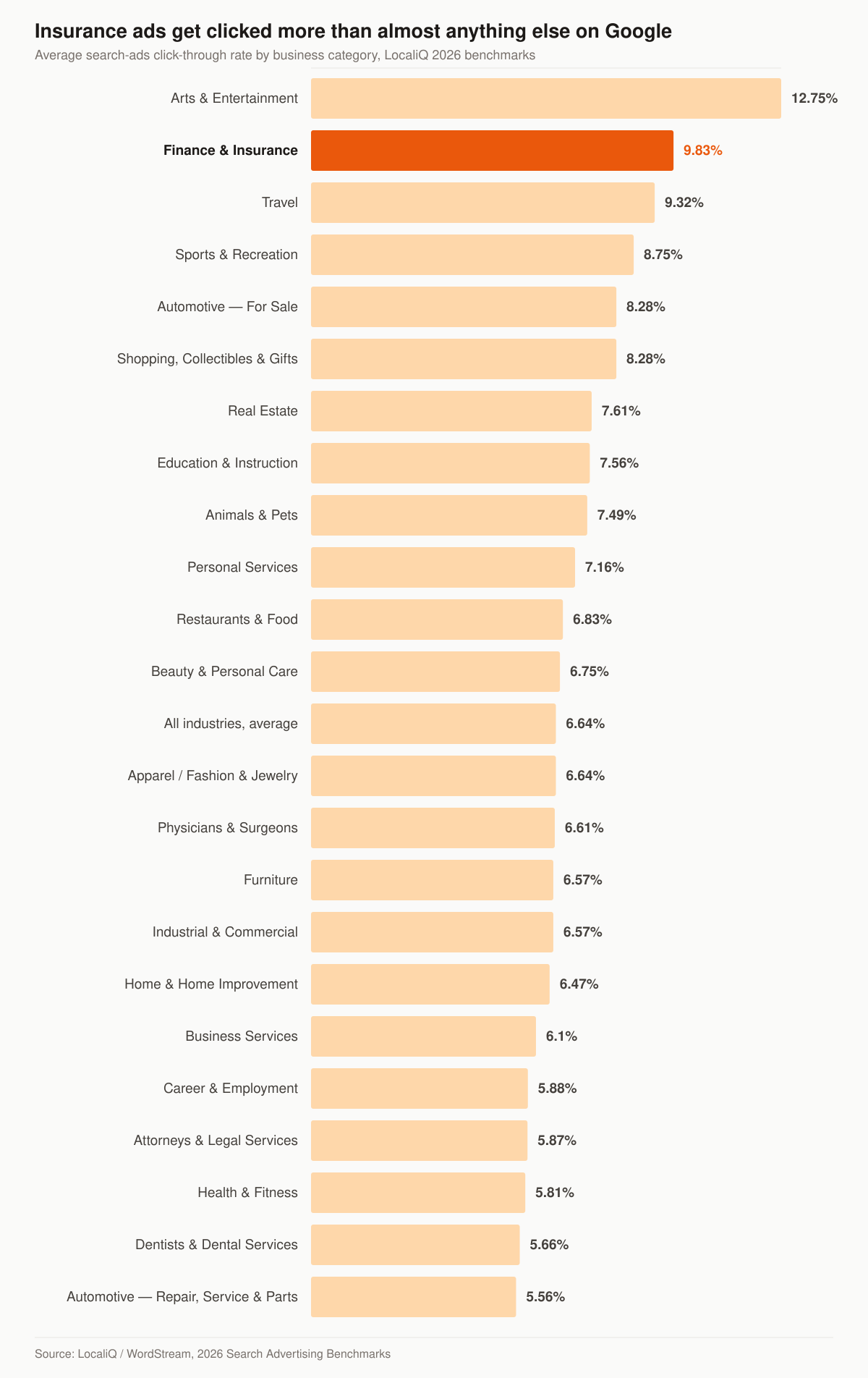
Average search-ads click-through rate by business category. Source: LocaliQ / WordStream, 2026 Search Advertising Benchmarks.
Read the two charts together and the diagnosis is unusually clean. Finance and Insurance sits second of the 23 categories LocaliQ reports on click-through rate at 9.83%, and last on conversion rate at 2.64%. The traffic wants what you sell. The page and the follow-up are where it goes. That is a landing-page and speed-to-lead problem dressed up as a bidding problem, which is why we treat account work and conversion-focused landing pages as one job rather than two invoices. If you want the per-line breakdown of what each insurance keyword family costs, our insurance PPC cost per click by line post goes term by term.
What budget buys a readable signal?
The honest answer to “what should I spend” starts as arithmetic, not opinion. Below is nothing but division and multiplication against two published averages — LocaliQ’s $3.39 Finance and Insurance cost per click and its 2.64% conversion rate. It is a sizing exercise for how much data a budget can buy, not a forecast of your account, which will differ by line, state, and how tight the keyword list is.
Every cell in this table is arithmetic on the two LocaliQ averages named above; no cell is a projection, a promise, or a result we have observed.
| Monthly media budget | Clicks at $3.39 | Leads at 2.64% | Clicks at a $48 top-of-page bid | Leads at 2.64% |
|---|---|---|---|---|
| $1,000 | 295 | 7.8 | 20.8 | 0.5 |
| $2,500 | 737 | 19.5 | 52.1 | 1.4 |
| $5,000 | 1,475 | 38.9 | 104.2 | 2.8 |
| $10,000 | 2,950 | 77.9 | 208.3 | 5.5 |
The right-hand columns are the reason a test budget has to be sized against the keywords you are actually buying rather than against a category average. On blended traffic, $2,500 in media buys enough leads that a week of data means something. On a head term priced at the low end of that published $48 to $126 range, the same $2,500 buys 1.4 leads on the same arithmetic — a spend that can only ever produce anecdotes. Neither outcome is a verdict on Google Ads. They are two different keyword strategies, and choosing between them before the money moves is most of the job.
This is also where the channel comparison gets decided rather than argued. Meta’s cheaper impressions look attractive against a $48 search bid until you price the intent difference; we lay that trade out in Facebook ads vs Google ads for insurance agencies, and run the Meta side as insurance Facebook ads when it is the better buy.
The number that matters: cost per sale, not cost per click
A cheap click that never closes is expensive. A $45 click that closes one-in-six at a $600 commission is a bargain. We instrument the full path so the math is visible.
Table: the five paid-search metrics we instrument, what each one measures, and how much weight it carries in a budget decision.
| Metric | What it measures | Why it decides budget |
|---|---|---|
| Cost per click | Price of one visitor | Useful only as an input |
| Cost per lead | Spend ÷ leads | First read on campaign health |
| Lead-to-appointment | Show-up quality | Filters junk traffic early |
| Cost per sale | Spend ÷ closed policies | The real number; drives scaling |
| ROAS | Commission ÷ ad spend | Decides the next dollar |
Google can only optimize toward what you measure. Send it raw clicks and it buys clicks; feed it booked appointments and it buys those. Tracking is the lever, not a reporting afterthought.
How does a placed policy get back into the ad account?
This is the step that separates a reported cost per sale from a real one, and it has an official mechanism most insurance accounts never turn on: offline conversion imports.
Google’s own framing of the problem describes an insurance sale almost word for word — a case where “an ad doesn’t lead directly to an online sale, but instead starts a customer down a path that ultimately leads to a sale in the offline world, such as at your office or over the phone.” The purpose of the feature is to “measure what happens in the offline world after your ad results in a click or call to your business.”
The plumbing runs on one identifier. Per Google’s offline conversion import documentation, “Google Ads provides you with unique IDs, called Google Click ID (GCLID), for every click that comes to your website from an ad. To track offline conversions from clicks, you’ll save these IDs along with whatever lead information you collect from the person who clicked your ad.” When the policy issues, you hand that GCLID back with the conversion type and date.
Three things change once that loop is closed:
- The bid strategy learns from the right event. A smart bidding strategy optimizing toward form fills will happily buy more form fills, including the bad ones. Optimizing toward issued policies changes what it buys.
- Keyword-level decisions become defensible. A keyword with a high cost per lead and a high close rate stops looking like a loser, and a cheap keyword that never places stops hiding inside a good-looking CPL average.
- The report answers the operator’s question. Cost per placed policy against average commission is the number that decides whether next month’s budget goes up, and it cannot be produced from platform data alone.
The requirement is a CRM that stores the GCLID against the lead record and a disposition field the agency actually updates. That is a process problem more than a technical one, which is why we scope it alongside the insurance sales funnel work rather than pretending it is a checkbox in the ad account.
Landing pages and page speed do the heavy lifting
A homepage is not a landing page, and an account that points paid clicks at one is paying insurance prices for a page written to introduce a business rather than to convert a search. A dedicated, fast landing page with a single offer lifts conversion rate, and landing page quality is one of the inputs Google names when it explains Ad Rank. Given a category conversion rate of 2.64%, the page is where the biggest arithmetic sits: doubling conversion rate halves cost per lead without touching a bid.
We pair every campaign with purpose-built insurance landing pages and call tracking, so a faster page and a cleaner offer compound into a lower cost per sale. If paid search is one channel in a wider plan, we also run insurance social media advertising on Meta, where Special Ad Category limits targeting for insurance and changes the playbook. Want search, social, and landing pages managed as one budget with one scoreboard? That’s our done-for-you insurance advertising engagement. And when the harder question is how much of the agency’s total spend should sit in paid at all, that allocation call belongs to senior marketing leadership on retainer, not to any single channel manager.
Does a better landing page actually lower your cost per click?
Not by the route the industry usually claims, and the correction matters because it changes what you optimize.
The folk version goes: improve the landing page, Quality Score rises, cost per click falls. Google’s own documentation on Quality Score says otherwise in two sentences. It calls Quality Score “a diagnostic tool meant to give you a sense of how well your ad quality compares to other advertisers,” and then states flatly: “Quality Score is not an input in the ad auction.” It adds that “Quality Score is not a key performance indicator and should not be optimized or aggregated with the rest of your data.”
What does sit in the auction is Ad Rank. Google’s Ad Rank documentation defines it as “a set of values that are used to determine whether your ads are eligible to show and if eligible, where on the page your ads are shown (if at all) relative to other advertisers’ ads,” and lists six factors behind it.
The table below separates the diagnostic from the auction, because insurance accounts routinely get optimized against the wrong one.
| Ad Rank factor (in the auction) | Quality Score component (diagnostic only) | Google’s wording |
|---|---|---|
| Your bid | — | A factor Google names in Ad Rank |
| The quality of your ads and landing page | Landing page experience | “How relevant and useful your landing page is to people who click your ad” |
| The Ad Rank thresholds | Ad relevance | “How closely your ad matches the intent behind a user’s search” |
| The competitiveness of an auction | Expected clickthrough rate (CTR) | “The likelihood that your ad will be clicked when shown” |
| The context of the person’s search | — | A factor Google names in Ad Rank |
| The expected impact from your ad assets and other ad formats | — | A factor Google names in Ad Rank |
Sources: Google Ads, About Ad Rank and Google Ads, About Quality Score for Search campaigns.
So the landing page still earns its place — through the ad-and-landing-page quality factor in Ad Rank, and much more directly through conversion rate. What it does not do is move a Quality Score dial that then discounts your bid. Two further details from the same page are worth carrying into any account review. Quality Score is scored against a peer group: components are evaluated “based on a comparison with other advertisers whose ads showed for the exact same search over the last 90 days.” And it is match-type blind — Google notes Quality Score is “based on historical impressions for exact searches of your keyword, therefore changing keyword match types will not impact Quality Score.” Anyone selling you a match-type change as a Quality Score fix is selling you something Google says does not work that way.
Core Web Vitals belongs in the same clean-up. Google’s Ads documentation names landing page experience as a Quality Score component and the quality of your ads and landing page as an Ad Rank factor; it does not name Core Web Vitals as an auction input. We build fast pages because a slow page loses the lead before the form loads, and we say so in that order rather than dressing speed up as a bid discount. For the organic side of the same speed work, see insurance SEO.
Can an insurance agent run Local Services Ads?
Only in two states, and the constraint is published rather than inferred. Google’s Local Services Ads help for the United States opens with “At this time, Local Services Ads are available only for certain service categories,” and its category list carries the entry “Insurance agency (California and Florida only)”. Google’s business screening and verification requirements page repeats the restriction in its own heading for the category.
Where it is available, the model is genuinely different from search. Google’s description is “Pay only for leads related to your business and the services you offer” — you are charged for a contact, not a click. The badge has been renamed: Google now describes the Google Verified badge as one that “helps inspire confidence by signaling to consumers that your business has passed Google’s proprietary screening process.” If your notes or an older agency proposal still say Google Screened or Google Guaranteed, that is the previous naming.
The table below lists what Google publishes as the screening requirements for the insurance agency category, alongside the general rule it applies to every Local Services advertiser.
| Requirement | What Google publishes for insurance agency |
|---|---|
| Availability | “Insurance agency (California and Florida only)” |
| Insurance | “Professional liability insurance*” |
| Licence, business | “Business license on state level*” |
| Licence, owner | “Owner license on state level*” |
| Background, business | “Business check (Select users only)” |
| Background, owner | “Owner check (Select users only)” |
| General screening rule | Providers “undergo screening procedures that vary by category and region but may include license, insurance, and background checks” |
Sources: Google, business screening and verification requirements and Google, how providers qualify for Local Services Ads. The asterisk is Google’s own, marking requirements that apply where applicable by location.
Lead quality on a pay-per-lead product lives or dies on the dispute process, and Google’s terms are specific: “If you believe the lead you received isn’t valid, you can immediately dispute a lead. A successfully disputed lead will be credited back to you (US and Canada only).” The same page adds a limit worth reading before you plan around credits: “Note that lead disputes aren’t available for health care verticals.” Between the two-state availability and that carve-out, LSAs are a targeted opportunity for a California or Florida P&C agency and not a national strategy. Our Google Local Service Ads guide walks the setup, and the local SEO work sits under it either way, because the Business Profile does not stop mattering when the ad stops running.
Keywords, match types, and the settings that spend money on their own
Match type is the throttle on how far Google is allowed to interpret you, and Google’s keyword matching options documentation states the three plainly.
Table: the three match types in Google’s own words, with the discipline each one demands in an insurance account.
| Match type | Syntax | Google’s description | What it demands here |
|---|---|---|---|
| Broad match | No special characters | “Ads may show on searches that are related to your keyword, which can include searches that don’t contain the direct meaning of your keywords” | A long negative list and daily search-term review |
| Phrase match | Quotation marks | “Ads may show on searches that include the meaning of your keyword” | A working middle ground once conversion data exists |
| Exact match | Square brackets | “Ads may show on searches that have the same meaning or same intent as the keyword” | The place a small insurance budget should start |
Broad match is not simply a wider net; Google says it also reads other signals, naming “The user’s recent search activities”, “The content of the landing pages and assets”, and “Other keywords in an ad group to better understand keyword intent”. In an insurance account that inherits a thin landing page and a mixed ad group, those signals are exactly the ones pointing the wrong way. Negatives are the counterweight, and Google’s description is the whole idea in one line: “You can use negative keywords to exclude your ads from showing on searches with that term.”
Then there is the setting that quietly rewrites the account while you sleep. Google’s auto-apply recommendations feature does what it says: “When you turn on ‘Automatically apply recommendations’, the recommendations will apply regularly.” Among the recommendation types Google lists as auto-appliable are “Add broad match keywords”, “Add keywords”, “Add keywords (Smart bidding)”, “Expand your reach with Google search partners”, “Use targeting expansion” and “Use Display expansion”. Every one of those widens what an insurance account buys. Google also states that “This feature can be turned on or off at any time by updating your auto-apply settings,” so the fix is a settings review, not a support ticket. We audit that panel on every account we inherit, because a tight keyword list and an open auto-apply setting cancel each other out.
The negative-keyword work is the unglamorous half of this and it is where junk spend actually stops. Career searches like “insurance agent jobs”, definition searches like “what is a deductible”, and “free insurance” queries are all traffic an untended account can pay for without ever meeting a buyer. For the line-level version of this build, see our final expense PPC management page.
Compliance is part of the build, not a bolt-on
We provide marketing services, not licensed insurance advice; you are the licensed party. That said, compliant accounts survive longer. We keep ad copy and claims within Google’s policies, route call-based leads with TCPA in mind, and for Medicare we respect CMS marketing rules during AEP. Note the FCC one-to-one consent rule was vacated in January 2025, but consent discipline still protects your account and your book. Our TCPA compliance guide for agents buying leads covers the consent side in more depth.
What Medicare adds to a Google Ads account
Two layers stack on top of a standard search build, and both are published requirements rather than best practice.
The first is the certification gate already described: Google names Medicare Advantage and Medigap among its examples of restricted health and medical insurance coverage, so a Medicare account needs certification before it can serve at all.
The second is the disclaimer. Under 42 CFR 422.2267(e)(41), the required standardized text where a third-party marketing organization does not sell for every MA organization in the service area is: “We do not offer every plan available in your area. Currently we represent [insert number of organizations] organizations which offer [insert number of plans] products in your area. Please contact Medicare.gov or 1-800-MEDICARE to get information on all of your options.” Where the TPMO does sell for all MA organizations in the service area, the regulation sets a different statement: “Currently we represent [insert number of organizations] organizations which offer [insert number of plans] products in your area. You can always contact Medicare.gov or 1-800-MEDICARE for help with plan choices.”
Read the scope clause before assuming it applies to you. The regulation requires the MA organization to ensure the disclaimer is “Used by any TPMO, as defined under § 422.2260, that sells plans on behalf of more than one MA organization.” A captive writing for a single organization is outside that trigger; an independent agency representing several is not.
The table below maps each placement requirement in the regulation to the part of a paid-search funnel it governs.
| Regulation’s wording | Where it lands in a Google Ads funnel |
|---|---|
| “Verbally conveyed during sales calls prior to the discussion of any benefits” | The call script, before the agent starts on plans |
| “Electronically conveyed when communicating with a beneficiary through email, online chat, or other electronic means of communication” | Autoresponders, chat widget, nurture email |
| “Prominently displayed on TPMO websites” | The landing page the ad points at, above the form |
| “Included in any marketing materials, including print materials and television advertisements, developed, used or distributed by the TPMO” | Every asset the campaign produces |
Source: eCFR, 42 CFR 422.2267(e)(41). Part 422 governs Medicare Advantage; the parallel Part D rules sit in Part 423. This is a summary of published regulation, not legal advice — read the section yourself and run the campaign past your compliance contact.
Practically, that last row is why a Medicare paid-search build is a landing-page project as much as an ad-account project: the disclaimer has to live on the page the ad points at, in a form a reviewer would call prominent, and the plan and organization counts have to be current. For the seasonal side of this, our Medicare AEP marketing strategies post covers the calendar, and the Medicare marketing hub covers the wider channel mix.
How we run a managed account
- Audit — we read your existing account or build from zero, then map keywords to your real buyer.
- Clear the policy gate — certification started first where the line requires it.
- Track first — conversion tracking and call tracking live before we scale a dollar.
- Test budget — enough spend to buy a readable signal, not a token amount.
- Cut and scale — kill losing keywords and geos weekly, push budget to winners.
- Report to cost per sale — you see the number that matters, every week.
Want to see where your current spend is leaking before you commit? Start with a free marketing audit of your account, or compare it against our PPC pricing and the broader list of marketing services we run for agents. Managed paid ads sit in the Full-Funnel tier at $5,500 a month, with media billed at cost straight to Google, and there is no long lock-in. Skeptical operators usually start with the audit, because we show the math before we ask for the budget — or just start a conversation and bring your search-terms report.
If you sell final expense or Medicare and want channel-specific numbers, our final expense lead generation breakdown pairs well with a paid-search build, and is final expense PPC worth it answers the question directly for that line. The way to know whether Google Ads fits your book is to put real tracking on it and read the cost per sale.
Guides that go deeper
Frequently asked questions
How much does insurance Google Ads management cost?
Do you need Google's permission to advertise health insurance?
Can insurance agents run Google Local Services Ads?
Does a faster landing page lower my cost per click?
Why is my insurance PPC so expensive with no leads?
How do you measure ROAS on insurance ads?
How does a closed policy get back into the Google Ads account?
What does Medicare add to a Google Ads account?
See exactly where your agency is leaking leads.
15 minutes. We screen-share our own live lead dashboard and tear down your funnel line by line — no pitch deck, just numbers.
- Site speed & conversion
- Local + AI-search visibility
- Ad efficiency
- Your cost per lead vs ours
No obligation · no pitch deck