Google Local Services Ads for Insurance Agents (2026)
Insurance agents can run Google Local Services Ads only where Google supports the category: its US category list shows "Insurance agency" as eligible in California and Florida only. Agents elsewhere cannot buy LSAs yet. Where available, you pass Google's screening, earn the Google Verified badge (which replaced Google Guaranteed in October 2025), and pay per lead.
Ask ten agents whether they can run Google Local Services Ads and you’ll get ten confident guesses. Here is the documented answer: in the United States, Google’s own category list supports “Insurance agency” LSAs in California and Florida only. Anywhere else, the channel isn’t available to you yet — and most of what’s written about LSAs for insurance agents quietly skips that fact.
(Google’s product name is plural — Local Services Ads — though half the internet, and the URL of this page, writes “Local Service Ads.” Same product.)
The 2026 state of play, in six lines:
- Eligibility. Google’s US category list supports “Insurance agency” Local Services Ads in California and Florida only.
- Badge. Google Guaranteed and Google Screened were replaced by one blue Google Verified badge on October 20, 2025.
- Screening. Before your ad runs, Google can check your licenses, your business insurance, and your background.
- Pricing. You pay per lead, not per click, and you budget by how many leads you want per week.
- Ranking. Proximity, reviews, and response speed move you up. Budget alone does not.
- Platform. Google is migrating LSAs out of their own dashboard and into Google Ads as Performance Max pay-per-lead campaigns, in phases that began in August 2026.
This guide covers what Google’s documentation actually says in 2026: who’s eligible, the badge change that made older advice wrong, how setup works where you qualify, and what to run instead where you don’t. For the full search-campaign build — ad groups, keywords, tracking — see our step-by-step on setting up Google Ads for insurance agents.
Are insurance agents eligible for Google Local Services Ads?
In most states, no. Google’s Getting started with Local Services Ads page lists over a hundred eligible business types for the US, and exactly one is insurance-related: “Insurance agency (California and Florida only).” No other insurance category appears. If your agency operates in California or Florida, you can apply. If it doesn’t, the signup flow won’t offer you the category.
The pattern holds on Google’s Local Services Ads product page, which showcases eight verticals — Home, Business, Health, Learning, Care, Wellness, Beauty, and Automotive — with examples like plumbers, lawyers, dentists, and mechanics. Insurance isn’t mentioned once.
Two practical notes before you close the tab:
- Eligibility shifts over time. Google’s getting-started page points advertisers to the eligibility checker inside the signup flow as the authoritative answer for any category and location. Check there, not a blog post — including this one. The three-step check is below.
- “Not eligible” is not “no Google presence.” The rest of the results page — search ads and the organic map pack — is fully open to you. More on that below.
How to check your Local Services Ads eligibility today
Google settles the eligibility question in its signup flow, not its help pages — the category list on a support article is a snapshot, while the checker reflects what Google will actually sell you in your ZIP codes today. Three steps:
- Open the Local Services Ads eligibility check and start the signup flow.
- Enter your business category and service area — the category you’d sell under (“Insurance agency”) plus the ZIPs or metros you cover.
- Read what Google offers you. If the category is supported at your location, the flow proceeds into business details and screening. If it isn’t, the category simply won’t be selectable — that silence is your answer, and it’s a firmer one than any blog post.
Run this before you budget, and re-run it once a quarter. Category availability is a product decision at Google, and product decisions change.
Does Google still run Local Services Ads in 2026?
Yes. Local Services Ads are live in 2026: Google’s getting-started documentation lists them as available in the United States plus Austria, Belgium, Canada, France, Germany, Ireland, Italy, Spain, Switzerland, and the United Kingdom. What changed is the badge, not the product — one blue Google Verified badge replaced Google Guaranteed and Google Screened in October 2025.
The category list also keeps growing. Google announced that Local Services Ads had expanded to “more than 70 types of businesses, including those in categories like education, people care, pet care, wellness and health care” — an announcement dated March 2023. Insurance is the conspicuous holdout: categories from lawyers to dentists to pet groomers are open nationwide, while “Insurance agency” stays fenced to two states. Read that as a Google product decision that could flip, not a permanent rule — which is exactly why the eligibility checker, not this page, gets the last word.
Local Services Ads are becoming Performance Max pay-per-lead campaigns
The separate LSA dashboard is being retired. Google Ads Help states it plainly: “Over the upcoming months, existing Local Services Ads campaigns will be automatically migrated to a specialized Performance Max campaign type optimized specifically for pay-per-lead goals.” The product survives; the place you manage it does not. Placement is untouched — Google’s migration documentation says “where and how your ads appear to local customers on Google Search and Google Maps remains exactly the same.”
The migration keeps the economics and moves the controls. Read the left column as what you can still plan around, and the right as what changes on transition day.
| Stays the same | Changes |
|---|---|
| You pay only for valid leads, not clicks | Budgets, targeting and lead replies move into Google Ads |
| Ads serve only on Google Search and Google Maps, in the same positions | Your average weekly budget becomes a daily average budget |
| Targeting stays keywordless, driven by service categories and areas | Manual bidding and vertical-level Target CPA are deprecated |
| Your verification status and Google Verified badge transfer automatically | Better Business Bureau callouts are dropped; you pick at least six other structured callouts |
| Past lead history, message threads and older call recordings carry over | Historical performance reports do not carry over |
Rollout is phased, and insurance agency is not among the categories Google names for the first phase. Google’s timeline names August 2026 this way: “The first phase of the migration begins for select home and storefront service advertisers in the United States (including plumbing, HVAC, electrical, appliance repair, house cleaning, lawn care, roofing, pest control, and moving).” Late 2026 expands to “broader advertiser groups, including service-area businesses without physical storefronts and accounts with custom bidding or booking configurations.” 2027 covers “Non-U.S. accounts, and all remaining business categories that were not migrated in 2026 will transition to Google Ads.” A California or Florida agency running LSAs today should expect the move in a later phase, not this one.
Budget arithmetic changes shape. Google divides your historical average weekly budget by 7 to set the daily average budget, and caps the month at that daily average multiplied by 30.4 — the same spending-limit mechanic standard search campaigns already run on, which our step-by-step Google Ads build covers in the budgeting section. If you have been thinking in leads per week, you now also have to think in dollars per day.
Three operational notes for anyone with a live LSA account:
- Save your reports before transition day. Google is explicit that “Your Local Services Ads performance reports will not transition to Google Ads,” and advises screenshots if you need them immediately. Lead history transfers; the performance history behind it does not.
- New campaigns still start outside Google Ads. Google’s FAQ says “You can’t create new campaigns with pay-per-lead goals directly within Google Ads at this time,” and points advertisers back to the Local Services signup — the same flow the eligibility check lives in. So the two-state answer for insurance is still decided there.
- You get 14 days’ notice. The account administrator receives an advance email 14 days before the migration date, a reminder seven days later, and banner warnings inside the old dashboard. Google says to allow up to two weeks after the move for performance to settle.
One line agents will read twice: verification carries. Google’s migration page says “Insurance and license reverification are no longer required, but if any additional business-level checks are ever required, you will view a notification in your Google Ads account.” Screening is a gate you pass once, not a toll you pay again.
There is a second-order effect worth planning for. Migrated campaigns pre-populate from your Google Business Profile and sync from it daily — business name, address and hours flow one way, profile to ads — and significant changes to a name, storefront address or primary category trigger a review that can pause the campaign for 24 to 48 hours. Your profile stops being only a local-SEO asset at that point. A suspended Google Business Profile becomes an ad outage as well as a map-pack one, which is one more argument for treating profile hygiene as infrastructure rather than a marketing chore.
What Local Services Ads actually are
LSAs sit at the very top of eligible local searches as compact units showing your business name, review score, phone, and a verification badge. Two features define them:
- You pay per lead, not per click. In Google’s words, you “only pay when a customer gets in touch from your ad” — not when a curious browser clicks and bounces.
- You are screened first. To earn the badge, businesses pass Google’s screening and verification, which varies by category and region and can include license, insurance, and background checks. That screening is what the badge signals to a searcher.
What insurance is required for Google Local Services Ads?
Google doesn’t publish a single dollar figure. Its screening documentation states only that “whenever applicable, each business must be insured” and that “the insurance type and minimum amount required depend on the category and location.” The minimums are set per category and per country, and Google doesn’t list them publicly — the signup flow tells you what your category needs.
Note which way this question points. It is about the coverage you must carry as an advertiser to be screened — not about insurance agents advertising on LSAs. For an agency, the two documents that matter are the ones Google’s qualification page describes:
- License check. Google “verifies that advertisers hold applicable state, provincial and/or country-level licenses for businesses and owners or managers” — for you, that is your resident agency and producer licensing.
- Insurance check. Whatever business coverage your category and location require. Have your certificates of insurance ready before you start the flow rather than scrambling mid-screening.
- Background checks. Depending on service type and country, Google’s third-party partners may run a business entity check, a business-owner background check, and a service-professional background check.
Advanced verification exists too, and it is not a formality: for some categories Google may review the Google Ads account, publicly available data, and conduct video interviews. Budget days, not minutes, for screening.
Google Guaranteed vs Google Screened: both are now Google Verified
If you researched LSAs before late 2025, you read about two badges — the green-checkmark Google Guaranteed, which carried a consumer money-back guarantee, and Google Screened. Both are gone.
Effective October 20, 2025, Google replaced all of its LSA badge labels — “Google Guaranteed, Google Screened, and License Verified by Google” — with a single badge called Google Verified, and changed the checkmark from green to blue, per the badge-change announcement in Google’s Business Profile community. Two details matter:
- The money-back guarantee is discontinued. The consumer reimbursement program tied to the old Google Guaranteed badge ended; per Google’s Verified badge documentation, claims were accepted only for services booked before December 7, 2025.
- Nobody had to reapply. Advertisers in good standing were migrated to the new badge automatically. New advertisers earn it by completing the standard screening and verification process.
So when an older guide tells you to “get the green Google Guaranteed checkmark,” translate: pass Google’s screening, get the blue Google Verified badge. Same trust mechanic, one label, no guarantee fund behind it. Google’s getting-started documentation now describes it in a single sentence: “The Google Verified badge helps inspire confidence by signaling to consumers that your business has passed Google’s proprietary screening process.”
How to set up Local Services Ads (if you’re eligible)
Google’s product page breaks setup into four steps. Here is the sequence with the eligibility reality folded in:
- Confirm your category and location qualify. Start the signup flow and check eligibility before anything else — for insurance, that currently means a California or Florida agency per Google’s category list.
- Tell Google about your business. Business name, service type, location, and the basics of what you offer.
- Set your budget. Google’s guidance is to choose a budget “based on the number of new leads you want every week.” You’re budgeting in leads, not clicks — a different mental model from search ads.
- Complete screening and verification. Google verifies business registration and identity; checks vary by category and region and can include license and background verification. Passing is what earns the Google Verified badge. Screening isn’t instant — treat it as a gate, not a formality.
- Go live and optimize. Ads appear with call and message buttons. Google recommends enabling messaging and adding photos to lift engagement.
How do Local Services Ads leads reach you?
Local Services Ads leads arrive as calls and message requests and collect in your Local Services lead inbox. Calls route through a Google forwarding number — you hear “Call from Google” before you’re connected, and in the US and Canada Google records those inbound calls. Message leads land with the customer’s name, ZIP code, job details, and phone number attached.
What that means operationally, per Google’s lead-management documentation:
- Calls. A tracking number in the ad forwards to your business line; the “Call from Google” prompt tells you which calls came from the ad before you pick up.
- Messages. You get email and SMS notifications, and you can reply in the inbox, call the customer, or decline the request.
- Speed is a ranking input, not a courtesy. Google’s guidance is blunt: “It’s highly recommended that you respond to leads as soon as they come in. Having a consistently fast response time could improve your ad’s ranking on search and increase your ability to receive leads.”
- Your response time becomes public. Once you have at least two message leads in 90 days, an estimated messaging response time — from “a few minutes” up to “one day” — can appear in your ads.
An agency that answers on the second ring and one that returns calls after lunch are not running the same campaign, even on identical budgets.
How pay-per-lead pricing actually works
The core mechanic, in Google’s words: you “only pay when potential customers get in touch” through the ad. No charge for impressions, no charge for clicks that never contact you. You control spend through the lead budget rather than keyword bids, and Google doesn’t publish per-lead rate cards on its product pages — dollar figures you see in blog posts are third-party estimates, not official pricing.
Because you pay per lead, a bad lead you fail to dispute is pure waste. Google lets you dispute leads that fall outside your job type, service area, or that are clearly spam, and credits qualifying disputes. The agents who quietly overpay for LSAs are the ones who never review their leads.
Build a simple routine:
- Review new leads daily while the call is fresh.
- Dispute off-target and spam leads promptly, with a documented reason.
- Track your effective cost per lead after credits, not the gross number.
- Feed genuine callers into a fast, consistent follow-up cadence so the leads you paid for actually convert.
What do LSA leads cost? Since Google publishes no rate card, every figure in circulation is a third-party estimate. WordStream’s Local Services Ads guide puts the LSA average cost per lead at “about $60,” against a search-ads benchmark average cost per lead of $66.69. One caveat before you plan around it: that is a cross-industry average from one agency’s account data, not a Google-published insurance rate — and since agencies can only run LSAs in two states, no insurance-specific LSA benchmark exists to check it against. Treat it as an order-of-magnitude sanity check. Your real number moves with your category, your ZIPs, your review profile, and how disciplined you are about disputes.
The published LSA cost-per-lead data comes from home services, not insurance. SearchLight Digital’s Home Services LSA Benchmark tracked $6.72M in Local Services Ads spend across 888 contractors and 1,774 campaigns, covering 126,650 leads between February 1 and 28, 2026, and puts the blended cost per lead at $53, broken out by trade.
| Trade | Cost per lead | Book rate | Accounts |
|---|---|---|---|
| Electrical | $39 | 43.4% | 112 |
| HVAC | $51 | 44.0% | 409 |
| Blended average | $53 | 43.9% | 888 |
| General / all trades | $54 | 43.9% | 464 |
| Plumbing | $57 | 44.5% | 230 |
| Drain / sewer | $59 | 39.5% | 23 |
| Water heater | $71 | 35.0% | 2 |
SearchLight flags the last row itself — two accounts, “Directionally useful but not statistically robust.” Source: SearchLight Digital, Home Services LSA Benchmark, February 2026.
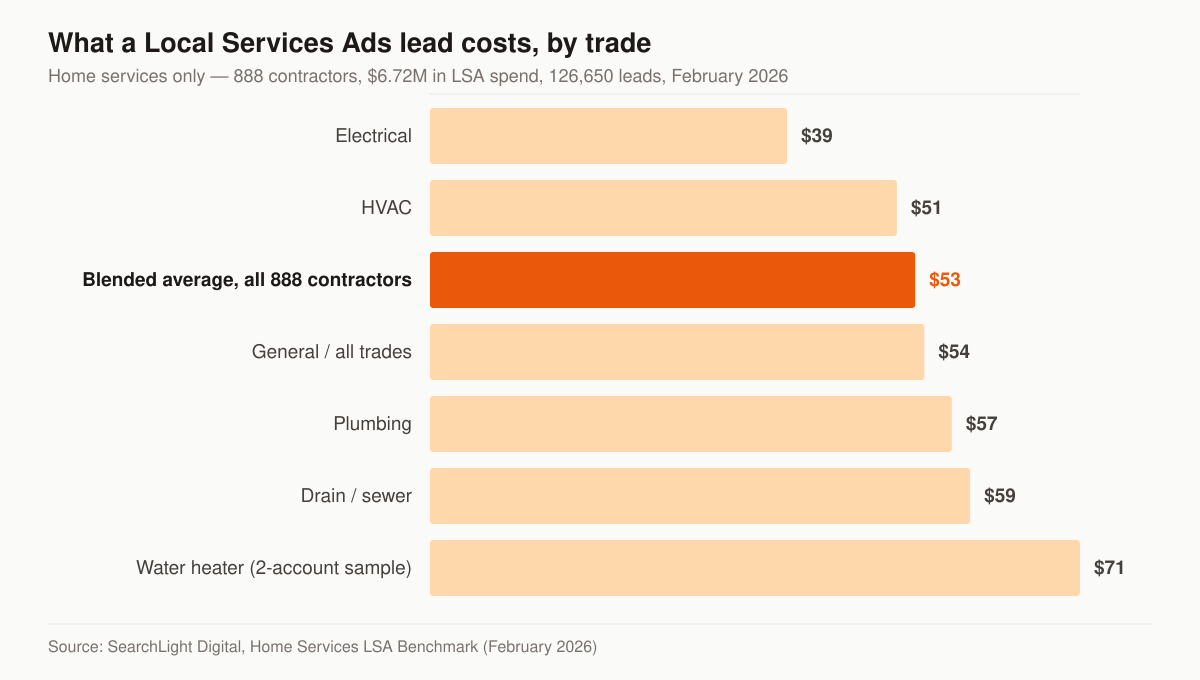
LSA cost per lead by trade, February 2026. Source: SearchLight Digital, Home Services LSA Benchmark.
Read the range, not the rows. Every category in that dataset is a home-services trade; there is no insurance line, and you cannot borrow one, because SearchLight describes the mechanic plainly: “LSA lead pricing is set by Google based on your trade, your market, and competition in your service area. You control your weekly budget cap, not your per-lead bid.” An insurance agency in Sacramento is a different category in a different auction from a Sacramento electrician. What the spread does tell you is scale — LSA leads in that dataset priced in the tens of dollars, between $39 and $71, not the hundreds.
The more transferable part of that benchmark is the second column. SearchLight reports a 43.9% book rate and a $233 cost per paying customer against a $53 lead, and argues the lead price is only interpretable once the downstream numbers are tracked. Insurance has the same structure with different labels: a quoted household is the booked appointment, an issued policy is the paying customer. Cost per lead is a budgeting input; cost per issued policy decides whether the channel stays switched on. That is the measurement we build campaigns around in insurance PPC management, and it is why our pricing is published as flat monthly tiers rather than a percentage of ad spend — a percentage rewards the agency for raising your budget, not your close rate.
Is $10 a day good for Google Ads?
For Local Services Ads, $10 a day is the wrong unit: you budget by the number of leads you want each week, not by daily click spend. For standard search ads, $10 a day is thin in this vertical — LocalIQ’s 2026 search benchmarks put finance and insurance at $3.39 per click and $74.44 per lead.
At those benchmark figures, a $10 daily budget buys a trickle of clicks and starves the campaign of the conversion data it needs to optimize — you spend months assembling a sample too small to learn from. If that is genuinely your ceiling, don’t spread it thin across a keyword build; put it into reviews and the map pack, which compound instead of resetting each month. When you’re ready to spend properly, our Google Ads walkthrough for agents covers the campaign structure and insurance PPC cost per click by line shows what clicks actually cost in Medicare, final expense, auto, and commercial.
LSAs vs standard search ads for insurance agents
The two channels differ on who controls the auction and what a bad click costs you. Everything below follows from the pay-per-lead versus pay-per-click split at the top.
| Factor | Local Services Ads | Standard search ads |
|---|---|---|
| Pricing model | Per qualifying lead | Per click |
| Position | Above search ads | Below LSAs |
| Trust signal | Google Verified badge | None built in |
| What controls rank | Proximity, reviews, responsiveness, standing | Bid, Quality Score, relevance |
| Bad-traffic recourse | Dispute off-target leads for credit | Refine negatives; clicks already paid |
| Insurance availability | California and Florida agencies only | Every state |
| Best for | Phone leads, trust-sensitive buyers | Keyword control, custom landing pages, tracking |
Neither wins outright. LSAs suit agents who want vetted, per-lead phone volume with minimal setup — where they can get them at all. Search ads give you keyword-level control, custom landing pages, and richer conversion tracking in every state. Eligible advertisers who are serious about the channel run both and compare cost per issued policy across them.
Why ranking isn’t just about budget
The trap agents carry over from search ads is “spend more, rank higher.” LSAs do not work that way. Google orders them on a blend of:
- Proximity to the searcher.
- Review score and volume on your profile.
- Responsiveness — how fast and reliably you answer leads.
- Hours and completeness of your profile.
- Good standing after screening.
Three of those five are earned, not bought. That is why LSAs reward operational discipline: an agent who answers within a ring or two and steadily accumulates genuine reviews will outrank a bigger budget that lets leads go to voicemail. Reviews do double duty here — they lift both LSA rank and broader local trust, which is why we treat reputation management as connected work, not a separate silo, and why a repeatable system for asking clients for Google reviews pays off whether or not your state ever gets LSAs.
What to run instead if LSAs aren’t available in your area
For agents outside California and Florida, the answer isn’t to wait on Google. The same results page has slots you can win today:
- Search ads. Standard Google Ads gives you keyword-level control, custom landing pages, and full conversion tracking. Our walkthrough on Google Ads for insurance agents covers the build, and insurance PPC management is the done-for-you version, tracked to cost per policy rather than cost per click.
- Performance Max, cautiously. Once your search campaigns convert reliably, PMax can extend reach — but run it as a supplement to proven search campaigns, not a replacement, because it gives you far less query-level visibility.
- The map pack and organic local results. LSA eligibility doesn’t gate the organic map results. A tuned Google Business Profile, steady reviews, and location pages put you in front of the same “insurance agent near me” searches without paying per lead — that’s the core of local SEO for insurance agencies. Reviews compound here: they build local trust now, and they’re already a documented LSA ranking input if Google ever opens your state.
If you’re in California or Florida, run LSAs and search together and compare cost per issued policy. Everyone else: build the search-plus-local stack now. If Google flips your state on, your reviews and response discipline transfer directly.
The takeaway
For most US insurance agents in 2026, the honest answer on LSAs is “not yet.” Google supports insurance agency ads in California and Florida only, under a single blue Google Verified badge that replaced Google Guaranteed and Google Screened in October 2025. In an eligible state, it’s a clean pay-per-lead channel that rewards fast answers and dispute discipline — and one that is moving into the Google Ads interface as a Performance Max pay-per-lead campaign over 2026 and 2027, with the pay-per-lead billing and the Search-and-Maps placement intact. Everywhere else, don’t force it: search ads and the map pack are open in every state, and that’s where the same buyers are. A free marketing audit will tell you which path is fastest for your agency — including whether LSAs are even live for your category before you spend a dollar.
- How to Set Up Google Ads for Insurance Agents: Step by Step
How to set up Google Ads for insurance agents: campaign structure, settings, bidding, keyword and LSA setup, TCPA-aware compliance, and conversion tracking.
- How to Run Facebook Ads for Insurance Agents (Step by Step)
A step-by-step guide to how to run Facebook ads for insurance agents: Special Ad Category setup, creative that converts, lead forms, and TCPA-safe compliance.
- Facebook Ads vs Google Ads for Insurance Agencies: Which Wins?
Facebook ads vs Google ads for insurance agencies: intent, cost, lead quality, and which channel fits final expense, Medicare, and auto — plus how to run both.
- The Final Expense Sales Funnel: From Click to Issued Policy
A practitioner's map of the final expense sales funnel from click to issued policy: a stage table, checkpoints, and the math that decides the profit.