Insurance Lead Follow-Up: The Cadence and Speed-to-Lead Math That Closes More Leads
Insurance lead follow-up works when you call inside 5 minutes and run 7 to 9 touches across phone, text, and email over 14 days. Touch three onward is the part that pays: EverQuote's agent playbook alone tells lead buyers to plan a minimum of six calls over a 90-day sales cycle.
When an agent tells us the leads are junk, we look at the follow-up before we look at the source. The fix is mechanical: first dial inside 5 minutes, then 7 to 9 touches across phone, text, and email over 14 days before a lead moves to nurture.
Two agents can buy the same file, from the same vendor, in the same week, and report opposite results. We start from the assumption that the difference is the cadence rather than the file — because the cadence is the half you control, and it is the half that is written down nowhere.
This page lays out that cadence exactly as we hand it to agents: the speed-to-lead window, the touch-by-touch sequence with scripts, and the channel mix. You can run it manually with a phone and a spreadsheet, or automate it. Either way works. Doing nothing past the second dial does not.
What is insurance lead follow-up?
Insurance lead follow-up is the sequence of calls, texts, and emails an agent runs after a prospect requests a quote: a first dial inside 5 minutes, then 7 to 9 touches over the following 14 days. It is a contact process, not a single call, and it ends in an appointment, a sale, or a nurture list.
A “lead” in this context is the person, not the policy: someone who filled out a form, answered an ad, or returned a mailer and left you a way to reach them. Follow-up is the machinery that turns that raw record into a conversation. Everything below — the speed-to-lead window, the 9-touch cadence, the scripts — is that machinery written down.
One collision worth clearing up, because it sends people to this page by mistake: in the London subscription market, “lead and follow” means something else entirely. There, the lead insurer is the one “responsible for setting the terms on an insurance or reinsurance contract that is subscribed to by more than one insurer,” and the follow market decides whether to subscribe on those terms (London Insurance Market glossary). That is contract placement. This page is about sales.
Speed-to-lead is the whole game in the first 10 minutes
When someone submits a form, they are looking at their phone right now. That attention has a half-life measured in minutes, not hours.
The mechanism is simple. A fresh lead remembers filling out the form, expects a call, and hasn’t yet talked to three of your competitors. An hour later, none of that is true. The form is forgotten, the phone shows an unknown number, and the prospect has cooled.
The target is a first dial inside 5 minutes. Not 5 hours. Not “when I finish my coffee.” Five minutes.
Here’s the hard part for solo agents: you can’t beat a 5-minute timer while you’re on another call or asleep. That’s why the first touch should be automated even if everything after it is manual. An instant text or an auto-dial that connects you the moment a lead lands closes the gap between the form hitting your inbox and you finding out about it. It is the first change we make to any insurance lead generation program, and it costs nothing but setup.
How many agents are already quoting the same person?
Speed matters because you are rarely the only call. J.D. Power’s 2026 U.S. Insurance Shopping Study — built on responses from 12,437 insurance customers who had requested an auto insurance price quote from at least one competitive insurer in the previous six months, fielded from January 2025 through January 2026 — reports that “Customers now receive an average of 3.5 quotes”, which the release describes as the highest level in the history of a study now in its 20th year.
Four figures from that release describe the market your first call lands in:
| What the 2026 study measured | Figure |
|---|---|
| Average quotes a shopper now receives | 3.5, the highest in the study’s history |
| New auto policies purchased digitally | 48%, up from 36% five years ago |
| Customers shopping their auto policy, year over year | Down from 57% to 53% |
| Active auto shoppers who already hold a homeowners policy | 45% — but only 20% received a homeowners quote while shopping |
Source: J.D. Power, 2026 U.S. Insurance Shopping Study, released 4 June 2026. The study measures auto shoppers; treat the figures as auto-line facts and the queue behind them as the part that travels to other lines.
Read the first row as a queue. A prospect collecting three or four quotes is not sitting by the phone waiting for you; they are working down a list, and your position on that list is decided in the first few minutes after the form posts. Read the last row as the question nobody asks. Forty-five percent of active auto shoppers already own a homeowners policy and only twenty percent got a homeowners quote out of the same conversation. The second policy is sitting in the house, unmentioned, while the agent races to quote the first one. Our guide to cross-selling and account rounding covers how to open that door once the auto conversation is live; the cadence’s job is just to make sure the conversation happens at all.
How many times should you follow up with an insurance lead?
Seven to nine touches across phone, text, and email over 14 days — then move the lead to long-term nurture, not the trash. Fewer than four touches and you are paying for leads you never actually reach. Here is the full sequence in one glance, ordered exactly as we run it:
- Minutes 0–5 — call. Live connect attempt while the form is still on their screen.
- Minute 5 — text (only if they didn’t answer): “It’s [Agent] returning your quote request.”
- Hour 1 — call. Second dial, different time of day.
- End of day 1 — email. Quote summary and what happens next.
- Day 2 — call plus a 12-second voicemail drop.
- Day 3 — text referencing the exact coverage they asked about.
- Day 5 — call in a new time slot.
- Day 8 — email. Value, not a chase: one relevant fact or FAQ.
- Days 12–14 — call plus text. Final active touch, then nurture.
That number isn’t decoration. EverQuote’s agent playbook tells lead buyers to plan “a minimum of six calls to any unresponsive leads over the 90 days” of the sales cycle — six being the floor, not the finish. Measured against that floor, two dials is not a follow-up strategy; it’s a donation to whichever agent calls third.
The multi-touch cadence: 7–9 touches over 14 days
A single channel is a single point of failure. Some prospects answer the phone, some only read texts, some respond to email at 9pm. Run all three.
Here is the cadence we use as the default. Adjust the volume to your appointment capacity, but do not cut the number of touches.
| Touch | Timing | Channel | Purpose |
|---|---|---|---|
| 1 | Within 5 min | Call | Live connect attempt while attention is hot |
| 2 | Within 5 min (if no answer) | Text | “Hi [Name], it’s [Agent] returning your request — good time to talk?” |
| 3 | +1 hour | Call | Second dial, different time of day |
| 4 | End of day 1 | Quote summary + what to expect, builds legitimacy | |
| 5 | Day 2 | Call + voicemail drop | Leave a 12-second voicemail with a callback number |
| 6 | Day 3 | Text | Short, specific: reference the coverage they asked about |
| 7 | Day 5 | Call | New day, new time slot |
| 8 | Day 8 | Value, not a chase — a relevant fact or FAQ | |
| 9 | Day 12–14 | Call + text | Final active touch before nurture |
After touch 9, the lead doesn’t get deleted — it moves to a long-term nurture list (monthly email, a check-in every quarter). Plenty of these convert in month two or three when their situation changes.
Two published constraints set the spacing. EverQuote’s playbook puts the floor at “a minimum of six calls to any unresponsive leads over the 90 days,” and warns that contacting a prospect every day runs into “consumer fatigue, particularly as they may be hearing from several other agents at the same time.” The table clears the floor by touch 9 without ever stacking two dials into one day.
Copy-paste Day-1 scripts: call, text, and email
Day 1 carries four of the nine touches, so it deserves actual scripts, not improvisation. Swap the brackets and use these as written.
Touch 1 — the 5-minute call opener:
"Hi, is this [Name]? This is [Agent] with [Agency] — you just asked for a
quote on [coverage] a few minutes ago, so I grabbed it before it got buried.
Do you have 90 seconds? Two quick questions and I can give you a real number
instead of a range."

If yes → qualify: age, tobacco, one health question, who the coverage protects.
If "I'm busy" → "No problem — I'll text you my name and number right now so
you know who called. Is later today or tomorrow morning better for five minutes?"
Touch 2 — the missed-call text (send within a minute of the no-answer):
Hi [Name], it's [Agent] with [Agency] — you requested a [coverage] quote just
now and I missed you by a ring. Want me to text the quote over, or is a call
this evening easier? Reply STOP to opt out.
Touch 4 — the end-of-day-1 email:
Subject: Your [coverage] quote — what happens next

Hi [Name],

I'm [Agent], a licensed agent in [State]. Your quote request came to me today.

To finish it I need two things: your age and your ZIP code. Reply with those
and I'll send the number back, or grab a time that suits you: [scheduler link].

I'll also try you tomorrow at [time window] at the number you gave.

[Agent], [Agency]
[License #] · [Phone]
The pattern across all three: name them, name yourself, reference the request they just made, and end with one small next step. Never open with “just checking in” — that’s a script for being ignored.
Touch 5 — the 12-second voicemail drop
Touch 5 is the first voicemail in the cadence, and it exists to earn a callback, not to sell. Twelve seconds is the budget. Read it at normal speed and it lands at roughly that length:
"Hi [Name] — [Agent] with [Agency]. You asked about [coverage] on [day],
and I've got your numbers ready. Call me back at [number]. That's [number].
Talk soon."
Three rules for the drop. Say the callback number twice, because nobody rewinds a voicemail. Never pitch price or product — the voicemail’s only job is to make a name and a number familiar. And never leave one on touch 1: on day one you want them to pick up, not to file you away as someone to call back later.
Why bother at all when they didn’t pick up? Pew Research Center surveyed 10,211 U.S. adults from July 13 to 19, 2020 and found that 19% generally answer a cellphone call from an unknown number, while 67% do not answer but check a voicemail if one is left. Another 14% ignore the call and any voicemail with it. On those figures the unanswered dial is not a failed touch — it is the delivery mechanism for the voicemail, and skipping the drop throws away the larger of the two audiences.
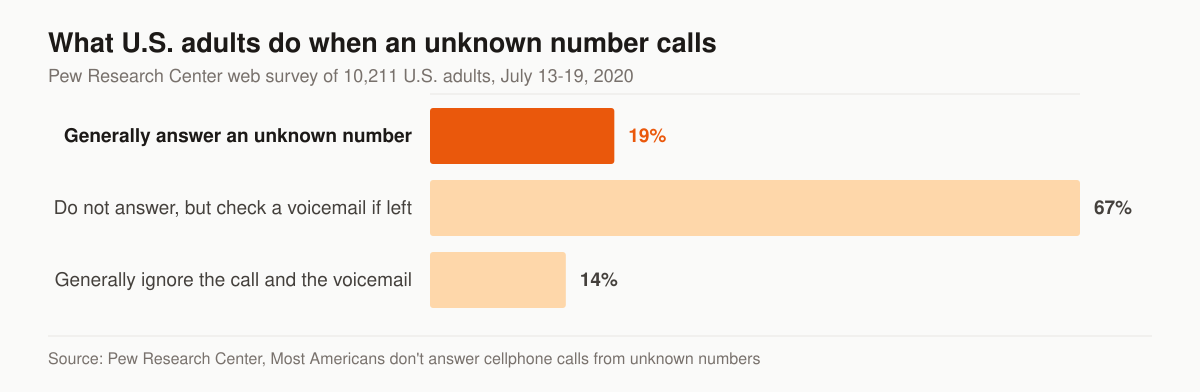
What U.S. adults do when an unknown number calls. Source: Pew Research Center, Most Americans don’t answer cellphone calls from unknown numbers, a survey of 10,211 U.S. adults conducted July 13-19, 2020.
What to say when they pick up and push back
A live answer is not a booked appointment. These are the four replies we script in advance, because each one arrives early and each one has a version that ends the call and a version that keeps it open. The difference isn’t charm. It is whether your reply hands the prospect somewhere to go.
Each row is the same objection handled two ways — the middle column closes the conversation, the right column continues it:
| They say | Reply that ends the call | Reply that keeps it open |
|---|---|---|
| “I never filled anything out.” | “Our system shows that you did.” | “No problem — comparison sites pass requests along, and the name on the form isn’t always the one you’d remember. Were you looking at [coverage] rates in the last week or so?” |
| “I was just looking.” | “Great, let me get you a quote.” | “That’s normal — comparing is the whole point of shopping. Were you comparing price, coverage, or both?” |
| “I already bought something.” | “Okay, sorry to bother you.” | “Good, that’s handled then. Two things so I’m not calling you for nothing: who did you go with, and what month does it renew?” |
| “Just email me something.” | Sending the email, and nothing else. | “Sending it now. So it isn’t a wall of text — is the goal a lower price, or better coverage at the same price?” |
The third row is the one to notice, because it is the row agents treat as a loss. A prospect who bought elsewhere is not a dead record; they are a dated one. Write the carrier and the renewal month into the CRM, set a task four weeks ahead of that date, and the lead you “lost” turns into a warm call at the moment the prospect is shopping again rather than the moment they were not. Same mechanic as cross-selling and account rounding: the policy you cannot write today has a date on it.
The fourth row matters for a different reason. “Email me something” is a polite way to end a call, and an agent who complies without asking anything has traded a live conversation for one more message in a crowded inbox. Ask the qualifying question first. Their answer is what makes the email worth opening, and it turns touch 4 in the table above from a template into a reply.
One rule underneath all four: the objection is information, not a verdict. Whether the person is shopping, already covered, or annoyed at the third call today, the reply that keeps the record alive is the one that ends in a question they can answer in a sentence. That is the same instinct behind the final expense telesales script — the call goes where the questions go.
Insurance follow-up email templates for day 8 and day 30
By day 8 there is nothing new to say about a quote the prospect already ignored, which is what makes this the hard email to write. So don’t chase the quote — send something that stands on its own. Both templates below are written to be useful even if the reader never replies.
Day 8 — the value email (touch 8):
Subject: The 3 things that actually move a [coverage] rate

Hi [Name],

No pitch here — just the three things that change what you'd pay for
[coverage], in case you're comparing quotes elsewhere:

1. [Rating factor — e.g. age band or tobacco status]
2. [Rating factor — e.g. coverage amount vs. what it's meant to cover]
3. [Rating factor — e.g. underwriting type: simplified vs. full]

If your situation touches any of those, the number I quoted you changes.
Reply with a yes/no on each and I'll re-run it — takes me ten minutes.

[Agent], [Agency] · [License #] · [Phone]
Day 30 — the nurture re-open (first touch after the cadence ends):
Subject: Still comparing [coverage]?

Hi [Name],

You asked about [coverage] back in [month] and we never connected. Two
possibilities: you got it handled somewhere else — great, tell me and I'll
close your file — or it's still on the someday list.

If it's the someday list, one question: what's the number you'd need to see
to say yes? Give me that and I'll tell you straight whether it exists.

[Agent], [Agency] · [License #] · [Phone]
Both emails follow the same shape: no guilt, no “circling back,” and one question that is easy to answer in a sentence. For subject-line patterns and full sequences beyond follow-up, see our insurance email marketing examples.
Why the agents who quit early lose
Run the math on a batch of leads to see why this matters more than lead price.
- Buy 100 leads — the total spend is fixed the moment you buy.
- Pick two contact rates and hold the close rate steady. Say two touches reach 50 of the 100 and nine touches reach 85, and that you close one in six of the people you actually speak to.
- That is 8 sales against 14, on identical spend. The close rate never moved. The number of humans you spoke to did.
- Those inputs are an illustration, not a benchmark. Pull your own contact rate out of the CRM, run the same three lines, and the arithmetic points the same direction.
The lead cost didn’t change. The follow-up did. This is exactly why chasing a cheaper cost per lead is the wrong fight; we break that down in our piece on the true cost per sale versus the sticker cost per lead. The expensive leads are the ones you stop calling.
Channel rules that keep you compliant and connecting
Cadence only works if your touches land. A few operating rules:
- Text only with consent on file. Texting is governed by the TCPA. The FCC’s one-to-one consent rule was vacated in January 2025, but consent and disclosure still matter — keep the opt-in language and timestamp your lead vendor captured, and honor STOP instantly. If you buy leads, confirm how consent is documented before you load numbers. Our guide to TCPA compliance for agents buying leads covers the paper trail.
- Vary your dial times. Calling at 10am every day for a week reaches one slice of the population. Rotate morning, lunch, and early evening across the cadence.
- Use voicemail drops past day 2. A pre-recorded 12-second voicemail with your callback number lifts callbacks without adding talk time. Don’t leave a voicemail on touch 1 — you want them to pick up, not call you back later.
- Keep texts human and specific. Reference the exact coverage they asked about. Generic blasts get ignored and get you flagged.
For agents working the phones all day, follow-up discipline pairs directly with a tight phone process — our final expense telesales script and best leads breakdown shows what to say once they actually pick up.
When you can call, and what counts as a stop request
Two federal clocks sit directly on top of a dialing cadence. This is a marketing-operations summary of the rule text, not legal advice — you are the licensed party, and your compliance counsel signs off on scripts and disclosures.
The calling window. 47 CFR 64.1200(c) provides that no person or entity shall initiate any telephone solicitation to “Any residential telephone subscriber before the hour of 8 a.m. or after 9 p.m. (local time at the called party’s location)”. Read the scope before you relax about it. The paragraph governs a telephone solicitation, and the same rule defines that term to exclude a call “To any person with that person’s prior express invitation or permission” and a call “To any person with whom the caller has an established business relationship” (64.1200(f)(15)). A prospect who submitted your quote form four minutes ago sits on the invitation side of that line — but the argument rests entirely on the consent record your source captured, which is exactly the paperwork our TCPA guide for agents buying leads tells you to demand before you load a single number. Two operational consequences: the local time that matters is the prospect’s, not yours, so a 7:30 p.m. dial placed from California to a prospect in New Jersey lands at 10:30 p.m. where the phone actually is; and the “vary your dial times” rule above has room to work between 8 a.m. and 9 p.m. without ever testing the edge.
The stop request. Paragraph (d) requires anyone making “any call for telemarketing purposes to a residential telephone subscriber” to have “instituted procedures for maintaining a list of persons who request not to receive such calls”, and it spells out the minimum standards: a written policy “available upon demand”, personnel “informed and trained in the existence and use of the do-not-call list”, and the request recorded and the number added to the list “at the time the request is made”. The clock to act is short — the rule says such a request must be honored “within a reasonable time from the date such request is made” and that “This period may not exceed ten (10) business days from the receipt of such request”. The clock to remember is not: “A do-not-call request must be honored for 5 years from the time the request is made” (64.1200(d)(6)).
That combination is the argument for a CRM field rather than a mental note. Five years outlives the spreadsheet, the dialer contract, and the producer who took the call, and the internal list is a record your cadence generates whether or not anyone maintains it. The rest of the paperwork — disclosures, state overlays, recordkeeping — is mapped in our insurance marketing compliance guide for agents.
How do you follow up with aged insurance leads?
Aged insurance leads — we treat anything past the 30-day mark as aged — get worked email-first, then by phone, with the compliance clock re-checked before you dial. Contact rates run below fresh leads; the offset is price, since aged leads cost a fraction of fresh ones. Judge them on cost per contact, not on first-attempt pickups.
Four adjustments turn an aged list from a waste of dials into a margin line:
- Reset the expectation, not the effort. An aged lead is not a bad lead; it is a cold one. Run the same 7–9 touches, but expect to work more records per appointment and price the batch accordingly.
- Re-check the do-not-call clock before you dial. Under the FCC’s TCPA rules, an inquiry only creates an established business relationship on the basis of a request made “within the three months immediately preceding the date of the call” (47 CFR 64.1200(f)(5)) — so a 6-month-old form no longer carries the exemption it once did for a number on the registry. The same rule’s safe harbor requires scrubbing against a version of the national do-not-call registry “obtained from the administrator of the registry no more than 31 days prior to the date any call is made.” Aged leads are exactly the batch where that scrub gets skipped.
- Email first to re-permission. Lead with a low-friction email or text that re-opens the conversation and gives an obvious exit. When someone takes that exit, the FCC requires revocation requests to be honored “within a reasonable time not to exceed ten business days from receipt” — that belongs in the CRM as an automation, not on a sticky note. Our TCPA compliance guide for agents buying leads covers the paper trail your vendor should hand you.
- Open by naming the age. Never pretend the form is new. “You looked at [coverage] back in [month] — did you ever get that sorted?” outperforms any script that hides the gap, because it hands the prospect an honest reason for the call. The full economics of working an aged file are in our breakdown of aged final expense leads.
What follow-up looks like after day 14
The active cadence stops at day 14. The file does not, and two different jobs run past it.
The first is the long sales cycle. EverQuote’s agent playbook tells lead buyers to keep reaching out with calls and emails “spaced out through a 90-day sales cycle”, and reports that “many agents find that they convert some of their best leads after 45-60 days” — well past the point where the record has stopped looking like an opportunity in a pipeline view. The second is the renewal clock. When a prospect buys elsewhere, the same playbook’s advice is to “Make a note to follow up with these leads in six to 12 months” and check whether they are still happy with the provider they chose. That is the objection-table row three mechanic again, with a date attached.
After day 14 every record lands in one of four states, and each one is a different automation rather than a different mood:
| State at day 15 | What fires the next touch | What that touch says |
|---|---|---|
| Never contacted | Monthly nurture email; one call around day 45 and day 90 | Useful first, quote second — they have never actually spoken to you |
| Contacted, not ready | The date they named, or 90 days if they named none | “You said [month] — is that still the plan?” |
| Bought elsewhere | Renewal month minus four weeks | Their carrier, their renewal, and what has changed since they bought |
| Asked you to stop | Nothing, for five years | Nothing |
The fourth row is the one that has to be enforced by software rather than memory, for the reason set out in the compliance section above. The first three are the ones that quietly decide the year: a 90-day file worked on schedule is a second pass over leads you have already paid for, at no additional lead cost.
Running three clocks by hand is where the file dies. A sequenced email automation build handles the nurture leg, and our published tiers say which retainer carries the automation and CRM work: Foundation is $2,500/mo, Growth is $3,500/mo, and Full-Funnel at $5,500/mo is the tier that includes marketing automation and CRM alongside managed ads and landing-page CRO. The full breakdown is on the pricing page.
Manual or automated — pick one, but pick
You can run this cadence two ways:
- Manual: a CRM with reminders, a notepad of dial times, and the discipline to work the list every morning. Cheap, but it breaks the day you get busy.
- Automated: a CRM/dialer that fires the first text in seconds, queues the dials, drops the voicemails, and sends the emails on schedule. You still make the live calls; the system just makes sure no touch is missed.
Touch by touch, here is what each version actually looks like:
| Touch | Manual method | Automated method |
|---|---|---|
| 1 — 5-min call | You watch the inbox and dial the moment a lead email arrives | Dialer rings your phone and connects you the second the lead posts |
| 2 — 5-min text | You type it from a saved note on your phone | Templated SMS fires automatically on no-answer |
| 4 — day-1 email | You paste the template and fill the brackets | Merge fields populate and send at end of day |
| 5 — day-2 voicemail | You call and speak the voicemail live | Pre-recorded 12-second drop, no talk time |
| 6–7 — day 3–5 | Calendar reminders and a dial list you rework each morning | Sequence queues the task; you just take the calls |
| 8 — day-8 email | You remember, or you don’t | Scheduled the day the lead entered the cadence |
| Post-day-14 | The lead quietly dies in a spreadsheet | Auto-moves to the monthly nurture list |
The gap in that right-hand column is the entire argument. Pick your tooling from our best CRM for insurance agents breakdown — the cadence above is the spec any of them has to run.
The automated version isn’t about replacing the agent. It’s about guaranteeing the 5-minute first touch and making sure touch 7 actually happens on day 5 instead of getting lost. The cadence above is the spec; the tooling just enforces it. For what to automate beyond follow-up — and which tool category fits your shop — see our insurance marketing automation build guide. If you want help wiring speed-to-lead and a multi-touch sequence into a system that runs without you babysitting it, that’s the core of what our lead generation service builds.
There is also a third path: don’t run the touches yourself at all. Our appointment-setting team runs the cadence — dials, texts, voicemail drops — and hands you booked appointments instead of a lead list. And if the problem sits upstream of follow-up, a sales funnel that runs the cadence for you wires the pages, automation, and tracking into one system.
The one-page summary
If you remember nothing else:
- Speed: first touch inside 5 minutes, automated if you have to.
- Volume: 7–9 touches across call, text, and email over 14 days.
- Channels: all three, with consent on file for texting.
- Persistence: six calls is a published floor, not a finish. Don’t quit at 2.
- After day 14: nurture, don’t delete.
The lead source matters less than what you do in the 60 seconds and 14 days after it lands. Tighten the cadence first, then judge the leads.
Want us to look at your current follow-up and tell you exactly where leads are leaking? Grab a free marketing audit and we’ll map your speed-to-lead and contact rate against the numbers above — no pitch, just where the money is falling out of your funnel. Cadence works best on leads that already raised a hand — see insurance leads without cold calling for sourcing those. And a cadence only pays if the stages around it are wired together: capture, nurture, booking, and CRM handoff are what an end-to-end insurance sales funnel connects.
- The Final Expense Sales Funnel: From Click to Issued Policy
A practitioner's map of the final expense sales funnel from click to issued policy: a stage table, checkpoints, and the math that decides the profit.
- How to Run Facebook Ads for Insurance Agents (Step by Step)
A step-by-step guide to how to run Facebook ads for insurance agents: Special Ad Category setup, creative that converts, lead forms, and TCPA-safe compliance.
- Facebook Ads vs Google Ads for Insurance Agencies: Which Wins?
Facebook ads vs Google ads for insurance agencies: intent, cost, lead quality, and which channel fits final expense, Medicare, and auto — plus how to run both.
- How to Set Up Google Ads for Insurance Agents: Step by Step
How to set up Google Ads for insurance agents: campaign structure, settings, bidding, keyword and LSA setup, TCPA-aware compliance, and conversion tracking.