Insurance Email Marketing Examples: 10 Emails for the Whole Client Lifecycle
Insurance email marketing works when each email matches a moment: an instant reply the minute a lead opts in, a quote follow-up the next day, renewal reminders 30 days out, cross-sell and win-back sequences, referral asks after the policy issues, and AEP announcements in October. Below are ten copy-ready examples with subject lines and send timing.
Most insurance email fails for a boring reason: the agent sends one generic drip to every contact, regardless of whether that contact is a two-minute-old lead, a client renewing next month, or a quote that went cold in March. Each of those moments needs a different email. This page gives you ten — subject line, body skeleton, and send timing — covering the whole lifecycle from opt-in to referral. For context on the ceiling you’re working against: across all senders, Mailchimp’s benchmark data (updated December 2023) puts the average email open rate at 35.63% and the click rate at 2.62% — which is exactly why every email below is built to earn a reply, not a click.
These are skeletons, not scripts. The bracketed placeholders are where your specifics go — and the specifics are what make them work.
The cadence at a glance
Timing is half the craft. Here is when each of the ten emails fires and what it exists to do:
| # | Scenario | When to send | Goal |
|---|---|---|---|
| 1 | New-lead speed-to-lead | Within 5 minutes of opt-in | Get a reply or a call window while attention is hot |
| 2 | Quote follow-up | Day 1 after quoting | Restate the offer plainly, ask one closing question |
| 3 | No-response nudge | Day 4–5 of silence | Force a yes / no / later decision |
| 4 | Renewal reminder | 30 days before renewal | Prevent silent lapse, open a review conversation |
| 5 | Cross-sell | 30–60 days after the policy issues | Open one adjacent-coverage conversation |
| 6 | Win-back | ~90 days after a quote goes cold | Restart with a fresh reason to talk |
| 7 | Referral ask | After issue, again at anniversary | Turn a satisfied client into introductions |
| 8 | AEP announcement | Late September–early October | Fill the AEP calendar before October 15 |
| 9 | OEP education | Early January | Stay useful inside CMS restrictions |
| 10 | Newsletter | Fixed monthly cadence | Stay top-of-mind between renewals |
Emails 1–3 belong inside a broader phone-first sequence — the full touch-by-touch timing lives in our insurance lead follow-up cadence guide. The emails below are the copy that plugs into it.
The 10 insurance email marketing examples
1. New-lead speed-to-lead email
Send: within 5 minutes of the lead landing — automated, because no human beats that timer reliably.
Subject: [First name], got your request — quick question
Hi [First name] — this is [Agent] with [Agency]. Your request for [coverage type] info just came through, and I’m pulling options for [state] now.
What’s the best time today for a five-minute call? Just reply with a time, or call me directly: [phone].
[Agent], [Agency], [address]
Why it works: the lead just submitted a form and is still at their phone. The email’s only job is a reply or a call window — not a pitch, not an attachment, not three paragraphs about your agency.
2. Quote follow-up email
Send: the day after you quote, whether or not they answered the phone.
Subject: Your [coverage type] quote, in plain English
[First name], here’s what we talked about (or what I ran for you), without the jargon:
- Coverage: [face amount / limits]
- Monthly cost: [premium]
- What it actually covers: [one plain sentence]
One question: do you want me to lock this in, or compare one more option first? Reply either way and I’ll handle it.
Why it works: quotes die in confusion. Restating the offer in three lines removes the “I’ll figure it out later” excuse, and the either/or question is easier to answer than “any questions?”
3. No-response nudge
Send: day 4–5 of silence after the quote follow-up.
Subject: Should I close your file, [First name]?
I don’t want to clutter your inbox. Two options:
Reply YES if you still want the [coverage type] coverage sorted — I’ll call at whatever time you name.
Reply LATER if the timing’s wrong, and I’ll check back in a month. Either way, the quote I sent stays valid until [date].
Why it works: it converts silence into a decision. Some prospects reply YES out of guilt for ghosting; the LATER replies build your nurture list instead of your dead-lead pile.
4. Renewal reminder
Send: 30 days before the renewal date, to existing clients.
Subject: Your [policy type] renews [date] — 2 minutes now saves a headache
[First name], your [policy type] policy renews on [date]. Two things worth checking before it does:
- Has anything changed — new car, new driver, renovation, new job?
- Do you want me to re-shop the rate before it auto-renews?
Reply “review” and I’ll call you this week, or “all good” and I’ll leave it be.
Why it works: silent lapses and surprise premium jumps are how books shrink. A 30-day heads-up makes you the agent who caught it, not the one who let it happen.
5. Cross-sell email
Send: 30–60 days after a policy issues — long enough to not feel like an upsell ambush, soon enough that the goodwill is fresh.
Subject: You covered the [first policy] — what about the [gap]?
[First name], your [policy type] policy is in force and you’re set there. While your file was open I noticed one gap most of my clients in [state] have: [one specific gap — e.g. no coverage on the spouse, home without umbrella, auto without renters].
Want me to run a quick number on it? One reply, no obligation.
Why it works: it names exactly one gap. Cross-sell emails that list four products read as a catalog; one specific observation reads as an agent doing their job.
6. Win-back email
Send: 90 days after a quoted lead went quiet, or when a former client’s policy has lapsed.
Subject: Rates changed since we last talked, [First name]
Back in [month] I quoted you [coverage type]. That quote is stale now — carriers reprice, and your situation may have moved too.
If the coverage question never actually got solved, reply “re-run” and I’ll pull fresh numbers this week. No need to re-explain anything; I still have your file.
Why it works: it gives the prospect a face-saving reason to re-engage (“rates changed”) instead of making them admit they ghosted. “I still have your file” removes the effort barrier of starting over.
7. Referral ask
Send: right after the policy issues, and again at the one-year anniversary.
Subject: A quick favor (and a thank-you)
[First name], your policy is in force — thanks for trusting me with it.
One favor: who’s the one person you know who keeps putting this off? A parent, a sibling, a coworker. Forward them this email or just reply with a name, and I’ll take the same care with them that I did with you.
Why it works: “who’s the one person” is answerable; “know anyone who needs insurance?” is not. Asking at issue and at anniversary catches the two moments a client is most aware of the value.
8. AEP announcement (senior list)
Send: late September to early October — before Medicare’s Open Enrollment opens October 15 and runs through December 7.
Subject: Medicare Open Enrollment starts October 15 — book your review early
[First name], Medicare’s Open Enrollment runs October 15 to December 7. That’s when you can switch, join, or drop a plan for next year.
My calendar fills fastest the first two weeks. If you want your annual review before the rush, reply with a day that works and I’ll hold the slot.
Compliance note: this send is calendar education plus an appointment ask — deliberately. The moment an email names specific plans, benefits, or carriers, it falls under CMS marketing rules with disclaimer and review requirements. Before building your senior-market sequence, read our CMS Medicare marketing rules guide and keep anything plan-specific inside your compliance path.
9. OEP education email (January)
Send: early January, to clients already enrolled in a Medicare Advantage plan. The Medicare Advantage Open Enrollment Period runs January 1 to March 31.
Subject: Enrolled in a Medicare Advantage plan? Your January checklist
[First name], quick new-year checklist for your coverage:
- Confirm your doctors are still in-network this plan year.
- Check your new drug formulary against your prescriptions.
- If something changed and it’s a problem, call me — you may have options.
No action needed if everything looks right. I’m here either way: [phone].
Compliance note: OEP is the most restricted window in Medicare marketing — CMS limits how agents can reference it, and “second chance to switch” campaigns are exactly what the rules target. Our Medicare OEP marketing rules guide draws the line between service emails like this one and prohibited OEP marketing. When in doubt, stay educational and reactive.
10. Monthly newsletter
Send: a fixed monthly slot, to the whole list — clients, aged leads, referral partners.
Subject: [Month] note from [Agency]: the [seasonal topic] most people skip
One seasonal hook — [what’s happening: storm season, tax season, enrollment season].
One explainer — [a single coverage question answered in plain language].
One human note — [a client milestone, community event, or office photo].
One soft ask — [a review request, referral prompt, or annual-review invitation. One, not four.]
Why it works: the newsletter is a different animal from emails 1–9 — it maintains the relationship instead of chasing a decision. If you’d rather not write one every month, our done-for-you insurance newsletter service runs this exact recipe under your brand.
How often should insurance agents send marketing emails?
Match frequency to the relationship. A brand-new lead can hear from you several times in the first two weeks — that intensity is expected while the question is live. A client should hear from you monthly through the newsletter, plus triggered sends around renewals and life events. The list-killer is not frequency; it is irrelevance — the fifth generic blast, not the fifth useful touch. When an email has a reason tied to the recipient’s moment, cadence takes care of itself.
How to segment an insurance email list
Segmentation is what decides which of the ten emails a given contact gets. Skip it and the ten collapse back into the single generic drip this page opened by arguing against. You do not need a wall of tags to fix that — four fields on the contact record carry the routing.
Four fields on the contact record decide which email fires:
| Field | What it has to hold | Emails it routes |
|---|---|---|
| Lifecycle stage | New lead, quoted, client, lapsed, cold quote | 1, 2, 3, 6, 7 |
| Line of business | Auto, home, life, final expense, Medicare, commercial | 5, 8, 9 |
| Key date | Renewal date, policy issue date, date of birth | 4, 5, 7 |
| Consent record | Email opt-in source and timestamp, with SMS consent stored separately | Every send, and the text sitting beside it |
Read that as a build order rather than a wish list. Lifecycle stage comes first because it is the field that fixes the problem in the opening paragraph: a contact sits in exactly one stage at a time, so moving someone to client should stop the no-response nudge and start the cross-sell clock without anyone remembering to do it by hand.
Line of business is what keeps the senior list separate from everything else. Emails 8 and 9 go to Medicare-eligible contacts and to nobody else — an AEP announcement landing on a 34-year-old auto client is a wasted send, and it drops a general-market contact into a message written against a rulebook that was never meant to apply to them.
The key date field is the one that gets skipped, because populating it is data entry rather than marketing. It is also the field that makes emails 4, 5 and 7 fire on their own. With no renewal date on the record, the renewal reminder is a manual job someone does when they think of it, which makes the renewal reminder a task somebody owns rather than a system that runs.
One test separates a segmented list from an annotated one: does changing a field start or stop a send by itself? A tag no automation reads is a sticky note. Which platform you run matters less than whether it can trigger off a date and a stage — our comparison of CRM options for insurance agents covers which ones do that without a developer.
7 subject line formulas for insurance emails
Every subject line above comes from a small set of reusable patterns. Steal the pattern, not the exact words:
- The named deadline — “Medicare Open Enrollment starts October 15.” Real dates create real urgency; invented urgency trains people to ignore you.
- The direct question — “Still need the [coverage] sorted, [First name]?” Questions get answered; statements get archived.
- The file-closer — “Should I close your file?” A gentle ultimatum that turns silence into a decision.
- The plain-recap — “Your [coverage] quote, in plain English.” Promises clarity, which is the thing insurance buyers are starved of.
- The named gap — “You covered the car — what about the house?” One specific observation beats a product list.
- The changed circumstance — “Rates changed since we last talked.” Gives a cold contact a fresh, face-saving reason to re-open.
- The favor ask — “A quick favor (and a thank-you).” Low-stakes and personal: it asks for a minute of goodwill rather than a buying decision, so it reads differently from the rest of the sales mail in the inbox.
Two rules across all seven: short enough to survive a phone screen, and honest about what’s inside — a subject line that overpromises gets one open and zero trust.
Will these emails actually reach the inbox?
Every example above assumes delivery, and delivery stopped being a given in February 2024. Gmail and Yahoo each published sender requirements that took effect that month, and the two lists overlap closely.
Here is what the two mailbox providers publish as requirements:
| Requirement | Gmail | Yahoo |
|---|---|---|
| Authentication, all senders | “Set up SPF or DKIM email authentication for your sending domains.” | “Implement SPF or DKIM at a minimum” |
| Authentication, bulk senders | “Set up SPF and DKIM email authentication for your domain.” plus “Set up DMARC email authentication for your sending domain. Your DMARC enforcement policy can be set to none.” | “Implement both SPF & DKIM” and “Publish a valid DMARC policy with at least p=none” |
| Unsubscribe, bulk senders | “Marketing messages and subscribed messages must support one-click unsubscribe, and include a clearly visible unsubscribe link in the message body.” | “Implement a functioning list-unsubscribe header, which supports one-click unsubscribe for marketing and subscribed messages” and “Honor unsubscribes within 2 days” |
| Spam complaint rate, all senders | “Keep spam rates reported in Postmaster Tools below 0.3%.” | “Keep your spam rate below 0.3%” |
| Who counts as bulk | “email senders who send more than 5,000 messages per day to Gmail accounts” | Requirements are split into all senders and bulk senders; the page publishes no message-count threshold |
Sources: Google, Email sender guidelines; Yahoo, Sender Requirements & Recommendations. Both sets took effect in February 2024.
An agency mailing a book of a few thousand contacts once a month sits under Gmail’s 5,000-messages-a-day line, which puts it in the all-senders row rather than the bulk row. Two things still bite at that size.
The first is the sending domain. The all-senders row still asks for SPF or DKIM on the domain the mail leaves from, which means agency mail should go out from a domain you own and have authenticated — not from a free consumer mailbox, and not from a shared address you cannot publish DNS records for.
The second is the complaint ceiling, and both providers state it as a rate rather than a count, so a short list has correspondingly little slack in absolute terms. We treat the unexpected send as the complaint risk — the untargeted blast, the purchased list, the newsletter that restarts after eight months of silence — and we treat a dated renewal reminder to a client whose renewal really is 30 days out as the safe end of the range. That is a relevance judgement, not a measured split, but it is why the segmentation above is a deliverability control as much as a targeting one, and the marketing automation stack that fires the sequences is the same place the authentication and suppression rules live.
The compliance floor under every send
None of these examples work if they get you fined or filtered. Three layers to respect:
CAN-SPAM governs every commercial email you send. As the FTC’s compliance guide puts it, the law “establishes requirements for commercial messages, gives recipients the right to have you stop emailing them, and spells out tough penalties for violations.” Per the FTC’s CAN-SPAM guide, that means accurate sender information, a subject line that reflects the content, your valid physical postal address in the message, and a clear opt-out you honor within 10 business days — with each violating email exposed to penalties of up to $53,088.
TCPA governs the texts and calls around your emails. If your sequence includes SMS — and the best ones do — consent at opt-in is the whole ballgame. Our breakdown of TCPA compliance for agents buying leads covers what your consent records need to show.
CMS governs the senior-market calendar. Emails 8 and 9 above are written to stay on the educational side of the line, but any drift into plan specifics changes their regulatory status. The two Medicare guides linked in those sections are the guardrails.
We provide marketing services, not legal or licensed insurance advice — you are the licensed party, and your compliance path has the final word.
What to measure when the open rate is unreliable
Open rate is the easiest number to report, and two of the largest mailbox operators have deliberately made it a weaker signal than it looks.
Google says so on the same page that carries the sender requirements: “Google doesn’t track open rates. Google can’t verify the accuracy of open rates reported by third parties. Low open rates aren’t necessarily an accurate indicator of deliverability or spam classification issues.” Apple goes further on the recipient’s side. With Mail Privacy Protection switched on, Apple’s user guide says the feature “hides your IP address so senders can’t link it to your other online activity or determine your exact location. It also prevents senders from seeing if you’ve opened the email message they sent you.”
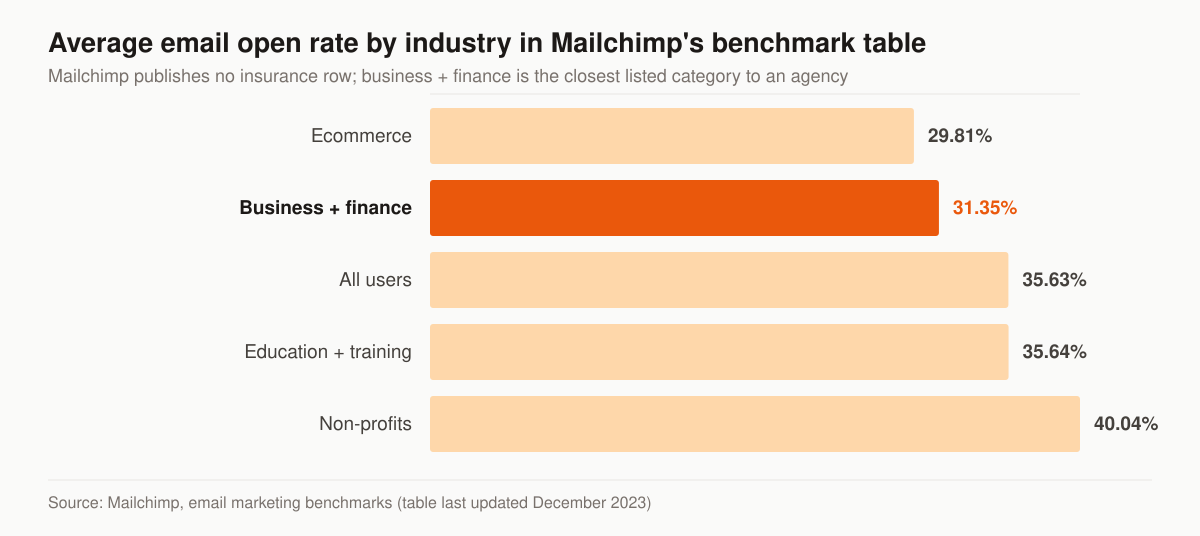
Mailchimp’s published benchmark table, last updated December 2023. Mailchimp lists no insurance row; business + finance is the nearest listed category to an agency. Source: Mailchimp, email marketing benchmarks.
The benchmark is worth knowing because it is the number an agent gets asked about, not because it settles anything. The same Mailchimp table puts the business and finance click rate at 2.78% and the unsubscribe rate at 0.15% — both of those are counted from something a person chose to do, which makes them harder to inflate than an image load.
These are the numbers we report on an email program, in the order they matter:
| What we count | Why it survives pixel blocking | Where it comes from |
|---|---|---|
| Replies | A person typed something back | Inbox, or the CRM if replies are logged |
| Booked calls | A calendar slot exists | Scheduler |
| Quotes started | Work began on a policy | Agency management system |
| Policies issued | Money changed hands | Carrier or AMS |
| Hard bounces, complaints, unsubscribes | Mailbox providers report them directly | Sending platform and Postmaster Tools |
Eight of the ten emails above end in an explicit reply request, so the reply is the conversion — treating the open as the goal tunes the subject line and ignores the ask sitting underneath it. Emails 9 and 10 are the exceptions, and they are scored differently: the OEP checklist exists to be useful and answered only if something is wrong, and the newsletter is judged on unsubscribes staying flat, not on replies arriving.
That reporting is the difference between a template pack and a program someone runs. Our rates are published rather than quoted on request — $2,500 a month at Foundation up to $5,500 at Full-Funnel — and marketing automation and CRM sit in the Full-Funnel tier.
Templates don’t send themselves
The gap between reading these examples and benefiting from them is the machine that fires each one at the right moment: the CRM triggers, the consent capture, the deliverability plumbing, the branching logic when someone replies. That machine is what our done-for-you email automation service builds and runs — these scenarios, wired to your lead flow and your book, tuned on replies and issued policies rather than opens.
If you want to know which of these ten emails your agency is currently not sending — and what that’s costing — start with a free marketing audit. We’ll map your follow-up against this cadence and show you exactly where leads and renewals are leaking.
- Digital Marketing for Insurance Agents: The Channel-by-Channel Playbook
Digital marketing for insurance agents, channel by channel: which of SEO, PPC, social, email, and AI search to run first — by line and budget. Free audit.
- Insurance Marketing Automation: What to Build, in What Order
What insurance marketing automation is, six automations worth building, honest tool categories, and the TCPA and CMS rules that govern automated outreach.
- 45 Marketing Ideas for Insurance Agents, Ranked by Effort and Impact
45 marketing ideas for insurance agents, ranked into four tiers by effort and impact. Every idea notes the line it fits, from final expense to P&C.
- Best CRM for Insurance Agents: An Honest, Vendor-Neutral Guide
A vendor-neutral guide to the best CRM for insurance agents — CRM vs AMS, the best tools by line and budget, real 2026 pricing, and where marketing fits.