Best CRM for Insurance Agents: An Honest, Vendor-Neutral Guide
The best CRM for insurance agents depends on your line and how you sell. Life and health agents favor insurance-native platforms like AgencyBloc or InsuredMine; telesales and lead-driven agents favor all-in-one systems like Agent CRM; simple books do fine on HubSpot's free tier or Less Annoying CRM. Match the tool to the job — not the hype.
Search “best CRM for insurance agents” and you get two kinds of results: vendors ranking themselves #1, and listicles that rank whoever paid for placement. Neither helps when you’re the one who has to live in the tool every day.
This guide is different. We build and run marketing systems for insurance agents, so we have no CRM to sell you — the CRM is the engine you own, and our only stake is that you pick one you’ll actually use. Below is the framework we’d use ourselves: the CRM-versus-AMS distinction that quietly decides your shortlist, the jobs a CRM has to do for an agent, and the real tools mapped to real situations, with pricing verified in July 2026 and linked to each vendor.
First, the distinction that changes your shortlist: CRM vs. AMS
Most confusion in this category comes from treating “CRM” and “agency management system” as the same thing. They aren’t.
Per EZLynx’s own breakdown (updated March 2026), a CRM is used to “manage, track and organize an agency’s customer relationships and respond to their needs” — it lives on the sales side: lead generation, follow-up, and automating sales and marketing tasks. An AMS “goes beyond customer-related sales tasks so insurance agencies can handle the complete customer lifecycle” — policy processing, renewals, endorsements, accounting, compliance, and carrier integrations.
The table below sets the two categories side by side: the job each one is built for, the data it holds, and the work it handles badly.
| CRM | AMS | |
|---|---|---|
| Job | Win and nurture clients | Service policies end to end |
| Core data | Leads, deals, activities | Policies, renewals, endorsements, commissions |
| Strong at | Follow-up, automation, marketing | Back-office ops, carrier connectivity, compliance |
| Weak at | Deep policy administration | Sales pipeline and outreach speed |
Why this matters before you compare a single tool: a new final-expense telesales agent and a 12-person P&C shop need almost opposite things. The telesales agent needs a fast sales CRM. The P&C shop needs policy administration — an AMS, or an AMS-hybrid. Buy the wrong category and no feature list saves you.
The jobs a CRM must do for an insurance agent
Before comparing brands, score any tool against the work you actually do. These are the axes that separate a fit from an expensive mismatch:
- Policy & renewal data model. Can it store policy numbers, effective/renewal dates, carriers, and coverage — or are you forcing that into a “notes” field built for B2B sales?
- Commission tracking. Does it reconcile carrier statements and split commissions, or is that a separate spreadsheet forever?
- Compliance posture. For health, Medicare, and life, does it handle protected data (HIPAA), and does its outreach respect TCPA on calls and texts and CMS rules on Medicare marketing?
- Speed-to-lead automation. Instant SMS/email on a new lead, a dialer, and drip sequences — the difference between a booked appointment and a dead lead.
- Carrier / AMS integration. Does it connect to the AMS or carrier tools you already use (Applied Epic, HawkSoft, Vertafore), or become an island?
- Mobile access. Field and in-home sales need policy and client data from a phone.
- Entry cost and ownership. Free tier vs. per-seat vs. quote-based — and whether your data leaves with you if you switch.
No tool wins every axis. Pick the two or three that match how you sell, and weight the comparison there.
The best CRMs for insurance agents, by fit
Here’s the landscape grouped by category. The table below names each tool’s category, the agent it fits, the feature it is strongest at, and the entry price its vendor listed in July 2026 — software pricing changes often, so treat these as a starting point and confirm on the vendor’s site.
| Tool | Category | Best for | Notable strength | Entry price (Jul 2026) |
|---|---|---|---|---|
| AgencyBloc | AMS + CRM hybrid | Life, health, Medicare/senior, group | Commissions+ reconciliation; HIPAA, HITRUST, SOC 2 Type II | Quote-based (no public price) |
| InsuredMine | Insurance-native CRM | Independent multiline agencies | Policy “Account 360”; 20+ integrations incl. AMS platforms | $1 trial; quote-based |
| Agent CRM | All-in-one sales/automation | Telesales & lead-driven agents | AI follow-up, power dialer, funnels, booking calendar | $97/mo after 14-day trial (+ carrier fees) |
| HubSpot | General-purpose CRM | Solo agents wanting a free start | Forever-free tier; strong marketing automation | Free tier available |
| Less Annoying CRM | General-purpose (simple) | Simple books, zero complexity | Set up in about an hour; flat pricing | $15/user/mo |
| Pipedrive | General-purpose pipeline | Pure lead & pipeline follow-up | Clean visual pipeline | From ~$14/user/mo (billed annually) |
| Zoho CRM | General-purpose | Budget, multi-tool users | Free edition up to 3 users | Free (≤3 users); paid tiers above |
| Salesforce FSC | Enterprise CRM | Large, complex brokerages | Deep customization; Einstein AI | $175–$375/user/mo (billed annually) |
Insurance-native and AMS-hybrid (for policy-heavy books)
AgencyBloc positions itself as “Your Growth Engine Built for Health Insurance Agencies” and is really an AMS+CRM hybrid for life, health, Medicare/senior, and group benefits. Its differentiators are the ones generic tools lack: a Commissions+ module that reconciles carrier statements and tracks splits, and a compliance posture built for protected data — it states HIPAA compliance backed by HITRUST and SOC 2 Type II audits, per agencybloc.com. If you’re a senior-market or benefits agent drowning in commission spreadsheets, this is the category to look at first.
InsuredMine is purpose-built for insurance agencies — “The Growth Engine Behind High-Performing Agencies” — pairing a visual sales pipeline with insurance-native policy management (“Account 360”) and 20+ integrations, including AMS platforms like Applied Epic, HawkSoft, and Vertafore, per insuredmine.com. It suits independent multiline agencies that want a modern CRM layer that still talks to their policy systems.
All-in-one sales & automation (for telesales and lead-driven agents)
Agent CRM brands itself “The AI-Powered, Easy to Use CRM Built for Insurance Agents” and covers the full sales stack — AI-driven lead follow-up, a power dialer and phone system, pre-built funnels, drip campaigns, and a booking calendar — across lines from Medicare and final expense to IUL and annuities, per agent-crm.com. Pricing is a 14-day free trial then $97/month, with carrier fees for SMS and calling on top. For a solo or small-team agent running Facebook or telesales leads, the speed-to-lead automation is the draw. It is a sales engine, not a policy-administration system.
General-purpose CRMs (for lead follow-up without policy admin)
If you mainly manage prospects, not policies, a general CRM is simpler and cheaper:
- HubSpot markets a general-purpose CRM to insurance (“Scale quick, stay lean”) with a genuinely useful forever-free tier, no credit card required, per hubspot.com. It integrates with agency management systems rather than administering policies itself — best for solo agents who want to start free and grow into automation.
- Less Annoying CRM leans entirely on simplicity — “The easiest way to keep clients and policies organized,” set up in about an hour, at a flat $15/user/month, per lessannoyingcrm.com.
- Pipedrive is a clean visual sales pipeline starting around $14/user/month billed annually (pipedrive pricing) — good when your only job is making sure no follow-up slips.
- Zoho CRM is multi-industry with a free edition for up to three users, per zoho.com — a budget option for agents already living in other Zoho tools.
Enterprise (for large, complex brokerages)
Salesforce Financial Services Cloud is the enterprise end: deeply customizable with Einstein AI, and priced accordingly — roughly $175 to $375 per user per month billed annually across its Professional, Growth, and Enterprise editions, per Salesforce’s pricing. It’s overkill for a solo agent and a fit for multiline brokerages with an admin to configure it.
The AMS-first platforms that rarely show up on CRM lists
Search this keyword and the results mix two product categories, because agency management systems are routinely marketed under the CRM label. That is less a marketing trick than a real overlap: these platforms carry a pipeline, a task list and renewal automation, so an agent shopping for a CRM ends up in a demo for something larger. The distinction at the top of this page still holds — they are built around the policy, not the prospect — but for a P&C or multiline shop, the larger thing is frequently the right purchase.
The table below lists the AMS-side platforms that surface in the same search results, with the price each vendor published on its own pricing page in September 2026.
| Platform | Category | Published price (September 2026) | The fine print attached to it |
|---|---|---|---|
| AgencyZoom | Sales and service layer for agencies | Independent plans at $149, $199 and $349 per month, billed monthly; Allstate agency plans at $99 and $129 per month | The Allstate plans state “All plans include up to 7 users.” On integrations, the plan note reads: “This includes most major agency management systems. Some may require additional costs to access the integration.” |
| NowCerts | Agency management system | Essentials $99/month, Professional $169/month, Business $349/month; Enterprise listed as “Call Us” | Each published plan carries a “Start For Free” trial |
| EZLynx | Agency management system with quoting | No price published | Its pricing page explains that pricing scales with your user count and the exact features your agency needs, and that Applied Client Network members get added discounts |
Two things fall out of that table. First, we read a published price as a signal about the sales motion rather than about quality: a public number tends to come with a self-serve sign-up, and a quote request tends to come with a rep, a discovery call and a longer buying process. Budget your own time accordingly. Second, the published number and the signed number differ by the integrations — AgencyZoom’s own note points at the connector into your management system as the place a surcharge can appear.
Feature availability moves by tier as well, and it moves in ways a headline price hides. On AgencyZoom’s Independent ladder, lead management, revenue tracking and AMS integration appear from the Essential plan, while two-way email, two-way texting, Google Reviews and renewal automation are listed from Growth, and click-to-call, the service center and events automation only from Pro. If the automation is the reason you are buying, the entry tier is not the tier you are buying.
Quick picks by insurance line
Your line narrows the field faster than any feature chart:
- Final expense / telesales: an all-in-one with a dialer and instant SMS wins, because speed-to-lead is the whole game. Pair it with strong final expense marketing so the CRM has leads to work.
- Medicare / senior: favor a platform with compliance and commission tracking (AMS-hybrid), since CMS rules and AEP volume punish sloppy data. It should slot into your Medicare marketing calendar.
- Health: HIPAA handling is non-negotiable — start with an insurance-native platform.
- P&C / multiline: you likely need AMS-grade policy administration, or a CRM that integrates cleanly with your AMS.
- Working under an FMO/IMO? Ask first — many provide a free or discounted CRM to contracted agents, which can change the math entirely. If you run an agency giving agents a platform, that’s the FMO and white-label model.
What the monthly price leaves out
A CRM’s list price is the smallest number in the deal. Several other lines land on the invoice, and each of them is visible on a vendor’s own pricing page if you read past the headline figure.
The table below maps the cost lines sitting underneath a published monthly price, quoting the wording each vendor used in September 2026.
| Cost line | What it does to the bill | Where it appears |
|---|---|---|
| Per seat versus per agency | A per-user rate multiplies with headcount; a flat agency rate does not | InsuredMine lists “$118.00 total per user/month, billed monthly”; AgencyZoom’s Allstate plans state “All plans include up to 7 users.” |
| Setup and implementation | A one-time fee agreed at contracting, quoted apart from the license | InsuredMine’s pricing page carries “+ Setup and Implementation fees” beside its plans |
| Annual commitment | A lower rate bought with a longer term | InsuredMine lists “$106.00 total per user/month, billed annually” against $118.00 billed monthly |
| Usage on top of the license | Texts and call minutes billed through a telecom carrier rather than the software | Agent CRM’s $97/month plan carries carrier fees for SMS and calling |
| Integration surcharge | The connector into your management system priced apart from the plan | AgencyZoom, on AMS integrations: “Some may require additional costs to access the integration.” |
| Trial exclusions | The capability you are buying may be absent from the evaluation | InsuredMine’s pricing page footnotes: “AMS integration not provided in InsuredMine trial” |
That last row deserves its own sentence, because it decides what a trial can prove. If policy data is the reason you are buying the platform and the trial runs without the AMS connection, the fortnight you spend in the sandbox tests the parts you were never worried about.
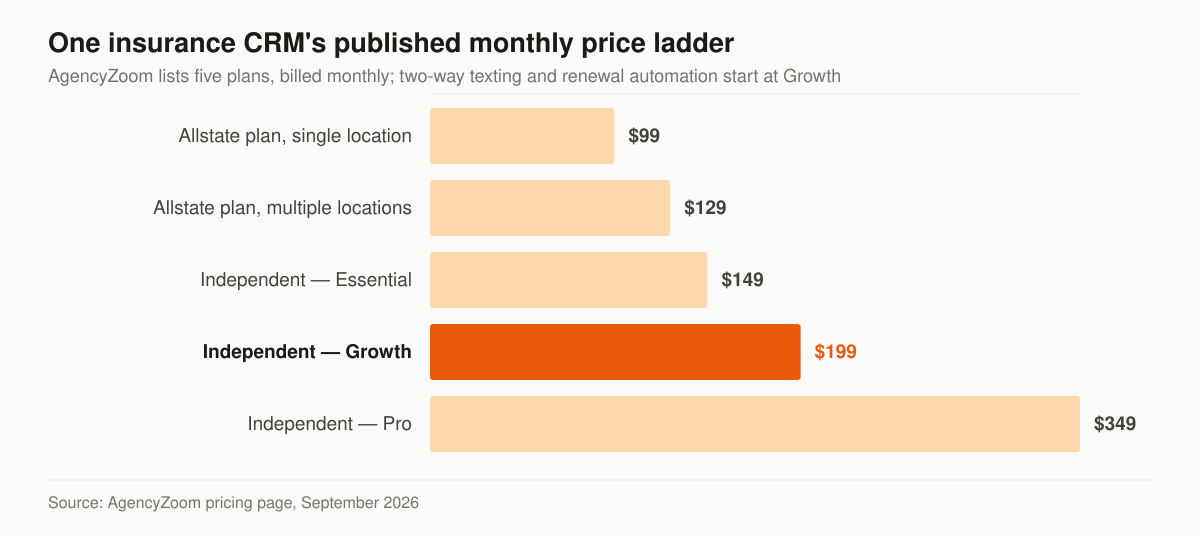
Chart: AgencyZoom’s five published monthly plans, read from its pricing page in September 2026. Renewal automation and two-way texting appear on the Growth plan’s feature list, not on Essential’s.
Read the ladder as a shape rather than a set of numbers. The rungs are not a discount curve on one product; they are different products, and on this ladder the difference between them is largely the automation layer. That is the part a marketing program depends on, which is why we size the CRM tier against the campaigns it has to run rather than against the lowest row on the page.
The compliance questions to ask before you sign
A CRM is where consent records, call recordings and — in health lines — protected health information come to rest. That makes the vendor part of your compliance posture, not merely a tool you rent. Four questions are worth putting in writing before you sign anything.
Will the vendor sign a business associate agreement?
HHS’s Office for Civil Rights is explicit that a cloud vendor holding health data sits inside the HIPAA perimeter. Its cloud computing guidance states: “When a covered entity engages the services of a CSP to create, receive, maintain, or transmit ePHI (such as to process and/or store ePHI), on its behalf, the CSP is a business associate under HIPAA. Further, when a business associate subcontracts with a CSP to create, receive, maintain, or transmit ePHI on its behalf, the CSP subcontractor itself is a business associate. This is true even if the CSP processes or stores only encrypted ePHI and lacks an encryption key for the data.”
The paperwork follows from that. HHS’s business associate guidance says the HIPAA Rules permit a covered entity to disclose PHI to a business associate where it “obtains satisfactory assurances, in the form of a contract or other written arrangement (collectively referred to as a “business associate agreement,” or BAA), that the business associate will appropriately safeguard the information, among other obligations,” and that the required elements of that agreement are specified at 45 CFR 164.504(e). Where you handle protected health information on a health plan’s behalf, the CRM storing it sits one link further down the same chain — HHS states that a business associate “must establish a BAA with its subcontractor before disclosing PHI to the subcontractor for work to be done for a covered entity.”
One caution about vendor badges. OCR’s cloud guidance says plainly: “OCR does not endorse, certify, or recommend specific technology or products.” SOC 2 Type II and HITRUST are real audits performed by real auditors, and they are useful evidence about a vendor’s controls. They are not a government certification, because the government issues none.
Which consent fields does it store, and can it produce them later?
The FCC’s telemarketing rules turn consent into a record you have to be able to reproduce. Under 47 CFR 64.1200, paragraph (a)(2), no person or entity may initiate a call that “includes or introduces an advertisement or constitutes telemarketing, using an automatic telephone dialing system or an artificial or prerecorded voice” to the lines and numbers listed in (a)(1)(i) through (iii) — a list that includes “any telephone number assigned to a paging service, cellular telephone service, specialized mobile radio service, or other radio common carrier service” — other than with the prior express written consent of the called party, with narrow carve-outs for tax-exempt nonprofits and for a “health care” message from a HIPAA covered entity or its business associate.
Paragraph (f) defines the consent itself as “an agreement, in writing, bearing the signature of the person called that clearly authorizes the seller to deliver or cause to be delivered to the person called advertisements or telemarketing messages using an automatic telephone dialing system or an artificial or prerecorded voice, and the telephone number to which the signatory authorizes such advertisements or telemarketing messages to be delivered.” The agreement must carry a clear and conspicuous disclosure that the person “is not required to sign the agreement (directly or indirectly), or agree to enter into such an agreement as a condition of purchasing any property, goods, or services,” and signature “shall include an electronic or digital form of signature, to the extent that such form of signature is recognized as a valid signature under applicable federal law or state contract law.”
Read as a data model, that is a field list: the exact wording shown at opt-in, the signature or its electronic equivalent, the timestamp, the specific number authorized, and the page or form it came from. A CRM that records a checkbox and nothing else cannot reproduce any of it two years later, when reproducing it is the entire point.
Can it honor a revocation everywhere, inside ten business days?
Consent is not permanent. Paragraph (a)(10) of the same section provides that a called party may revoke consent for calls or text messages made under paragraphs (a)(1) through (3) and (c)(2) “by using any reasonable method to clearly express a desire not to receive further calls or text messages from the caller or sender,” and that replies of “stop,” “quit,” “end,” “revoke,” “opt out,” “cancel,” or “unsubscribe” to an incoming text are a reasonable means per se. It then sets the clock: “All requests to revoke prior express consent or prior express written consent made in any reasonable manner must be honored within a reasonable time not to exceed ten business days from receipt of such request.” It also forecloses funneling opt-outs into one channel — senders covered by those paragraphs “may not designate an exclusive means to request revocation of consent.”
For a CRM demo, that is a concrete test rather than a policy question. A STOP typed into the texting tool has to suppress the email sequence and the dialer as well, and the revocation has to carry a timestamp you can find. Ask the vendor to demonstrate the suppression crossing channels while you watch. Our guide to insurance marketing compliance covers the wider outreach rules, and the lead follow-up cadence shows where the consent branch sits in a live sequence.
For Medicare: can it hold the recordings and the scope of appointment?
Medicare Advantage adds storage obligations that arrive through your contract with the plan. 42 CFR 422.2274, paragraph (g)(2), requires that contracts between a third-party marketing organization and an MA plan, or between the TPMO and an MA plan’s first tier, downstream or related entity, ensure the TPMO meets a list of conditions, one of which reads: “All marketing and sales calls, including the audio portion of calls conducted via web-based technology, must be recorded and retained in their entirety for a minimum period of 6 years. For the first 3 years of the retention period, records must be maintained in audio format. For years 4, 5, and 6, records may be maintained in either audio format or as complete and accurate transcript recordings.”
Two further storage jobs sit in the same section. Agents and brokers who represent MA organizations must “Secure and document a Scope of Appointment prior to a personal marketing appointment” under paragraph (b)(3) — our scope of appointment and TPMO walkthrough covers what that record contains. And beginning October 1, 2024, personal beneficiary data a TPMO collects for MA marketing or enrollment “may only be shared with another TPMO when prior express written consent is given by the beneficiary,” obtained through a clear and conspicuous disclosure that “lists each entity receiving the data and allows the beneficiary to consent or reject to the sharing of their data with each individual TPMO.” Part 422 governs Medicare Advantage; the Part D counterpart to this section is 42 CFR 423.2274. The CMS marketing rules for agents page tracks the rest of the regime.
None of this makes a general-purpose CRM unusable in the senior market. It does mean the recordings, the scopes of appointment and the consent trail have to live somewhere you can produce them from, and “somewhere” should be a decision rather than an accident.
How to run a trial that actually decides something
Every platform here offers a trial or a demo, and a trial spent clicking around a seeded demo dataset decides nothing. We treat the trial as a scripted test of the two or three axes the tool was shortlisted on, run with real records.
- Load your own data on day one. Import a couple of hundred of your own contacts, including the messy ones — nicknames, two phone numbers, households that share an email. A CRM that looks tidy on seed data is being graded on the wrong exam.
- Run one live lead end to end. Point a real inbound at it and watch the clock: how long until the record exists, how the first text renders on a phone, whether the dial task lands on the right person.
- Test the exit before the entry. Export everything on day two, not day thirteen. Open the file. Confirm the policy fields, the notes and the consent timestamps are actually in it, not just the names and numbers.
- Make the vendor name the trial’s exclusions in writing. InsuredMine states on its pricing page that AMS integration is not provided in the trial. Assume other exclusions exist and get the list before you start counting days.
- Put the person who will live in it at the keyboard. Hand it to the producer or the service assistant who will actually work in it. They hit the friction a guided demo skips, because they are the ones entering records all day.
- Price the second year, not the first. Ask for the renewal rate, the per-seat rate at next year’s headcount, the setup fee, and the cost of the integration the trial excluded.
If the tool survives that, you have tested it. If it only survived a guided demo, you have tested the salesperson.
Switching CRMs without losing the book
The license is rarely what makes a bad CRM sticky — the migration is. Plan it as its own small project rather than an afternoon.
- Export before you import. Pull a complete export from the incumbent while you still have a paid seat and the vendor still answers the phone. Store it somewhere outside both systems.
- Map the fields your automations branch on first. Consent state, line of business, lead source, lifecycle stage, renewal date. A sequence that branches on a field the migration dropped will either fire blindly or stall — the field families are laid out in our insurance marketing automation build guide.
- Ask both vendors, in writing, what does not transfer. Call recordings, email attachments, note history and the logs behind past automations often live outside the exportable contact record. Whatever cannot move has to be archived deliberately or written off knowingly.
- Mind the retention clocks. Medicare call recordings covered by § 422.2274(g)(2)(ii) have to remain retrievable for the full retention period, whatever platform you are on by then. A migration is not a reset.
- Run both systems for one cycle. Keep the old one readable while the new one takes live traffic. Cheap insurance for a month, and it turns “we think everything came across” into something you can check.
- Cut over on a slow week. Not during AEP, not during OEP, and not the week a campaign launches — the calendar for that is in our Medicare AEP marketing guide.
The honest part: a CRM won’t fill your pipeline
Here’s what no vendor demo will tell you: a CRM organizes demand — it doesn’t create it. The best-configured pipeline in the world is empty until leads flow in and follow-up actually happens. That’s the gap we get called about, and it’s a marketing problem, not a software one.
That’s the work we do around whatever CRM you choose. We run your CRM’s automations and nurture sequences so speed-to-lead and drip follow-up happen without you touching them, turn captured leads into booked appointments, and fill the pipeline your CRM organizes with campaigns built for your line. You own the CRM and the data; we make sure it’s fed and worked, and we publish what that costs — retainers start at $2,500 a month on our pricing page. If you’re also weighing who should run that marketing, our guide to choosing a marketing partner uses the same vendor-neutral lens as this one.
Not sure where your setup leaks — the tool, the automation, or the lead flow? Get a no-pitch marketing audit and we’ll tell you which one to fix first.
How we compiled this
This guide is vendor-neutral: no affiliate links, no paid placement, no “#1” award. Every tool claim and price was verified in July 2026 directly from the source linked inline — the vendors’ own sites for positioning, features, and pricing (AgencyBloc, InsuredMine, Agent CRM, HubSpot, Less Annoying CRM, Pipedrive, Zoho, Salesforce) and EZLynx for the CRM-vs-AMS distinction. The September 2026 additions were fetched the same way: AgencyZoom, NowCerts, EZLynx and InsuredMine’s pricing page for prices and plan notes, and primary law for the compliance section — 47 CFR 64.1200 and 42 CFR 422.2274 on the eCFR, plus HHS guidance on business associates and HIPAA and cloud computing. Software pricing and features change; confirm current details on each vendor’s site before you commit.
- Insurance Marketing Automation: What to Build, in What Order
What insurance marketing automation is, six automations worth building, honest tool categories, and the TCPA and CMS rules that govern automated outreach.
- 45 Marketing Ideas for Insurance Agents, Ranked by Effort and Impact
45 marketing ideas for insurance agents, ranked into four tiers by effort and impact. Every idea notes the line it fits, from final expense to P&C.
- Best Insurance Marketing Agencies & Companies: A Buyer's Guide
Best insurance marketing agencies compared by provider type, real cost ranges, and the six vetting criteria that matter. See which model fits your agency.
- 40 Content Ideas for Final Expense Agents You Can Steal This Week
40 content ideas for final expense agents: cost and qualifying answers, video hooks, offline angles, and the capture step that turns views into leads.