Service
Local SEO for Insurance Agents Who Want the Map Pack
Your agency ranks in the three-result map pack and the local organic results for the "[city] insurance agent" and "near me" searches that produce in-person and phone clients — inbound that carries no per-lead cost once it ranks.
- We run our own final-expense book
- No pitch deck — we screen-share real numbers
- TCPA-aware · CMS/AEP-compliant · Meta Special Ad Category
- Core Web Vitals < 2.0s LCP
Local SEO for insurance agents is the work of ranking in Google's local map pack when nearby seniors search for a Medicare or final expense agent — an optimized Business Profile, consistent citations, review signals, and city-level landing pages. It gets you found first; reputation and review work then convert the searchers who see you.
What you get
What your local seo for insurance agents program includes
- A map-pack baseline for your service area — where you currently rank for "[city] insurance agent," "Medicare agent near me," and your line-specific terms, plus who is beating you and why
- Google Business Profile ranking optimization — primary and secondary categories, service and service-area setup, and completeness signals set specifically to lift map-pack position (not just to look finished)
- A citation and NAP audit across the core directories and data aggregators, with inconsistent name/address/phone records corrected so Google trusts one canonical business identity
- City- and service-area landing pages built to rank for the towns you actually write, each with genuine local substance rather than a find-and-replace template Google reads as doorway spam
- On-page local signals — title tags, headers, embedded map, local business schema, and internal links from your money pages to the local pages
- A review-velocity plan aimed at the prominence signal, coordinated with (not duplicated by) your reputation work so reviews arrive steadily instead of in bursts
- A monthly local-rank report — map-pack position by keyword and city, plus the profile-driven calls and direction requests that ranking actually produced
How it works
How the local seo for insurance agents engagement runs
- 01
Local baseline & gap read
We pull your current map-pack and local-organic positions across your service area, benchmark the agents ranking above you, and flag the fixes that move proximity-adjusted ranking first.
- 02
Profile & category tuning for rank
We set the primary and secondary categories, service and service-area entries, and completeness signals that Google weighs for relevance, settling them before AEP so the highest-weighted settings are not being changed during the selling season.
- 03
Citation & NAP cleanup
We audit the core directories and aggregators, correct conflicting name/address/phone records, and consolidate duplicates so prominence signals reinforce one identity instead of splitting.
- 04
Local landing pages
We build city and service-area pages with real local substance — carriers written, areas served, agent context — plus local schema and internal links, so you rank beyond just the map pack.
- 05
Track rank & compound
Each month we report map-pack position by keyword and city and the calls it drove, then reallocate toward the towns and terms with the most winnable, highest-intent volume.
When a senior types “Medicare agent near me” or “final expense help” into Google, a three-result map pack loads above the regular results. Local SEO is the work of landing your agency in that pack — and in the local organic results just below it — for the searches that actually produce in-person and phone clients in your service area.
This is a distinct job from ranking a blog nationally. Local ranking runs on its own signals, its own competition (the agents in your zips, not carriers), and its own page types — it is one layer of the full SEO playbook for insurance agents, not a substitute for it. This page covers how the local pack is won, which settings decide it, and what a real local program builds.
The three signals that decide the local pack
Google ranks the map pack on relevance, distance, and prominence. You can only move two of them.
- Relevance — how well your Business Profile categories, services, and local pages match the search. This is the lever you control most directly.
- Distance — proximity between the searcher and your address. You cannot change where a prospect is standing, so this caps how far reach extends from your location.
- Prominence — how established Google thinks you are, read from reviews, citations, and links. This compounds slowly and is where consistency wins.
This framing is Google’s own. Its local ranking guidance states: “More reviews and positive ratings can help your business’s local ranking.” It also states: “Businesses with complete and accurate info are more likely to show up in local search results.” Near the end of the same page, under the heading “Understand factors that determine local ranking,” Google flags what no vendor can sell you: “There’s no way to request or pay for a better local ranking on Google.” The whole strategy follows from that: since distance is fixed and rank cannot be bought, you win by maximizing relevance and prominence in the areas close enough to rank at all.
Which local pack signals actually carry weight
Google names the three factors but never ranks them, so the practical weighting comes from practitioner surveys. Whitespark’s 2026 Local Search Ranking Factors report asked 47 local search professionals to score individual signals by their impact on local pack and Maps rankings. The chart below shows the nine highest-scoring local pack signals in that survey, with the ones an insurance agency can actually change highlighted.
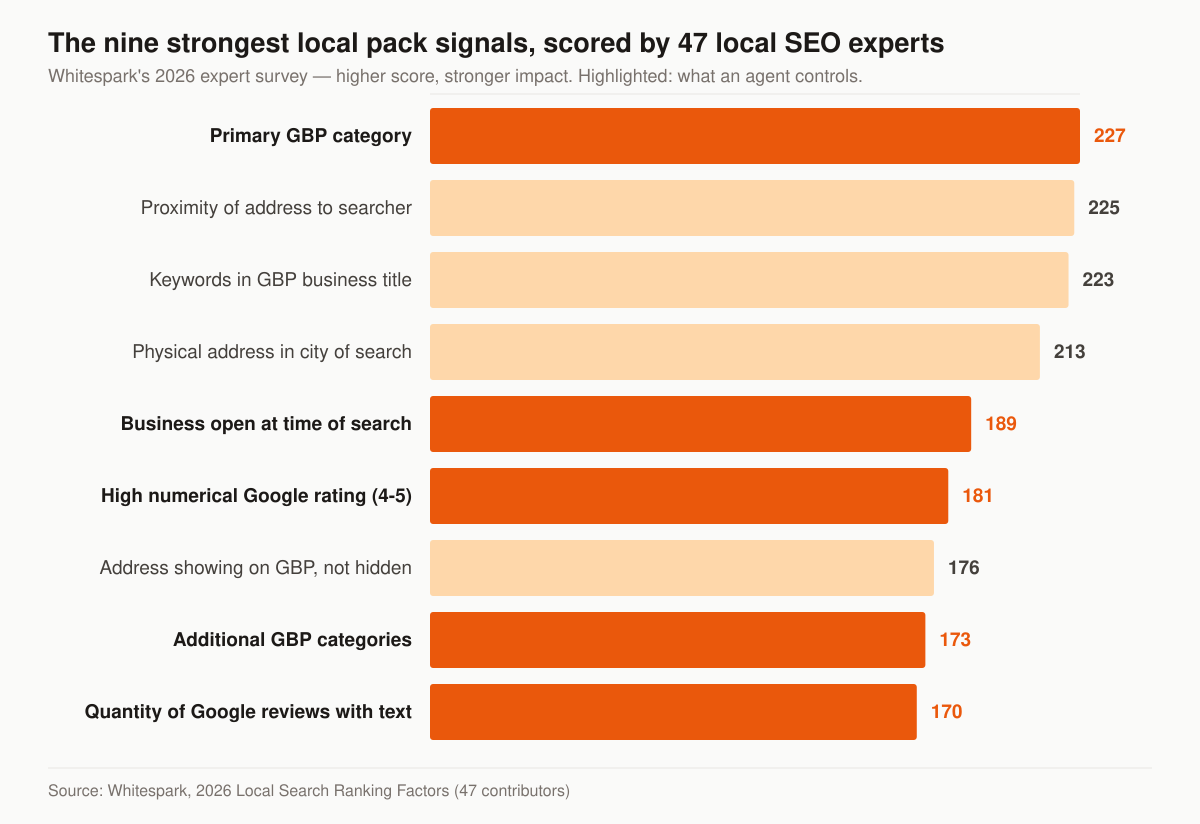
Source: Whitespark, 2026 Local Search Ranking Factors, scored by 47 contributors. Higher score means stronger reported impact.
Read the shape of it rather than the individual numbers. Four of the nine strongest signals — proximity to the searcher, a physical address in the city being searched, an address that displays rather than hides, and keywords in the business title — are decided by where your office sits and what your business is legally called. They are not campaign levers. The highest-scoring signal that is a genuine setting is primary category, which scored 227 — one field, ranked above proximity itself.
This table separates the same signals into what a local SEO engagement can move and what it cannot.
| Signal | Score | Who decides it | What we do about it |
|---|---|---|---|
| Primary GBP category | 227 | You, in one setting | Set it deliberately and stop changing it |
| Proximity to the searcher | 225 | The prospect’s location | Target the zips you can reach, not a wish list |
| Keywords in the business title | 223 | Your registered name | Match reality; never stuff (see below) |
| Physical address in the city searched | 213 | Your lease | Build local pages for towns you cannot rank in by address |
| Business open at time of search | 189 | Your hours field | Keep hours, holidays and AEP extensions current |
| High numerical rating | 181 | Your clients | Review engine, run through reputation work |
| Address showing, not hidden | 176 | Storefront vs service-area status | Choose the setup honestly (see below) |
| Additional categories | 173 | You, in one setting | Add only lines you actually write |
| Quantity of reviews with text | 170 | Your request flow | Steady velocity, never bursts |
Two conclusions follow. First, an agency in a dense metro competing against agents physically closer to downtown is fighting a fixed signal, and the answer is local organic pages plus a wider citation and review base, not a harder push on the map pack. Second, most of the signals on that list an agent can actually change live inside the Business Profile itself — which is why the profile settings below get more space here than the content does.
Can every producer in your agency have a Business Profile?
Google treats insurance agents as individual practitioners, and its guidelines for representing your business name them explicitly: “Doctors, dentists, lawyers, financial planners, and insurance or real estate agents are all individual practitioners.” That single sentence is the basis for a multi-producer agency’s whole local footprint, and the conditions attached to it are narrower than they look.
The rules that decide who qualifies:
- A practitioner must be public-facing and reachable. Google requires that they “operate in a public-facing role” and “can be contacted directly at the verified location during stated hours.” Support staff do not qualify.
- Sales associates do not qualify. Google states plainly: “Sales associates or lead generation agents for corporations aren’t individual practitioners and aren’t eligible for a Business Profile.” A captive downline of appointment setters cannot each hold a listing.
- One profile per practitioner. “A practitioner shouldn’t have multiple Business Profiles to cover all of their specializations.” Your Medicare listing and your final expense listing cannot be two profiles for the same person.
- Several producers in one office means the agency creates its own profile separate from the practitioners, and each practitioner profile “should include only the name of the practitioner, and shouldn’t include the name of the organization.”
- A solo producer under a brand shares one profile with the organization, named
[brand/company]: [practitioner name]. Google’s own example is “Allstate: Joe Miller.”
The practical read for an agency owner: practitioner listings are a legitimate way to widen your map-pack surface across a metro, because each verified practitioner is a separate entity Google can rank. They also put a whole cluster of profiles at risk if you register listings for people who are not public-facing producers reachable at that address, because each one fails the same two eligibility tests Google states above. We build practitioner profiles only for licensed, contactable producers, and we document who each one belongs to before creating it.
Storefront, service area, or hybrid: which setup fits your agency
Business Profile setup for an insurance agency comes down to one question — do clients come to you? Independent agents who write kitchen-table appointments, and agents running out of a home office, are service-area businesses whether or not they have set the profile up that way. Google’s test is signage, and it is stated as a disqualifier: “If your business doesn’t have permanent on-site signage, it’s not eligible as a storefront and should be listed as a service-area business.”
Google’s rules, from the guidelines and the service-area help page:
| Setup | Who it fits | Address | Constraints |
|---|---|---|---|
| Storefront | Staffed office clients visit during posted hours | Displayed | “Businesses showing their address on Google should maintain permanent fixed signage of their business name at the address” |
| Service area | Agents who travel to clients and do not serve them at the address | Hidden | “If you’re a service-area business, you should hide your business address from customers” |
| Hybrid | An office that receives clients and also travels to them | Displayed, plus a service area | Must be “staffed by your team and able to receive customers during its stated hours” |
The service-area mechanics that trip agents up:
- You cannot set a radius. Google states: “You can’t set your service area as a radius distance around your business.” Areas are specified by city, postal code, or another named area.
- Twenty areas is the ceiling. “You can have up to 20 service areas.”
- Two hours of driving is the outer boundary. “The boundaries of your overall area shouldn’t be more than about 2 hours of driving time from where your business is based.” An agent licensed in four states does not get a four-state service area.
- A virtual office is not eligible. “If your business rents a physical mailing address but doesn’t operate out of that location, also known as a virtual office, that location isn’t eligible for a Business Profile.” The mailbox address on your carrier paperwork is not a listing address.
- Coworking needs signage and staff. Google allows a coworking office only if “that office maintains clear signage, receives customers at the location during business hours, and is staffed during business hours by your business staff.”
- Edits take time. Service-area changes “may take up to 48 hours to show,” which is one more reason not to touch settings in October.
Note the tension with the ranking data above: an address that displays scored 176, higher than additional categories or review quantity. Hiding your address costs you a signal. Hiding it anyway is still the right call when you are genuinely a service-area business, because the alternative is a listing that violates the guidelines, and Google “reserves the right to suspend access to Business Profiles on Google or other Google Services to individuals or businesses that violate these guidelines” — a suspended profile ranks nowhere. If yours goes dark, here is what to do when your Google Business Profile gets suspended.
What you can and cannot put in your Business Profile name
Keywords in the business title scored 223 in the Whitespark survey, third of all local pack signals. That is exactly why agents stuff them, and exactly why Google’s name policy is enforced with suspensions. The guideline is that your name “should reflect your business’s real-world name, as used consistently on your storefront, website, stationery, and as known to customers,” and Google’s published examples rule out marketing taglines, store codes, business-hours information, phone numbers and URLs, and service or product information — “Midas Auto Service Experts” is listed as not acceptable, “Midas” as acceptable. Location behaves differently from how agents assume. A plain place name appended to the brand is permitted: Google lists “Holiday Inn Salem” and “Equinox SOHO” among its acceptable examples. What the location row actually rules out is a descriptive locator, and the published not-acceptable examples are “Holiday Inn (I-93 at Exit 2)” and “Equinox near SOHO.”
This table applies Google’s published name rules to the patterns we see on agent listings; the examples are ours, the rule behind each one is Google’s.
| Pattern | Not acceptable | Acceptable |
|---|---|---|
| Service or product information appended | Hillcrest Insurance Medicare & Final Expense Experts | Hillcrest Insurance |
| Location used as a descriptor rather than a place name | Hillcrest Insurance (off I-635 near the Galleria) | Hillcrest Insurance North Dallas |
| Containment information | Hillcrest Insurance (inside Preston Realty Group) | Hillcrest Insurance |
| Marketing tagline | Hillcrest Insurance Seniors Save More | Hillcrest Insurance |
| Phone number in the name | Hillcrest Insurance 555-0100 | Hillcrest Insurance |
| Legal suffix with no real-world proof | Hillcrest Insurance Agency LLC | Hillcrest Insurance |
| Agency name on a practitioner profile | Hillcrest Insurance — Dana Reyes | Dana Reyes |
The one legitimate route to keywords in the title is the slow one: register or file a DBA that genuinely contains the words, then use it consistently on signage, stationery and your website so the profile name matches the real world. Google’s legal-suffix rule is the tell — special characters and terms like LLC are permitted only when you can “provide real-world proof (e.g. signage, business cards, invoices) that consistently displays those elements as part of your business name.” Everything else is a suspension waiting for a competitor to report it.
How to choose primary and additional categories
Primary category is the highest-scoring controllable signal in the survey, and the temptation is to pick something broad because it sounds safer. Google’s test for category selection is a grammar test: “Select categories that complete the statement: ‘This business IS a’ rather than ‘this business HAS a.’”
How we apply it to an agency:
- Pick the most specific category that describes the business, not the widest. Google’s wording is “Choose categories that are as specific as possible, but representative of your main business,” and it notes that selecting a specific category implicitly includes the general ones above it — so the specific choice loses you nothing.
- Match the primary category to the searches you actually want. An agency writing 80% Medicare and 20% final expense should not carry a primary category chosen for the 20%.
- Use the fewest categories that describe the core business. Google’s wording: “Use as few categories as possible to describe your overall core business from the provided list.”
- Do not use categories as keywords. Google prohibits categories used “solely as keywords or to describe attributes of your business” — lines you are appointed for but do not write are attributes, not categories.
- Set them before AEP, not during. Decide the category set in the summer and lock it, so you are not editing the highest-scoring signal you control during the weeks you most need the profile to be stable.
Local SEO vs. the rest of your marketing stack
Local SEO overlaps with neighboring services, and knowing the seam keeps you from paying twice for the same work.
| Job | What it owns | Where it lives |
|---|---|---|
| Getting found in the map pack | Categories, citations, local pages, review velocity for ranking | This local SEO service |
| Reviews & reputation defense | Review generation flow, responses, monitoring, star average | Reputation management for insurance agents |
| Broad organic ranking | Topical content, national/line-level authority, technical SEO | SEO for insurance agents |
| Being cited by AI assistants | Answer-first structure, entity clarity, citable source pages | AI search and GEO for insurance |
| Converting the visitor | Fast, trust-building site the local pages live on | Insurance web design |
The Google Business Profile is the shared surface: local SEO tunes it to rank, reputation work fills it with reviews and replies. We run both, but the ranking mechanics — categories, citations, NAP, local pages — belong here.
What a real local program builds
- A Business Profile tuned for rank, not just completed — starting with the primary category, the highest-scoring signal in the survey that is genuinely a setting you control.
- Clean citations so your name, address, and phone read identically everywhere Google checks.
- City and service-area pages with genuine local substance, so you rank in the local organic results beyond the three-pack too.
- Local schema and internal links that tie the pages to your money pages.
- Review velocity aimed at prominence, coordinated with your reputation engine so the signal is steady, not spiky.
Agents working a single line can go deeper with the local sections of our final expense SEO and home insurance agency SEO programs, which apply this same playbook to one market. Auto and home shops live on “near me” intent more than any other line, so the map pack is the primary channel inside P&C insurance agency marketing rather than a supporting one.
What does local listings management include?
Listings management is the maintenance layer of local SEO: keeping your agency’s name, address, and phone (NAP) identical across every directory and data aggregator Google cross-references, killing duplicate listings, and monitoring the records so they do not drift. It is unglamorous, front-loaded work — one hard cleanup, then upkeep — and it sets the ceiling on everything else in the program, because conflicting records make Google less certain which version of your business to trust.
The listings worth managing for an insurance agency, in rough order of weight:
- Google Business Profile — the listing that is the map pack; everything else exists to corroborate it.
- Apple Maps and Bing Places — the map layers behind iPhone, Siri, and Microsoft’s ecosystem. Apple runs Maps listings through Apple Business, formerly Apple Business Connect — a separate registration; nothing you do in Google reaches it.
- Yelp, Facebook, and Nextdoor — where seniors and their adult children actually check whether a local business is real and alive.
- BBB and your local chamber of commerce — membership listings that carry your NAP and, where the directory links out, a link with it.
- Data aggregators — the services that syndicate business data to hundreds of smaller directories; fix the record at the source and much of the long tail corrects itself.
- Carrier and FMO agent locators — insurance-specific citations that sit outside the standard directory set, so check them by hand; the NAP there should match everything else.
One sequencing rule: change one thing at a time. Profile edits are reviewed before they publish — Google’s own help text is conditional, “If approved, service area edits may take up to 48 hours to show on your Business Profile” — so a batch of simultaneous name, category and address changes leaves you unable to tell which edit produced whatever happens next.
Google Business Profile optimization checklist
The profile is the highest-leverage single asset in local SEO. Work through this list in order:
- Verify the profile — in Google’s words, verification “tells Google that you’re authorized to represent the business, so it’s more likely to show up in search results.”
- Set “Insurance agency” as the primary category unless a more specific category fits your book better under the “this business IS a” test, then add secondary categories only for lines you actually write.
- Define the service area by the towns you genuinely serve, inside the 20-area and two-hour-drive limits, not an aspirational radius that dilutes relevance.
- List each line as its own service — Medicare Advantage, final expense, term life — with a plain-language description.
- Match NAP exactly to your website footer and every citation: same suite format, same phone number.
- Write the business description around what you sell and where you sell it, not slogans. Google prohibits links in the description field entirely.
- Load real photos of the office, the signage, and the producers — not stock imagery.
- Point the website field at your local landing page and tag the URL so profile clicks show up in analytics.
- Keep hours current, including AEP-season extensions and holiday exceptions — stale hours cost calls, and the survey scored “Business is Open at Time of Search (Business Hours)” at 189, a ranking signal in its own right.
- Feed the profile reviews and replies on a steady cadence through a compliant review engine, since prominence is what separates ranked profiles from parked ones. The request mechanics are in our guide to getting more Google reviews for insurance agents.
Phone numbers, call tracking, and NAP consistency
Attribution and NAP consistency pull against each other. You want a tracking number to know which calls the map pack produced; NAP consistency wants one number everywhere. Google’s guidelines settle most of it:
- The number must be yours. “The phone number must be under the direct control of the business.” A vendor-owned pool number that could be reassigned fails this.
- Local beats toll-free. “Use a local phone number instead of a central call center helpline number whenever possible.”
- No redirects to third parties. Google prohibits “phone numbers or URLs that redirect or ‘refer’ users to landing pages or phone numbers other than those of the actual business, including pages created on social media sites.”
- Additional numbers exist for a reason. Google’s guideline: “Additional phone numbers can be used on Google Business Profile websites and other local surfaces.” That is the sanctioned place for a second line, not the primary field.
- Premium-rate numbers are banned regardless of what the caller pays.
The workable pattern for an agency: keep your real local number as the primary on the profile and in every citation, and measure map-pack calls with the profile’s own call metrics rather than by swapping the number. If you do run a tracking number, it should be a number you own that forwards to the same line, and the canonical number stays primary everywhere so citations do not fracture. Web-form and click-to-call attribution belongs on the landing page, where dynamic number insertion changes nothing about your NAP.
City landing pages that are not doorway pages
City pages are how you rank in local organic results for towns your address cannot reach. They also sit on a pattern Google names directly. Its spam policies define the failure mode precisely: “Doorway abuse is when sites or pages are created to rank for specific, similar search queries. They lead users to intermediate pages that aren’t as useful as the final destination.” One of the listed examples is exactly the agent-website pattern: “Having multiple domain names or pages targeted at specific regions or cities that funnel users to one page.”
The same document names the volume version of it: “Scaled content abuse is when many pages are generated for the primary purpose of manipulating search rankings and not helping users.” Forty city pages spun from one template with the town name swapped is both violations at once.
This table is the standard we build local pages against — the left column is what a template produces, the right column is what earns the ranking.
| Element | Doorway version | Substantive version |
|---|---|---|
| Carriers | The same carrier list on every page | The carriers you are actually appointed with in that state |
| Plan detail | Generic product description | The plan year, county rating area, or state-specific rules that apply there |
| Proof of presence | “Serving [City] since 2010” | Named towns, zips, and the office or meeting locations you actually use |
| Contact path | One shared form | A path that reaches the producer who covers that territory |
| Cross-links | Links only back to the homepage | Links to the line pages and guides relevant to that market |
| Volume | One page per zip code in the metro | One page per market you can genuinely staff and describe |
Two rules we hold to. A city page that a human in that town would not find useful does not get built, no matter what the keyword volume says. And where a local page discusses Medicare Advantage or Part D, the CMS third-party marketing organization disclaimer can attach to the page itself — under a condition agents routinely drop. The requirement lives in two parallel places, 42 CFR 422.2267(e)(41) for Medicare Advantage and 42 CFR 423.2267(e)(41) for Part D. Each requires the standardized disclaimer to be “Prominently displayed on TPMO websites,” and each limits that duty to a TPMO “that sells plans on behalf of more than one MA organization” (422) or “that sells plans on behalf of more than one Part D sponsor” (423). A TPMO captive to a single carrier is outside the requirement; one representing two or more is inside it, page by page. Which of the two standardized texts applies also turns on scope — the regulation prescribes one wording where the TPMO “does not sell for all MA organizations in the service area” and a different one where it does. The full rule set is in our CMS Medicare marketing rules for agents, and the broader ranking mechanics in how to rank an insurance agency website on Google.
Local schema for an insurance agency
Structured data does not rank your Business Profile, but it makes the entity on your website unambiguous, which matters for both local organic results and the assistants now answering “insurance agent near me” without a map. Google’s LocalBusiness documentation sets a short bar: the required properties are name and address, and the guidance is to use “the most specific LocalBusiness sub-type possible” for the entity on the page.
For an agency, that means InsuranceAgency rather than plain LocalBusiness. Beyond the two required fields, the properties worth populating on a local page are telephone, opening hours, geo coordinates, the service area, and sameAs links to the profiles you cleaned up during citation work — the same records, restated in a form a machine reads without ambiguity. If your agency genuinely operates as more than one type, Google’s note is that multiple types go in an array and that additionalType “isn’t supported.”
Two cautions. Schema describes what already exists; marking up an address you do not staff, or hours you do not keep, converts a technical asset into a liability. And structured data is a comprehension aid, not a ranking purchase — Google states it “does not guarantee that features that consume structured data will show up in search results.” The entity-clarity work that does pay off across AI assistants is covered in AI search and GEO for insurance.
How we measure local SEO for an insurance agency
Local SEO is unusually measurable, and also unusually easy to report dishonestly. A single rank check run from your own office flatters you, because proximity scored 225 as a ranking signal and is at its maximum at exactly the point you ran the check from. Rank has to be sampled across the service area, not from one point.
This table is the monthly reporting set for a local engagement, and what each number is actually good for.
| Metric | Where it comes from | What it tells you |
|---|---|---|
| Map-pack position by keyword and city | Grid-based local rank sampling across the service area | Whether relevance and prominence work is landing, per town |
| Local organic position for “[city] insurance agent” | Standard rank tracking | Whether the city pages are earning results below the pack |
| Calls from the profile | Business Profile performance data | Volume of inbound the pack actually produced |
| Direction requests | Business Profile performance data | Whether searchers intend to visit, and from which areas |
| Website clicks from the profile | Business Profile performance data, plus a tagged URL | The bridge between the listing and your site analytics |
| Review count, velocity and average | Profile and reputation reporting | The prominence input, tracked as a rate not a total |
| Citation accuracy rate | Listings audit | Whether cleanup is holding or drifting back |
| Booked appointments from local sources | Your CRM | The number that pays; everything above is an input to it |
Every profile-driven call should land in the same lead generation system and follow-up cadence you already run for paid leads, so free inbound is worked as seriously as inbound you paid for.
The first 90 days of a local SEO engagement
Sequence matters here, because the blocks run on different clocks: profile settings are single edits, while citations, reviews and pages compound over months. This is the order we run, and why each block sits where it does.
| Window | Work | Why here |
|---|---|---|
| Days 1–14 | Baseline the map-pack grid, audit the profile against the guidelines, inventory citations and duplicates | You cannot report movement without a starting position, and eligibility problems have to surface before anything else is touched |
| Days 15–30 | Fix profile setup: category, storefront or service-area status, service areas, services, hours, description, photos | Highest-scoring controllable signals, set once and then left alone |
| Days 30–60 | Citation and NAP cleanup at the aggregators first, then the named directories; kill duplicates | Correcting the source repairs much of the long tail automatically |
| Days 45–90 | Build the first city and service-area pages, wire local schema and internal links | Content work runs in parallel because it compounds on a slower clock than profile settings |
| Ongoing | Review velocity, monthly rank grid, listings monitoring | Prominence is a rate, not a project |
If your calendar runs on AEP, do the profile block in summer: the edits, the review window they sit in, and any correction they need should all be finished before the selling weeks start.
How much does local SEO for insurance agents cost?
Local SEO is not sold as a standalone line item — it runs inside a monthly tier. The published tiers are Foundation $2,500/mo, Growth $3,500/mo, and Full-Funnel $5,500/mo. Foundation covers the Business Profile itself: local SEO and profile setup, on-page SEO, and monthly reporting, which is the right fit for a single-location agency in one market. Growth is the tier this program maps to, because a real local build adds citation cleanup, city and service-area pages, the review engine and a rank grid across the service area. Full-Funnel adds managed paid ads, landing-page CRO and marketing automation on top of everything in Growth. If your current site cannot carry local landing pages or schema, a one-time build runs $2,500–$8,000. Full breakdown on the pricing page.
The multiplier on that number is scope, not effort: markets covered, practitioner profiles managed, and how many city pages the service area justifies. An agent covering three towns and an agency covering a metro run the same playbook at different volumes.
What local SEO cannot do for your agency
Honest limits, so the engagement is judged against the right expectations:
- It cannot move your address. Proximity scored 225 and is not purchasable. If your competitor’s office is closer to the searcher, some of those queries are theirs.
- It cannot buy a position. Google is explicit: “There’s no way to request or pay for a better local ranking on Google.” Anyone quoting you a guaranteed map-pack position is selling something Google says does not exist.
- It cannot outrun a suspension. An ineligible setup — virtual office, unstaffed coworking desk, keyword-stuffed name — leaves the listing at Google’s discretion, and a suspended profile ranks nowhere at all.
- It cannot substitute for authority in competitive organic terms. City pages win local organic; head terms in your lines still need the topical depth and links that insurance SEO builds over a longer horizon.
- It cannot make calls close. The map pack produces conversations. What happens in the following ten minutes is your sales process, not your ranking.
Where the map pack is genuinely out of reach for a term you need this quarter, the paid equivalent is Google’s Local Services Ads, which sit above the pack and run on a different qualification model — covered in Google Local Services Ads for insurance agents.
Where local SEO fits
Local SEO is the “get found nearby” layer. It feeds the same follow-up as the rest of your funnel: a map-pack call should land in the lead generation system and follow-up cadence you already run for paid leads, so free inbound is worked as seriously as inbound you paid for.
Want to see where you currently rank in your service area and what is holding the map pack back? Start with a free marketing audit — we pull your map-pack position by city, your category setup, and your citation health, then show you the fixes that move ranking first. If you would rather talk it through, reach the team here.
Guides that go deeper
Frequently asked questions
What is the difference between local SEO and reputation management for agents?
How does an insurance agent rank in the Google map pack?
Can every agent in my agency have their own Google Business Profile?
Do citations and NAP consistency still matter for local SEO?
Are separate city landing pages worth it, or is that just doorway spam?
How long does local SEO take to move the map pack?
What does a local listings management service actually do?
Does local SEO replace my broader website SEO?
See exactly where your agency is leaking leads.
15 minutes. We screen-share our own live lead dashboard and tear down your funnel line by line — no pitch deck, just numbers.
- Site speed & conversion
- Local + AI-search visibility
- Ad efficiency
- Your cost per lead vs ours
No obligation · no pitch deck