Google Business Profile Suspended: The Insurance Agency Recovery Guide
A suspended Google Business Profile means Google flagged your listing for a guideline violation — for insurance agencies, usually name stuffing, an ineligible address, or a bad service-area setup. Recovery is a fixed process: correct the profile to match Google's guidelines, then submit one appeal through the appeals tool with documents proving your agency operates at the listed address.
A suspended Google Business Profile takes an insurance agency out of the map pack overnight — the calls stop, the “Medicare agent near me” visibility disappears, and there is no phone number to call at Google. The good news: reinstatement follows a documented process, and Google’s own help pages spell it out. This guide walks that process step by step, built directly from Google’s suspension documentation, with the parts that specifically bite insurance agencies flagged along the way.
Google’s position is blunt. Its help documentation states: “We may suspend or disable Business Profiles that don’t follow our guidelines.” So recovery has two halves — fix the guideline problem, then prove your agency is legitimate — and doing them in that order is what the appeal process is designed around.
Why do insurance agency profiles get suspended?
Insurance agency profiles usually get suspended for guideline violations that feel harmless when you make them: adding “Medicare & Final Expense” to the business name, listing a virtual office or UPS-store address, showing a home address instead of hiding it, or stretching the service area across half a state. Each one violates a specific rule in Google’s business representation guidelines, and each is fixable before you appeal.
This table maps the edits agencies make to the specific rule each one breaks in Google’s representation guidelines.
| What agencies do | The guideline it breaks |
|---|---|
| Name like “Smith Insurance — Medicare, ACA & Final Expense” | Business names can’t include service or product descriptors, taglines, or location info — that’s keyword stuffing |
| Listing a virtual office or mailbox address | Virtual offices and remote mailboxes are ineligible addresses; co-working spaces need signage and staffed reception |
| Home-based agency showing its street address | Service-area businesses run from a residence should clear the address from the profile — Google’s own example is a plumber working from home |
| Service area covering the whole state | Google says the service area “shouldn’t extend farther than about 2 hours of driving time from where your business is based” |
| A profile per product line, or agent profiles duplicating the agency | One profile per location; practitioner profiles have their own naming rules and can’t just clone the agency listing |
| Call-tracking or call-center numbers | Phone numbers must be under the business’s direct control and not redirect elsewhere |
Two agency-specific notes. First, individual agents can have their own practitioner profile if they are public-facing and directly reachable at the verified location — but the profile should carry the agent’s name, not a second copy of the agency name. Second, if you keep a visible office address, Google expects “permanent fixed signage” of your business name there. A desk in a shared suite with no sign is a suspension waiting for its first review. Google’s wording on co-working is tighter than agencies assume: a business “can’t list an office at a co-working space unless that office maintains clear signage, receives customers at the location during business hours, and is staffed during business hours by your business staff.” All three conditions, not one of three.
Which violations practitioners score as the highest suspension risk
Google publishes the rules but does not publish a ranking of what actually triggers enforcement. The closest public proxy is Whitespark’s Local Search Ranking Factors survey, whose 2026 edition asked 47 local search practitioners to weigh and score 187 factors — including a set scored purely on how likely each one is to get a profile suspended.
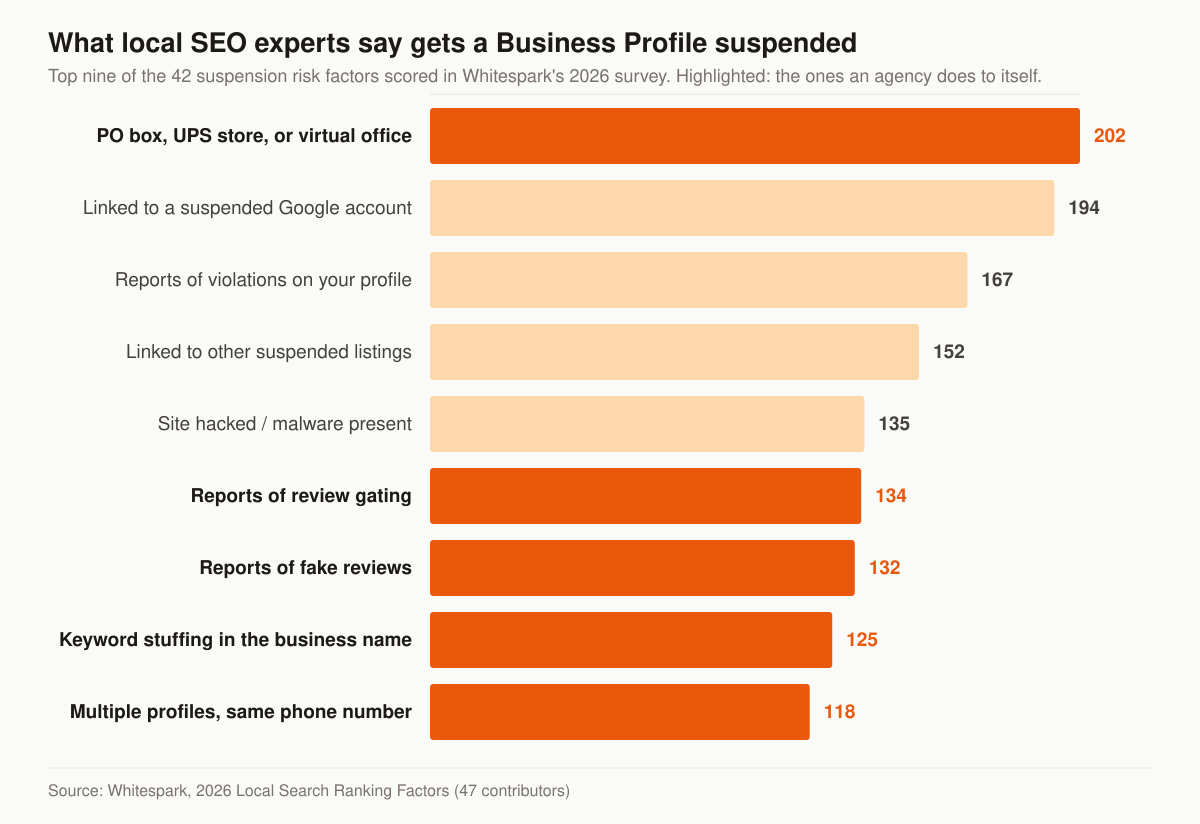
Chart: suspension risk factor scores from Whitespark’s 2026 Local Search Ranking Factors, a survey of 47 local search practitioners published November 6, 2025.
Three things in that ranking are worth an agency’s attention. The address problem tops it at 202, and it is the same problem an agency creates by listing a mailbox, a virtual suite, or an unstaffed desk in a shared building. Two of the next four are not about your profile at all — association with a suspended Google user account scores 194 and association with other suspended listings scores 152 — which is the argument for auditing who holds access to your profile before you audit the profile itself. And review behaviour scores higher than the name field: reports of review gating (134) and reports of fake reviews (132) both sit above keyword stuffing in the business name (125). If someone has been routing unhappy clients to a private form, that is a suspension exposure as well as a policy problem, and the clean version of that workflow is in our guide to getting more Google reviews as an insurance agent.
Suspended, disabled, or account-restricted: which problem do you have?
Three different moderation actions get called “suspended” in conversation, and they have three different recovery paths. Before you appeal anything, work out which one you are looking at, because appealing the wrong object wastes the attempt.
This table separates the three states Google describes in its own policy documentation, and where each one is appealed.
| What happened | How Google describes it | Where the appeal goes |
|---|---|---|
| One profile is suspended or disabled | “We may suspend or disable Business Profiles that don’t follow our guidelines.” | The Business Profile appeals tool |
| Your Google account is restricted | “If a merchant’s account is restricted, all Business Profiles associated with that account will be suspended.” | Your My accounts page at myaccount.google.com/restrictions, then the profile appeal |
| A different Google product’s account is restricted | “restriction of the non-Business Profile product account may result in suspension of the Business Profile” | Reinstate the other product’s account first |
The sequence matters. Google’s instruction for the account case is that once the account restriction is lifted, you then submit an appeal for the Business Profile — two appeals, in order, not one. And the trigger for an account restriction is a pattern, not a single mistake: Google’s policy overview says a merchant who “displays a pattern of violating Google Business Profile policies” may have their Business Profile access restricted.
Removal has a similar branching structure. Google spells out what happens when it removes a profile: “The public can’t go to the profile.” and “The owner and managers can’t act on the profile.” They can still ask for reinstatement, and Google reinstates “both the profile and its owner and managers.” When it is the owner’s Google account that is removed, Google removes “all the locations owned by that user.” When it is a manager’s account, Google suspends the manager on the accounts they manage, and says of the listings themselves: “It doesn’t affect the locations.” For an agency that hands profile access to a marketing vendor, that distinction is the difference between one contractor’s account problem and your whole listing disappearing.
One more consequence of a suspension that catches agencies out: while it lasts, nothing you add sticks. Google’s policy page is direct — “Suspended profiles must be reinstated first before content can be successfully contributed to the profile,” and the same rule is stated separately for disabled profiles. Photos, posts, hours updates, and Q&A answers uploaded during a suspension are rejected, so the effort is wasted.
Is your agency eligible for a Business Profile at all?
Some suspensions are not fixable, because the entity was never eligible. Google’s business eligibility and ownership guidelines set one gate before everything else: “To qualify for a Business Profile, a business must make in-person contact with customers during its stated hours.” Two entries on Google’s ineligible list land directly on insurance operations — “Lead generation agents or companies” and “Brands, organizations, artists, and other online-only businesses.”
The practitioner guidelines say the same thing from the other direction. Google names our industry explicitly: “Doctors, dentists, lawyers, financial planners, and insurance or real estate agents are all individual practitioners.” Then it draws the line — “Sales associates or lead generation agents for corporations aren’t individual practitioners and aren’t eligible for a Business Profile.”
Read together, that puts a licensed agent who meets clients at an office, or travels to them, comfortably inside the rules, and puts a pure telesales operation with no in-person contact, or a brand that exists only to collect and sell leads, outside them. If your book is written entirely over the phone, a Business Profile is the wrong asset to fight for. The visibility you want lives in organic search and in AI answers instead — the build sequence is in how to rank an insurance agency website on Google, and the newer surface is covered in getting cited by Perplexity and AI Overviews.
Two address rules also decide eligibility outright rather than by degree. Google’s policy overview states that “Businesses with a P.O. Box address aren’t permitted on Google Business Profile” and that merchants who set a P.O. Box as their address “will have their profile suspended.” The eligibility guidelines extend that to any business “whose address is listed as a P.O. box or mailbox in a remote location.” And existence is checked independently of paperwork: “If we determine that your business doesn’t exist in the location you claim, Google will disable your profile.”
How captive offices and multi-agent agencies should name their profiles
Because Google treats insurance agents as individual practitioners, the naming rules for a two-agent office are different from the rules for a one-agent office, and getting this wrong produces duplicate-profile suspensions that look mysterious from the inside.
This table maps Google’s practitioner rules onto the office shapes an insurance agency actually takes.
| Office shape | What Google’s guidelines say | What the profile should be |
|---|---|---|
| One public-facing agent at a branded location | “it’s best for the practitioner to share a Business Profile with the organization” | A single profile named “[brand/company]: [practitioner name]” — Google’s own example is “Allstate: Joe Miller” |
| Several public-facing agents at one location | “The organization should create a Business Profile for this location, separate from that of the practitioner.” | An agency profile for the location, plus practitioner profiles whose title includes “only the name of the practitioner” |
| One agent, several product specialisms | “A practitioner shouldn’t have multiple Business Profiles to cover all of their specializations.” | One profile; the lines of business belong in categories and services |
| A licensed producer working as a sales associate | “Sales associates or lead generation agents for corporations aren’t individual practitioners and aren’t eligible for a Business Profile.” | No separate profile |
| Support staff — CSRs, account managers | “Support staff should not create their own Business Profiles.” | No profile |
The name field itself has its own list of prohibitions, and Google states plainly that “Including unnecessary information in your business name isn’t permitted, and could result in the suspension of your Business Profile.”
This table translates Google’s business-name examples into the strings agencies actually type into that field.
| Google’s rule | What it looks like in an agency name |
|---|---|
| No marketing taglines | “Smith Insurance — coverage you can count on” |
| No service or product information | “Smith Insurance Medicare, ACA & Final Expense” |
| No location information | “Smith Insurance near the courthouse” |
| No phone numbers or website URLs | A call-tracking number appended to the agency name |
| No fully capitalized words | “SMITH INSURANCE” |
| No containment information | “Smith Insurance (inside the bank branch)” |
| Legal terms like LLC, LTD, INC need proof | Google requires “real-world proof (e.g. signage, business cards, invoices) that consistently displays those elements as part of your business name” |
Categories are the field to move those keywords into, and Google gives a usable test for choosing them — select categories that complete the statement “This business IS a” rather than “this business HAS a.” An agency is an insurance agency; it has a Medicare practice. The first belongs in the category picker, the second belongs in your services and on a page of your site.
How to appeal a suspended Google Business Profile
Reinstatement runs through the Google Business Profile appeals tool, and Google’s documentation is explicit that step zero is compliance: “Make sure your profile follows all the guidelines.” Appealing a profile that still has a stuffed name or an ineligible address just gets the violation reviewed again. Fix first, then follow Google’s appeal steps:
- Correct every guideline violation on the profile — name, address, service area, phone — before touching the appeals tool.
- Open the Business Profile appeals tool signed into the Google account that manages the profile; confirm the account or switch to the right one.
- Select the suspended profile and continue.
- Read the moderation reason Google shows you, with the link to the specific policy it says you violated — this tells you what the reviewer will be checking.
- Submit the appeal.
- Add evidence immediately after submitting. Google’s form has a hard deadline: “Once you open the evidence form, you must submit it within 60 minutes or it won’t be attached to your appeal.” Have your documents ready as files before you open it.
- Upload matching documents and submit. Then wait — per Google: “We’ll review your appeal and send you an email with a decision.”
And the one thing not to do while you wait, verbatim from Google’s help page: “Do not create a new Business Profile for the same business while your appeal is under review.” A duplicate profile is itself a violation, and account-level restrictions suspend every profile the account manages.
Reading the appeal status
The appeals tool reports where your submission stands, and Google lists five states it can show: Submitted, Approved, Not Approved, Can’t be appealed, and Eligible for appeal. Those are worth knowing before you refresh the page for a week. “Can’t be appealed” is not a synonym for “not yet decided” — it means this profile is outside the tool’s process, which is the point at which an account restriction or an eligibility problem, rather than a profile edit, is the thing to investigate.
Agencies running several locations get one more rule. Google’s process for appealing more than ten profiles asks you to select one profile in the tool, answer yes when it asks whether the appeal covers more than ten, and attach a spreadsheet carrying the evidence and Business Profile ID for each one. Google then warns that “the status will only change for the profile you selected” and that you will receive one email decision, for that profile. So a multi-location appeal needs its own tracking sheet; the tool will not maintain one for you.
If you are appealing from inside the European Economic Area, Google notes that you “may have additional redress options” and links its Digital Services Act redress page. For a US insurance agency that is not a route, which makes the quality of the first appeal matter more, not less.
What evidence should an agency prepare?
Google’s evidence form accepts official documents that tie your agency to its name and address. The documents Google lists are business registration, business licenses, tax certificates, and utility bills — and Google’s instruction is to “check that the business name and address match the profile you want to make an appeal for.” For an insurance agency, that matching requirement is the whole game.
This table takes each document Google names and adds the check that decides whether it helps an insurance agency or hurts it.
| Document | What it proves | Agency-specific check |
|---|---|---|
| Official business registration | The legal entity exists | Entity name matches the profile name, not a DBA nobody else uses |
| Business / producer license | You’re authorized to operate | Your state insurance license showing the agency name and address |
| Tax certificate | Real, registered operation | Address matches the profile, not your accountant’s office |
| Utility bill (electric, phone, water, internet) | You physically operate at the address | Recent, in the business name, at the exact profile address |
If your documents show your personal name or an old address, fix the underlying records or use the documents that do match — a stack of non-matching PDFs reads like the problem, not the proof.
How long does reinstatement take?
Honest answer: Google does not publish a review timeline. The only deadline stated anywhere in Google’s suspension documentation is the 60-minute window to submit the evidence form after opening it. After that, Google commits only to reviewing the appeal and emailing a decision — approved, not approved, or not appealable. Anyone quoting you a guaranteed reinstatement turnaround is guessing or selling.
If the appeal is denied, it is usually not the end. Google’s documentation says that for a denied request it “may be able to do an additional review to prove your eligibility,” and you can submit that additional review with new evidence. Use the second pass properly: re-read the violated policy Google showed you, fix anything you rationalized the first time, and submit stronger matching documents.
What to run while the profile is dark
The instinct while an appeal sits in a queue is to work the profile harder. Do not. Google’s policy overview says content submitted to a suspended profile is rejected and that “Suspended profiles must be reinstated first before content can be successfully contributed to the profile,” so photos, posts and hours edits made now simply do not land.
Two other instincts are actively harmful. Creating a replacement listing is the one action Google names outright — “Do not create a new Business Profile for the same business while your appeal is under review” — and deleting the suspended profile to start clean destroys the appeal with it: Google lists a deleted profile among the reasons content and appeals get rejected, noting that appeals may be rejected “when the associated profile is deleted by any user with access to the profile before Google reviews or publishes the content.”
What still belongs to you is everything outside Google’s listing surface. Your website ranks on its own merits, your existing clients and email list are unaffected, and your paid channels are separate products with separate policies. This is the week to close the gaps that made the profile load-bearing in the first place: city and service pages that rank organically, the review-request habit you will restart on day one of reinstatement, and a second acquisition channel so a single moderation decision cannot switch your pipeline off again. Our SEO guide for insurance agents prices that decision, and Local Services Ads for insurance agents covers the other Google surface an agency can hold.
Moving, renaming, or closing an office without triggering a suspension
Three ordinary business events cause suspensions purely through the order they are done in, and all three have written rules.
Relocation is not an address edit. Google’s policy overview instructs that if your business has relocated, “you must mark the existing profile as permanently closed and create a new Business Profile at the new location.” The exception is narrow and runs the other way: if the business has not moved and the address on the profile is simply wrong, you contact support rather than editing it yourself. Google also warns that location edits are rejected outright “for businesses whose physical identity is directly tied to customer experience,” listing dining, lodging and entertainment venues as its examples.
A rename is only sometimes a rename. Google allows rebranding — a name change without a new profile — when “the proper nouns and services described in the business name remain unchanged and the business category remains unchanged,” or where you have multiple locations and the business name changes. Outside those criteria, Google’s position is that it is a new business: “You must mark the existing Business Profile as closed and then create a new Business Profile with your new business name.” An agency that sells its book, joins a cluster, or drops a carrier name from its signage is usually in the second case, not the first.
Rebuilding costs more than the paperwork. Whitespark’s 2026 survey scored “Business Marked as Permanently Closed” as the strongest of the 42 negative local ranking factors at 217, ahead of an incorrect primary category at 214. So the close-and-recreate route is correct policy and a real visibility hit, which is an argument for doing it deliberately — new profile verified, citations updated, review-request flow restarted — rather than discovering it mid-move. There is a quieter version of the same failure, too: Google states that merchants who “don’t access their Google Business Profile for long periods of time may have their access revoked and content removed after adequate warning.”
Preventing the next suspension
Reinstated profiles live under more scrutiny, so run the profile conservatively from here:
- Name = your agency name, nothing else. No lines of business, no cities, no “best rates.” Rankings come from categories, reviews, and content — not the name field.
- Keep the address eligible. Home-based agencies hide the address and operate as a service-area business; office-based agencies keep real signage.
- Set the service area to reality — the towns you actually write, inside Google’s roughly two-hour boundary, not an aspirational half-state.
- One profile per real location. Agent practitioner profiles only where an agent is genuinely public-facing at that address.
- Change one thing at a time. Bursts of edits — name tweak, category swap, address reformat in one sitting — are a classic trigger for re-review. Let each change settle.
- Match your NAP everywhere. The profile, your site footer, and your citations should agree to the character; consistency work is covered in our guide to ranking an insurance agency website on Google.
This table is the pre-appeal audit: work every row before you open the appeals tool, because the reviewer assesses the profile as it stands, not as you intend it.
| Profile element | The check to run | What Google’s guidelines require |
|---|---|---|
| Business name | Strip taglines, product lines, cities, phone numbers and capitals | Represent the business “as it’s consistently represented and recognized in the real world across signage, stationery, and other branding” |
| Address | Confirm it is a real, staffed location you operate from, not a mailbox or virtual suite | A rented mailing address you don’t operate from “isn’t eligible for a Business Profile” |
| Signage | Photograph the sign at the address, inside and out | Businesses showing an address “should maintain permanent fixed signage of their business name at the address” |
| Service area | Cut it back to the towns you actually write | The service area “shouldn’t extend farther than about 2 hours of driving time from where your business is based” |
| Phone | Replace any call-tracking or call-centre number with the office line | “The phone number must be under the direct control of the business” and premium numbers “are not acceptable regardless of the rate charged to the caller” |
| Website field | Point it at the page for that location, not a redirect | A profile URL must not send users “to landing pages or phone numbers other than those of the actual business” |
| Duplicates | Search Maps for your agency name, phone number and address | “There should only be one profile per business” |
| Managers | Remove every old vendor and ex-employee from the profile’s user list | The rule for authorized representatives: “Never claim a Business Profile without express consent from the business owner.” |
| Categories | One primary category that describes what the agency is | Use “as few categories as possible to describe your overall core business” |
| Description | Delete prices, promotions and links | The description must not “Focus on special promotions, prices, and offer sales.” and “No links of any type are allowed.” |
A suspension also pauses your review flow, so once you’re reinstated, rebuild velocity steadily — here’s how agents get more Google reviews without tripping spam filters, and how a reputation management program keeps the signal steady instead of spiky. Because two of the highest-scoring suspension risks in the Whitespark data are reports of review gating and reports of fake reviews, the review process is worth running to the letter rather than to the spirit — the same discipline your marketing compliance program already applies to advertising claims.
Get the profile working for you again
Reinstatement gets you back on the board; it doesn’t get you into the three-pack. Categories, citations, review velocity, and city pages decide that — the full playbook is a managed local SEO program built for insurance agencies, and what that costs is published on our pricing page rather than quoted after a call. If you want a second set of eyes on your profile setup, service-area configuration, and citation health before Google looks at it again, start with a free marketing audit and we’ll flag what a reviewer would. If the profile is suspended right now and you want the appeal checked before you spend your one clean submission, get in touch.
- How to Get Cited by Perplexity and Google AI Overviews as a Local Business
How to get cited by Perplexity and Google AI Overviews as a local business: answer-first passages, structured data, consistent NAP, and third-party citations.
- How to Get More Google Reviews for Insurance Agents (Without Gaming It)
How to get more Google reviews for insurance agents: when to ask, the direct-link method, texting requests, responding to reviews, and staying compliant.
- How to Get Your Insurance Agency Recommended by ChatGPT
A practical GEO playbook to get your insurance agency recommended by ChatGPT: entities, schema, llms.txt, reviews, citations, and answer-first content.
- Insurance SEO Cost, Timeline, and the DIY-vs-Hire Decision
What insurance SEO costs in 2026, how long it takes to pay back, and whether to run it yourself or hire it out — with the four layers ranked by payback.