How to Rank an Insurance Agency Website: The Insurance Agency SEO Guide
To rank an insurance agency website on Google, fix technical health (speed, indexing, mobile), publish topic-clustered content that answers agent and buyer questions, build local and trust signals, and earn relevant links. Rankings follow consistent monthly work, not a one-time push. Plan on 4–9 months to compounding results.
Ranking an insurance agency website on Google is not a trick. It is four jobs done in order: make the site technically clean so Google can read it, publish content that matches what people actually search, build local and trust signals, and earn a few real links. Do those consistently and rankings compound. Skip the order and you spend months stuck on page three.
This guide is written from the operator seat. We run our own lead book across live campaigns, and organic search is one of the cheapest channels we have once it ramps. Here is the sequence we use. (Still deciding whether SEO deserves the budget at all, or which layer fits your line? Start with the complete guide to SEO for insurance agents, then come back here for the build.)
How Google decides which agency page ranks
Google describes its own pipeline in three stages, and its documentation is blunt that “not all pages make it through each stage.” In crawling, “Google downloads text, images, and videos from pages it found on the internet with automated programs called crawlers.” In indexing, “Google analyzes the text, images, and video files on the page, and stores the information in the Google index, which is a large database.” In serving, “When a user searches on Google, Google returns information that’s relevant to the user’s query” (Google Search Central).
Two more lines from that page should reset your expectations before you spend a dollar. Google states that “Google doesn’t guarantee that it will crawl, index, or serve your page, even if your page follows the Google Search Essentials,” and separately that “Indexing isn’t guaranteed; not every page that Google processes will be indexed.” Nobody can sell you a position. You make a page eligible; Google decides.
The same page closes the door on the shortcut agents ask about, in Google’s words: “it’s important to note that Google doesn’t accept payment to crawl a site more frequently, or rank it higher. If anyone tells you otherwise, they’re wrong.” There is no paid lane into the organic results. The ads are the paid lane, and they are labelled — which is a different budget and a different playbook, covered in our Google Ads guide for insurance agents.
Why the stages matter for the order of work below: a fix at the crawling stage is wasted if the page dies at indexing, and a cleanly indexed page still loses at serving if a competitor answers the query better. Google says relevancy at that last stage “is determined by hundreds of factors, which could include information such as the user’s location, language, and device (desktop or phone)” — the mechanical reason a Dallas prospect and a Waco prospect see different results for identical words, and the reason location pages exist at all.
Each stage has its own failure mode, its own diagnostic, and its own fix:
| Stage | What Google is doing | How it breaks on an agency site | Where you check |
|---|---|---|---|
| Crawling | Fetching your pages with Googlebot | robots.txt disallow left over from staging, server errors, pages nothing links to | Search Console → Pages report |
| Indexing | Analyzing content, choosing a canonical, storing it | Thin pages, a noindex never removed at launch, near-identical city pages collapsed into one canonical |
Search Console → URL Inspection |
| Serving | Matching the stored page to a live query | Page is indexed but answers a different question than the one being typed | Search Console → Performance, by query |
Everything below is one of those three stages, in the order they run.
Start with technical health, because rankings cap there
If Google cannot crawl, render, and trust your pages quickly, nothing else you do matters. Fix this layer first.
- Indexing. Confirm your pages are actually in Google. Search
site:youragency.comand check Google Search Console coverage. Pages that are not indexed cannot rank. - Core Web Vitals. Google publishes specific thresholds you should hit on mobile.
- Mobile rendering. Google indexes the mobile version of your site. If your layout breaks or buttons overlap on a phone, that is the version Google scores.
- Crawl clarity. One clear sitemap, a sane robots.txt, no orphan pages, no redirect chains.
The Core Web Vitals targets are concrete, so treat them as a pass/fail checklist:
| Metric | What it measures | “Good” threshold |
|---|---|---|
| Largest Contentful Paint (LCP) | Loading speed | ≤ 2.5 seconds |
| Interaction to Next Paint (INP) | Responsiveness | ≤ 200 milliseconds |
| Cumulative Layout Shift (CLS) | Visual stability | ≤ 0.1 |
Those are not house rules. They are the published thresholds, and the measurement rule attached to them is the part agents skip: “To ensure you’re hitting the recommended target for these metrics for most of your users, a good threshold to measure is the 75th percentile of page loads, segmented across mobile and desktop devices” (web.dev). Your own phone on office wi-fi is not the test. Three-quarters of real visits have to clear the bar, including the one on a four-year-old Android with two bars of signal in a rural county.
Mobile is not a courtesy version either. Google states that “Google uses the mobile version of a site’s content, crawled with the smartphone agent, for indexing and ranking,” and advises that “If your mobile site has less content than your desktop site, consider updating your mobile site so that its primary content is equivalent to your desktop site” (Google Search Central). Agency sites break this in one predictable way: a carrier logo grid, a quote widget, or a long “who we serve” block hidden behind a display: none on small screens. Hidden from the phone is hidden from the index.
The bar is genuinely hard to clear, which is the opportunity for a small agency willing to clear it. HTTP Archive’s 2024 crawl found 79% of mobile sites scoring good on CLS and 74% of mobile websites scoring good on INP, but only 59% of mobile pages achieving a good LCP score — and across the whole set, 43% of websites had good Core Web Vitals with INP as the responsiveness metric.
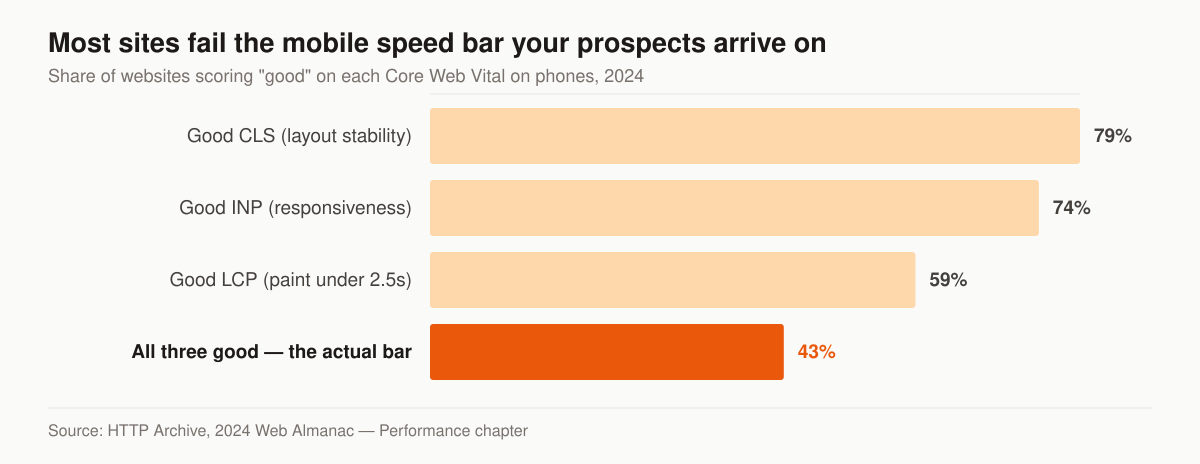
Source: HTTP Archive, 2024 Web Almanac — Performance chapter.
LCP is the metric we check first on an agency site, and three causes account for what we find: a full-width hero photograph shipped at desktop resolution to a phone, a page-builder theme loading a dozen scripts before any text paints, and a third-party quote or chat widget that blocks rendering. If you are rebuilding, our insurance web design approach bakes these thresholds in from the start rather than patching them later. A fast, crawlable site is the floor — it does not win rankings by itself, but a slow one loses them.
Confirm the page is indexed before you optimize it
Rewriting a title tag on a page Google has not indexed is motion without movement. Before any on-page work, open Search Console’s Page indexing report and the URL Inspection tool and find out which state the page is actually in. Google names the reason for you, and each named reason points at a different fix.
The statuses you will actually see on an agency site, and what each one is telling you:
| Search Console status | What it means | The fix on an agency site |
|---|---|---|
| Discovered — currently not indexed | Google found the URL but has not crawled it yet | Reduce the number of near-empty pages competing for crawl attention; link to it from a page Google already crawls |
| Crawled — currently not indexed | Google fetched the page and chose not to store it | Read it as a depth problem before a technical one — answer more of the query, or merge the page into a stronger one |
| Duplicate without user-selected canonical | Google decided another page is the real version | Make the two pages substantially different, or pick one and redirect the other |
| Alternate page with proper canonical tag | The page correctly points at a canonical that is indexed | Nothing to do |
| URL marked ‘noindex’ | A robots meta tag is blocking indexing | Remove the tag — we treat it as the first thing to check on any rebuilt agency site |
| Page with redirect / Not found (404) | The URL is not a destination | Fix the internal links pointing at it |
Google’s own definitions are worth reading in the two cases that confuse agents. “Crawled - currently not indexed” means “The page was crawled by Google but not indexed. It may or may not be indexed in the future; no need to resubmit this URL for crawling.” “Discovered - currently not indexed” means “The page was found by Google, but not crawled yet. Typically, Google wanted to crawl the URL but this was expected to overload the site; therefore Google rescheduled the crawl” (Search Console Help). Neither is a penalty and neither is fixed by resubmitting.
Discovery itself has two mechanisms and you should use both. Google finds pages from sitemaps you submit and from links it follows: “the vast majority of the new pages Google finds every day are through links, making links a crucial resource you need to consider to help your pages be discovered by Google and potentially shown in search results” (Google Search Central). A new location page linked from nothing but the sitemap takes the slow route into the index. Link it from the services page, the footer service-area list, and one relevant blog post the day it publishes.
One more line worth holding on to when a page is indexed and still invisible: Google acknowledges that “Search Console might tell you that a page is indexed, but you don’t see it in search results,” and attributes it to content that is irrelevant to the query, low content quality, or robots rules preventing serving. Indexed is eligibility, not placement.
The on-page checklist for every insurance page
On-page SEO is a short list, it is the same list on every page, and it costs nothing but attention. Google’s starter guide sets out the pieces plainly: a title element that describes the page, a meta description that is “short, unique to one particular page, and includes the most relevant points of the page,” headings that expose structure, alt text that is “a short, but descriptive piece of text that explains the relationship between the image and your content,” and internal links that carry both readers and crawlers to the next page (Google Search Central).
The reason a small agency can win here is that the wider web does not bother. HTTP Archive’s 2024 crawl found a title element on 98.2% of mobile pages, an H1 on 70%, a meta description on 66.4%, and a canonical tag on 65%; the median mobile site carried alt attributes on 57.8% of its images (HTTP Archive, 2024 Web Almanac — SEO chapter).
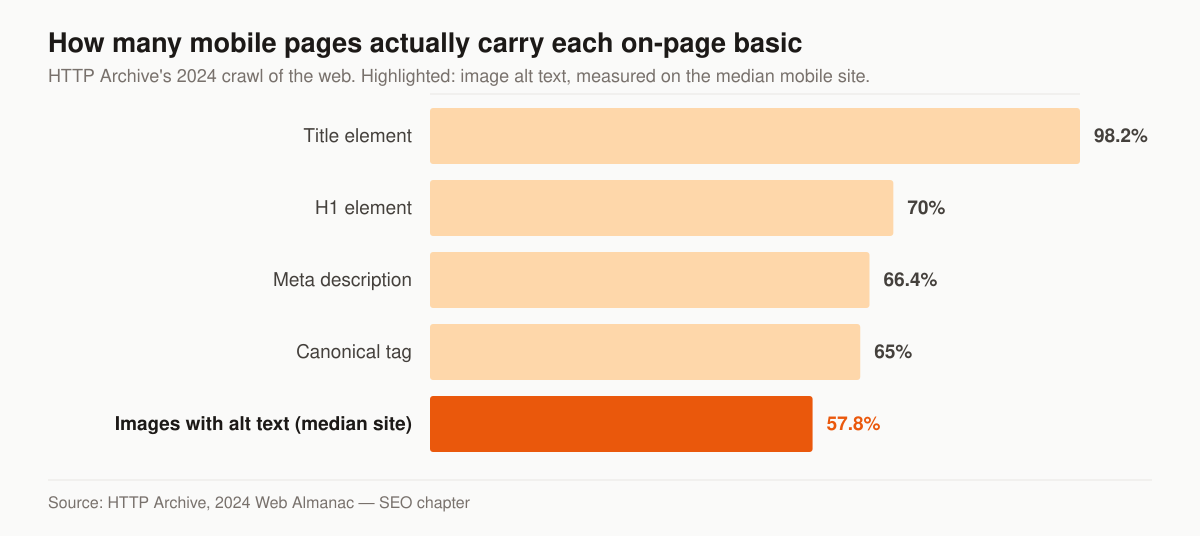
Source: HTTP Archive, 2024 Web Almanac — SEO chapter, measuring mobile pages crawled in 2024.
The H1 and meta-description figures are the interesting ones — 70% and 66.4%. On an agency site those gaps are usually the template’s fault rather than the writer’s — a page builder that renders the page name as a styled div instead of a heading, or a theme that only writes a meta description when you remember to fill a field buried three tabs deep.
Work this list on every service, location and blog page before you publish it:
| Element | What goes in it on an agency page | The miss to check for |
|---|---|---|
| Title element | The thing the page is about plus the place or the line, written for a human scanning results | Every page inheriting the same site-name title |
| Meta description | One or two sentences naming the specific answer the page gives | Auto-generated from the first sentence, or missing entirely |
| H1 | One per page, matching what the page actually delivers | The logo marked up as the H1; the real headline marked up as a div |
| H2s | Real questions, phrased the way a prospect would ask them | Decorative headings like “Our approach” that answer nothing |
| Image alt text | What the image shows and why it is on the page | Empty alt on a chart or a team photo that carries meaning |
| Internal links | Descriptive anchors pointing at the money page for that topic | “Click here” and “learn more”, which describe nothing |
| Canonical | Self-referencing on the version you want ranked | Left pointing at a staging domain after a rebuild |
| URL | Short, readable, stable, no dates or ID strings | Changing on every redesign, with no redirects |
None of these are ranking factors you tune for points. They are how a page states what it is. Get them consistent across the site and the harder work — content and links — starts from a page Google can read without guessing.
Match content to search intent, not to what you want to say
Google ranks the page that best answers the query. So the work is figuring out what your buyers and prospects type, then building a page for each meaningful cluster. For measured volumes, CPCs, and difficulty scores on the terms agents actually target, start from our insurance SEO keyword data.
There are three intent types you will see in insurance search, and they want different pages:
- Informational — “how much does final expense insurance cost.” Answer it in a blog post. These are top of funnel and high volume.
- Commercial — “best final expense carriers” or “Medicare vs Medicare Advantage.” Comparison content; the searcher is deciding.
- Transactional / local — “final expense agent near me,” “Medicare broker in Dallas.” These convert; build service and location pages for them.
Organize content into topic clusters: one strong pillar page on a subject, surrounded by supporting posts that link up to it. For example, a pillar on final expense marketing supported by posts on getting leads without cold calling and content ideas for final expense agents. Clusters tell Google you have depth on a topic, and the internal links pass authority to the page you most want ranked.
A practical content cadence that works:
- 2–4 pages per month, minimum, if you want movement inside a year.
- Each page targets one primary keyword and a few close variants — not ten unrelated terms.
- Every informational post links to a relevant money page (a service or lead page) and to a conversion path.
Thin, AI-spun, near-duplicate pages do the opposite of ranking. In a Your Money or Your Life category like insurance, Google leans hard on E-E-A-T — experience, expertise, authoritativeness, trust. Google’s guidance is explicit about the weighting: “our systems give even more weight to content that aligns with strong E-E-A-T for topics that could significantly impact the health, financial stability, or safety of people, or the welfare or well-being of society” (Google Search Central). Put a licensed agent’s name and credentials on content, cite real carriers accurately, and keep a clear disclaimer that you provide marketing or licensed advice as applicable. That trust layer is itself a ranking input here.
How long should an insurance page be?
There is no word count that ranks, and chasing one is a documented anti-pattern. Google’s helpful-content guidance lists “Are you writing to a particular word count because you’ve heard or read that Google has a preferred word count?” among the self-assessment questions that flag search-engine-first content, and it answers the motive test directly: “If the ‘why’ is that you’re primarily making content to attract search engine visits, that’s not aligned with what our systems seek to reward” (Google Search Central).
That matters because a great deal of the SEO advice aimed at agents prescribes a number — write 1,500 words, write 2,000, write 2,500. Length is an output of answering a question completely, not an input you set in advance. A page that settles “does Medicare cover dental” in 700 honest words beats the same answer stretched to 2,000 with restated paragraphs, and it is a better AI-citation candidate for the same reason: an engine lifting a passage wants a self-contained answer, not a wind-up.
The workable method is to write to a question list rather than a target:
- List the questions. Everything a prospect asks on the phone about this topic, plus the People Also Ask box and the autocomplete suggestions for your query.
- Answer each one once, in its own section. One question, one H2, one direct answer in the first two sentences under it.
- Stop when the list is empty. If the page is short, the topic was small — cover it and move on to the next page.
- Come back when a new question appears. Search Console will show you queries the page is picking up that it does not yet answer. Those are the next sections.
If the page still feels thin after the list is exhausted, the honest conclusion is usually that it should be a section of a bigger page rather than a page of its own. Merging two thin pages into one that fully answers a topic is the move we default to — the same logic behind the topic clusters above, and the reason we read “Crawled — currently not indexed” as a depth signal before a technical one.
Win local search, because that is where intent is highest
If your book comes from a service area you could drive across in an afternoon, local search is where a “Medicare broker near me” turns into a call, and it is the fastest place to rank. All four pieces below are the core of local SEO for insurance agencies.
- Google Business Profile. Claim it, fill every field, pick accurate categories, add photos, and collect reviews steadily. The map pack often sits above the regular results.
- NAP consistency. Name, address, phone identical across your site, GBP, and directories. Inconsistency confuses Google.
- Location pages. A real page per service area with unique content — not the same paragraph with the city swapped. Genuine local detail (carriers you write, neighborhoods, local context) ranks; doorway pages get ignored.
- Local schema. Mark up your business with structured data so Google can read your name, location, and services without guessing.
Google reduces local ranking to three inputs on its own help page — relevance, how well the profile matches the search; distance, how far the business is from the searcher; and prominence, how well known the business is, which it says takes in signals including how many websites link to the business and how many reviews it has (Google Business Profile Help). You cannot move your office, so distance is fixed. Relevance and prominence are the whole job, and both are things you do rather than things you buy.
Reviews do double duty: they feed the map pack and they build the trust signals that lift everything. We cover the full system in our insurance reputation management service, and the tactical how-to lives in how to get more Google reviews for insurance agents. The SEO side connects to our final expense SEO playbook for agents who want a niche-specific roadmap. If the profile itself disappears mid-program — a risk service-area businesses carry — the recovery sequence is in our guide to a suspended Google Business Profile.
Build location pages Google does not read as doorway pages
The copy-swap city page — one template, the city name changed — is named outright in Google’s spam policies: “Doorway abuse is when sites or pages are created to rank for specific, similar search queries” (Google Search Central). One template, forty cities, one paragraph changed, is precisely that shape. The neighbouring policy on the same page catches the generative version: “Scaled content abuse is when many pages are generated for the primary purpose of manipulating search rankings and not helping users.”
The distinction Google is drawing is about the reader, not the count. Twelve city pages that each carry something true and specific about that market are twelve legitimate pages. Twelve pages that differ by a city name are one page with eleven decoys, and the indexing stage tends to catch them anyway — near-duplicates get clustered and one canonical is chosen, which is why a batch of city pages can surface in Search Console as “Duplicate without user-selected canonical.”
What actually differentiates a location page, in descending order of how hard it is to fake:
| Differentiator | Why it works | Where to get it |
|---|---|---|
| Carriers you are appointed with in that state | Product availability genuinely varies by state, and prospects search on carrier names | Your own appointment list |
| State-specific rules that change the buying decision | A real answer nobody else on page one is giving | The state department of insurance site |
| Named service area, in the language locals use | Matches how the query is actually typed | Your own book |
| A local reference point — an office, a partner, an event you attend | Signals a real presence rather than a landing page | Your own operations |
| Questions specific to that market | Distinct FAQ block, distinct AI-citation surface | Your last twenty calls from that area |
The test we apply before publishing: can you write three hundred words about this city that would be false if pasted onto the next city’s page? If not, do not publish it. Fold the city into a single service-area page and put the effort into the one page that can actually rank. The same rule applies to line-of-business pages — depth per page beats page count, which is the argument our insurance agent website examples round-up makes in visual form.
Earn links and authority the slow, safe way
Backlinks still matter, but the game is relevance and reality, not volume. A handful of links from carrier directories, your state association, local press, and genuine partners outweigh dozens of low-quality ones — and they will not get your domain devalued later.
The inventory available to a working agency, ranked by whether it is safe to touch:
| Link source | Effort | Safe? |
|---|---|---|
| Carrier & FMO directories | Low | Yes |
| State/industry associations | Low | Yes |
| Local press & community sponsorships | Medium | Yes |
| Guest content on real industry sites | Medium | Yes |
| Bought link packages / PBNs | Low | No — risky |
Never buy link packages or use private blog networks. Google devalues or penalizes link schemes, and cleaning up a bad backlink profile costs more than the links ever bought you.
Google names the practice and enumerates the behaviours, which is useful because the pitches that reach an agency inbox are written to sound like none of them. Its spam policies define link spam as “the practice of creating links to or from a site primarily for the purpose of manipulating search rankings,” and the listed examples include “Exchanging money for links, or posts that contain links,” “Exchanging goods or services for links,” excessive link exchanges and partner pages that exist purely for cross-linking, “Low-quality directory or bookmark site links,” and “Advertorials or native advertising where payment is received for articles that include links that pass ranking credit” (Google Search Central).
Read the safe column against that list and the pattern is consistent: every link that survives scrutiny follows a relationship that would exist even if search engines did not. You are appointed with the carrier, so the carrier’s agent locator lists you. You pay association dues, so the member directory lists you. You sponsor the little-league team, so the club site thanks you. The link is a by-product. When the link is the product, it is the thing Google’s policy describes.
Practical order for an agency starting from zero:
- Claim what you are already entitled to. Carrier and FMO agent locators, your state association’s member directory, your chamber of commerce listing, the alumni or trade bodies you already pay. These are unglamorous, relevant, and free.
- Make the local paper’s job easy. Rate changes, storm-season deadlines, and enrollment windows are stories local outlets cover annually and rarely have a licensed source for. Being that source is one of the few repeatable link routes an agency has.
- Publish something worth citing. Original data, a genuinely complete answer, or a tool. This is the slow route, and the one that compounds.
- Ignore the rest. Anyone quoting you a monthly link volume is quoting from the list above.
Put it on a cadence and measure what matters
SEO is not a launch; it is a routine. Here is the rough sequence and timeline we run:
- Month 1: Technical audit and fixes — indexing, speed, mobile, schema.
- Months 1–2: Lock down Google Business Profile, citations, and core service pages.
- Months 2–6: Publish content clusters, 2–4 pages a month, internally linked.
- Ongoing: Earn links, gather reviews, refresh and expand winning pages.
Track rankings, organic clicks (Search Console), and the number that actually pays — leads and calls from organic. Rankings without leads mean you targeted the wrong keywords.
Want the unglamorous version: an SEO program that stops in month two has bought the entire cost and none of the payoff. The compounding only shows up if you keep going.
Why a page is not ranking: work the list in this order
When a page does not rank, the instinct is to rewrite it. We treat the rewrite as the last move rather than the first, because a page can be failing at an earlier stage than the one you are fixing. Diagnose in the order Google’s pipeline runs — crawl, then index, then serve — and stop at the first stage that fails.
Google publishes the common failure causes at each stage. For crawling it lists problems with the server handling the site, network issues, and robots.txt rules preventing Googlebot’s access. For indexing it lists low content quality, robots meta rules disallowing indexing, and website design that makes indexing difficult. For serving, where the page is indexed but absent from results, it lists content that is irrelevant to users’ queries, low content quality, and robots meta rules preventing serving (Google Search Central).
Run the symptom down this table before you touch the copy:
| What you are seeing | Stage that is failing | What to check first | The usual fix |
|---|---|---|---|
| URL Inspection says the page is not on Google | Crawl or index | robots.txt, robots meta, server response code | Remove the block, then request indexing once |
| Indexed, zero impressions in Search Console | Serving | Whether anyone searches the phrasing you targeted | Retarget the page at a query with demand |
| Impressions rising, average position past 20 | Serving | The top three results for the query | Answer the questions they answer and you do not |
| Position 8 to 20, flat for months | Serving | Internal links pointing at the page; depth versus the pages above it | Link it from stronger pages, extend it against the gap |
| Ranked, then dropped | Serving | Whether the SERP intent changed, or a competitor updated | Refresh rather than rewrite; match the new intent |
| Ranking for the wrong page of your own site | Indexing | Which URL Google chose as canonical | Differentiate the two pages, or consolidate them |
Two of those deserve emphasis for agency sites. Position 8 to 20 is where we look first: the page already has Google’s confidence, so so we extend it against the questions the top three answer instead of starting a new page. And “ranking for the wrong page of your own site” is the tell for keyword cannibalization — two pages built around the same query, splitting the signals between them. One of them should absorb the other.
Hiring it out: what to ask, and what it costs
Google’s own guidance on hiring an SEO gives you a filter one sentence long: “No one can guarantee a #1 ranking on Google.” It goes further, telling site owners to “Beware of SEOs that claim to guarantee rankings,” or that allege a special relationship with Google, or advertise a priority submit to Google (Google Search Central). Anything a provider promises about position is a promise about something they do not control.
Questions worth asking any provider, with the answer you want:
- Who writes the content, and will their name be on it? On a YMYL topic, an anonymous byline costs you the E-E-A-T weighting described above.
- What does the reporting show? Leads and calls from organic, segmented from blog traffic. A rankings-only report hides whether the program produces business.
- How many pages a month, and who approves compliance? Medicare and life content has to clear CMS and state rules before it publishes — the constraints are laid out in our insurance marketing compliance guide.
- What happens to the work if we stop? The pages and the profile should be yours. Ask before signing, not after.
- What is the price, in writing, before a call? A vendor who will not publish a number is pricing you rather than the work. Our comparison of the insurance marketing agencies serving agents sorts the market on exactly that.
Our own rates are published rather than quoted. Foundation is $2,500 per month and covers the optimized website or landing pages, local SEO and Google Business Profile, on-page SEO, and monthly reporting — the first three layers of this guide. Growth is $3,500 per month and adds the ongoing SEO and content engine, AI-search visibility, and reputation and reviews. Full-Funnel is $5,500 per month and adds managed paid ads, landing-page CRO, and marketing automation. A one-time website build runs $2,500 to $8,000. Every line of that is on the pricing page, with no quote gate.
One layer this guide has not covered is where the same content earns citations rather than clicks. The structural work overlaps almost entirely with what is above — direct answers, clean headings, consistent entity facts — and the tactical version is in how to get cited by Perplexity and AI Overviews, with the managed version on our AI search and GEO service.
If you would rather hand the cadence to operators who run it daily, our insurance SEO service covers the technical, content, and local work as one program. Or, if you just want a clear read on where your current site stands, start with a free marketing audit — we will show you the specific gaps holding your rankings down before you spend a dollar. You can also see how the pieces fit across our full service lineup, and who is behind the advice — on a YMYL topic like insurance, knowing whose experience you are reading is part of the evaluation.
- Insurance SEO Cost, Timeline, and the DIY-vs-Hire Decision
What insurance SEO costs in 2026, how long it takes to pay back, and whether to run it yourself or hire it out — with the four layers ranked by payback.
- How to Get More Google Reviews for Insurance Agents (Without Gaming It)
How to get more Google reviews for insurance agents: when to ask, the direct-link method, texting requests, responding to reviews, and staying compliant.
- How to Get Cited by Perplexity and Google AI Overviews as a Local Business
How to get cited by Perplexity and Google AI Overviews as a local business: answer-first passages, structured data, consistent NAP, and third-party citations.
- How to Get Your Insurance Agency Recommended by ChatGPT
A practical GEO playbook to get your insurance agency recommended by ChatGPT: entities, schema, llms.txt, reviews, citations, and answer-first content.