Service
Insurance Agency Website Design and What It Actually Costs
A fast, mobile-first insurance agency site that turns the traffic you already pay for into booked, trackable leads instead of a brochure nobody measures.
- We run our own final-expense book
- No pitch deck — we screen-share real numbers
- TCPA-aware · CMS/AEP-compliant · Meta Special Ad Category
- Core Web Vitals < 2.0s LCP
Insurance agent website design is building a fast, mobile-first site engineered to turn traffic into booked leads rather than to look pretty. What drives the price is page count, custom design, integrations, and conversion work — not template polish. A site that loads fast and captures contacts pays back the build.
What you get
What your insurance agent website design program includes
- A custom-designed site (typically 5–12 pages: home, service, line/niche, about, contact) built mobile-first, not a filled-in template
- Sub-2.5-second mobile LCP verified against Core Web Vitals (LCP, INP, CLS) with a before/after Lighthouse report
- Lead-capture forms (name, phone, ZIP) with call tracking wired in, so every submission maps to a booked appointment, not guessed
- TCPA-aware consent language and timestamped capture built into every form
- CRM and lead-routing integration connected to your dialer, calendar, or booking tool
- WCAG-AA contrast and tap-target compliance sized for senior-market readability
- On-page SEO plus JSON-LD schema (title/meta/H1 per page, LocalBusiness + FAQ markup) so pages are eligible to rank and be cited
- Hosting and care handoff with a monthly speed + uptime report
How it works
How the insurance agent website design engagement runs
- 01
Audit & scope
Grade your current site on speed, forms, and capture gaps, then lock the page count, the single offer per page, and the integrations before any design starts.
- 02
Design & copy
Wireframe and brand the pages, then write conversion-first copy — one clear offer above the fold, trust signals (license language, carrier logos, real reviews), and short forms.
- 03
Build & integrate
Engineer the build mobile-first to hit Core Web Vitals, then wire the forms, call tracking, consent capture, and CRM/booking handoff so leads route the moment they submit.
- 04
Launch & instrument
Run QA and an accessibility pass, ship the site, connect analytics and call tracking, and fire test leads end-to-end to confirm every capture path works.
- 05
Measure & hand off
Deliver a 30-day speed and lead report tying form-fills to booked appointments, then move you onto monthly care or a growth program.
One question comes first: what does an insurance agency website cost? The honest answer is that price tracks the work, not the screenshots. A template you fill in yourself costs a coffee a day. A custom site engineered to load fast and capture leads costs more upfront and usually returns it inside a quarter. This page shows the real tiers and what moves the number.
Insurance agency website cost by tier
Here is what the market actually charges, and what you get at each level. Figures are typical ranges for U.S. agents, not quotes.
Table: four insurance agency website build tiers, with typical U.S. build cost, ongoing monthly cost, and the kind of agent each tier suits.
| Tier | Typical build cost | Monthly | Best for |
|---|---|---|---|
| DIY template (Wix, GoDaddy) | $0–$500 | $20–$100 | Brand-new agents testing the waters |
| Insurance SaaS platform | $0–$1,500 setup | $80–$300 | Agents who want carrier feeds, low effort |
| Custom small-business build | $2,500–$8,000 | $50–$200 | Established agents driving paid traffic |
| Conversion-engineered site | $8,000–$15,000+ | $150–$400 | Agencies scaling lead spend |
The gap between tiers is not aesthetics. It is speed, copy, forms, and whether anyone measures what happens after a visitor lands. A pretty page that does not capture a phone number is a brochure.
Our own numbers sit in that table rather than beside it. A one-time build runs $2,500–$8,000 depending on page count and integrations; ongoing marketing programs are separate and start at $2,500 a month. We publish them so you can do the comparison before a discovery call rather than after one.
What a $170-a-month platform site actually buys you
The insurance-specific website platforms are the real alternative to a build, and BrightFire publishes its rates in full. Its pricing page lists an insurance agency website at $170 per month, reviews and reputation management at $110, local listings management at $50, search engine marketing at $160, and social media marketing at $100 — with an “Ultimate SEO Bundle” of website, reviews and listings at $290 per month against a $330 list price. The page states “No Contracts. No Setup Fees. No User Fees. 30-Day Money Back Guarantee.” (Figures as published on 5 September 2026.)
That is a genuinely reasonable offer, and for a lot of agents it is the right one. What it is not is the same product as a build. Read the two side by side on the axes that decide cost per booked lead.
Table: what a subscription insurance website platform includes versus what a custom build includes, on the six axes that change your cost per lead.
| Axis | Insurance website platform | Custom build |
|---|---|---|
| Monthly cost | Published, predictable, e.g. $170/month | $50–$200/month hosting and care |
| Upfront cost | Usually none | $2,500–$8,000 |
| Copy | Compliance-reviewed library shared with other agents | Written for your lines, your market, your ad |
| Layout | One template family across the customer base | Built around your single offer |
| Testing | Not usually available on rented templates | One-variable A/B tests you own |
| If you cancel | Site goes away; content and design stay with the vendor | You keep the domain, content, and an exportable site |
The decision rule is not “which is better.” It is whether you are buying traffic. A platform site is a fine home for organic and referral visitors who already know your name. The moment you pay for a click, the copy, the form, and the load time stop being cosmetic and start being your media budget, which is when the build starts paying for itself.
What actually drives the price
Five inputs explain almost every quote you will get:
- Page count — a five-page site is not a 30-page site. Service pages, niche pages, and location pages each add design and copy time.
- Custom design vs. template — bespoke layout and brand work costs more than configuring a theme.
- Integrations — CRM, call tracking, calendar booking, and lead routing add development hours.
- Conversion work — copywriting, form design, and A/B testing are labor, not plugins.
- Speed and accessibility engineering — hitting Core Web Vitals and WCAG standards takes deliberate build choices.
When you compare bids, normalize on these five. A $3,000 bid and a $9,000 bid are usually buying different things.
The hidden sixth input is content supply. Builds slip when the copy is not written, and they run over when copy the agent said they would write gets handed back to the agency mid-project. Decide up front who writes, and price that line separately so you can see it.
What every insurance agency website needs
Whether you hire out the insurance agency website design or build it yourself, the same handful of elements decide whether the site produces leads. Miss one and the rest work harder for less. Check any design — including your current one — against this table.
Table: the six elements that decide whether an insurance agency website produces leads — what each looks like done right, and why it matters.
| Element | Done right | Why it matters |
|---|---|---|
| Trust signals | License language, carrier logos, real reviews, a real face and office address | Insurance is a stranger asking for personal data — trust is the product |
| Quote / contact CTA | One clear “get a quote” or “book a call” action above the fold on every page | A visitor who has to hunt for the next step leaves instead |
| Licensing display | License number and states shown where prospects and regulators can find them | Signals legitimacy and keeps compliance questions off your back |
| Speed | Fast mobile paint, stable layout, no render-blocking bloat | Slow pages bleed the exact traffic you paid for |
| Short mobile forms | Name, phone, ZIP — large tap targets, click-to-call in the header | Senior-market visitors are on phones; long forms die there |
| Measurement | Form tracking and call tracking wired to your CRM | If you cannot count last month’s leads, you cannot improve them |
The pages an agency site actually needs, and why the count moves the price
Page count drives the quote, so it is worth deciding deliberately rather than accepting whatever number appears in the proposal. A page earns its place if it answers a question a prospect asks before they call, or if it is a page you intend to point paid traffic or search demand at. Everything else is maintenance you will pay for twice.
Table: a working page inventory for three sizes of insurance agency, and what each page is for.
| Page | Solo agent (5–7 pages) | Established agency (8–14) | Multi-line or multi-location (15–30) | Job it does |
|---|---|---|---|---|
| Home | Yes | Yes | Yes | States who you serve and routes to one action |
| One page per line written | Combined into one | One each | One each | Ranks and answers line-specific questions |
| About with a real face | Yes | Yes | Yes | Carries the trust signal a stranger needs |
| Contact with hours and a form | Yes | Yes | Yes | Converts the visitor who is already sold |
| Quote request or booking | Yes | Yes | Yes | The money path, repeated in the header |
| Location page per office | No | If you serve named towns | One per office | Feeds local search and the map pack |
| Carrier page | No | Optional | Yes | Answers “do you write my carrier” |
| Blog or resources hub | Optional | Yes | Yes | Earns the queries the service pages cannot |
| Claims or service page | No | Yes | Yes | Deflects service calls from your producers |
| Privacy, terms, accessibility | Yes | Yes | Yes | Required plumbing, cheap to build, costly to omit |
A solo agent who insists on 20 pages usually ends up with a pile of thin ones, which is worse for search than seven substantial ones. If the plan is to add pages as the practice grows, budget the template work now and the pages later — the second page on a built template costs a fraction of the first.
Speed is a revenue line, not a vanity metric
Google’s Core Web Vitals set a clear bar. Per Google’s web.dev guidance (updated October 2024): “LCP should occur within 2.5 seconds of when the page first starts loading” — alongside interaction response within 200 milliseconds (INP) and layout shift under 0.1 (CLS), measured at the 75th percentile of real page loads. Senior-market visitors frequently arrive on older phones over weaker connections, so a heavy template that paints in five seconds bleeds the exact prospects you paid to reach.
That bar is not a formality, because most of the web misses it. HTTP Archive’s 2024 Web Almanac performance chapter reports that on phones, 79% of websites scored good on Cumulative Layout Shift and 74% on Interaction to Next Paint, but only 59% scored good on Largest Contentful Paint — and just 43% passed all three at once. Desktop sat at 54%. Paint speed is the metric that fails, and paint speed is the one your prospect feels in the first two seconds.
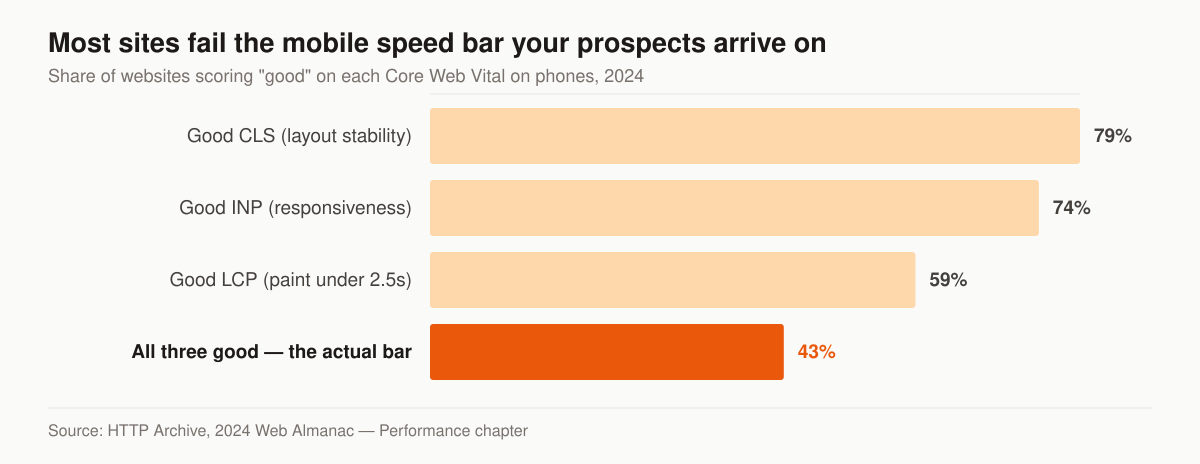
Share of websites scoring “good” on each Core Web Vital on phones. Source: HTTP Archive, 2024 Web Almanac — Performance chapter, published 11 November 2024.
We build for sub-2.5-second LCP on mobile because every second of delay quietly raises your cost per lead. We run our own final-expense and senior-market lead operation, so these sites are built against live-campaign economics, not theory. Speed and clean capture are a big part of keeping that acquisition cost down.
What actually makes an insurance agency site slow
Slowness on agency sites is rarely mysterious. It is usually one of six things, and five of them are decisions rather than budget.
- A hero image nobody resized. The full-resolution photograph of a family on a porch is the LCP element on a lot of agency homepages. Exported at display dimensions in a modern format it is a fraction of the weight, and the LCP moves with it.
- A carrier logo strip loaded as ten separate full-size PNGs. Sprite them, or serve them at display size.
- Three tracking scripts doing the job of one. An analytics tag, a heatmap tool, a chat widget and two ad pixels each cost main-thread time. Audit what each one actually reports, and drop the ones nobody reads.
- Web fonts loading render-blocking. Two families in four weights each is eight files before a word appears. One family, two weights, preloaded.
- A page builder shipping the CSS for every layout you did not use. This is the standard cost of a drag-and-drop theme and the standard reason a template site cannot be tuned past a point.
- Shared hosting with a slow time to first byte. The one item on this list that is genuinely a budget question, and the one you fix by moving hosts rather than by rebuilding.
Layout shift has its own cause list, and on insurance sites it is usually the same one: a quote widget, carrier badge or cookie banner injected after paint, pushing the form down the screen exactly as the visitor reaches for it. Reserve the space in the layout before the thing loads and CLS stops being a problem.
Should you use a website builder or hire a designer?
Use a website builder if you are new, have no ad budget, and the site’s only job is to prove you exist — a builder page beats no page. Hire a designer or agency once you are spending on traffic or competing in local search, because that is when conversion work, speed engineering, and CRM integration return more than they cost. The honest dividing line is paid clicks: sending them to a template can waste more in media than the build would have cost.
Here is the tradeoff agents actually face:
- Insurance website builders (Wix, GoDaddy, Squarespace) win on price, launch speed, and zero technical skill required. They lose on load speed, layouts every visitor has seen, weak forms, and platform lock-in.
- Insurance SaaS site platforms win on carrier content feeds and low-effort compliance pages. They lose on sameness — other agents in your market may be running the identical site — and on conversion testing you cannot run on rented infrastructure.
- Custom web design for an insurance agency wins on speed, copy written for your market, instrumented forms, and integrations that route leads the moment they submit. It loses on upfront cost and a build measured in weeks, not an afternoon.
To see the difference in the wild, we broke down real insurance agent website examples — what the strong ones share and where template sites leak leads. If you are weighing full insurance agency website design and development against DIY, price it per booked lead over twelve months, not per invoice.
Who owns the site when the engagement ends
This question tends to become interesting at the exact moment you have lost the leverage to answer it well. Settle it in writing before the build starts, and settle it item by item — “you own your website” is a sentence, not an answer.
Table: the seven assets to name in a web design agreement, who should hold each, and what it costs you if you do not.
| Asset | Who should hold it | What happens if the vendor holds it |
|---|---|---|
| Domain registration | Your agency, in your own registrar account | You cannot move the site or your email without their cooperation |
| DNS control | Your agency | Every migration, mail change and verification goes through a ticket |
| Site content and images | Your agency, with an export you have actually downloaded | You rewrite the whole site to leave |
| Design files or theme | Negotiable — ask whether a platform template can transfer at all | You rebuild the look from screenshots |
| Form submissions and lead history | Your agency, exported to your CRM continuously | Your lead list is stranded on someone else’s dashboard |
| Analytics and call-tracking accounts | Your agency, with the vendor added as a user | You lose the baseline that proves whether anything worked |
| Reviews and listings profiles | Your agency, always | You start the review history over on a new profile |
The cheapest protection is also the simplest: register the domain yourself, in the agency’s name, on a card the agency controls, and add your vendor as a user rather than an owner. Everything else can be recovered from a domain you control. Almost nothing can be recovered without one.
Wiring the site into your agency management system and CRM
“Integration” covers four different builds at four different costs, so make the proposal say which of these it means. In descending order of what it costs to build:
- Form to email. A submission notifies you. This is not integration; it is a mailbox.
- Form to CRM or dialer record. The submission creates a contact with source, campaign and timestamp attached, so speed-to-lead can start automatically and you can report on where leads came from. This is the tier that changes your numbers.
- Two-way sync with an agency management system. Records written into AMS360, EZLynx, HawkSoft, Applied Epic or QQCatalyst and status changes flowing back. Genuinely useful, genuinely more work, and dependent on what your AMS exposes.
- Live comparative rating on the page. A visitor gets a real premium without talking to anyone. Attractive and expensive, and worth weighing against the senior-market lines where the visitor wanted a phone call rather than a form in the first place.
Pick the tier by the bottleneck you actually have. If you are not calling web leads within minutes, buy the CRM tier and fix speed-to-lead before you buy anything cleverer. If you already call fast and your producers are re-keying data, the AMS sync is the one that pays. Our comparison of the best CRM for insurance agents covers which systems make each of these tiers straightforward.
Mobile, accessibility, and conversion
Senior-market traffic arrives on phones. That means large tap targets, a short form (name, phone, ZIP), and click-to-call above the fold. Accessibility is not just compliance theater — WCAG contrast and font-size rules happen to match what older eyes need, so it lifts conversion too.
The senior-market numbers say something more specific than “go mobile.” Pew Research Center’s Mobile Fact Sheet, from a survey of U.S. adults conducted 5 February to 18 June 2025, found 95% of adults 65 and older own a cellphone but only 78% own a smartphone — leaving 16% of that age group holding a cellphone that is not a smartphone, against 91% smartphone ownership among all adults. Roughly one senior in six cannot use your form well no matter how you design it. That is the argument for a phone number in the header as plain tappable text, not an argument against forms.
Accessibility has hard numbers too, and they are build specifications rather than opinions. WCAG 2.2 Level AA requires a contrast ratio of at least 4.5:1 for normal text and 3:1 for large text (SC 1.4.3), text that can be resized to 200% without losing content or function (SC 1.4.4), and pointer targets of at least 24 by 24 CSS pixels (SC 2.5.8). Those three alone rule out most of what makes agency templates hard for a 72-year-old to use: grey-on-grey body copy, fixed-pixel type, and 18-pixel icon links in a footer.
On the legal question, be precise rather than alarmed. The Justice Department’s 2024 final rule codified at 28 CFR 35.200 adopts “Level A and Level AA success criteria and conformance requirements specified in WCAG 2.1,” with compliance beginning 26 April 2027 for public entities with a total population of 50,000 or more and 26 April 2028 for smaller entities and special district governments. That rule binds state and local government under ADA Title II — it does not cover a private insurance agency. Private businesses fall under Title III, where no technical standard has been published, which is exactly why WCAG remains the reference point everyone argues from. We build to WCAG AA because it is the same work either way and it demonstrably suits the audience.
Conversion design is measurable work:
- One offer per page, stated plainly
- Trust signals: license language, carrier logos, real review snippets
- Forms instrumented so every field maps to a booked appointment
- Call tracking so phone leads are counted, not guessed
If your current site cannot tell you how many leads it produced last month, that is the first thing we fix.
What your website is required to display
Two rulebooks reach an agent’s website, and they reach it differently. Neither of them is satisfied by a footer that says “licensed in all 50 states.”
State producer-licensing rules are narrower than they look, and more specific. California Insurance Code § 1725.5 requires a person licensed under any of the producer sections it enumerates to print its license number on business cards, written price quotations, and print advertisements distributed exclusively in the state, “in a type size that is at least as large as any indicated telephone number, address, or fax number or in 12-point type, or in 8-point type for business cards, whichever is larger.” Subdivision (c) extends the requirement to emails involving licensed activity, at a type size no smaller than the largest phone number, street address or email address, on or adjacent to the line with the name. Violations carry $200 for the first offense, $500 for the second, and $1,000 for the third and subsequent, capped at $1,000 for any one offense — with relief from that penalty available under subdivision (g), but only where the commissioner finds a failure to comply with subdivision (a) or (b) was due to reasonable cause or circumstance beyond the licensee’s control and occurred notwithstanding the exercise of ordinary care and in the absence of willful neglect.
Read that carefully and notice what it does not say: the statute names print advertisements and emails, not the web page itself. Which is precisely why the design detail matters — your website’s quote form generates the written price quotation and the confirmation email that are covered. Templating the license number into the page, the form, the auto-responder and the quote document at once is a ten-minute build decision that no template platform makes for you.
Federal Medicare rules do name websites, explicitly — and they come in two parallel sets. Medicare Advantage marketing is governed by Subpart V of 42 CFR part 422; Part D marketing by the parallel Subpart V of part 423. Cite only the 422 sections and you have described half the rule if you also sell Part D.
Start with who is covered. 42 CFR 422.2260 defines a third-party marketing organization (TPMO) as “organizations and individuals, including independent agents and brokers, who are compensated to perform lead generation, marketing, sales, and enrollment related functions as a part of the chain of enrollment”; 42 CFR 423.2260 carries the same definition for Part D sponsors. If that is how you are compensated, you are a TPMO.
The disclaimer is standardized content with two variants, and the widely quoted one is only the first. 42 CFR 422.2267(e)(41) reads — and 42 CFR 423.2267(e)(41) reads identically with “Part D sponsors” in place of “MA organizations”:
- If a TPMO does not sell for all MA organizations in the service area: “We do not offer every plan available in your area. Currently we represent [insert number of organizations] organizations which offer [insert number of plans] products in your area. Please contact Medicare.gov or 1-800-MEDICARE to get information on all of your options.”
- If the TPMO sells for all MA organizations in the service area: “Currently we represent [insert number of organizations] organizations which offer [insert number of plans] products in your area. You can always contact Medicare.gov or 1-800-MEDICARE for help with plan choices.”
The obligation is scoped as well as split: the disclaimer is to be used by any TPMO “that sells plans on behalf of more than one MA organization,” and where it applies the same paragraph requires it to be “Verbally conveyed during sales calls prior to the discussion of any benefits,” “Electronically conveyed when communicating with a beneficiary through email, online chat, or other electronic means of communication,” “Prominently displayed on TPMO websites,” and “Included in any marketing materials, including print materials and television advertisements, developed, used or distributed by the TPMO.” 42 CFR 422.2274(g)(2)(iv) and 42 CFR 423.2274(g)(2)(iv) put the MA organization or Part D sponsor on the hook for making sure you use it.
The build implication is small and worth stating: the organization and plan counts change every plan year, and which of the two variants applies changes the moment you add or drop a carrier — so the disclaimer belongs in one template partial that renders sitewide, not pasted into page after page and forgotten in October. The Medicare agent website playbook covers the rest of the CMS-specific build. We provide the marketing build; the licensed agent owns final compliance sign-off.
How to compare two insurance web design proposals
We treat a $4,000 quote and a $9,000 quote as two different scopes until the line items say otherwise, and we look for the gap in copy, integrations and measurement before we look at the design. Ask both bidders the same eight questions and the difference usually explains itself in one page.
Table: eight questions that normalize any two web design proposals, and what a good answer sounds like.
| Ask | A good answer | A warning sign |
|---|---|---|
| How many pages, named? | A list you can count | “Up to 10 pages” |
| Who writes the copy? | Named, priced, with a revision round | “You provide content” buried in the terms |
| What LCP will you ship on mobile? | A number and how it will be verified | “It’ll be fast” |
| Where do form submissions go? | A named CRM or dialer, with the field mapping | An email address |
| Is call tracking included? | Yes, with a number and reporting | Not mentioned |
| Who owns the domain and the content? | You, in writing, itemized | “We handle all that” |
| What is the monthly after launch, and what is in it? | A figure and a scope | A figure and no scope |
| What happens in month two? | A measurement report and a change list | The project ends at launch |
On timeline: our own schedule for a five-to-twelve-page build is four to eight weeks — one to two weeks of scope and copy, two to four of design and build, one to two of integration, QA and launch — and it moves with how fast copy comes back, not with design hours. Other shops schedule differently, so ask each bidder for their split rather than treating ours as the market rate. If one promises two weeks, they are either using a template or assuming you already have the copy. Both are fine, as long as they say so.
How to tell whether the new site is working
A launch is not a result, and the honest version of this trade admits that a redesign does not by itself change your position in search. Depth and speed make a page eligible to compete; links, reviews and time decide the rest. What a new site can do immediately is stop losing the visitors you already get, and that is measurable within a month.
Instrument these five before launch, not after, so the before-and-after is real:
- Form-fill rate — submissions divided by unique visitors to the page, per page. This is the number a redesign should move first.
- Calls from the site — a tracking number in the header and on the contact page, so phone leads stop being invisible.
- Mobile LCP at the 75th percentile — field data, not a lab score on your office wifi.
- Lead-to-appointment rate — the ratio that tells you whether the new form is bringing better leads or just more of them.
- Source attribution on every submission — page, campaign and timestamp written into the CRM record, because “the website” is not a source.
Report them monthly against the pre-launch baseline. If form-fill rate rises and appointments do not, the copy is over-promising and the form is under-qualifying — that is a fixable copy problem, and it is invisible without the second number. Once the site converts what it receives, the next lever is getting more of it: insurance SEO for the queries your service pages should own, local SEO for the map pack in your towns, and our guide to ranking an insurance agency website on Google for the sequence between them.
Where a website fits in your funnel
A site is one piece. For paid traffic, we point clicks at a focused insurance landing page rather than the homepage, because it removes the navigation and the competing calls to action that pull a paid visitor sideways. If you sell final expense specifically, the build choices differ — see our final expense agent website playbook for the senior-market specifics that move close rates.
For transparent package numbers, our pricing page lays out what each tier includes so you are not comparing apples to anvils. And if you want a read on your current site before spending a dollar, the free marketing audit checks your speed, forms, and capture gaps against the agents we already run.
The honest bottom line on insurance website cost
The cheapest insurance agency website cost is rarely the lowest true cost per sale. Run the arithmetic on your own traffic before you price on the invoice: at the same visitor volume, a page converting at 4% produces four times the appointments of one converting at 1%, the build is a one-time line, and that gap repeats every month. Price the outcome, not the invoice. We are a marketing operator, not a licensed insurance advisor — you carry the license; we build the machine that fills your calendar.
If you already know the scope, tell us the page count and the integrations and we will price it against the tiers above rather than against a discovery call.
Guides that go deeper
Frequently asked questions
How much does an insurance agency website cost?
Why are template website builders cheaper than a custom build?
Does website speed actually affect insurance leads?
What makes an insurance agent website convert better?
How long does an insurance agency website take to build?
Who owns my insurance agency website and domain if I stop paying?
Does my insurance agency website have to be ADA accessible?
Can I build my insurance agency website on Wix or GoDaddy?
See exactly where your agency is leaking leads.
15 minutes. We screen-share our own live lead dashboard and tear down your funnel line by line — no pitch deck, just numbers.
- Site speed & conversion
- Local + AI-search visibility
- Ad efficiency
- Your cost per lead vs ours
No obligation · no pitch deck