Service
Email Marketing for Insurance Agents That Works Leads You Paid For
Every lead you already paid for gets worked automatically — instant email and SMS on opt-in, a multi-week nurture cadence, and a CRM that follows each lead to issued policy so leads stop dying unworked in a spreadsheet.
- We run our own final-expense book
- No pitch deck — we screen-share real numbers
- TCPA-aware · CMS/AEP-compliant · Meta Special Ad Category
- Core Web Vitals < 2.0s LCP
Email marketing for insurance agents is the automated follow-up layer that works the leads you already bought — timed sequences, a CRM-driven cadence, and deliverability that keeps you inbox-side. A lead that does not answer the first dial is not lost, so email and SMS catch the contacts a single call misses.
What you get
What your email marketing for insurance agents program includes
- A speed-to-lead trigger that fires an email and SMS within 5 minutes of opt-in
- A 5-9 touch nurture cadence over 3-4 weeks, mapped against your dial capacity so email and human follow-up reinforce each other
- CRM automation built inside your system (GoHighLevel, HubSpot, or dialer-integrated) — pipeline stages, tags, and triggers wired to your lead source
- Deliverability setup: SPF, DKIM, and DMARC configured plus sending-domain warm-up, with bounce and complaint monitoring
- Consent capture and automatic opt-out handling — one-click CAN-SPAM unsubscribe and recorded TCPA consent at opt-in
- A re-engagement cadence that re-works aged and no-answer leads instead of letting spend rot
- Reply routing with live alerts so a closer only picks up warm, replied-to leads
- Monthly reporting on contact rate, reply rate, and cost per issued policy — not open rates
How it works
How the email marketing for insurance agents engagement runs
- 01
Follow-up audit
We map your current follow-up against your lead source and find exactly where leads go cold — which touches never fire and how much paid-for spend is sitting unworked.
- 02
Build cadence and CRM triggers
We build the sequences, the branching cadence (what sends, when, and what happens on click, reply, or silence), and the CRM tags, stages, and triggers against your lead source.
- 03
Wire deliverability and consent
We authenticate the sending domain (SPF, DKIM, DMARC), warm it up, and build consent capture and automatic opt-out handling into the form so messages land in the inbox and stay compliant.
- 04
Launch and tune to cost per policy
We turn it on, then tune off real signals — reply rate, contact rate, and cost per issued policy — the same way we run the automation across our own live campaigns.
You paid real money for that lead. Then your agency dials it once, maybe twice, and moves on. The lead isn’t dead — it’s unworked. Email and SMS automation is the layer that keeps working it after the first dial fails.
This service builds and runs that layer the same way we run it on our own book: a consented cadence, a CRM that fires on its own, and deliverability tuned so your messages land in the inbox instead of spam.
What is insurance marketing automation?
Insurance marketing automation is software plus pre-built rules that send the right email or text to the right contact at the right moment — a new lead, an approaching renewal, a policyholder with only one line of coverage — without an agent touching it. The software (your CRM) is the engine; the sequences, triggers, and consent handling built on top are what actually produce contacted leads and kept policies. For the longer version — the definition, and what to build in what order, starting with speed-to-lead — see our guide to what insurance marketing automation is.
Most “insurance marketing automation solutions” pitched to agencies are the software half alone. This service is the other half: we design the cadence, wire the triggers, and run it inside your system. If you’re still choosing the software layer, our insurance marketing automation guide compares the platforms agencies actually run — and our insurance email marketing examples show the copy patterns these sequences are built from.
Why email marketing for final expense agents pays off
A single phone call reaches a fraction of the leads you buy. The rest aren’t lost — they’re early in a cycle that takes multiple touches to connect. Without automation, those touches don’t happen, because no human remembers to dial a lead on day 9 and day 21.
Automation does. It turns a lead list into a system that:
- Texts and emails a new lead within minutes of opt-in, while the request is still fresh in their mind.
- Runs a multi-week drip so a lead that didn’t answer today still gets worked next week.
- Re-engages aged leads instead of letting them rot.
- Hands warm, replied-to leads back to the agent at the right moment.
This is the natural partner to done-for-you lead generation — generation fills the top, automation makes sure the leads you paid for actually get worked.
What the automation layer includes
The table below lists the six components we build, what each one does mechanically, and the reason it earns its place in the cadence.
| Component | What it does | Why it matters |
|---|---|---|
| Welcome + speed-to-lead | Instant email/SMS on opt-in | Reaches the lead before the request goes cold |
| Multi-touch drip | 5–9 touches over 3–4 weeks | Catches the leads one dial misses |
| CRM automation | Tags, pipeline stages, triggers | Removes the human “did I follow up?” gap |
| Re-engagement | Cadence for aged / no-answer leads | Recovers spend already made |
| Deliverability setup | SPF, DKIM, DMARC, warm-up | Keeps you in the inbox, not spam |
| Reply routing | Live alerts to the agent | Closer talks to warm, not cold |
The five sequence types an insurance agency needs
Every insurance email program is built from the same five sequences.
This table maps each sequence to the event that fires it, its shape, and the commercial job it does, so you can see which ones your agency is currently missing.
| Sequence | Trigger | Shape | Job it does |
|---|---|---|---|
| Welcome / speed-to-lead | New opt-in | Instant email + SMS, then 5–9 touches over 3–4 weeks | Turns paid leads into contacts while they still remember opting in |
| Renewal | Days before the policy anniversary | 3–4 touches ending in a call task | Stops silent lapses; protects renewal commissions |
| Cross-sell | Policy issued with one line of coverage | 2–3 spaced touches per eligible product | A second policy per household without new lead spend |
| Win-back | 60–90 days of silence, or a lapsed policy | Short re-engagement burst, then quarterly | Recovers spend on leads and clients you already paid for |
| AEP/OEP seasonal | The Medicare and ACA enrollment calendar | Window-length campaign with CMS-aware copy | Books enrollment appointments inside the rules |
Build order matters. Welcome first, because it works the leads you’re paying for this week. Renewal second, because keeping a policy is cheaper than buying a lead. Cross-sell, win-back, and seasonal layer on once those two run clean — and when the seasonal one goes live, our open enrollment email templates supply the angles and send-week timing that campaign runs on. Agencies rounding accounts rather than chasing new households should read the cross-selling and account-rounding playbook before wiring the third sequence.
The welcome sequence, touch by touch
The table below is the default shape of the welcome sequence we build: nine touches across 22 days, alternating channels so no single inbox carries the whole cadence and no single dial decides the lead’s fate. Day numbers shift with your dial capacity and the line of business; the structure does not.
| Day | Channel | Job of this touch |
|---|---|---|
| 0, within 5 minutes | SMS + email | Confirm the request back in the words the lead used on the form, name the licensed agent, offer two specific times |
| 0, +1 hour | Dial task | The first human attempt, while the form is still in short-term memory |
| 1 | Answer the question the form implies — cost, eligibility, or what happens on the call | |
| 2 | SMS | One line, one question, easy to reply to with a thumb |
| 4 | Handle the objection this line of business always raises | |
| 7 | Dial task + SMS | Second human attempt, texted first so the number is recognized |
| 11 | Social proof and a plain restatement of the offer | |
| 16 | SMS | Last short-form nudge before the pace drops |
| 22 | Close the loop, then move the record to the re-engagement track |
Four branches sit under that spine, and they are what separate a sequence from a broadcast. A reply of any kind stops the automation immediately and alerts a human, so the lead never gets a scheduled email that ignores the conversation they just had. A click without a reply advances the lead a stage and shortens the gap to the next touch. A hard bounce suppresses the address permanently rather than retrying it. An opt-out, in either channel, writes back to the contact record and stops every sequence that record is enrolled in, not just the one that sent the message.
Cadence is the product, not the email
A good sequence isn’t a newsletter. It’s a timed, branching cadence: what sends, when, and what happens when a lead clicks, replies, or goes quiet. We map this against your dial capacity so email and human follow-up reinforce each other instead of stepping on one another. Our full breakdown of timing lives in the insurance lead follow-up cadence guide — the automation is that cadence, built and running.
For Medicare books, the same machine runs inside CMS marketing rules and the AEP calendar, with tighter disclaimers and segmented timing. Final-expense lists get more creative latitude on subject lines and angles, but the same consent and deliverability discipline.
Segmentation: the fields the cadence branches on
Segmentation in an agency CRM is not demographics for their own sake. It is the small set of fields the automation reads to decide which sequence a contact enters and which copy it sends. Six carry almost all the weight:
- Line of business. Final expense, Medicare, ACA, term life, and P&C each need their own copy and their own compliance posture. One shared cadence across all of them produces messages that are wrong for everyone.
- Lead source and vintage. A lead that filled in your own landing page yesterday and an aged list bought in bulk are different problems. The aged file gets the re-engagement track, not the welcome track — the mechanics are in our guide to working aged final expense leads.
- Consent flags, per channel. Email consent, SMS consent, the timestamp, the source URL, and any revocation date are separate fields. Treating “opted in” as one boolean is how agencies text people who only ever agreed to email.
- State. Licensing, and in some cases state-level marketing rules, decide whether a contact should be in a sequence at all.
- Eligibility dates. A turning-65 date, a policy anniversary, or an enrollment window is a date field that fires a sequence on its own schedule — and it needs no new lead spend.
- Existing coverage. Which lines a household already holds is what makes the cross-sell sequence targeted rather than generic.
Get those six populated at the point of capture and the segmentation problem is solved. Try to reconstruct them later from a spreadsheet of names and email addresses, and it is not.
Where your email addresses come from, and why you never buy a list
Three sources are legitimate. Your own opt-in forms — quote requests, calculators, guide downloads, and the landing pages they sit on — produce contacts who asked to hear from you, with a consent record attached at the point of capture. Your book of business is the second, and it is the source we look at first in an audit: existing clients are already reachable, already trust you, and are the entire input to the renewal and cross-sell sequences. Purchased leads are the third, and they arrive with a consent record that has to travel into your CRM intact rather than being thrown away at import.
Rented lists, scraped addresses, and appended email addresses are the fourth source, and it is the one that ends the program. The arithmetic is not close. The FTC’s CAN-SPAM compliance guide puts each separate violating email at a penalty of up to $53,088. Google’s email sender guidelines tell senders to keep the spam rate reported in Postmaster Tools below 0.10% and to “avoid ever reaching a spam rate of 0.30% or higher.” The same page tells senders to “send email only to people who want to get messages from you.” Its stated reason: “These recipients are less likely to report your messages as spam.” And the consequence it names is cumulative: “Over time, user spam reports can lower your domain’s reputation.” The damage is not confined to the cold list, because the sending domain whose reputation drops is the same one carrying your renewal notices and your policy-delivery emails to actual clients. You would be trading a real asset for a batch of strangers.
The Gmail and Yahoo sender rules that decide whether you reach the inbox
Deliverability stopped being a best practice and became an entry requirement. Per Google’s email sender guidelines: “Starting February 1, 2024, email senders who send more than 5,000 messages per day to Gmail accounts must meet the requirements in this section.”
This table lists what Google requires of bulk senders, the concrete artifact we publish or configure for each one, and the threshold Google states.
| Google requirement | What we set up | Google’s stated threshold |
|---|---|---|
| “Set up SPF and DKIM email authentication for your domain” | SPF and DKIM records published in your DNS for the sending domain | Both required |
| “Set up DMARC email authentication for your sending domain” | A DMARC record on the sending domain | Enforcement policy may be set to none |
| One-click unsubscribe | List-Unsubscribe-Post: List-Unsubscribe=One-Click and List-Unsubscribe: <URL> headers on marketing sends |
Required on marketing and subscribed messages |
| “Use a TLS connection for transmitting email” | TLS on the sending platform | Required |
| Spam rate in Postmaster Tools | Complaint monitoring wired into the monthly report | “below 0.30%” in the bulk-sender list; Google’s spam-rate guidance adds “below 0.10%” |
Yahoo published its own standards on the same timetable. Its sender best practices page opens with a note: “Beginning in February 2024, enforcement of the following sending standards will take effect.” It then splits the standards in two. Every sender, at any volume, must “Implement SPF or DKIM at a minimum,” “Keep your spam rate below 0.3%,” and “Have a valid forward and reverse DNS record for your sending IPs,” plus compliance with RFCs 5321 and 5322. Bulk senders must additionally “Implement both SPF & DKIM,” “Publish a valid DMARC policy with at least p=none - DMARC must pass,” ensure “the domain in the From: header is aligned with either the SPF domain or the DKIM domain,” “Implement a functioning list-unsubscribe header, which supports one-click unsubscribe for marketing and subscribed messages,” carry “a clearly visible unsubscribe link in the email body,” and “Honor unsubscribes within 2 days.” Yahoo does not publish a messages-per-day number for what counts as bulk on that page. It also notes that its spam rate “is calculated in our system based on mail delivered to the inbox,” so the figure you compute in your own platform will not match the one Yahoo is grading you on.
Volume does not get a single-agent book off the hook. Google’s 5,000-a-day section applies to senders “who send more than 5,000 messages per day to Gmail accounts,” which most agency books are nowhere near — but the section above it opens “Starting February 1, 2024, all email senders who send email to Gmail accounts must meet the requirements in this section,” and that all-sender list still requires you to “Set up SPF or DKIM email authentication for your sending domains,” to “Ensure that sending domains or IPs have valid forward and reverse DNS records, also referred to as PTR records,” to “Use a TLS connection for transmitting email,” and to keep spam rates “below 0.3%.” Yahoo’s all-sender tier is the same shape. What the 5,000-a-day line actually adds on top is stricter: both SPF and DKIM rather than either one, a DMARC record, From:-header alignment, and the one-click unsubscribe header. All four are worth building at any volume, because the filters read the same signals either way. Authentication is a one-time DNS job, and a domain that is authenticated from day one never has to be dug out of a spam folder later.
What open and click rates should an insurance agency expect?
Mailchimp publishes an email marketing benchmark table built from campaigns sent to at least 1,000 subscribers, last updated December 2023. Across all users it lists a 35.63% average open rate, a 2.62% average click rate, and a 0.22% unsubscribe rate. The closest listed category to an insurance agency is business and finance, at 31.35% open, 2.78% click, and 0.15% unsubscribe. Non-profits top the table at 40.04% open and ecommerce sits lowest at 29.81%.
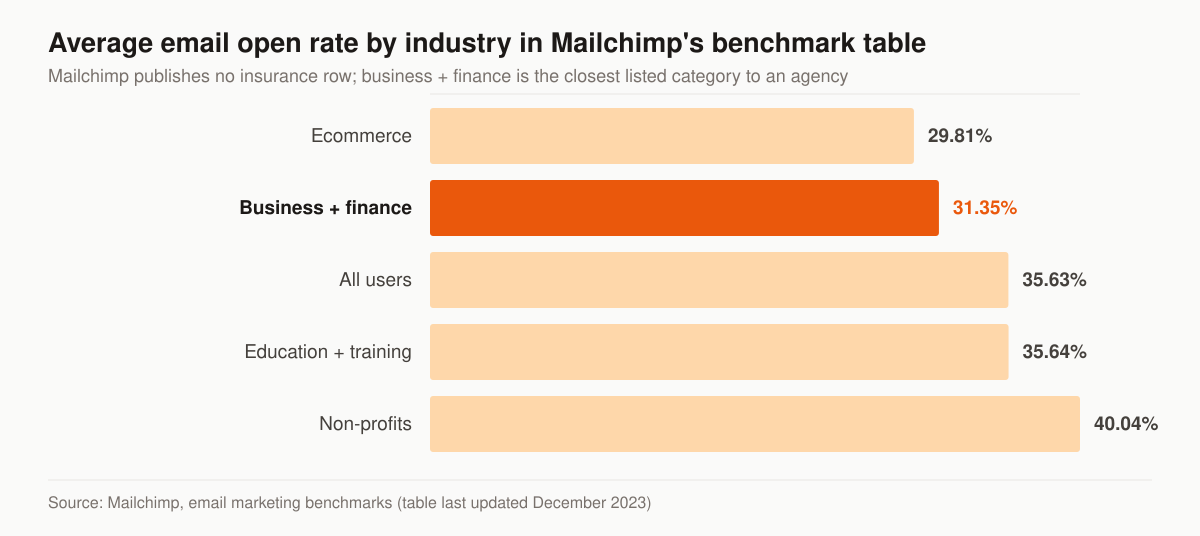
Source: Mailchimp, email marketing benchmarks, table last updated December 2023.
Two things follow from that table. The first is that Mailchimp publishes no insurance row at all, so any “average insurance email open rate” you see quoted without a source behind it was made up by whoever wrote the page. The second is that open rate is the weakest number on the chart. Mailchimp says so itself, in the disclaimer directly under the data: “The accuracy of email open rates may be impacted by Apple’s privacy changes and their Mail Privacy Protection (MPP) feature, and this should be considered as you interpret open rate data.” An open is a tracking pixel loading. Privacy proxies load that pixel for people who never opened anything, which is why we report opens as a directional trend and grade the program on replies and issued policies instead.
Deliverability and compliance, treated as the foundation
None of this matters if your email lands in spam. We configure authentication (SPF, DKIM, DMARC), warm the sending domain, and watch bounce and complaint rates so your sender reputation holds. On the legal side:
- Email runs under CAN-SPAM: honest sender, physical mailing address, one-click unsubscribe honored automatically.
- SMS and calls run under TCPA: consent captured at opt-in and recorded. The FCC’s one-to-one consent rule was vacated by the Eleventh Circuit in Insurance Marketing Coalition Ltd. v. FCC, No. 24-10277 (11th Cir. Jan. 24, 2025), which vacated Part III.D of the FCC’s 2023 order — the part imposing the one-to-one requirement — after finding the agency had “impermissibly exceeded its statutory authority.” The TCPA’s own consent requirement is untouched by that — we treat consent as a requirement, not a checkbox.
The CAN-SPAM bar is concrete. Per the FTC’s CAN-SPAM compliance guide (penalty figures updated January 2024), each separate violating email can draw a penalty of up to $53,088; every message needs accurate sender information and a valid physical postal address; the opt-out mechanism must keep working for at least 30 days after you send; and opt-outs must be honored within 10 business days. Outsourcing doesn’t move the liability, either — in the FTC’s words, “even if you hire another company to handle your email marketing, you can’t contract away your legal responsibility to comply with the law.” That is exactly why we build unsubscribe handling and consent records into the system itself instead of trusting whatever the template shipped with.
We provide marketing services, not licensed insurance advice; you are the licensed party. Compliance is a trust signal, and we build it in rather than bolt it on.
What Medicare email marketing may and may not do
Medicare is the line where the channel choice is made for you by regulation, and the rule is more specific than it looks from a distance. CMS defines beneficiary contact at 42 CFR 422.2264 — the Medicare Advantage marketing rule — as “any outreach activities to a beneficiary or a beneficiary’s caregivers by the MA organization or its agents and brokers”, so it reaches the individual agent, not only the carrier. Standalone Part D drug plans sit under the parallel provision at 42 CFR 423.2264, which is worded the same way and substitutes “the Part D sponsor or its agents and brokers”.
Inside that section, paragraph (a)(1) states that organizations “may make unsolicited direct contact by conventional mail and other print media (for example, advertisements and direct mail) or email (provided every email contains an opt-out option).” Paragraph (a)(2)(iv) then prohibits unsolicited use of “telephone solicitation (that is, cold calling), robocalls, text messages, or voicemail messages,” and names specific examples including “Calls to beneficiaries who attended a sales event, unless the beneficiary gave express permission to be contacted.” Paragraph (a)(3) supplies the release valve: “Calls are not considered unsolicited if the beneficiary provides consent or initiates contact with the plan.”
Read together, that makes email the one unsolicited digital channel the section permits — and only when the opt-out link is in every single message, including the plain-text and transactional-looking ones. It also means the SMS leg of a Medicare cadence cannot be a default. It fires only for contacts whose own consent record shows they initiated the contact or agreed to be texted, which is precisely why the consent flags in the segmentation section are stored per channel rather than as one field.
We build the Medicare branch as a separate cadence for that reason, not as a copy of the final-expense one with the wording softened. The broader rule set is in our guide to CMS Medicare marketing rules for agents, the appointment-side obligations are in scope of appointment and TPMO compliance, and the seasonal timing sits in the Medicare marketing program. Nothing here is legal advice — your compliance officer or upline makes the call on your specific setup.
Texting insurance leads: consent, revocation, quiet hours, and carrier registration
SMS carries more regulatory exposure than email, so the build treats it as a regulated system rather than a feature toggle. Four rules shape it.
Revocation has to be easy, and it applies to both channels of a phone. 47 CFR 64.1200(a)(10) is written to a defined scope, and the scope is the half that gets dropped when the paragraph is quoted: it covers consent “to receive calls or text messages made pursuant to paragraphs (a)(1) through (3) and (c)(2) of this section” — the section’s autodialer, artificial-or-prerecorded-voice and national do-not-call paragraphs, which is where an automated agency cadence sits. Inside that scope, a called party may revoke consent “by using any reasonable method to clearly express a desire not to receive further calls or text messages from the caller or sender,” and a reply of “stop,” “quit,” “end,” “revoke,” “opt out,” “cancel,” or “unsubscribe” “constitutes a reasonable means per se to revoke consent.” Other wording still counts: if a reply uses different words, the same paragraph says the caller “must treat that reply text as a valid revocation request if a reasonable person would understand those words to have conveyed a request to revoke consent.” It requires that all such requests “must be honored within a reasonable time not to exceed ten business days from receipt of such request,” and provides that callers or senders of text messages covered by those same paragraphs “may not designate an exclusive means to request revocation of consent.” Practically: your CRM cannot insist people use one magic keyword, and a revocation received in one place has to suppress every sequence.
The confirmation text is allowed, once, and only if it sells nothing. Paragraph (a)(12) permits a one-time message confirming the opt-out “as long as the confirmation text merely confirms the text recipient’s revocation request and does not include any marketing or promotional information, and is the only additional message sent to the called party after receipt of the revocation request.” Timing is part of the rule, and it has two halves: “If the confirmation text is sent within five minutes of receipt, it will be presumed to fall within the consumer’s prior express consent. If it takes longer, however, the sender will have to make a showing that such delay was reasonable.”
Send windows follow the lead’s clock, not your office’s. Paragraph (c) of the same section bars any “telephone solicitation” to, at (c)(1), “[a]ny residential telephone subscriber before the hour of 8 a.m. or after 9 p.m. (local time at the called party’s location).” Read alone it is a rule about calls to residential subscribers and says nothing about texting a mobile number. Paragraph (e) is what carries it across: the rules in paragraph (c) are “applicable to any person or entity making telephone solicitations or telemarketing calls or text messages to wireless telephone numbers to the extent described in” the FCC’s 2003 Report and Order, CG Docket No. 02-278, FCC 03-153. An agency in Phoenix running one national cadence on local send times will reach East Coast leads outside that window, which is why the automation schedules on the contact’s timezone field rather than the office’s.
Carriers gate the channel independently of the law. Twilio’s US SMS guidelines list domestic long-code sending as requiring A2P 10DLC registration, and note that “U.S. telecommunications providers may assess fees for non-compliant A2P traffic,” with T-Mobile publishing a $1,000 pass-through fee for 10DLC program evasion and, after prior warning, a $10,000 pass-through fee that “may be imposed for each unique instance of content violating the T-Mobile Code of Conduct.” The same page lists “Lead Generation” among the use-case restrictions for domestic long code — so how the campaign is registered and what the messages actually do both matter. An unregistered or mis-registered number does not produce an error you notice; it produces texts that quietly stop arriving.
Automation vs. a newsletter — you likely want both
This service is behavioral: a sequence fires off something an individual lead did (opted in, requested a quote, went silent) and stops when they convert or exit. It is not a standing publication. The complement is a done-for-you agency newsletter — a recurring, whole-list email that keeps your entire book top-of-mind between renewals and drives referrals, regardless of whether any single contact did anything. Automation works the individual lead to a decision; the newsletter keeps the relationship warm for years. They share one list and one consent record, so running both reinforces rather than double-messages the same contact. Where the newsletter is doing retention work on an existing book, it pairs with our client retention program.
What we report on, and what we ignore
This table shows the numbers on the monthly report, what each one actually measures, and the published reference point where one exists.
| Metric | What it measures | Reference point |
|---|---|---|
| Contact rate | Share of new leads that reach a two-way conversation | Your own baseline before launch |
| Reply rate | Replies per sequence, by touch and channel | Your own baseline before launch |
| Appointments set | Booked conversations attributable to the cadence | Your own baseline before launch |
| Cost per issued policy | Total spend divided by policies issued | The number we grade the program on |
| Spam complaint rate | Complaints per delivered message | Google: below 0.10%, never 0.30%+ |
| Unsubscribe rate | Opt-outs per delivered message | Mailchimp all-users benchmark: 0.22% |
| Click rate | Clicks per delivered message | Mailchimp all-users benchmark: 2.62% |
| Open rate | Pixel loads, reported as a trend only | Directional; distorted by privacy proxies |
What is not on that list is as deliberate as what is. Impressions, sends, and list size measure activity rather than outcome. Open rate stays on the report only as a trend line, for the reason Mailchimp’s own disclaimer gives. And no figure on the report is an industry average dressed up as your result — the benchmarks above set context, your own pre-launch baseline sets the target.
What email automation will not fix
Four problems look like follow-up problems and are not, and it is cheaper to say so before the engagement than after.
A lead source reselling the same contact to every agency that will buy it is a lead-source problem. A faster cadence means you are first to reach a person the other buyers are also calling, which helps, but it does not change the economics of the file; the comparison is in exclusive versus shared final expense leads. No one available to answer the replies is a staffing problem — a cadence that generates conversations nobody picks up converts worse than no cadence, because the lead now believes you ignored them. Our appointment setting service exists for exactly that gap. An offer nobody wants is a product and copy problem; more touches on weak copy produce more unsubscribes, and the fix starts with insurance copywriting. And a sending domain that has already been burned by a purchased list is a reputation problem measured in months, not a settings problem measured in an afternoon.
How much does email marketing for insurance agents cost?
Email automation is not sold here as a standalone line item; it runs inside a monthly tier. The published tiers are Foundation $2,500/mo, Growth $3,500/mo, and Full-Funnel $5,500/mo. This program maps to Full-Funnel, which is where managed paid ads, landing-page conversion work, and marketing automation sit together — the combination matters, because a cadence is only as good as the opt-in flow feeding it. If the forms and pages that capture consent need building first, a one-time build runs $2,500–$8,000. Full breakdown on the pricing page.
Your software is billed separately by the vendor and is the smallest number in the stack. If you already own a CRM with automation features included, you are paying for capability that may never have been switched on; the platform landscape and what each one includes is in our marketing automation guide and the CRM comparison for agents. Deciding between building this in-house and buying it is the same calculation covered in insurance agency marketing budget.
How long before the automation shows up in your numbers
Three clocks run at different speeds, and conflating them is how agencies talk themselves out of the program in week three.
Contact rate moves first. The speed-to-lead trigger changes the first-touch interval the day it goes live, and that shows up in conversations within the first week because it acts on leads you are already buying. The nurture cadence needs a full cycle before it can be judged — 22 days for the sequence to finish running on a single cohort, plus however long your line of business takes to close after a conversation starts, which for final expense is short and for Medicare is bounded by the enrollment calendar. Deliverability is the slowest clock and the one that cannot be rushed: DNS records publish in hours, but sending reputation is built by weeks of low-complaint volume on a warmed domain, and it is earned back far more slowly than it is lost.
None of that is a ranking or revenue promise. It is the sequence in which the parts start working, so the monthly report is read against the right clock.
How we run insurance email automation for you
We work inside your CRM and your brand so the list and the automation compound as your asset — not ours. The setup is the same one we operate across our own live campaigns:
- Audit your current follow-up and find where leads go cold.
- Build the cadence, sequences, and CRM triggers against your lead source.
- Wire deliverability and consent capture.
- Launch, then tune off reply rates, contact rates, and cost per issued policy.
Want to see how many of your paid leads are going unworked? Start with a free marketing audit, explore the broader final-expense marketing program this plugs into, or compare the rest of our agency services. If you would rather talk it through first, reach the team here.
Guides that go deeper
Frequently asked questions
Does email actually work for final expense leads?
Is email marketing to insurance leads TCPA and CAN-SPAM compliant?
What CRM do you use for the automation?
How is Medicare email marketing different from final expense?
Do I need marketing automation software before hiring a service?
How much does email marketing for insurance agents cost?
What open rate should an insurance agency expect from its email?
See exactly where your agency is leaking leads.
15 minutes. We screen-share our own live lead dashboard and tear down your funnel line by line — no pitch deck, just numbers.
- Site speed & conversion
- Local + AI-search visibility
- Ad efficiency
- Your cost per lead vs ours
No obligation · no pitch deck