Insurance Marketing Automation: What to Build, in What Order
Insurance marketing automation is software that runs your repeatable marketing tasks — lead follow-up, email sequences, review requests, renewal reminders — off triggers instead of memory. We build speed-to-lead first — an instant text and email when a lead lands, followed by a multi-touch cadence your CRM fires automatically.
Insurance marketing automation is software that runs your repeatable marketing tasks — lead follow-up, email and SMS sequences, review requests, renewal reminders, enrollment-season campaigns — off triggers instead of memory. We build speed-to-lead first: an instant text and email the moment a new lead lands, followed by a cadence the CRM fires on schedule.
That’s the short answer. The rest of this guide is the operator’s version: the six automations that actually move an agency’s numbers, the fields every workflow branches on, a numbered walkthrough for building the first one, how the automation connects to your policy data, what the platforms cost according to their own pricing pages, an honest map of the tool landscape organized by category rather than ranked, the two compliance regimes — TCPA and CMS — that automated outreach has to respect, and the ways these programs break once they are live.
One framing note before any of it: automation is leverage on discipline you already have, not a substitute for it. A bad follow-up process automated is just bad follow-up at scale.
What is insurance marketing automation?
Insurance marketing automation is software that executes your repeatable marketing tasks — new-lead follow-up, email and SMS sequences, review requests, renewal reminders, seasonal enrollment campaigns — from triggers instead of someone’s to-do list. A lead lands, a text fires; a policy hits its renewal window, an email goes out. The agent still sells; the system guarantees the touches happen on time, every time.
This is mainstream practice, not an edge tactic: per HubSpot’s 2026 State of Marketing data, 47% of marketers report leveraging automation to make marketing processes more efficient. Insurance is actually a better fit for it than most industries, because so much of the work is calendar- and event-driven — leads land at odd hours, policies renew on fixed dates, and enrollment windows open and close on a federal schedule.
What automation is not: a blast tool. Sending one email to your whole list is a broadcast. Automation is behavioral — each contact moves through a sequence based on what they did (opted in, replied, went quiet, bought, lapsed) and exits the moment the sequence’s job is done.
The six automations that matter for an insurance agency
Every platform demo shows you hundreds of possible workflows. In practice, six families of automation do nearly all the work for an agency. The table below names each family, the event that fires it, what it does, and the specific agency failure it exists to prevent.
| Automation | Trigger | What it does | The failure it prevents |
|---|---|---|---|
| Lead routing + speed-to-lead | New lead hits the CRM | Instant text and email, first-dial task, routes the lead to the right agent | The fresh lead that cools while nobody notices it landed |
| Email/SMS nurture sequences | Opt-in, no-answer, or gone-quiet | Timed multi-touch drip across email and text | Leads abandoned after one or two dials |
| Review requests | Policy issued or service ticket closed | Sends a review ask with your direct Google link | A book of happy clients and an empty Google profile |
| Renewal + retention triggers | Renewal window opens, payment fails | Reminder emails, agent tasks, cross-sell prompts | Silent lapses and churn you never saw coming |
| AEP/OEP seasonal campaigns | Calendar dates + eligibility tags | Pre-built education and booking pushes for enrollment season | Rebuilding the same campaign from scratch every fall |
| CRM workflows | Stage change, tag, inactivity | Tasks, pipeline moves, alerts, data hygiene | The “did anyone follow up on this?” gap |
A few operator notes on the table:
- Speed-to-lead and nurture are the revenue pair. They work leads you already paid for, which is why they come first. The exact timing spec — first touch inside 5 minutes, 7–9 touches over 14 days — is laid out in our insurance lead follow-up cadence guide; the automation is that cadence with the discipline built in.
- Review requests are one trigger and one message. The output compounds on a profile you keep — the mechanics are in our guide to getting more Google reviews as an insurance agent.
- Seasonal automations are calendar arbitrage. Medicare and ACA agents who wire their AEP marketing into reusable, dated workflows stop paying the September rebuild tax every year.
- CRM workflows are the connective tissue. None of the above run without a CRM that supports triggers and tags — if you’re still choosing one, start with our vendor-neutral CRM guide for insurance agents.
What the workflow branches on: tags, scores and consent state
Automation is only as good as the fields it can read. Every branch in a sequence — send or hold, text or email-only, agent A or agent B — resolves against a value sitting on the contact record, so the field list is the real build spec. Get it wrong and the workflow either fires blindly or stalls waiting on data nobody captures.
The table below maps the five field families that carry almost every branch an agency needs, the decision each one drives, and where the value has to come from.
| Field family | Example values | The branch it drives | Where the value comes from |
|---|---|---|---|
| Consent state | SMS opt-in yes/no, opt-in timestamp, source URL | Whether the SMS leg of a cadence runs at all | The lead form or the vendor’s opt-in record, written at import |
| Line of business | final expense, Medicare, auto, term life | Which copy set and which objection email the contact receives | The form field, or the campaign the lead came from |
| Lead source | vendor name, campaign, aged vs. fresh | Cadence length and dial priority | The lead file, or the ad platform’s UTM parameters |
| Lifecycle stage | new, contacted, quoted, issued, lapsed | Entry into and exit from every sequence | The agent working the pipeline, not the automation |
| Eligibility and dates | age, effective date, renewal date, turning-65 month | Renewal triggers, enrollment-season tagging, cross-sell timing | The policy system, synced back to the CRM |
Lead scoring sits on top of those fields, and it is worth being blunt about what a score is: an arithmetic sort, not a prediction. Scoring adds points for behaviour that has preceded a sale in your book — opened three emails, clicked the quote link, replied to a text — and subtracts for the age of the record. It changes who gets dialled first on a Tuesday morning. It does not change what happens to everyone else on the list, which is why scoring belongs after the cadence is built, not before it. Budget for it as a paid feature, too: HubSpot’s published Marketing Hub pricing lists lead scoring on Professional and Enterprise only, capped at 5 scores on Professional and 50 on Enterprise.
One rule holds across all five families: a field the automation branches on has to be populated at the moment the record is created, not backfilled later. Any sequence that waits for a human to type a value is a sequence that stops.
How to build your first automation: speed-to-lead in eight steps
Build this one first. It is a small workflow, and every platform in the landscape section below can run it. The urgency isn’t hypothetical — as James B. Oldroyd, Kristina McElheran, and David Elkington put it in Harvard Business Review back in March 2011: “Our research shows that most companies are not responding nearly fast enough.”
- Pick the trigger. “New lead created” in your CRM, or the form submission itself via a native integration or webhook. The trigger must fire the moment the lead exists — not on an hourly sync.
- Gate on consent. Before any SMS branch, check that the lead carries a recorded opt-in from your form or lead vendor. No consent record, no text — that lead gets the email-and-dial path only.
- Fire the instant text and email. Both reference the exact thing they asked about (“your final expense quote request”) and name a human. Generic “thanks for your interest” messages announce that a robot is talking.
- Create the first-dial task. Automation buys you the first touch; a human still makes the first real call. The workflow should drop a dial task on the assigned agent with the lead’s details attached.
- Branch on behavior. A reply pauses the sequence and alerts the agent immediately — nothing torches trust like an automated message arriving mid-conversation. No reply lets the cadence continue.
- Load the rest of the cadence. The follow-on touches — calls, texts, emails across two weeks — follow the sequence in the cadence guide. The workflow schedules them; the agent works the tasks.
- Wire the exits. Booked appointment, policy sold, STOP reply, or do-not-contact — each one must immediately remove the contact from every active sequence, across channels, not just the one they replied on.
- Test with your own number, then watch it. Run yourself through the workflow before it touches a real lead. After launch, check contact rate and opt-out rate weekly — a rising opt-out rate is the system telling you the messages need work.
Wire the automation to the system that holds your policy data
Speed-to-lead needs nothing but the CRM. The renewal, cross-sell and retention automations need something the CRM usually does not have: the policy record. Effective dates, carriers, premiums, coverage lines and renewal dates live in the agency management system, and a trigger that fires on “renewal window opens” is reading a date that has to arrive from there. We treat that sync as the long-lead item in the build, and start it before anything on the book side is scoped.
Three integration paths exist, in descending order of how much of your weekend they consume:
- A native connector. The vendor already speaks to your management system. InsuredMine, for instance, lists integrations with AMS platforms including HawkSoft, AMS360 and Applied Epic on its own site. Check the fine print before you assume you can pilot it, though — InsuredMine’s pricing page states that AMS integration is not provided in its trial, so the single feature the whole build depends on is the one the trial will not show you.
- A webhook or API push. Your management system or a middleware layer posts a payload to the CRM the moment a policy changes state. More work up front, but it fires in real time and you control the field mapping.
- A scheduled file sync. A nightly export lands in the CRM and updates records in bulk. Adequate for renewal dates, useless for speed-to-lead, and the path where a re-imported record can re-trigger a sequence it already ran.
Whichever path you take, settle four questions before the first record moves. Which system is the source of truth when the two disagree. Which direction each field syncs, and whether any field syncs both ways (very few should). How duplicate contacts are matched and merged — email, phone, or policy number. And what happens to a contact mid-sequence when its record is updated underneath it. Write those four answers down; they become the runbook that whoever inherits this system will need.
The tool landscape: categories, not rankings
“Best insurance email automation software” has no abstract answer. More useful: know the three categories, then match one to how you actually sell. We have no software to sell — we build automation inside whatever system a client owns — so what follows is what each vendor says its own product does, cited to their pages, with no performance claims attached.
General marketing automation platforms
Built for any industry, strongest on email workflows and integrations.
- HubSpot describes its automation as visual-editor workflows, email triggers and sequences, and lead scoring, and states its basic marketing automation features are available free, with paid tiers above that.
- ActiveCampaign positions itself around personalized email marketing, SMS, WhatsApp automation, and 1,000+ app integrations.
Fit: agencies that already run marketing beyond lead follow-up (content, newsletters, webinars) and want one engine for all of it.
Agent-focused all-in-one platforms
Built around the sales motion — dialers, texting, funnels, and pipelines in one login.
- HighLevel (GoHighLevel) lists CRM, workflows and automations, funnels, a consolidated SMS/social conversation stream, appointment reminders, and automated review requests among its features, aimed at agencies and solo marketers.
- Agent CRM is insurance-specific, listing pre-built automation campaigns, a power dialer, renewal reminders, and cross-sell workflows, priced at $97/month after a 14-day trial as listed on its site in July 2026.
Fit: telesales and lead-driven agents where speed-to-lead and dial volume are the business.
Insurance-native AMS/CRM suites
Built on policy data, so automation can trigger off renewals, commissions, and coverage details.
- AgencyBloc describes itself as an all-in-one platform for health and benefits agencies — serving Medicare, group benefits, and individual/ACA — with its Engage+ product handling email, lead nurture, and content alongside its AMS and commissions modules.
- InsuredMine lists drip campaigns, automation, Google review requests, and integrations with AMS platforms like HawkSoft, AMS360, and Applied Epic.
Fit: established agencies where the renewal book, not new-lead volume, is the asset being automated.
The honest tiebreaker: the best platform is the one your team will actually keep using in month six. A mediocre tool with a maintained cadence beats a best-in-class tool running last year’s broken sequence.
What insurance marketing automation costs
Software pricing in this category is public, and it varies by more than an order of magnitude — so “what does automation cost?” has no single answer until you say which category you are buying.
The table below lists what four vendors publish on their own pricing pages, checked September 5, 2026. These are list prices, not quotes, and they change.
| Platform | Published list price | What that price actually buys |
|---|---|---|
| HubSpot Marketing Hub | Free $0/mo (up to 2 users); Starter from $7/mo/seat paid annually or $20/mo/seat month-to-month — promotional, new-customers-only rates carried on the page September 5, 2026 under a “Save up to 65% on Starter” banner; Professional from $800/mo paid annually or $890/mo monthly; Enterprise from $3,600/mo | Free is capped at 1 automated action and Starter at 10, so branching cadences start at Professional. Professional lists 2,000 marketing contacts and up to 300 workflows, and its page states a required one-time onboarding fee of $3,000 (Enterprise: $7,000) |
| HighLevel | Starter $97/mo; Unlimited $297/mo; Agency Pro $497/mo | CRM, workflows, funnels and a consolidated conversation stream at every tier, with sub-account and white-label scope rising by tier |
| Agent CRM | $97/month after a 14-day free trial | Insurance-specific pre-built campaigns — new-lead email and SMS sequences, long-term nurture, cross-sell, renewal reminders, appointment reminders |
| InsuredMine | $118.00 per user/month billed monthly, or $106.00 per user/month billed annually, plus setup and implementation fees | Per-seat pricing on the policy-data side of the house; messaging volume is metered on top, with add-ons listed at 1,000 texts for $10/mo and 10,000 emails for $10/mo |
Two things fall out of that table. The seat- and contact-based models diverge fast — a four-producer agency on InsuredMine’s monthly rate is a different budget line than the same agency on HighLevel’s flat $97, and neither number tells you which one fits the work. And the sticker price is rarely the whole cost: HubSpot’s mandatory onboarding fee and InsuredMine’s setup fee are both printed on the vendors’ own pages, and metered texts and emails accrue on top of every plan.
None of that covers the labour. Software licences a workflow engine; somebody still has to write the copy, wire the branches, set up authentication, and tune the thing monthly. Priced as a service here, that layer sits in one tier: marketing automation and CRM are listed under Full-Funnel at $5,500/mo, alongside managed ads and landing-page CRO. Foundation at $2,500/mo and Growth at $3,500/mo do not include it — they cover the website, local and on-page SEO, the content engine, AI-search visibility and reputation work. A one-time website build is separate at $2,500–$8,000. The full breakdown is on our pricing page. If you are working out how automation should sit against your other line items, our insurance agency marketing budget guide puts the trade-offs side by side.
Automation scales your TCPA exposure too
Every efficiency argument for automation cuts both ways: a system that can text 500 leads an hour can violate consent rules 500 times an hour. The rules are not vague. Per the FCC’s consumer guide on robocalls and robotexts (updated February 27, 2026):
“FCC rules require a caller to obtain your prior written consent – on paper or through electronic means, including website forms or a telephone keypress – before they make a prerecorded telemarketing call to your home or wireless phone number. FCC rules also require a caller to obtain your oral or written consent before making an autodialed or prerecorded call or text to your wireless number.”
The same guide is explicit that consent is revocable “at any time and in any reasonable manner” — which is why step 7 in the walkthrough above (cross-channel suppression on STOP) is a build requirement, not a nice-to-have. If your leads come from vendors, the consent paper trail is your problem the moment you load the file; our guide to TCPA compliance for agents buying leads covers exactly what documentation to demand and keep. We build marketing systems, not legal defenses — when in doubt, run your sequence past a TCPA attorney before it runs at scale.
The table below turns the FCC’s consumer guide into the settings a workflow has to carry, one row per rule. Every rule in the left column is stated on that same FCC page; the right column is how it shows up as a build decision.
| What the FCC guide states | What that means in the workflow |
|---|---|
| Prior written consent is required before a prerecorded telemarketing call to a home or wireless number — on paper or electronically, including website forms or a telephone keypress | The opt-in artefact and its timestamp are stored on the contact record, not in the lead vendor’s portal |
| Oral or written consent is required before an autodialed or prerecorded call or text to a wireless number | The SMS branch is gated on a consent field, and defaults to off when the field is empty |
| Commercial texts require written consent; for informational texts, consent may be oral | Transactional touches (appointment reminders) and marketing touches are separate sequences with separate gates |
| A consumer may opt out of any robocall or robotext at any time and in any reasonable manner, even after previously consenting | STOP, “remove me”, and a reply to any channel all write to one suppression flag that every sequence reads |
| Prerecorded telemarketing calls must provide an opt-out option at the start of the message | The opt-out is scripted into the first seconds of the recording, not the last |
| Every prerecorded voice message must include the caller’s name, number and business name at the beginning | The identification line is a locked template block, not something a producer can edit out |
| Telemarketing calls to a home are prohibited before 8 a.m. and after 9 p.m. | Send windows are enforced against the contact’s time zone, not the agency’s |
| Telemarketers must comply immediately with a do-not-call request made during a call | The agent can set the suppression flag from the dialer screen mid-call |
| AI-generated voice calls are illegal unless the consumer has agreed to receive them or the caller is exempt | An AI voice agent is a separate consent question from an SMS or email opt-in, and is treated as one |
Scale is the reason these settings matter more under automation than under manual dialing. The audience that can complain is enormous: the FTC’s National Do Not Call Registry Data Book for fiscal year 2025 states that the agency received over 2.6 million Do Not Call complaints that year and that the Registry included over 258 million active registrations, and the FTC’s announcement of that data book notes that complaints about robocalls continued to make up most DNC violation complaints. A manual dialer touches a few dozen of those numbers a day. A misconfigured workflow touches thousands before anyone opens the report.
Can you automate Medicare marketing?
Yes — Medicare agents can automate email and follow-up, but automated outreach for Medicare Advantage and Part D products falls under CMS’s marketing oversight, and the agent-broker rules are stricter than anything in the final-expense world. Automate the mechanics — the sending, the timing, the task creation — and have every template compliance-reviewed before the sequence goes live.
CMS maintains marketing oversight for Medicare Advantage and prescription drug plans, including published agent-broker marketing FAQs, and the practical rules reach down to the sequences an individual agent runs: what a message may claim, which disclaimers it carries, and how enrollment periods constrain outreach. The full breakdown for agents is in our guide to CMS Medicare marketing rules — read it before you clone a final-expense cadence onto a Medicare book. The workflow architecture transfers; the copy and timing do not.
What AI changes in automation, and what it does not
AI has arrived in this category mostly as a drafting tool, and the adoption numbers are already high while the confidence behind them is not. HubSpot’s marketing statistics page cites its 2026 State of Marketing Report for four of these: 93% of marketers use automation for administrative tasks, 92% use it for data analysis and reporting, 80% currently use AI for content creation and 75% use it for media production. The same page carries a fifth figure from the earlier 2025 State of Marketing Report: 47.18% of marketers strongly or somewhat agree that they understand how to incorporate AI into their marketing strategy.
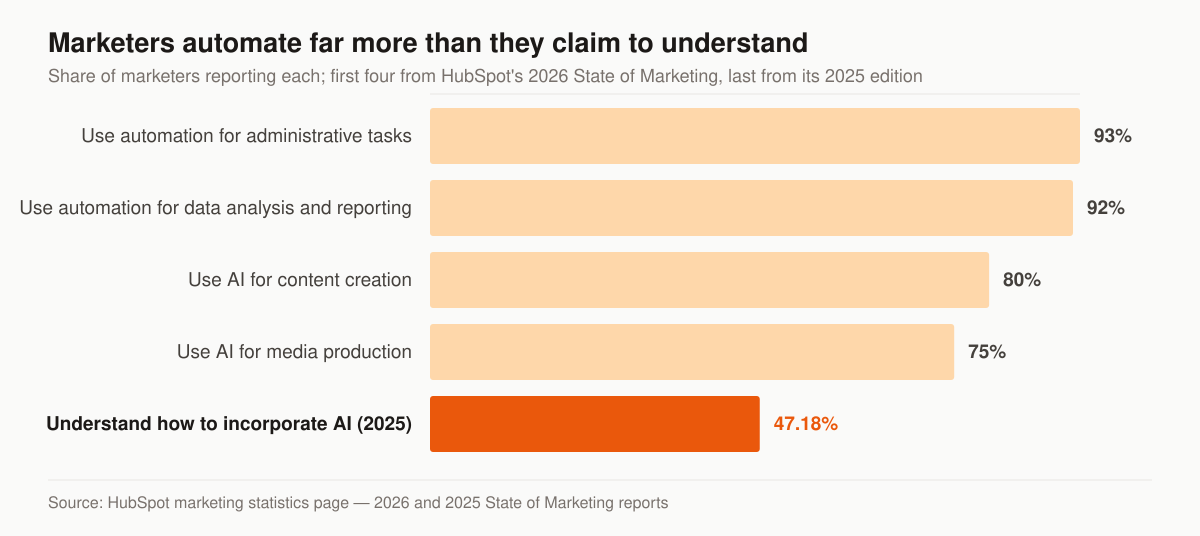
Chart: share of marketers reporting each item. The first four bars are from HubSpot’s 2026 State of Marketing Report; the last is from its 2025 edition. Both are published on HubSpot’s marketing statistics page.
That last bar is the one to sit with. Adoption is close to universal and understanding is close to a coin flip, which is exactly the condition under which automated systems ship mistakes at volume. It is also a reason not to treat the adoption numbers as a mandate: those figures describe marketers across every industry, not licensed agents operating under carrier and CMS rules, and the compliance cost of a bad automated message is higher here than almost anywhere else.
For an agency, the useful split is between drafting and deciding. AI drafts well: subject-line variants, a first pass at the day-4 objection email, the same nurture sequence rewritten for a different line of business, summaries of a call for the CRM note. It decides badly, because it does not know which claims your carrier contracts allow, which disclaimers a Medicare message needs, or that the prospect who just replied is mid-underwriting. Every AI draft in an insurance sequence goes through the same review a human draft goes through, and Medicare copy goes through compliance review regardless of who typed it.
One line is not a judgement call at all. Per the FCC’s guide, AI-generated voice calls are illegal unless the consumer has agreed to receive them or the caller is exempt — so an AI voice agent dialling your aged list is a consent question first and a technology question second. Automating the message is not the same permission as automating the voice that delivers it.
Where automation programs break
Automation fails quietly. Nothing errors out; the sequence just keeps sending while the results decay. Six failure modes account for most of it, and each one has a check you can run this week:
- The suppression list covers one channel. A contact replies STOP to a text, the SMS stops, and the email cadence keeps going for another three weeks. Test it by opting yourself out on one channel and watching the others.
- Contacts get stranded mid-sequence. A workflow with no exit for “booked” or “sold” keeps nurturing people who already bought. Pull a list of contacts in an active sequence whose lifecycle stage is issued — it should be empty.
- Double enrollment. A lead that matches two entry conditions receives two cadences at once, which reads to the recipient as a spamming agency. Check any contact that arrived through more than one source.
- The copy is a year old. Rates, plan names, enrollment dates and carrier language all move. A sequence written for last year’s enrollment season is still sending this year’s prospects last year’s dates.
- Nobody owns it. The person who built the workflow left, and no one has opened the builder since. Automation needs a named owner with a monthly slot on the calendar, or it becomes furniture.
- Sending reputation erodes before anyone notices. Deliverability degrades gradually, so open rates slide for a month before anyone connects it to authentication or complaint volume. The mechanics of that layer sit in our done-for-you email and SMS automation service page, which covers the sender-authentication setup in detail.
The common thread is that all six are maintenance failures, not design failures. The build is a weekend. The upkeep is forever, and it is the part that decides whether any of this earns its cost.
A 90-day build order
Sequencing matters more than scope. Build the automation that works leads you have already paid for, prove it, then extend into the book. The table below is the order we build in, and what has to be true before each phase starts.
| Window | What gets built | Prerequisite | The number that tells you it worked |
|---|---|---|---|
| Days 1–30 | Speed-to-lead: instant text and email, first-dial task, reply-pause, cross-channel exits | Consent field populated on every inbound record; sender authentication in place | Contact rate on new leads, measured against your pre-launch baseline |
| Days 31–60 | The full multi-touch nurture cadence, plus re-engagement for no-answer and aged records | Speed-to-lead running clean for two weeks with a stable opt-out rate | Appointments set per hundred leads worked |
| Days 61–90 | Book-side automation: review requests, renewal triggers, cross-sell prompts | Policy data syncing from the management system into the CRM | Second policies per household, and review count on your Google profile |
Two notes on that schedule. Nothing in days 61–90 works without the data sync described above, so start that conversation with your management-system vendor in week one, not week nine — it is the long-lead item. And the cross-sell leg pays off in proportion to how well your book is segmented in the first place, which is the subject of our guide to cross-selling and account rounding. Agencies whose priority is keeping the book rather than growing it should read the retention automations as the main event, not the third phase; that is the shape of our client retention service.
Software or service: who runs the machine?
Searches for “insurance email automation services” and “insurance email automation solutions” are really one question: should I build this or hire it? The honest split:
- Build it yourself if you’ll maintain it. Speed-to-lead plus a basic nurture sequence is a weekend project in any of the platforms above, and owning the system means owning the asset.
- Hire it out if the maintenance won’t happen. The gap between a demo and a durable system is deliverability setup, consent capture, branching logic, and monthly tuning — that operational layer is exactly what our done-for-you email and SMS automation service builds and runs inside your CRM, so the asset stays yours either way. Note the distinction: automation is triggered by behaviour, while a recurring agency newsletter is scheduled and goes to the whole list. Most books need both, and they are separate builds.
Either path beats the default, which is paying for leads and only ever working a fraction of them. If you want a second set of eyes first, grab a free look at where your follow-up leaks — we’ll map your current speed-to-lead and touch count against the cadence spec, no pitch attached.
- Best CRM for Insurance Agents: An Honest, Vendor-Neutral Guide
A vendor-neutral guide to the best CRM for insurance agents — CRM vs AMS, the best tools by line and budget, real 2026 pricing, and where marketing fits.
- The Insurance Agency Marketing Plan That Fits on One Page
Build an insurance agency marketing plan in 7 steps: positioning, channels by line, quarterly budget, KPIs, compliance. Free fill-in one-page template.
- Insurance Email Marketing Examples: 10 Emails for the Whole Client Lifecycle
Insurance email marketing examples for every scenario — new leads, quote follow-up, renewals, win-backs, referrals, AEP — with subject lines and timing.
- 45 Marketing Ideas for Insurance Agents, Ranked by Effort and Impact
45 marketing ideas for insurance agents, ranked into four tiers by effort and impact. Every idea notes the line it fits, from final expense to P&C.