Service
Insurance Facebook Ads, Managed to Cost Per Sold Policy
We run your Meta advertising inside the Special Ad Category rules that now govern insurance, and report it to cost per sold policy instead of cost per click.
- We run our own final-expense book
- No pitch deck — we screen-share real numbers
- TCPA-aware · CMS/AEP-compliant · Meta Special Ad Category
- Core Web Vitals < 2.0s LCP
Insurance Facebook ads are Meta campaigns that must now run inside the Financial products and services Special Ad Category, which Meta requires for US insurance advertisers. That category removes age, ZIP, gender, exclusion, and lookalike targeting, so managed insurance Facebook ads win on creative, offer, and speed-to-lead rather than audience settings.
What you get
What your insurance facebook ads program includes
- Campaign build in your ad account with the correct Special Ad Category declared up front, so ads are not rejected or quietly throttled after spend starts
- Creative built to do the qualifying that Meta's audience panel no longer can — self-selecting hooks by line, tested in a running rotation rather than set once
- Instant lead forms with real qualifying questions, or a dedicated landing page where the offer earns the extra step, chosen per line instead of by default
- Meta Pixel and Conversions API wired live before budget scales, so Meta optimizes toward booked appointments rather than cheap form fills
- Consent language and disclosure placement built into the form and page, with CMS/TPMO disclaimer handling on Medicare funnels
- Speed-to-lead routing into your CRM — instant text and call trigger — because a Meta lead cools faster than a search lead
- Weekly reporting that maps spend to leads, appointments, and issued policies, so budget moves on cost per sale rather than CPL
How it works
How the insurance facebook ads engagement runs
- 01
Category and account audit
We check which Special Ad Category your campaigns should be declaring, review past rejections, and read whatever conversion data the account already has.
- 02
Offer and creative build
We write the self-selecting hooks per line, because under Special Ad Category limits the creative is doing the targeting the audience panel used to do.
- 03
Tracking before spend
Pixel, Conversions API, and CRM routing go live first, so the algorithm learns from booked appointments instead of raw leads.
- 04
Test, cut, scale
Creative runs in rotation against a cost-per-appointment target; losers are cut weekly and budget moves to whatever is producing placed business.
- 05
Report to cost per sale
You get spend mapped to leads, appointments, and issued policies against your close rate and average commission, not a CPL screenshot.
Google Ads has a service page. Organic social has a service page. Meta advertising — the channel most insurance agents actually run — has been folded into both and owned by neither. This is the page that owns it, and it starts with the rule change that reshaped the channel.
Do insurance Facebook ads have to run in a Special Ad Category?
Yes, in the US. In October 2024 Meta introduced a Special Ad Category called Financial products and services, which replaced the previous Credit ads category. Meta’s own examples of ads in that category are “those promoting insurance, bank accounts, investment services and payment services.” And the designation is not optional: Meta states that “Starting January 21, 2025, using the Special Ad Category designation is required for advertisers based in the United States or reaching audiences in the United States running financial products and services campaigns. Ads may be rejected if the advertiser does not choose an appropriate Special Ad Category.”
That is a bigger deal than it sounds. Declaring the category strips out most of the audience panel agents were taught to use.
Table: the audience levers a Financial products and services campaign loses, and what Meta’s audience help page says about each.
| Audience lever | Status in the category | Meta’s own wording |
|---|---|---|
| Age | Limited or unavailable | “Options are generally fixed to include ages 18 through 65+ for housing, employment and credit ads” |
| Gender | Unavailable | “Audiences must include all genders. You can’t edit this option.” |
| ZIP / postal code | Unavailable | Target by “country, region, state, province or city… but not by ZIP code or postal code” |
| Location exclusion | Unavailable | “You also can’t exclude locations.” |
| City or pin-drop radius | Expanded | A 15-mile (25-kilometer) radius is required in the US and Canada |
| Advantage+ lookalike | Unavailable | “Advantage+ lookalike is unavailable.” |
| Detailed targeting | Partly unavailable | “Some demographic, behavior and interest options are unavailable.” |
Meta notes its category examples are “not a comprehensive list… and does not constitute legal advice,” so treat the category call as something to confirm against your own products and counsel rather than inherit from a blog post.
What changes when you can’t target by age or ZIP?
Everything moves upstream into the offer and the creative. Agents used to buy precision from the audience panel; now they have to earn it from the ad itself. That is the whole discipline of running insurance Facebook ads well in 2026:
- Self-selecting hooks. The ad has to say who it is for, out loud, so the wrong person scrolls past instead of costing you a lead. “Homeowners with a mortgage under 15 years” does the filtering the ZIP radius used to.
- Qualifying on the form, not in the audience. The questions on your instant form are now your primary filter. Two well-chosen questions cut junk harder than any interest stack ever did.
- Broad plus signal. With lookalikes gone, the pixel and Conversions API are what teach Meta who converts. Starve the conversion signal and you are running a reach campaign with a lead-gen label on it.
- Geography by city, not radius pins. Plan coverage by state and metro from the start, and price your funnel knowing a “local” audience will include everyone within 15 miles of the city center.
- Creative volume as the new targeting budget. When the panel is fixed, the only variable left is the ad. Campaigns that stop testing creative stop improving.
If you want the step-by-step build rather than the managed version, our walkthrough on running Facebook ads for insurance agents covers account setup end to end. This page is the done-for-you side of the same system.
What can an insurance Facebook ad actually say?
Less than agents expect, and the limit is not the Special Ad Category — it is a separate policy that catches the exact copy an insurance ad wants to write. Meta’s Privacy Violations and Personal Attributes policy says the company does not “allow advertisers to run ads that share or ask for private information about users or assert or imply the personal attributes of the viewer of an ad, such as their race or age.” The prohibited-attribute list Meta publishes runs to eighteen items, and four of them sit directly under the insurance pitch: “Age”, “Family status”, “Physical or mental health (including medical conditions)” and “Vulnerable financial status”. A parallel privacy list covers residential information, financial information, and medical information.
One of Meta’s own worked examples of a violating ad is a financial-services ad. The text it gives is “Find out how our financial services can help people like you who just turned 62. Learn about how we can help you receive retirement benefits,” and its ruling is that the ad “implies knowledge of the exact age of the person who sees the ad.” The remedy Meta suggests is not softer language but a change of subject: “Explain how your financial services are positioned to help potential customers, including seniors.”
That is the rewrite rule. You may describe the product, the eligibility rule, and the buyer in the third person. You may not write copy that behaves as though you already know something about the reader. Meta is explicit that the second person survives the policy on its own: “you can use the words ‘you’ or ‘your’ as long as your ad doesn’t mention any prohibited personal attributes and complies with our Meta Advertising Standards.” And the policy reaches questions as well as statements — Meta says it does not allow “ads that ask questions about personal attributes,” so turning an assertion into a question does not clear it.
The table below takes Meta’s published violating examples and shows the rewrite we run for the equivalent insurance angle, so a hook still self-selects without asserting anything about the reader.
| Attribute at risk | Meta’s example of violating text | Meta’s own ruling | The angle we write instead |
|---|---|---|---|
| Age | “Find out how our financial services can help people like you who just turned 62.” | “This ad implies knowledge of the exact age of the person who sees the ad.” | Name the product rule: what a plan starting at 65 covers |
| Physical health | “Have you been diagnosed with cancer? Come to our clinic for treatment.” | “This ad contains a statement that assumes the audience has cancer, and uses the word ‘you’.” | Describe underwriting: which conditions a guaranteed-issue policy accepts |
| Vulnerable financial status | “Are you bankrupt? Our firm has solutions.” | “This ad implies knowledge of an individual’s financial status, and uses the word ‘you’.” | State the price band and what it buys, with no assumption attached |
| Disability | “Are you disabled? We can help!” | “This ad implies that the audience has a disability, and uses the word ‘you’.” | Explain the benefit and who it is designed for, in the third person |
Sources: Meta’s Privacy Violations and Personal Attributes advertising policy. The rewrite column is our method, not Meta guidance.
This is where the self-selecting hook and the policy meet, and the reconciliation is narrower than it looks. “Homeowners with a mortgage under 15 years” describes a product fit. “Still paying a mortgage you took out before 2015?” asserts something about the reader. We treat the first as writable and the second as a rejection risk, because it implies something about the reader in the pattern Meta’s examples describe. That line is where the creative work on an insurance account actually happens.
What retargeting still works inside the category?
Custom audiences do. Meta’s audience help page names the ones that go — “Advantage+ lookalike is unavailable,” saved audiences are updated to comply, “Excluding any detailed targeting selections is also unavailable” — but its own instructions for building a compliant audience read: go to your ad set, scroll to Audience controls, “Create a new custom audience.” It adds that “Certain audience options such as custom audiences may only be available via Meta Ads Manager,” which is a build note rather than a prohibition.
So the warm side of the funnel survives the category change largely intact while the cold side loses its precision. In practice that inverts the usual order of work on an insurance account. Instead of buying a narrow cold audience and retargeting loosely, you buy a wide cold audience, let the creative do the filtering, and spend the retargeting budget on the people the creative already qualified — page and profile engagers, video viewers who watched most of an explainer, form openers who did not submit.
The constraint worth planning around is that you cannot exclude. With no exclusion targeting and no location exclusions, a converted lead can keep seeing the acquisition ad, and a neighboring metro you do not write in can keep absorbing impressions. The fix is structural rather than clever: separate campaigns per geography, tight enough that a wasted impression is a small share of the budget instead of a hidden one.
Lead form or landing page for insurance ads?
There is no universal answer, only a per-line one. The trade is volume against qualification, and the higher your commission per case, the more the extra step pays for itself.
Table: how instant lead forms and landing pages differ on the four decisions that actually matter.
| Decision | Meta instant form | Dedicated landing page |
|---|---|---|
| Cost per lead | Lower — no site load, no bounce | Higher — you pay for the click and the load |
| Lead quality | Softer; auto-filled fields | Harder; the prospect chose to continue |
| Qualification depth | A few questions before submit | Full offer, proof, and disclosure before submit |
| Conversion signal | Fires in-platform | Fires on your page via pixel and Conversions API |
We treat a low instant-form CPL as a reading to be checked rather than a result to be reported, because the form is the cheapest place on the funnel to buy a submission and the most expensive place to buy a bad one. When we move a line to a page, we build it as part of the conversion-focused landing page work rather than pointing the ad at a homepage.
What can a Facebook lead form ask an insurance prospect?
Not the qualifying questions agents reach for first. Meta’s lead ads documentation carries a restriction that is easy to miss and expensive to discover after a form is built: “if you use lead ads for housing, employment, or financial products and services opportunities based in the US or targeted to the US or Canada, you may not collect certain information. This includes personal information such as age, gender, marital/relationship status and location information, such as street address, city, postal code and zip code.”
Read that against a standard insurance intake and the problem is plain. Date of birth drives final expense rating and Medicare eligibility; ZIP code decides plan availability and rating. Both are off the instant form for these campaigns. Meta leaves one narrow door open — “advertisers may use custom fields to ask about their customer’s location preferences for their service, but may not mimic prohibited prefill questions or ask the prohibited information shared above” — which is a service-preference question, not a rating field wearing a costume.
The table below sets the fields an insurance intake normally opens with against what a lead form for this category can carry, and where the missing answer has to be collected instead.
| What the intake wants | On a Meta instant form | Where it gets collected instead |
|---|---|---|
| Date of birth or age band | Not collectable for this category | The callback, or a landing-page form on your own domain |
| ZIP or postal code | Not collectable for this category | The callback, or your own page |
| Marital or relationship status | Not collectable for this category | The licensed conversation |
| Coverage amount or product interest | Custom question | On the form |
| Preferred contact time | Custom question | On the form |
| Appointment slot | Appointment request field | On the form |
| Consent language and disclosure | Custom disclaimer | On the form |
Source: Meta, About lead ads, which also documents the custom-question, appointment-request, conditional-answer and custom-disclaimer fields.
This is the argument for the landing page that the form-versus-page debate usually skips. A form on your own domain is not bound by Meta’s collection list, so the fields that decide whether a lead is worth an agent’s hour can sit in front of the submit rather than behind a callback. On lines where the case is worth enough to pay for the click and the load, that is the whole trade. Where the instant form stays, the qualification moves into the follow-up, which makes the routing described in our appointment setting program part of the campaign build rather than a downstream nicety.
Which insurance lines does this run for?
Meta behaves differently line by line, mostly because the compliance overlay changes even when the ad category does not. Each line has its own build page:
Table: the six lines we run Meta campaigns for, and the constraint that shapes each one.
| Line | The constraint that shapes the build | Page |
|---|---|---|
| Final expense | Senior audience, no age targeting to reach it with | final expense Meta campaigns |
| Medicare Advantage | CMS/TPMO rules govern the creative and the callback | Medicare Advantage ad compliance |
| Mortgage protection | Ads tied to home ownership trip the Housing category | mortgage protection ads under Housing |
| IUL | Non-guaranteed product; no return claims survive review | compliant IUL ad systems |
| Annuity | High ticket; the funnel has to qualify for investable assets | safe-money annuity angles |
| Auto | Rate-shoppers; the offer has to filter, and speed decides the bind | managed auto insurance campaigns |
Mortgage protection is the one line where a second category can apply on top: ads built around home ownership are routinely classified under Housing, which is policed hardest of the three restricted categories.
What do insurance Facebook ads cost?
Two separate numbers, and conflating them is how agencies end up arguing about the wrong one. The media budget goes to Meta and is billed at cost, straight to the platform. The management fee is what you pay to have the account built, tested and reported. Our published bands sit on the pricing page: Foundation at $2,500 a month, Growth at $3,500, and Full-Funnel at $5,500, which is the tier that carries managed paid ads on Google and Meta. A one-time website build runs $2,500–$8,000. Ad spend is separate from all of those.
For the media side, the closest thing to a public benchmark is WordStream’s 2025 Facebook Ads report, last updated September 15, 2025, drawn from 554 US traffic campaigns and 726 US leads campaigns running between April 1, 2024 and June 30, 2025. Its finance and insurance category posts the highest cost per click of any category it tracks on the traffic objective, at $1.22 against an all-industry figure of $0.70, and one of the three lowest click-through rates in the set at 0.98%, behind automotive repair on 0.80% and physicians and surgeons on 0.83%, against an all-industry 1.71%.
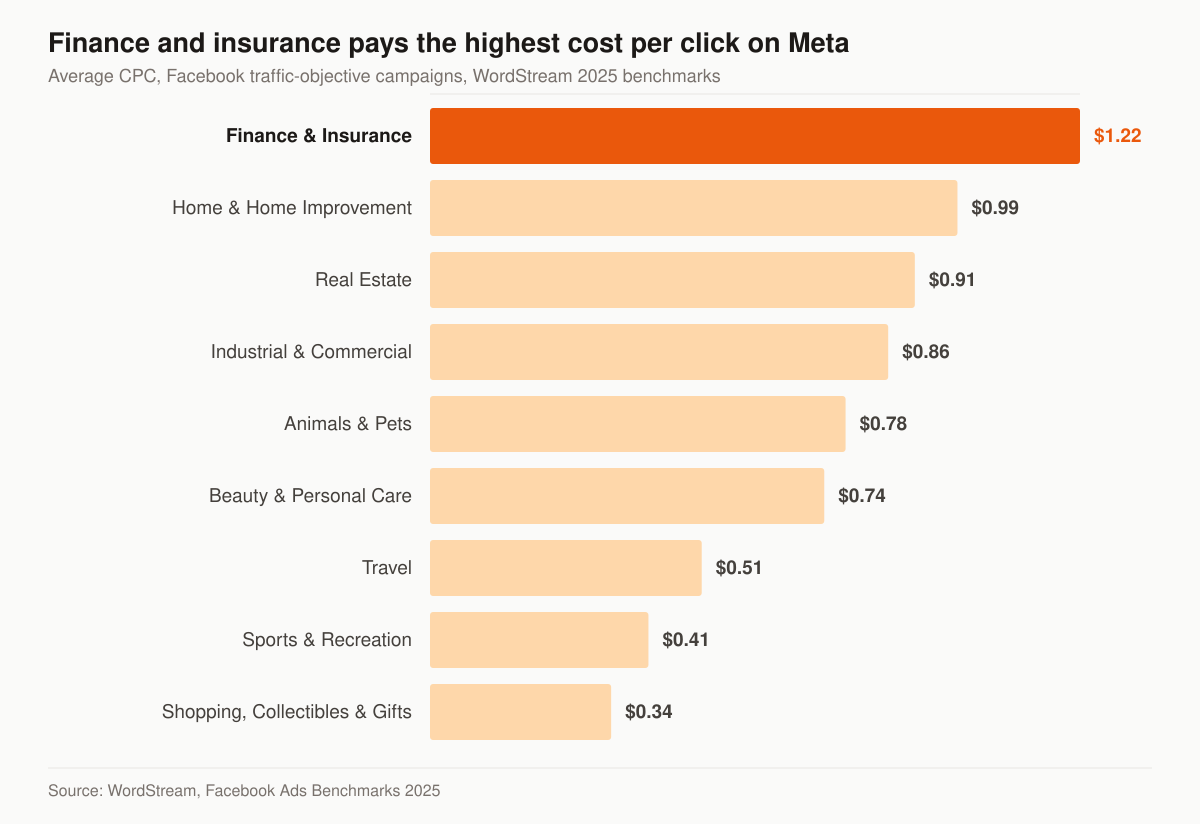
Average cost per click on Facebook traffic-objective campaigns by business category. Source: WordStream, Facebook Ads Benchmarks 2025, last updated September 15, 2025. WordStream notes that its “averages” are “technically median figures to account for outliers.”
Two honest caveats before anyone plans against that chart. First, WordStream’s leads-objective tables — the ones carrying cost per lead — do not publish a finance and insurance row at all, so there is no published CPL benchmark for this vertical in that report to quote. What it does give is an all-industry lead figure: $27.66 per lead, up 20.94% year over year from $22.87, at a 7.72% conversion rate and a $1.92 cost per click. Second, a benchmark drawn from one vendor’s client base is a sanity check, not a forecast for your metro and your line.
The table below sets WordStream’s two Facebook objectives side by side with the Google Ads figures from the same publisher, because the choice between search and social is usually argued on the wrong pair of numbers.
| Metric | Facebook, traffic objective | Facebook, leads objective | Google Ads |
|---|---|---|---|
| Average cost per click | $0.70 | $1.92 | $5.26 |
| Finance and insurance cost per click | $1.22 | Not published | Not published in this table |
| Average click-through rate | 1.71% | 2.59% | Not published in this table |
| Average conversion rate | Not published for this objective | 7.72% | Not published in this table |
| Average cost per lead | Not published for this objective | $27.66 | $70.11 |
Source: WordStream, Facebook Ads Benchmarks 2025. Blank cells are blank because the source does not publish that cut, not because the number is zero.
Where that leaves the budget conversation is simple enough. A test budget has to buy enough conversions for the algorithm to learn something, and at insurance click prices that floor is higher than in a cheap vertical. We size it from your close rate and average commission rather than from a round number, and we show that arithmetic before you commit — which is what the free marketing audit produces.
Why do insurance Facebook ads get rejected, and what happens then?
Because a machine reads them first. Meta states that its “ad review system relies primarily on automated technology to apply our Advertising Standards to the millions of ads that are run across Meta technologies,” with human reviewers used “to improve and train our automated systems, and in some cases, to manually review ads.” The review covers images, video or text, targeting information, the ad destination, special ad categories, advertiser permissions, and other components. Meta says “Most ads are reviewed within 24 hours, although in some cases it may take longer.”
Two properties of that system decide how a managed account should behave. The first is that approval is not final: Meta says “An ad may not be reviewed against all policies before delivering impressions, although all ads are subject to re-review at any time.” An insurance ad can run, then stop, with nothing about the ad having changed. The second is that your record follows you — Meta says it “may consider an advertiser’s historical compliance with our Advertising Standards when deciding whether a given ad warrants further review for a specific policy.” That is a reason to treat a rejection as an account-level cost rather than a one-ad inconvenience.
The table below lists which edits restart the review clock and which do not, which is the difference between a scheduled optimization and an unplanned day of downtime.
| Change to a live ad or ad set | Triggers a new review |
|---|---|
| Targeting | Yes |
| Creative — images, text, links or videos | Yes |
| Optimization | Yes |
| Billing event | Yes |
| Bid amount | No |
| Budget | No |
| Ad set schedule | No |
Source: Meta, About ads in review.
The operational consequence is that budget and bid moves are safe mid-flight and creative swaps are not, so a rotation gets scheduled rather than fired off on a Friday. Where an ad is rejected and we think the call is wrong, Meta’s route is to request another review in Meta Business Support Home; we run that as part of the account work rather than leaving an agency principal to argue with a form.
What has to be disclosed on a Medicare Facebook ad?
More than Meta requires, because CMS gets a say. If the entity running the funnel is a third-party marketing organization under 42 CFR 422.2260 and it sells plans on behalf of more than one Medicare Advantage organization, the Medicare Advantage rules require a standardized disclaimer, and place the duty on the MA organization to ensure it is used. The text depends on coverage. Where the TPMO does not sell for every MA organization in the service area, 42 CFR 422.2267(e)(41) sets the disclaimer as: “We do not offer every plan available in your area. Currently we represent [insert number of organizations] organizations which offer [insert number of plans] products in your area. Please contact Medicare.gov or 1-800-MEDICARE to get information on all of your options.” Where the TPMO does sell for all of them, the disclaimer becomes: “Currently we represent [insert number of organizations] organizations which offer [insert number of plans] products in your area. You can always contact Medicare.gov or 1-800-MEDICARE for help with plan choices.”
The placement conditions matter as much as the words. The same paragraph requires that the disclaimer be “Verbally conveyed during sales calls prior to the discussion of any benefits,” “Electronically conveyed when communicating with a beneficiary through email, online chat, or other electronic means of communication,” “Prominently displayed on TPMO websites,” and “Included in any marketing materials, including print materials and television advertisements, developed, used or distributed by the TPMO.”
Read those four together and a Meta funnel touches at least three of them: the landing page is a TPMO website, the instant form’s confirmation email is an electronic communication, and the callback is a sales call where the disclaimer lands before benefits are discussed. That is why the disclaimer is a build item on a Medicare campaign rather than a legal footnote added later — and why the Medicare marketing program treats AEP creative and the disclosure chain as one workstream. We build the placement; the compliance sign-off is yours and your upline’s, and we are describing a regulation here rather than giving legal advice.
What consent do you need before you call or text a Meta lead?
It depends on how you plan to dial. A Meta instant form is a lead, not a consent record, and the federal definition of the consent that matters is narrow and specific. Under 47 CFR 64.1200(f)(9), “prior express written consent” means “an agreement, in writing, bearing the signature of the person called that clearly authorizes the seller to deliver or cause to be delivered to the person called advertisements or telemarketing messages using an automatic telephone dialing system or an artificial or prerecorded voice, and the telephone number to which the signatory authorizes such advertisements or telemarketing messages to be delivered.”
Note the scope inside that sentence: the definition governs messages delivered “using an automatic telephone dialing system or an artificial or prerecorded voice.” It is a definition of one term in one rule, not a blanket ban on calling a lead, and it does not on its own settle what a manually dialed call requires.
The definition then adds requirements on the agreement itself. It must include “a clear and conspicuous disclosure” telling the signer that by executing it they authorize the seller to deliver telemarketing calls using an automatic telephone dialing system or an artificial or prerecorded voice, and that “The person is not required to sign the agreement (directly or indirectly), or agree to enter into such an agreement as a condition of purchasing any property, goods, or services.” A signature can be electronic: the rule says “signature” includes “an electronic or digital form of signature, to the extent that such form of signature is recognized as a valid signature under applicable federal law or state contract law.”
Practically, that shapes where the consent language sits. On an instant form it goes in the custom disclaimer field, above the submit, in words the prospect can read before they act. On a landing page it goes next to the button. Either way the record has to be retrievable per lead, which is a CRM configuration question rather than a copywriting one, and it belongs to the same build as the lead generation system the ads feed. For the buying-leads side of the same rule, our TCPA guide for agents goes further. We build funnels with this in mind and we are not your lawyer; the compliance call is yours.
How is this different from your organic social or Google Ads?
Three different jobs, three different budgets, one scoreboard.
- Meta advertising — this page. Paid demand generation into a cold audience, constrained by the Special Ad Category, won on creative and follow-up speed.
- Organic social — the trust layer. Cadence, content pillars, and platform fit live on our organic and paid social program, and it is what makes a cold ad click convert once someone checks your page.
- Paid search — captures people already looking. That is insurance PPC run to cost per sold policy, with its own keyword and Local Services Ads mechanics.
When an agency wants all three managed against one budget with one report, that is the full insurance advertising engagement rather than a single-channel retainer.
What number decides whether Facebook ads are working?
Not cost per lead. A Meta lead is cheap by design — the platform is very good at producing form fills from people who half-remember filling one out. The honest chain is spend → lead → contacted → appointment held → policy issued, and only the last link pays you. We instrument all five so a $9 lead that never answers loses to a $28 lead that books.
Want a read on whether your Meta account is even declaring the right category before we talk budget? Start with a free marketing audit — we open the account, check the category, the pixel, and the form logic, and show you where it is leaking. If you would rather see the commercial shape first, our pricing tiers lay out where a managed Meta program lands.
Guides that go deeper
Frequently asked questions
Do insurance Facebook ads have to use a Special Ad Category?
What targeting do you lose in the Financial products and services category?
Did the old Credit Special Ad Category go away?
Are Facebook lead forms or landing pages better for insurance?
How much does Facebook ads management cost for an insurance agency?
Do you run the ads, or sell me leads?
Can a Facebook lead form ask for a prospect's age or ZIP code?
Who is the licensed party on the ads?
See exactly where your agency is leaking leads.
15 minutes. We screen-share our own live lead dashboard and tear down your funnel line by line — no pitch deck, just numbers.
- Site speed & conversion
- Local + AI-search visibility
- Ad efficiency
- Your cost per lead vs ours
No obligation · no pitch deck