Who we serve
Mortgage Protection Facebook Ads, Run Under the Housing Category
Done-for-you Facebook ads for mortgage protection agents are managed campaigns run inside a Meta Special Ad Category — housing, financial products and services, or both — which fixes age at 18 through 65+, removes ZIP targeting and drops most detailed interests. You win on creative, follow-up speed and cost per issued policy.
Free · 15-minute teardown · no pitch deck
- We run our own final-expense book
- No pitch deck — we screen-share real numbers
- TCPA-aware · CMS/AEP-compliant · Meta Special Ad Category
- Core Web Vitals < 2.0s LCP
Mortgage protection is one of the few life lines where the buyer is easy to picture: someone just signed a mortgage, has a family, and does not want that payment landing on a spouse if they die. The problem is that the exact thing that makes the buyer easy to picture — a home and a mortgage — is also what trips Meta’s strictest ad rules. Get that wrong and your account gets flagged before a single lead comes in.
This page sits inside our mortgage protection marketing program and explains how done-for-you Facebook ads for mortgage protection agents actually run under those rules. The broader channel mechanics live in our insurance social media advertising service, and the platform-level build sits in our insurance Facebook ads service.
We do not claim final-expense lineage here — different buyer, different motion. What carries over is the part that matters: the same conversion systems and ad discipline that work for our senior-market clients, learned from campaigns we run ourselves.
The Housing Special Ad Category is the whole game
Meta classifies anything tied to home ownership, mortgages, or buying a house under the Housing Special Ad Category. Because mortgage protection is sold around a mortgage and a home, your ads will almost always get pulled into it. The moment that flag applies, Meta strips out the targeting levers agents instinctively reach for:
- No targeting by exact age band — you get 18+ only
- No gender targeting
- No ZIP-radius targeting under a 15-mile minimum
- Most detailed interest and behavior categories removed
Housing is also the category Meta polices hardest, because fair-housing law sits behind it. Copy that even implies you are excluding people by age, family status, or neighborhood gets rejected. So you stop hand-picking audiences and let the creative do the qualifying. A hook like “Just bought a home? Here’s what happens to the mortgage if you’re not here” self-selects the right person far better than any demographic checkbox could.
Meta’s own framing of why the categories exist is worth reading before you argue with one. Its help center describes a Special Ad Category as applying to ads with specific requirements such as “Limited audience selection tools for ads about employment, housing opportunities or financial products and services to help protect people from unlawful discrimination across our platforms,” and then instructs advertisers plainly: “We encourage you to broaden—not restrict—your audience.”
Housing or financial products and services: which label does the campaign take?
This is the question that stalls a launch, and it has a shorter answer than the arguments suggest.
Meta’s Marketing API accepts five values in the special_ad_categories field: HOUSING, FINANCIAL_PRODUCTS_SERVICES, EMPLOYMENT, ISSUES_ELECTIONS_POLITICS and NONE. Two of them have a claim on a mortgage protection ad. Meta introduced the financial products and services category in October 2024 to replace the older Credit ads category, and its help page states that “Examples of financial products and services ads include those promoting insurance, bank accounts, investment services and payment services.” Mortgage protection is insurance. It is also sold entirely in the language of a home loan, which is what pulls it toward housing.
The relief is that the argument is mostly academic at the ad-set level. Meta’s developer documentation says the audience and product restrictions written for the housing and employment inputs “will also apply to the new FINANCIAL_PRODUCTS_SERVICES input.” Same fixed age band, same radius floor, same missing interests. And the field is an array, not a single choice — Meta’s own eligibility example passes special_ad_categories=HOUSING,EMPLOYMENT, so a campaign can carry more than one label where more than one genuinely applies.
Two cautions, both in Meta’s own words. On its list of category examples, Meta prints: “This is not a comprehensive list of examples and does not constitute legal advice.” And on enforcement, its developer documentation warns: “If you send us an incorrect special_ad_category, there is a risk your ads will be paused until the campaign is adjusted.” So confirm the designation inside your own ad account against your actual creative, and route the classification question to compliance counsel. We provide marketing services, not legal advice.
Regular insurance category vs Housing category
This table compares the two labels a mortgage protection campaign can land on, and where the practical difference actually shows up. Both restrict the same levers, but the enforcement and the safe angles differ. Knowing which bucket your ad lands in changes how you write it.
| Lever | General insurance category | Housing category (mortgage protection) |
|---|---|---|
| Exact-age targeting | Removed | Removed |
| ZIP / radius | 15-mile minimum | 15-mile minimum, scrutinized harder |
| Detailed interests | Removed | Removed |
| Copy enforcement | Moderate | Strict — fair-housing review |
| Safe angle | Affordability, peace of mind | New-homeowner, payment protection |
Why Meta polices the housing bucket hardest
Agents treat the housing rules as arbitrary platform policy. They are not. They are the residue of a federal lawsuit, and knowing the history tells you which parts of the system will never loosen.
On 21 June 2022 the Department of Justice announced a settlement with Meta resolving allegations of discriminatory advertising under the Fair Housing Act — the department called it “the Department’s First Case Challenging Algorithmic Discrimination Under the Fair Housing Act.” Four terms of that settlement still shape the ad account you are handed today:
- Meta had to stop using the “Special Ad Audience” tool for housing ads by 31 December 2022 — the tool previously called “Lookalike Audience.” That is why lookalikes are simply absent from your housing campaign rather than merely discouraged.
- Meta had to build a new system “to address disparities for race, ethnicity and sex between advertisers’ targeted audiences and the group of Facebook users to whom Facebook’s personalization algorithms actually deliver the ads.” Delivery, not just targeting, is under supervision.
- “Meta will not provide any targeting options for housing advertisers that directly describe or relate to FHA-protected characteristics,” and it must notify the United States before adding any new targeting option.
- “Meta must pay to the United States a civil penalty of $115,054, the maximum penalty available under the Fair Housing Act.”
Meta’s developer documentation says the same thing from the other side: “As part of a historic settlement agreement, Meta made changes to the way it manages housing, employment, and credit ads. Special Ad Categories were created to support that commitment.” An independent third-party reviewer verifies compliance on an ongoing basis, with court oversight. That is why the housing bucket does not negotiate.
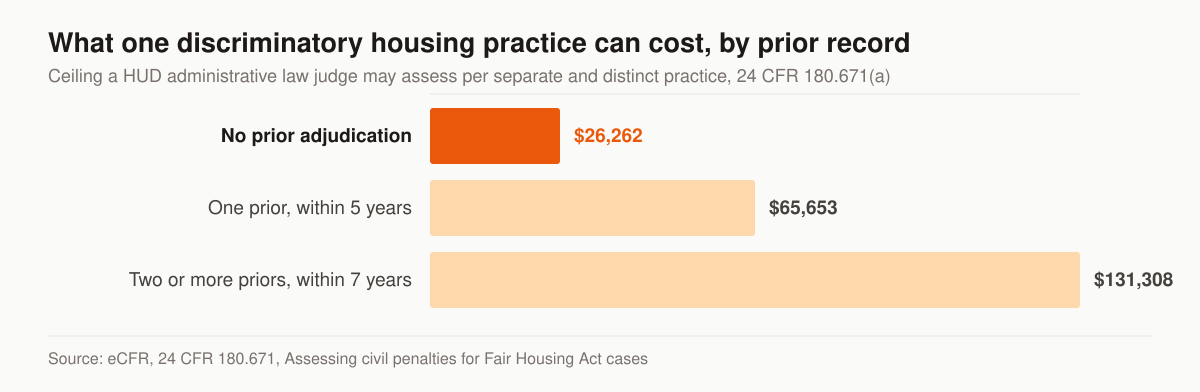
Maximum civil penalty per separate and distinct discriminatory housing practice. Source: eCFR, 24 CFR 180.671.
Read that chart for scale, not as a forecast for your ad account. Those are the ceilings a HUD administrative law judge may assess per separate and distinct discriminatory housing practice: $26,262 where the respondent has no prior adjudication, $65,653 where one prior adjudication was made in the five-year period preceding the date the charge was filed, and $131,308 where two or more were made in the preceding seven-year period. The regulation also defines the unit being counted — a separate and distinct practice is “a single, continuous uninterrupted transaction or occurrence,” and one transaction stays one practice even if it violates more than one provision or affects more than one person.
Whether the Fair Housing Act itself reaches an insurance ad is a narrower question than the penalty schedule suggests, and the scope limiters matter. The advertising provision at 42 U.S.C. 3604(c) covers making, printing or publishing “any notice, statement, or advertisement, with respect to the sale or rental of a dwelling that indicates any preference, limitation, or discrimination” on protected grounds. Section 3605 reaches “residential real estate-related transactions,” defined as “The making or purchasing of loans or providing other financial assistance” for or secured by a dwelling, and “The selling, brokering, or appraising of residential real property.” A term policy that pays off a mortgage balance is not clearly either one. But Meta’s classifier is not a court, and it sorts on signals in your copy and creative rather than on statutory scope. Build to the platform’s line and let your compliance counsel rule on the statute.
What the ad account looks like the day the category is declared
Declaring the category is not a checkbox with a warning attached. It rewrites the ad set. Meta’s Marketing API documentation is unusually specific about what changes, which makes it the honest basis for a launch checklist.
This table maps each restriction to what Meta’s documentation actually says, so you can tell a build constraint from an agency excuse.
| Lever | What Meta’s documentation says happens |
|---|---|
| Age | Options are “generally fixed to include ages 18 through 65+” |
| Gender | “Specific gender cannot be chosen” — genders default to all |
| Location exclusion | “Location exclusion is not supported” |
| Radius floor | Selections must cover at least a 15-mile or 25-kilometer radius from any city, address or dropped pin in the US and Canada |
| Geo granularity | zips, neighborhood, subcity, subneighborhood, metro_area, small_geo_area and electoral_district are all unsupported |
| Detailed targeting | Behavior and demographic targeting, interest exclusion and detailed targeting exclusion are not permitted; supported interests “have to be part of a previously approved list” |
| Lookalikes and saved audiences | Both listed as removed features |
| Custom audiences | Inclusion, exclusion and expansion all listed as supporting features |
| Bid multipliers | “You cannot use bid multipliers under a Special Ad Category” |
| Enforcement | “If you select HOUSING, EMPLOYMENT, or FINANCIAL_PRODUCTS_SERVICES as special_ad_category, all audience restrictions will be enforced with a hard error” |
Three of those rows cost agencies a launch day, so they are worth spelling out.
The first is a permission, not a setting. Meta’s error table lists code 2859024, “Certification Required,” with the message: “A business admin must review and accept our non-discrimination policy before you can run ads.” That acceptance happens in Business Settings, it is done by a business admin rather than by whoever built the campaign, and no amount of creative work substitutes for it.
The second is the customer list you were counting on. You can test a list before you plan around it: Meta exposes an is_eligible_for_sac_campaigns field on a custom audience, queried together with the categories and countries you intend to run. Checking it takes one API call. Discovering the answer at publish time costs a day.
The third is retrofitting. If the campaign already exists outside the category, Meta’s tune_for_category parameter at the ad-set level brings the targeting into compliance in one call before you change the campaign’s category — which is a cleaner path than manually unpicking a saved audience and hoping you caught everything. Our page on Facebook ads for Medicare Advantage agents walks the same machinery under a different rulebook, and the mortgage protection Facebook ads compliance guide covers the audience-planning side in more depth.
What “done-for-you” actually covers
Managed means we own the moving parts, not just the ad copy. A campaign we run includes:
- Account and pixel setup — Special Ad Category flagged correctly, the non-discrimination certification accepted by a business admin, and Conversions API wired so optimization survives iOS signal loss.
- Creative built to self-qualify — new-homeowner and payment-protection angles written to clear Housing review on the first pass.
- Lead capture — instant Facebook lead forms for volume, or a dedicated mortgage protection landing page when you want higher-intent, better-qualified leads.
- Speed-to-lead routing — leads pushed to your CRM or phone in seconds, because contact rate collapses when a fresh lead sits for hours.
- Cost-per-sale reporting — we optimize to issued policies, not raw lead count, and show you the working.
What that list deliberately excludes is as informative as what it includes. We do not sell the leads, we do not mark up the media, and we do not hold the ad account. Those three lines are where done-for-you quietly turns into done-to-you.
What a managed mortgage protection Facebook program costs
Two invoices, and conflating them is how agents end up unable to say whether the channel works.
Media is a pass-through. Your ad spend is paid straight to Meta at cost and is never marked up by us. For a sense of the market you are buying into, WordStream’s 2025 Facebook Ads Benchmarks report analysed 726 US leads-objective campaigns running from 1 April 2024 to 30 June 2025, reporting medians rather than means.
This table is the published market rate for the media, not a quote for your account.
| Metric, leads objective | All industries, 2025 | For contrast |
|---|---|---|
| Median cost per lead | $27.66 | $22.87 in 2024, a 20.94% rise |
| Median cost per click | $1.92 | $5.26 on Google Ads |
| Median conversion rate | 7.72% | 8.67% in 2024 |
| Median click-through rate | 2.59% | 2.58% in 2024 |
| Real estate, cost per lead | $16.61 | Lowest three of the fifteen categories reported |
One honest gap in that data: WordStream does not break out finance and insurance in its leads-objective tables at all. Finance and insurance appears only in the traffic-objective tables, where it carries the highest median cost per click of any category at $1.22 and the third-lowest click-through rate at 0.98%. Treat the $27.66 as the all-industries midpoint it is, not as a mortgage protection number, and expect a licensed financial product to sit above a restaurant and below a dentist.
Management is published. Managed paid ads across Google and Meta sit in our Full-Funnel tier at $5,500 per month; the Foundation tier at $2,500 and the Growth tier at $3,500 cover website, SEO and AI-search work but not managed media. A one-time website or landing-page build runs $2,500 to $8,000 depending on scope. Full detail, including what each tier contains, is on the pricing page.
The reason to publish both numbers is that a percentage-of-spend fee quietly rewards the agency for spending more of your money. A flat monthly fee against a pass-through media budget does not.
Stop measuring cost per lead
Cost per lead is a vanity number. A cheap lead that never answers is the most expensive lead you will buy. The figure that pays your bills is cost per issued policy.
The three rows below are worked arithmetic, not measured results — swap in your own CPL and close rate and the ranking can flip.
| Scenario | CPL | Close rate | Leads per sale | Cost per sale |
|---|---|---|---|---|
| Cheap lead form, slow follow-up | $9 | 1 in 25 | 25 | $225 |
| Tighter creative, fast follow-up | $16 | 1 in 10 | 10 | $160 |
| Landing page, high intent | $28 | 1 in 6 | 6 | $168 |
The cheap column also hides labor — 25 dials versus 6 for nearly the same outcome. We budget against the right-hand column from day one.
There is a second reason the cheap column is worse than it looks inside a Special Ad Category. With age, ZIP and most interests gone, the optimizer learns almost entirely from the conversion event you send it. Feed it a low-quality lead event and it will diligently find more people who submit low-quality leads. Sending a qualified-lead or booked-appointment event back through the Conversions API, rather than a raw form-fill, is a targeting lever the category did not take away. Our insurance landing pages service exists largely to create an event worth optimizing on.
What the instant form is actually collecting
Running these ads means you are dialing and texting opt-ins, and the instant form is where that permission is either captured properly or not captured at all.
The FCC defines prior express written consent at 47 CFR 64.1200(f)(9) as “an agreement, in writing, bearing the signature of the person called that clearly authorizes the seller to deliver or cause to be delivered to the person called advertisements or telemarketing messages using an automatic telephone dialing system or an artificial or prerecorded voice, and the telephone number to which the signatory authorizes such advertisements or telemarketing messages to be delivered.” Read the scope before applying it: that definition governs autodialed and artificial-or-prerecorded marketing, not every call a producer places by hand.
Where it does apply, the written agreement must carry a clear and conspicuous disclosure telling the signer two things — that “By executing the agreement, such person authorizes the seller to deliver or cause to be delivered to the signatory telemarketing calls using an automatic telephone dialing system or an artificial or prerecorded voice,” and that “The person is not required to sign the agreement (directly or indirectly), or agree to enter into such an agreement as a condition of purchasing any property, goods, or services.” The regulation accepts an electronic signature, “to the extent that such form of signature is recognized as a valid signature under applicable federal law or state contract law.”
Three consequences for how the form gets built. The consent language belongs on the form itself, where it is stored with the submission, rather than behind a link the lead never opened. The disclosure has to say that consenting is not the price of getting a quote, which rules out bundling it into the submit button. And the record you keep should tie the disclosure text, the timestamp and the number together, because a consent record that cannot reproduce what the person actually saw is not much of a record.
The FCC’s one-to-one consent rule was vacated in January 2025; the underlying consent and do-not-call rules were not. Our deeper treatment of consent capture and record-keeping sits in TCPA compliance for insurance agents buying leads. We provide marketing services, not legal advice — confirm scripts and disclosures with your compliance counsel.
Who owns the ad account, the pixel and the leads
This is the question that separates a program you can leave from a program you are stuck in. Ask it before you sign, because a proposal will not raise it for you.
Inside a Special Ad Category the conversion history stored on your dataset is the asset. Targeting is fixed by policy, so what compounds is the optimizer’s learning. An agency that runs your campaigns from its own ad account and its own pixel is holding the one thing that would let a successor pick up where they left off. Changing vendors then means starting the learning phase over at your expense, which is a switching cost dressed up as a technicality.
What to insist on, in writing, before the first dollar of media runs: the ad account sits in your Business Manager with the agency added as a partner; the dataset and Conversions API are installed on your domain; creative is delivered as editable source files, not just as live ads; lead data flows into your CRM in real time rather than into a vendor inbox; and the Page running the ads is yours.
Questions to ask before you hand an agency your ad account
The left column is what to ask; the right two columns are how to read the answer.
| Ask this | Answer that should worry you | Answer you want |
|---|---|---|
| Which Special Ad Category will you declare, and why? | “We don’t usually need to” | A specific value, and a reason drawn from your creative |
| Whose Business Manager holds the ad account? | The agency’s, “for efficiency” | Yours, with the agency as a partner |
| How is your fee calculated? | A percentage of ad spend | A flat fee, with media passed through at cost |
| What conversion event do you optimize on? | Form fills | A qualified-lead or appointment event sent via the Conversions API |
| Who writes the consent language on the lead form? | “The platform handles it” | Your compliance counsel, implemented by the agency |
| What happens to the pixel and the creative if we part ways? | Silence, or “we’d have to discuss it” | Both stay with you, stated in the agreement |
| How fast does a submitted lead reach a phone? | “We deliver a daily CSV” | Seconds, into your CRM, with routing you can see |
Two of those rows are really the same question asked twice. A vendor who owns the account and bills on spend has both the means and the incentive to keep you where you are.
The first ninety days, in order
A managed program has a build sequence, and skipping ahead is how accounts get restricted in week one.
- Access and permissions. Ad account in your Business Manager, agency added as partner, non-discrimination policy accepted by a business admin, domain verified, Page roles set.
- Measurement before media. Dataset installed, Conversions API wired server-side, the lead event defined as something worth optimizing on, and a test event confirmed in Events Manager.
- Category and structure. Category declared, one offer per ad set, budget consolidated rather than split across a dozen ad sets that each starve the learning phase.
- Creative in a batch. Several angles launched together — new-homeowner, payment-protection, coverage-lapsed-since-closing — so the first read is a comparison rather than a verdict on one idea.
- Follow-up on day one. Routing, dialer and text sequence live before the first lead lands, not after the first complaint that leads are not answering.
- Read creative early, read the program late. Cost per lead tells you which hook works within days. Cost per issued policy needs a cohort to finish being dialed, quoted and underwritten before it means anything.
That ordering is also why a paid-media engagement rarely starts on the same day it is signed. If your current agency launched ads before step two existed, the account has been optimizing on a signal nobody defined.
Where this fits — and where to buy leads
If you would rather buy mortgage protection leads, live transfers, or aged data as a product, that is a different motion. Get those direct from getinsureleads — we run marketing systems on this site, we do not sell leads here. For owned generation that you keep instead of rent, see our mortgage protection lead generation approach, and compare paid social against search in the wider insurance social media playbook and the head-to-head on Facebook ads versus Google ads for insurance agents.
Want your current mortgage protection ad spend mapped against ours — by cost per issued policy, not CPL? Take the free marketing audit, or get in touch and we will show you exactly where the budget leaks.
Guides that go deeper