How to Run Mortgage Protection Facebook Ads Without Tripping Meta's Rules
To run mortgage protection Facebook ads, flag the campaign under a Meta Special Ad Category first. That fixes age at 18 through 65+, removes gender and ZIP selection, requires a 15-mile minimum radius in the US, and makes lookalike audiences unavailable. Broad audiences, sharp creative and fast follow-up carry the campaign from there.
If you are asking how to run mortgage protection Facebook ads, the real question is usually why the old playbook stopped working. The answer is one Meta policy: the Special Ad Category. If you ignore it, you either get ads rejected or you build an audience the platform quietly refuses to honor, then watch your cost per lead drift while you blame the creative. This guide is the operator version, written by people who actually generate insurance leads, so you can launch clean and spend with intent.
Why mortgage protection ads land in a Special Ad Category
Meta uses Special Ad Categories to prevent discriminatory targeting. The valid designations are housing, employment, financial products and services, and social issues, elections or politics. Mortgage protection is an insurance product, and Meta’s own examples of financial products and services ads include “those promoting insurance” — a category Meta introduced in October 2024 to replace the older Credit ads category. Since January 21, 2025, choosing an appropriate Special Ad Category is required for advertisers based in the United States or reaching audiences in the United States, and Meta says ads may be rejected if you don’t. Meta prints its own caveat on those examples: they are not a comprehensive list and do not constitute legal advice, so if your offer sits near the housing line, check the designation in your own ad account rather than assuming.
Practically, the argument over which label applies doesn’t change your build. Housing and financial products and services carry the same restrictions, and the trade is the same either way: in exchange for being allowed to advertise, you give up the targeting levers agents lean on most.
Here is what changes the moment you flag a campaign, lever by lever.
| Targeting lever | Standard ads | Special Ad Category |
|---|---|---|
| Age | Allowed | Fixed to 18 through 65+ |
| Gender | Allowed | Specific gender cannot be chosen |
| ZIP / neighborhood / sub-city | Allowed | Not supported |
| Radius (US and Canada) | Any | Minimum 15 miles / 25 km |
| Lookalike audiences | Allowed | Unavailable |
| Broad / Advantage+ | Allowed | Allowed and preferred |
The old “homeowners aged 30–50 who recently moved” audience is gone. That feels like a handicap. It is not. It forces you to compete where you should have been competing all along: the offer, the form, and how fast you call back.
What the category does to the audiences you already built
The restriction is not only forward-looking. Meta rewrites what is already in your account. Its help page on audiences for these campaigns is explicit: “If you use a saved audience, it will be updated to comply with housing, employment or financial products and services Special Ad Category audience restrictions.” You do not get a warning that your 30-to-50-year-old homeowner audience has been widened; it is simply widened, and the reach number you were budgeting against stops meaning what it meant.
Two more clauses on that page cost agents money before they notice. On locations, Meta says you can target “by geographic location (such as country, region, state, province or city), but not by ZIP code or postal code,” and adds, “You also can’t exclude locations.” That second sentence is the one that stings in a licensed footprint. If you write in one state but your metro spills across a border, you cannot carve the neighboring state out — you can only choose not to add it, and accept the radius Meta applies. Meta’s own worked example: “if you want to reach people in the US who live in the city of Seattle, your audience will also include people within a 15-mile radius of Seattle’s city center.”
On interests, Meta says “Some demographic, behavior and interest options are unavailable” and “Excluding any detailed targeting selections is also unavailable.” So the homeowner, new-mover and mortgage interest stack that older guides still recommend is partly missing, and the negative-keyword habit you brought from Google has no equivalent here at all.
One audience type survives the category, and it is the one worth building deliberately.
| Audience asset | Status in a mortgage protection campaign | What to do about it |
|---|---|---|
| Saved audience built before the change | Rewritten by Meta to comply | Rebuild it as a fresh, broad audience so the reach figure is honest |
| Detailed targeting (interests, behaviors) | Some options unavailable | Move the qualifying job into the offer and the form |
| Detailed-targeting exclusions | Unavailable | Stop planning around exclusions entirely |
| Location exclusions | Unavailable | Choose which cities to add; you cannot subtract |
| Advantage+ lookalike | Unavailable | Feed the lead event instead and let optimization do that job |
| Custom audiences | Available, with a caveat | Meta notes they “may only be available via Meta Ads Manager,” so build them there, not in Business Suite |
That last row is the retargeting lane. Custom audience sources — site visitors, video viewers, page engagers, form-starters who bailed — are not on Meta’s list of restricted options, so confirm each one renders in your own ad set and then treat it as the closest thing to intent you can still hand the algorithm. Build them in Ads Manager before your first campaign spends, because a custom audience only holds what it has had time to collect.
The mindset shift: win on signal, not on sniping
When you can’t hand-pick the audience, you have to feed Meta a clean conversion signal and trust its model to find buyers. That means:
- Optimize for the lead event, not link clicks. Let Meta learn who actually fills out the form.
- Use broad or Advantage+ audiences. Inside a Special Ad Category, we start broad rather than trying to out-guess the model.
- Keep one offer per ad set. Mixed offers muddy the learning phase and inflate CPL.
- Give the algorithm volume to learn from. Tiny budgets in a restricted category starve the model.
This is the same discipline behind our senior-market work. Our final-expense lead operation performs because we stopped over-targeting and let clean conversion data do the work. Mortgage protection is a different buyer, but the ad-account discipline transfers directly.
Who actually buys a home now, and what that does to your creative
Losing age targeting only hurts if you know who you wanted. If your creative pictures a couple in their early thirties with a toddler and a thirty-year note, the market has moved underneath it. The National Association of REALTORS® has been running its Profile of Home Buyers and Sellers since 1981, and its 2025 edition describes a very different room.
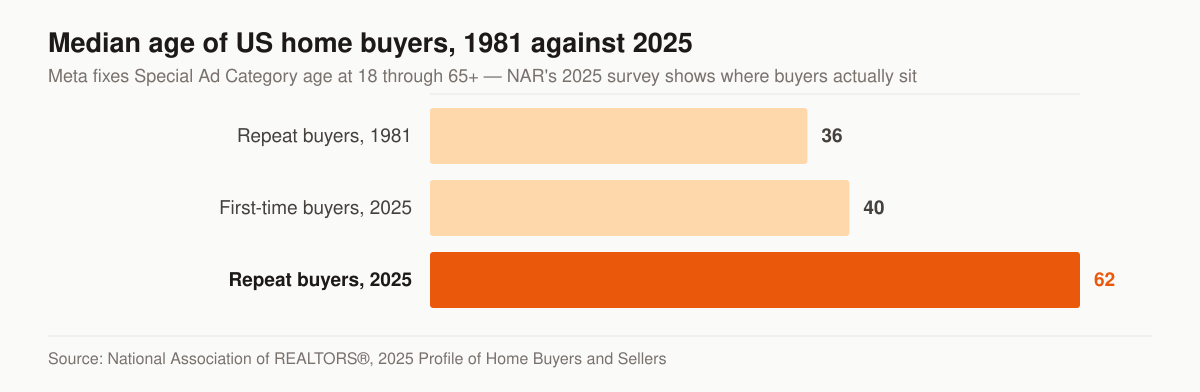
Median age of US home buyers, 1981 against 2025. Source: National Association of REALTORS®, 2025 Profile of Home Buyers and Sellers.
The median first-time buyer is 40, the highest NAR has recorded; NAR says that age has been climbing incrementally from age 30 since 2010. The median repeat buyer is 62; in 1981 that figure was 36. First-time buyers fell to 21% of the market, the lowest share since data collection began in 1981, against a pre-Great-Recession norm of 40%. And the share of buyers with a child under 18 at home is 24%, down from a high of 58% in 1985 — 32% among first-time buyers, 22% among repeat buyers.
Read those figures as a creative brief rather than as trivia.
| NAR 2025 figure | Value | What it changes in the ad |
|---|---|---|
| Median age, first-time buyers | 40 | The stock early-thirties couple sits below the median |
| Median age, repeat buyers | 62 | The median repeat buyer is closer to retirement than to raising toddlers |
| First-time buyer share | 21% | Only 21% are buying a first home; “your first home” is the wrong opening for everyone else |
| Buyers with a child under 18 | 24% | Child-centered imagery speaks to under a quarter of the market |
| All-cash buyers (primary residences) | 26% | 26% took no mortgage at all, so the mortgage angle does not reach them |
| Median years owned before selling (sellers) | 11 | The owner who closed a decade ago is still there, and still insurable |
Two practical consequences. First, the fixed 18-through-65+ band is not really the constraint — it holds everyone. The constraint is that the first-time median is 40 and the repeat median is 62, and you can no longer skew toward either one, so the creative has to do the sorting. Second, “just bought a home” is a narrow slice of a market where the median seller had owned for 11 years before selling. Refinance anniversaries, mortgage balances that were never covered, and coverage bought at closing that has since lapsed are all segments the new-closing hook never reaches. Our note on marketing mortgage protection to young families goes deeper on the family-stage angle; use it as one segment of the plan, not the whole plan.
Creative that converts under Special Ad Category constraints
Since you can’t narrow the audience, your creative does the qualifying. The headline and image have to self-select the right homeowner so the wrong clicks scroll past.
- Lead with the trigger, not the product. “Just bought a home? Here’s how to keep the mortgage paid if something happens to you” beats “Get a life insurance quote.”
- Show real people, plain settings. Stock-perfect couples underperform; a normal kitchen-table tone reads as trustworthy.
- Name the mechanism, not a fantasy. Say what the coverage does. Avoid hype or anything that reads as a guaranteed windfall, both for compliance and for trust.
- Match the form to the promise. If the ad says “30-second quote,” the instant form has to feel like 30 seconds.
A few mortgage protection Facebook ads tips that consistently move CPL: test three hooks before you touch the image, run instant forms over off-platform landing pages for cold traffic first, and add one qualifying question to the form to thin out tire-kickers without killing volume. Keep that qualifying question inside the boundaries in the next two sections — some of the questions agents reach for first are the ones Meta prohibits.
The hook rule that gets mortgage protection ads rejected
When an ad gets rejected after the category is set correctly, the copy is the next place to look, and the rule behind it is written down. Meta’s advertising standards state that ads “must not contain content that asserts or implies personal attributes. This includes direct or indirect assertions or implications about a person’s race, ethnicity, religion, beliefs, age, sexual orientation or practices, gender identity, disability, physical or mental health (including medical conditions), vulnerable financial status, voting status, membership in a trade union, criminal record, or name.” Meta’s business help version of the same policy lists family status among the prohibited attributes as well, and adds: “We also don’t allow ads that assert or imply personal attributes in alternative ways. For example, we don’t allow ads that ask questions about personal attributes.”
Meta is equally clear about what is still allowed: ads may “Contain passing reference to a personal attribute. This includes gender, age groups or age ranges,” and may “Use ‘you/your’ language without a personal attribute.” Its published contrast is small and sharp — “Meet seniors” passes, “Meet other seniors” does not; “Depression counseling” passes, “Depression getting you down? Get help now.” does not. The tell is whether the sentence implies the advertiser already knows something about the reader.
Mortgage protection copy walks straight into two of the listed attributes: family status and vulnerable financial status. Meta’s own violating example for the financial one is “Are you bankrupt? Check out our services.” Anything that names the reader’s money trouble sits in that family.
Rewrite the hook so it describes the offer instead of profiling the reader.
| Angle | Framing that implies an attribute | Framing that describes the offer |
|---|---|---|
| Affordability | “Struggling to keep up with the mortgage?” | “Mortgage protection with a level premium for the length of the term” |
| Family | “Do you have kids depending on your income?” | “Term coverage written to match a 30-year mortgage balance” |
| Health | “Been declined for life insurance before?” | “Simplified-issue mortgage protection, no medical exam required” |
| Age | “Are you over 55 and still paying a mortgage?” | “Mortgage protection quotes for homeowners, all ages 18 and up” |
| Estate | “Would your spouse lose the house?” | “A death benefit paid to your named beneficiary, used however they choose” |
Note the wider standard sitting above all of this: Meta’s introduction to its advertising standards says ads “promoting credit cards, loans or insurance services must be targeted to people 18 years or older and must not directly request the input of any personally identifiable information or certain types of financial information.” Your ad creative is not the place to ask for a mortgage balance or a birth date. Ask on the call.
What your instant form is not allowed to ask
This rule quietly invalidates the field list on a standard mortgage protection lead form. Meta’s lead ads documentation carries this note: “if you use lead ads for housing, employment, or financial products and services opportunities based in the US or targeted to the US or Canada, you may not collect certain information. This includes personal information such as age, gender, marital/relationship status and location information, such as street address, city, postal code and zip code.”
Read the list again. Date of birth, gender, marital status and ZIP are the four fields an underwriter wants, which is exactly why they end up on lead forms. Inside this category they are off the form. Meta leaves one narrow door open — “In some cases, advertisers may use custom fields to ask about their customer’s location preferences for their service, but may not mimic prohibited prefill questions or ask the prohibited information shared above” — which is a service-preference question, not a way to ask for a ZIP with a different label.
Qualify on need and timing, which Meta does not restrict, instead of on demographics, which it does.
| Field agents reach for | Allowed on the instant form? | Ask this instead |
|---|---|---|
| Date of birth or age | No | “Approximate coverage amount you’re considering” |
| Gender | No | Nothing; underwriting collects it later |
| Marital status | No | “Who else depends on this income?” as an open question |
| ZIP or street address | No | Meta already restricted the audience to your geography |
| Mortgage balance | Not named in Meta’s list, but the ad standards bar requesting financial information in the ad | “Roughly how many years are left on the loan?” |
| Best time to call | Yes | Keep it — it is the one field that helps the callback land |
The practical build is a short form with name, phone, email, one need question and one timing question, plus a custom disclaimer, and everything else gathered on the call. That is also the form your licensed producer can actually work.
The part agents skip: speed-to-lead
Mortgage protection meta ads produce leads that go cold fast because the buyer didn’t wake up shopping; your ad created the moment. If your follow-up is “I’ll call them tonight,” you’re paying for leads and lighting half of them on fire.
The system that fixes this is unglamorous:
- An automated text fires the second the form submits.
- The lead routes to a dialer or your phone within minutes, not hours.
- A multi-day cadence (call, text, email) runs automatically until contact.
This is where ad spend turns into commission. We build this end-to-end on our mortgage protection Facebook ads service, pairing the category-compliant campaign with the follow-up engine that actually closes the loop. The wider system, from offer to CRM cadence, lives under our mortgage protection marketing approach, and the touch-by-touch schedule is set out in our insurance lead follow-up cadence.
The consent that has to exist before your dialer touches the lead
Speed-to-lead and telemarketing law meet at the same moment, and the distinction is worth getting right rather than guessing at. Under 47 CFR 64.1200(a)(2), the prohibition applies to initiating “any telephone call that includes or introduces an advertisement or constitutes telemarketing, using an automatic telephone dialing system or an artificial or prerecorded voice” to the lines listed in the rule, including “any telephone number assigned to a paging service, cellular telephone service, specialized mobile radio service, or other radio common carrier service.” The paragraph carves out “a call made with the prior express written consent of the called party or the prior express consent of the called party when the call is made by or on behalf of a tax-exempt nonprofit organization,” plus certain HIPAA health-care messages. Two scope limiters matter for an agent: it is the automated or prerecorded dialing that triggers the written-consent requirement, not the act of calling a lead back, and the nonprofit and health-care carve-outs are not yours.
The regulation then defines what that consent has to be. Prior express written consent means “an agreement, in writing, bearing the signature of the person called that clearly authorizes the seller to deliver or cause to be delivered to the person called advertisements or telemarketing messages using an automatic telephone dialing system or an artificial or prerecorded voice, and the telephone number to which the signatory authorizes such advertisements or telemarketing messages to be delivered.” The written agreement must disclose both that signing authorizes those calls and that “The person is not required to sign the agreement (directly or indirectly), or agree to enter into such an agreement as a condition of purchasing any property, goods, or services.” The rule adds that the term “signature” “shall include an electronic or digital form of signature, to the extent that such form of signature is recognized as a valid signature under applicable federal law or state contract law.”
Consent also runs out the moment the prospect says so. Under 64.1200(a)(10), a called party may revoke by “using any reasonable method,” and a reply of “stop,” “quit,” “end,” “revoke,” “opt out,” “cancel,” or “unsubscribe” to a text is reasonable per se. If you send that instant auto-text on form submission, the reply path has to be live and honored. Our deeper treatment sits in TCPA compliance for insurance agents buying leads; the short version for this page is that the consent language belongs in the instant form’s custom disclaimer, captured with the lead record, and retained.
The math you should expect
Don’t judge a Special Ad Category campaign on day three. The restricted category and broad audiences need a learning runway. Here is a realistic frame to plan against:
Fill the first row from your own first month of spend rather than a borrowed benchmark.
| Metric | Planning benchmark |
|---|---|
| Cost per lead | Set it from your own first 30 days, by market and offer |
| Form-to-contact (with fast follow-up) | aim 60%+ |
| Contact-to-appointment | varies by script and persistence |
| Time to stable CPL | ~2–3 weeks of consistent spend |
Mortgage protection runs pricier than our final-expense book by design, the audience is broader and less self-identified, so the follow-up system carries more of the ROI than it does on senior-market leads.
Budget, the learning phase, and when to stop touching the ad set
The “2–3 weeks” above is not a superstition; it is Meta’s own delivery mechanic. Meta describes the learning phase as “the period when the delivery system still needs to learn about how an ad set may deliver and perform,” and says an ad set exits it “as soon as they can deliver stably. This usually occurs after about 50 results in the week after the ad set’s last significant edit.” That single sentence sets your budget floor: whatever daily spend buys roughly 50 leads a week in one ad set is the minimum viable test, and if the total budget only just clears 50 results, splitting it across four ad sets means none of them will.
Meta is blunt about the cost of impatience too — “During the learning phase, ad sets are less stable and usually have a higher CPA” — and its published best practices are the exact opposite of how a nervous agent behaves in week one: “Wait to edit your ad set until it’s out of the learning phase,” “Avoid unnecessary edits that cause ad sets to re-enter the learning phase,” “Avoid high ad volumes,” and “Use realistic budgets,” because “If you set a very small or inflated budget, the delivery system has an inaccurate indicator of the people for whom the delivery system should optimize.” If the ad set cannot reach enough results, the Delivery column reads “Learning limited.”
Match the symptom to the mechanic before you change anything.
| What you see in Ads Manager | The mechanic behind it | What we change first |
|---|---|---|
| Delivery reads “Learning” for days | Fewer than about 50 results since the last significant edit | Nothing yet; let the week finish |
| Delivery reads “Learning limited” | Budget or audience cannot produce 50 results a week | Consolidate ad sets, raise the single-ad-set budget |
| CPL jumped after a mid-week tweak | The edit was significant and reset learning | Stop editing; hold the ad set untouched for seven days |
| Six ad sets, all unstable | Ad volume split the learning across too many sets | Combine similar ad sets into one |
| Leads arrive, none answer | A follow-up problem, not a delivery problem | Fire the auto-text on submit and dial inside minutes |
The discipline is boring and it is the whole game: one offer, one ad set, a budget that can clear 50 results, and hands off the controls for a week. The full account-level version of this, across every line we run, is in our guide to Facebook ads for insurance agents.
When to buy instead of build
Running your own ads builds a compounding, controllable pipeline, but it takes testing time. If you need appointments this week and your account is cold, owned ads won’t fill the gap fast enough. In that case, treat lead-buying as a separate lane: you can buy leads direct from getinsureleads at getinsureleads.com for fill-in volume while your Meta campaigns mature. Just keep the brands clean in your head, owned ads are an asset you build, purchased leads are inventory you rent.
If you would rather not run the account yourself, managed paid ads across Google and Meta sit in the Full-Funnel tier at $5,500 per month, with ad spend billed at cost straight to the platforms — the full ladder and what each tier includes is on our pricing page. The landing-page side of the same build, for campaigns you would rather send off-platform, is covered under insurance landing pages.
Your launch checklist
- Flag the campaign under the correct Special Ad Category before you build a single audience.
- Rebuild any saved audience from before the change, because Meta has already rewritten it.
- Build your custom audiences in Ads Manager now so retargeting has something to work with later.
- Optimize for the lead conversion event, broad or Advantage+ audience.
- One offer per ad set, three hook variations to test.
- Read every hook against the personal-attributes rule: describe the offer, don’t profile the reader.
- Strip age, gender, marital status and ZIP off the instant form; qualify on need and timing.
- Put the consent language in the form’s custom disclaimer and store it with the lead.
- Automated text + multi-touch cadence firing within minutes.
- Budget one ad set to roughly 50 results a week, then leave it alone for the full week.
That is how to run mortgage protection Facebook ads that survive Meta’s policy and still produce booked appointments. If you’d rather have an operator pressure-test your account and offer before you spend more, grab a free marketing audit and we’ll show you exactly where the leak is, or start a conversation about running the account for you. Running Facebook ads for a different line? The same Special Ad Category discipline applies in how to run Facebook ads for auto insurance agents.
- Mortgage Protection Marketing Ideas for Reaching Young Families
Mortgage protection marketing ideas built around how young families actually buy: persona targeting, ad angles, and conversion systems that fit them.
- How to Generate IUL Leads With Marketing
How to generate IUL leads with your own marketing versus buying them. Published lead prices, the consent rules on a bought lead, and the channel plan.
- Key Person Insurance Marketing Ideas That Actually Reach Business Owners
Key person insurance marketing ideas for agents who sell to business owners: targeting, offers, buy-sell agreement marketing, and a lead system that runs.
- No Exam Life Insurance Marketing: A Playbook for Reaching Younger Buyers
No exam life insurance marketing for younger buyers: the offer math, the ad disclosure rules, and the funnel that turns a no-exam hook into bound policies.