Service
Landing Pages for Insurance Agents Built to Convert Paid Traffic
Turn paid clicks you already bought into booked calls with single-offer final expense landing pages that load fast, capture TCPA-compliant consent, and get A/B tested to cut your cost per lead.
- We run our own final-expense book
- No pitch deck — we screen-share real numbers
- TCPA-aware · CMS/AEP-compliant · Meta Special Ad Category
- Core Web Vitals < 2.0s LCP
Landing pages for insurance agents are single-purpose pages built for one offer, one audience, and one action: a booked call or quote request. They strip out navigation, load fast, place a short consent-compliant form above the fold, and get continuously A/B tested to lower your cost per lead.
What you get
What your landing pages for insurance agents program includes
- A conversion-engineered final expense landing page: navigation removed, one offer, one action, with a short above-the-fold form (name, phone, ZIP, age band) and a single repeated CTA top and bottom
- A Core Web Vitals build verified on mobile: Largest Contentful Paint under 2.5s, Interaction to Next Paint under 200ms, Cumulative Layout Shift under 0.1
- TCPA-aware consent capture wired into the form itself: plain-language consent copy plus timestamped, IP-logged capture so every lead is legally callable
- Form and call tracking instrumented so each submit and each phone lead maps to a booked appointment, not vanity traffic
- A documented form-fill-rate baseline and a monthly cost-per-lead report showing the lift from each test (e.g. 9% to 12% form fill = a third more leads and a 25% lower CPL at the same ad spend)
- A running A/B test log: one variable per cycle (headline, form length, hero, CTA copy) with a declared winner promoted to the live page each cycle
- Line-specific page variants from the same single-purpose skeleton (final expense, or Medicare with CMS-aware disclosures) plus a thank-you page and lead routing into your CRM or dialer so speed-to-lead starts the moment they submit
How it works
How the landing pages for insurance agents engagement runs
- 01
Offer & audience lock
We pin down the one offer, one audience, and one action the page exists for, then map the ad-to-page message match so the click lands on the promise it was sold. If you have a live page, we grade it and show you the form-fill math line by line.
- 02
Build & consent wiring
We build the page to the fixed converting skeleton, place the short form above the fold, wire in TCPA-aware consent language and timestamped capture, and route submissions into your CRM or dialer, shipping to pass Core Web Vitals on mobile.
- 03
Instrument & baseline
We install form tracking and call tracking, then set the numbers everything is measured against: your current form-fill rate and cost per lead. Nothing gets optimized until it can be counted.
- 04
Test & iterate (CRO)
We run one-variable A/B tests each cycle, headline vs. price framing, four fields vs. two-step, offer and proof variants, promote the winner, and report the CPL delta monthly. The page is never done; it is a baseline you keep beating.
A landing page has one job: take a click that already cost you money and turn it into a booked call or a quote request. Send that click to a homepage or a carrier microsite built to inform rather than to convert, and you pay for it twice — once for the click, and again for the sale that never happened. The page and the campaign are one number, not two: the paid traffic these pages receive is bid and pruned against the same cost-per-sold-policy target the page is judged on, which is why we do not treat a landing page build and an ad account as separate jobs.
What a final expense landing page actually is
Final expense landing pages are single-purpose pages built for one offer, one audience, and one action. No top nav. No “About,” “Products,” or “Careers” links pulling the visitor sideways. A senior who clicked a Facebook ad about a $9,000 burial benefit sees a page about that benefit and a form to request it — nothing else.
That focus is the whole mechanism. Every extra link is an exit. We design insurance landing pages so the only paths forward are “submit the form” or “leave,” and we make submitting the obvious choice.
That also means a landing page is not a substitute for your agency site. We build final expense websites and landing pages as two different assets on purpose: the website has to be found, carry your licensing and answer the questions a family asks before they call, while the landing page only has to convert one ad click. Running one where you needed the other is the first thing we check when paid budget underperforms.
We run this on our own final-expense book, so the landing page is judged the way an operator judges it — it’s the hinge the cost-per-sale math turns on.
Anatomy of a converting insurance landing page
A high-converting final expense lead landing page follows a fixed skeleton. Each block earns its place.
- Message-matched headline — restate the ad’s promise in the prospect’s words (“Affordable burial coverage, no medical exam”). If the ad sold a $9,000 benefit and the page opens with “protect your family,” you paid for a click you just confused.
- Subhead — one line on who it’s for and the catch-free terms.
- The form, above the fold — name, phone, ZIP, age band. Short forms win.
- Three proof points — licensed agents, A-rated carriers, no obligation.
- One trust strip — TCPA-compliant consent language, plainly worded.
- A single repeated call to action — same button text, top and bottom.
- Mobile-first build — senior-market paid clicks come from phones, so the page is designed at phone width first and desktop second.
- A thank-you page that starts the follow-up — it confirms the request, says who is calling and when, and fires the first speed-to-lead touch.
Notice what’s missing: a pricing table, a blog feed, social icons. Those belong on your main site, not on a page whose only metric is form-fill rate.
What conversion rate should an insurance landing page hit?
Nobody publishes a benchmark for a solo final expense agent, so the honest starting point is the largest public dataset there is, plus a clear note on what it does and does not describe. Unbounce’s Conversion Benchmark Report puts the median conversion rate across all industries at 6.6%, drawn from what the company describes on its B2B conversion page as an analysis of “41,000 landing pages, 464 million pageviews, and 57 million conversions.”
Inside that dataset, finance and insurance sits well above the all-industry line. Unbounce’s finance and insurance breakdown reports a median of 8.3% for financial services overall and 18.2% for the insurance subcategory, which the report describes as “converting 119% more than the overall financial services” median. Investing sits at 3.9% and credit and lending at 8.8%.
Table: median landing page conversion rates reported in Unbounce’s Conversion Benchmark Report, and what each row is actually useful for when you set a target. Figures as published on 5 September 2026.
| Segment | Median conversion rate | What it tells you |
|---|---|---|
| All industries | 6.6% | The line every landing page is measured against |
| Financial services overall | 8.3% | Money categories convert above the general web |
| Insurance subcategory | 18.2% | Insurance offers convert well when the page is built for one |
| Credit and lending | 8.8% | The nearest comparable money category |
| Investing | 3.9% | Long consideration cycles drag a page down |
| Paid search traffic, finance | 10.1% | Intent arrives with the click |
| Paid social traffic, finance | 9.3% | Interruption traffic still converts here |
| Email traffic, finance | 7.9% | Warm lists underperform paid in this category |
Read those numbers with the caveat attached. Every page in the sample was built on a landing page platform by someone who had already bought a landing page tool, and “insurance” there covers carriers, aggregators and national brands alongside agencies. Treat 18.2% as evidence that insurance offers convert well on a purpose-built page, not as a quota for your first final expense build. The number worth managing is your own last-30-day form-fill rate, and the comparison that decides anything is against your own previous month.
Two channel findings in the same report are worth acting on. Paid search converted at a median 10.1% and paid social at 9.3%, both above the 6.7% the report gives as the industry benchmark and, for paid social, well above the 5.2% all-industries median. Within paid social, Instagram led at 15.5%, TikTok at 10.8% and Facebook at 10.1% — relevant if you are already running Meta campaigns for insurance. And finance is one of the few categories where phones beat desktops: the report gives mobile an average conversion rate of 11.5% against 9% on desktop, under the headline “Mobile traffic converts 27.8% better than desktop.” For a senior-market page, that is one more argument that the phone layout is the design and the desktop layout is the adaptation.
Write the page at the reading level your buyer reads at
Same report, a different lever, and this one costs nothing to pull. Unbounce grouped finance and insurance pages by reading level and found the plainest writing converted best: pages at a 5th-to-7th-grade reading level posted a median conversion rate of 18.1%, against 9.3% for 10th-to-12th-grade copy and 7.1% for college-level copy. The curve is not clean — 8th-to-9th-grade copy came in lowest at 6.5%, and professional-level copy rose again to 14.4%, which the report reads as different audiences wanting different registers.
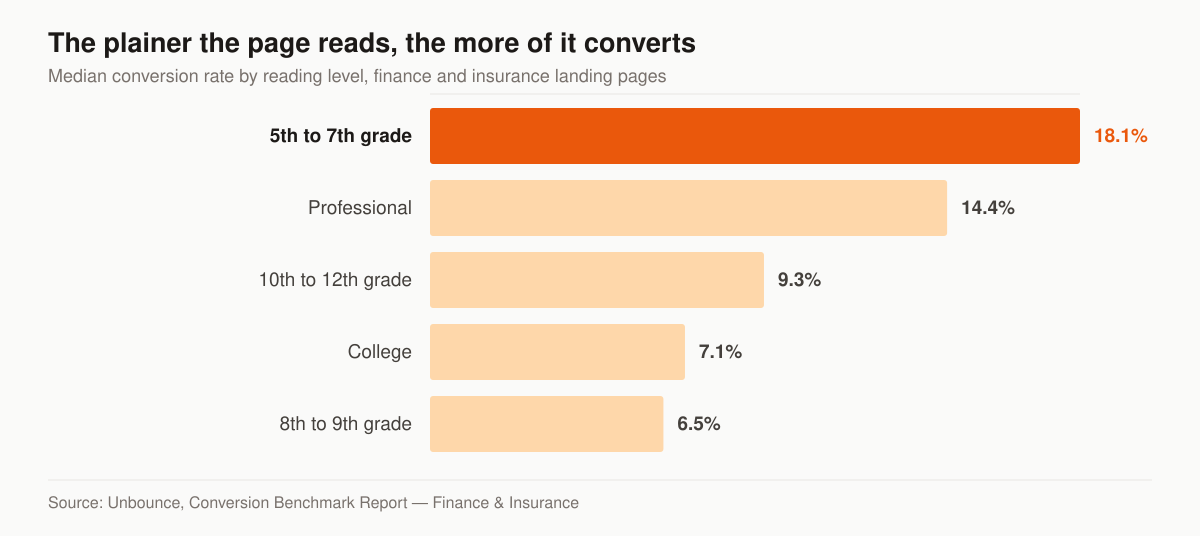
Median conversion rate by reading level on finance and insurance landing pages. Source: Unbounce, Conversion Benchmark Report — Finance & Insurance, figures as published 5 September 2026.
Length has a band too. The report puts the best-performing finance page length at 195 to 715 words, “around a median conversion rate of 8.3%,” and suggests a ceiling of “35 to 125 difficult words (i.e., words that have three or more syllables).”
For a page aimed at a 68-year-old reading on a phone, that is an instruction rather than a style preference. “Burial coverage” beats “final expense whole life protection.” “No medical exam” beats “simplified underwriting.” Say the number the ad promised, in the words the ad used, and stop. Every syllable you cut is a reader still on the page when they reach the form.
Speed and Core Web Vitals
Seniors on phones abandon slow pages, and Google charges you more per click to send traffic to them. We build to pass Google’s published Core Web Vitals thresholds — Largest Contentful Paint within 2.5 seconds, Interaction to Next Paint of 200 milliseconds or less, Cumulative Layout Shift of 0.1 or less — measured the way Google recommends, at “the 75th percentile of page loads, segmented across mobile and desktop devices,” not on a fast office connection. Speed is both a conversion lever and an ad-cost lever.
Table: the six axes on which a conversion-first landing page differs from an agency homepage or a carrier microsite.
| Element | Conversion-first landing page | Generic homepage / carrier site |
|---|---|---|
| Purpose | One offer, one action | Inform, browse, multiple goals |
| Navigation | Removed | Full menu (every link is an exit) |
| Form placement | Above the fold | Buried or on a contact tab |
| Load target | LCP < 2.5s | Often 4s+ on mobile |
| Consent capture | Built-in, TCPA-aware | Generic or absent |
| Measured by | Form-fill rate | Vanity traffic |
Consent capture, built in
Since the FCC’s one-to-one consent rule was vacated in January 2025, the bar didn’t disappear — TCPA still governs how you call and text the leads you collect. We wire compliant consent language and timestamped capture into the form itself, so the lead you generate is one you can legally work. We provide the marketing build; you remain the licensed party making the calls. For the rules around buying and dialing, see our guide to TCPA compliance when buying leads.
What the consent block has to say
The trust strip is the block agents copy off somebody else’s page, and it is the one block where copying is genuinely risky, because the wording is set by rule rather than by taste.
Telemarketing calls and texts placed to a mobile number with an autodialer or a prerecorded voice need prior express written consent, and the FCC defines that term at 47 CFR 64.1200(f)(9) as “an agreement, in writing, bearing the signature of the person called that clearly authorizes the seller to deliver or cause to be delivered to the person called advertisements or telemarketing messages using an automatic telephone dialing system or an artificial or prerecorded voice, and the telephone number to which the signatory authorizes such advertisements or telemarketing messages to be delivered.”
Two disclosures travel with it. The same paragraph continues: “The written agreement shall include a clear and conspicuous disclosure informing the person signing that: (A) By executing the agreement, such person authorizes the seller to deliver or cause to be delivered to the signatory telemarketing calls using an automatic telephone dialing system or an artificial or prerecorded voice; and (B) The person is not required to sign the agreement (directly or indirectly), or agree to enter into such an agreement as a condition of purchasing any property, goods, or services.”
The e-signature question is answered in the same place: the term “signature” there “shall include an electronic or digital form of signature, to the extent that such form of signature is recognized as a valid signature under applicable federal law or state contract law.” A checkbox plus a timestamp plus a stored IP address is the ordinary way a landing page produces that record, which is why we wire capture into the form rather than leaving consent as static text floating under the button.
The one-to-one rule that would have narrowed all of this is gone. In Insurance Marketing Coalition Ltd. v. FCC, No. 24-10277 (11th Cir., filed 24 January 2025), the Eleventh Circuit concluded: “For these reasons, we grant IMC’s petition for review, vacate Part III.D of the 2023 Order, and remand for further proceedings.” Its reasoning was that “our cases show that to give ‘prior express consent’ to receive a robocall, one need only ‘clearly and unmistakably’ state, before receiving the robocall, that he is willing to receive the robocall.” Note the scope: that holding is about the ordinary meaning of prior express consent. It did not disturb the separate written-consent definition quoted above, and it is not a licence to hide consent in a footer. We build the marketing asset; you remain the licensed party making the calls, so run the final wording past whoever approves your advertising. Our overview of insurance marketing compliance covers the wider set of rules a campaign touches.
What happens after a lead says stop
Consent captured on the page is not permanent, and the obligations that attach to revoking it land on your dialer and your CRM rather than on the page. Build them at the same time, because the page is where the lead record is born.
47 CFR 64.1200(a)(10) provides that a called party “may revoke prior express consent, including prior express written consent, to receive calls or text messages made pursuant to paragraphs (a)(1) through (3) and (c)(2) of this section by using any reasonable method to clearly express a desire not to receive further calls or text messages from the caller or sender.”
Table: what the revocation rule at 47 CFR 64.1200(a)(10) and (a)(12) requires of the system behind your landing page, and where each requirement actually gets built.
| What the rule says | Where it gets built |
|---|---|
| Replying “stop,” “quit,” “end,” “revoke,” “opt out,” “cancel,” or “unsubscribe” to a text “constitutes a reasonable means per se to revoke consent” | Keyword handling in your SMS platform |
| Other words count when “a reasonable person would understand those words to have conveyed a request to revoke consent” | Human review of inbound replies, not keyword matching alone |
| Requests “must be honored within a reasonable time not to exceed ten business days from receipt of such request” | A suppression list your dialer reads before every dial |
| Callers “may not designate an exclusive means to request revocation of consent” | Any opt-out route you publish is one more, never the only one |
| A single confirmation text is permitted if it “merely confirms the text recipient’s revocation request and does not include any marketing or promotional information” | The stop-confirmation message in your automation |
The page’s contribution to all of that is one clean, retrievable record of what the person agreed to and when. If a call is disputed two years later, the artifact you produce is the form submission. Store it somewhere you can query, not only in the notification email your form sends. The version of this problem you inherit when consent was captured on somebody else’s page is covered in our guide to TCPA compliance when buying leads.
Medicare landing pages: what CMS changes on the page
Medicare landing pages follow the same single-purpose skeleton, and then CMS adds requirements that change what appears on the page itself. If you market Medicare Advantage plans and you are not the plan, you are very likely a third-party marketing organization. CMS writes most of these as obligations the MA organization must impose on the TPMO, so in practice they reach you as terms in a carrier or FMO agreement rather than as a rule addressed to you directly. Part 422 covers Medicare Advantage; Part D has its own parallel provisions in Part 423.
Table: four requirements in 42 CFR Part 422 that change what a Medicare Advantage landing page and its follow-up must contain.
| Requirement | Citation | What it changes |
|---|---|---|
| The TPMO disclaimer must be “Prominently displayed on TPMO websites” and “Included in any marketing materials, including print materials and television advertisements, developed, used or distributed by the TPMO” | 42 CFR 422.2267(e)(41)(iv)–(v) | The standardized sentence goes on the page, and the layout has to be designed around its length |
| Lead generation must “Disclose to the beneficiary that his or her information will be provided to a licensed agent for future contact,” delivered “Electronically when communicating with a beneficiary through email, online chat, or other electronic messaging platform” | 42 CFR 422.2274(g)(3)(i)(C) | A line inside the form’s consent block, not only on the thank-you page |
| Sharing personal beneficiary data with another TPMO needs prior express written consent obtained through “a clear and conspicuous disclosure that lists each entity receiving the data” | 42 CFR 422.2274(g)(4) | If the lead is shared, every recipient is named and separately consentable |
| Marketing and sales calls “must be recorded and retained in their entirety for a minimum period of 6 years” | 42 CFR 422.2274(g)(2)(ii) | The follow-up stack behind the form, not the page |
The disclaimer itself is standardized text, not something to paraphrase. For a TPMO that does not sell for every MA organization in the service area, 42 CFR 422.2267(e)(41) sets it as: “We do not offer every plan available in your area. Currently we represent [insert number of organizations] organizations which offer [insert number of plans] products in your area. Please contact Medicare.gov or 1-800-MEDICARE to get information on all of your options.” A TPMO that does sell for all of them uses the alternate version in the same paragraph.
Two consequences for the build. The disclaimer is long, and dropping it into a mobile hero pushes the form below the fold, so it belongs in the wireframe rather than bolted on the week of launch. And the organization and plan counts are yours, they change, and a stale count on a live page is a compliance problem with a marketing cause — we treat those two numbers as fields the page reads, not as copy baked into the hero. The longer walk-throughs are CMS Medicare marketing rules for agents and scope of appointment and TPMO compliance.
A/B testing and CRO
A landing page is never “done” — it’s a baseline you beat. We test one variable at a time: headline, form length, hero, button copy. A 9% form-fill rate moving to 12% is a third more leads from the same clicks, which is a 25% cut in your cost per lead with no extra ad spend.
- Headline tests — benefit framing vs. price framing
- Form tests — four fields vs. two-step
- Offer tests — “free quote” vs. “coverage options”
- Proof tests — carrier logos vs. agent photo
How to run a test whose result you can believe
Most of the value in conversion rate optimization is not the idea. It is the discipline that stops you believing a result that is not there. Four rules we hold to, and why each one exists.
- One variable per cycle. Change the headline and the form together and a win tells you nothing about which half to keep. It also makes the loss unrecoverable — you cannot revert only the half that hurt.
- Whole weeks only. Senior-market response is not flat across a week. A test that starts Tuesday and ends Friday has sampled a different world than the campaign runs in. Run in multiples of seven days.
- Declare the deciding metric before you start. Form-fill rate is the page’s metric; booked appointments and issued policies are the campaign’s. A headline that lifts form fills and drops appointment rate has made your cost per sale worse while looking like a win. Pick which number decides before you look at either.
- Do not stop the moment it looks good. Checking a live test daily and calling it the first time the variant is ahead turns a coin flip into a strategy. Write the stopping rule down before the test starts and keep to it.
Order matters as much as method. Our default sequence is offer, then form, then headline, then proof, then layout — structural levers first, cosmetics last. The offer sets the page’s ceiling, and no headline rescues an ask the visitor did not want. The form comes next because it is the one block every converting visitor has to touch. Button color is a real effect and it goes last, because we expect it to move less than the four ahead of it.
Clicks but no leads: read the page in this order
A page taking traffic and returning nothing is a common brief, and the temptation is to start rewriting copy. Start with the plumbing instead — it is cheaper to check and it fails silently.
Table: a diagnostic order for a paid landing page that receives clicks and produces no form fills, cheapest check first.
| Check | How to check it | What it usually turns up |
|---|---|---|
| Does the form submit at all? | Fire a real test lead from a phone on cellular data, not from office wifi | A broken integration, a notification email in spam, a required field failing without a visible error |
| Does the page match the ad? | Open the ad and the page side by side and read the first line of each | A headline promising something the ad did not sell, or an ad selling something the page does not mention |
| Is the form above the fold on a phone? | Load it on a real handset, not a desktop browser resized | A hero image, a cookie banner or a long disclaimer pushing the form off screen |
| How fast does it paint on cellular? | Measure against the Core Web Vitals thresholds above, at the 75th percentile | An unresized hero image, render-blocking fonts, or three tracking scripts doing one job |
| Is this the traffic you meant to buy? | Placement, geography, age and device breakdown in the ad platform | Audience network placements, or clicks from outside the states you are licensed in |
| Are leads arriving but going nowhere? | Look in the CRM, not the inbox | Submissions landing in a list nobody dials, with no owner and no speed-to-lead trigger |
Four of those six are plumbing rather than design. We run them in that order because a broken submit costs an afternoon to find and a quarter to miss, while a headline rewrite costs a week and may not have been the problem at all.
The thank-you page is half the funnel
The page after the form is where a lead turns into an appointment, and it is the easiest block in the build to leave on its default. It has four jobs, and a blank “thanks, we’ll be in touch” does none of them.
- Set the expectation. Say who calls, from roughly where, and how soon. A prospect who knows an unknown number is coming answers it.
- Fire the conversion event. The thank-you URL is what your ad platform and analytics count as a conversion, which is what lets the campaign optimize toward leads instead of clicks.
- Give the impatient prospect a second path. A tappable phone number and a booking link, both above the fold. A prospect who filled in the form may still have preferred to call; let them.
- Start the follow-up in the same minute. The first text or email fires on submit, not on your next batch. That first touch is the difference between a lead and a callback attempt.
The machinery behind points three and four is not landing page work — it is CRM and automation, and it is where a fast page stops paying if nobody picks up the other end. Our lead follow-up cadence lays out the sequence, email and SMS automation runs it, appointment setting staffs it, and our comparison of the best CRM for insurance agents covers which systems make same-minute routing straightforward.
What a landing page costs, and what we charge
We publish rates so you can price this before a call instead of after one. A one-time build — page, consent wiring, tracking, thank-you page and CRM routing — falls inside our $2,500–$8,000 build band. Where you land in that band depends on four things: how many line variants you need from the same skeleton, how deep the integration goes into your CRM or dialer, whether the copy already exists or has to be written, and whether the offer itself needs designing before anything can be laid out.
Ongoing programs are monthly and separate from the build. Foundation is $2,500 a month and includes an optimized site or landing pages. Growth is $3,500. Full-Funnel is $5,500, and it is the tier where managed paid ads and landing-page CRO run as a standing discipline rather than a one-time delivery — which is the version of this service that keeps beating its own baseline. Ad spend is billed at cost, straight to the platforms.
The comparison worth doing is not build price against builder subscription. It is cost per booked appointment over twelve months. A page you ship once and leave alone is an asset with a fixed return. A page under a testing program is an asset whose return moves, and the direction it moves in is the whole argument for paying for the second thing.
Do you need ClickFunnels for insurance landing pages?
No. ClickFunnels is one page builder among many — GoHighLevel, Unbounce, Instapage, or a hand-coded static page can all produce the exact skeleton above. In insurance, the “funnel” after the page is a form, a thank-you page, and a follow-up cadence in your CRM, so most of the builder’s upsell machinery sits unused. Use the tool you already pay for and spend the difference on testing.
Where ClickFunnels makes sense: you already have an account, your team knows it, and its templates get a page live fast. Where it costs you: the subscription outlives most campaigns, and template pages shared across thousands of agents are weakest at the two things that actually move cost per lead — message match with your ad and consent capture that makes the lead legally callable. Neither is a platform feature; both are build decisions. If what you actually want is the whole path — page, automation, booking, and tracking built as one system — that is our insurance sales funnel service.
Should you start from an insurance landing page template?
A template is a fine skeleton and a bad finished page. It solves layout, which was never the hard part, and leaves untouched the parts that decide your cost per lead: a headline matched to your specific ad, consent language wired for how you’ll dial, and tracking that ties submits to booked calls. Start from one if it gets you live faster — just budget the real work for after. And if your main agency site needs the same conversion discipline as the landing page, that is insurance web design.
Where landing pages fit your funnel
Landing pages are the conversion layer that makes everything upstream pay. They turn clicks from insurance PPC campaigns and paid social on Meta into contacts, then feed your lead generation system and dialer. If you want the page plus everything downstream of it — automation, follow-up, tracking — built as one system, that is our full sales funnel service. The same approach works for Medicare leads — Medicare landing pages follow the identical single-purpose rules under CMS marketing constraints.
Want us to grade your current page? Start with a free marketing audit and we’ll show you the form-fill math line by line.
Frequently asked questions
What makes a final expense landing page different from my agency homepage?
How short should the lead form be?
Does page speed really affect my ad costs?
Do these landing pages work for Medicare leads too?
What platform do you build insurance landing pages on?
What is a good conversion rate for an insurance landing page?
Does a Medicare landing page need the TPMO disclaimer?
How long should an A/B test run before you pick a winner?
See exactly where your agency is leaking leads.
15 minutes. We screen-share our own live lead dashboard and tear down your funnel line by line — no pitch deck, just numbers.
- Site speed & conversion
- Local + AI-search visibility
- Ad efficiency
- Your cost per lead vs ours
No obligation · no pitch deck