Service
Insurance Agency Reputation Management for Agents and Agency Owners
A verified Google Business Profile plus a compliant review engine that turns the searchers who already find you into calls — steady review velocity, a measured reply on every review, and a reputation you can defend.
- We run our own final-expense book
- No pitch deck — we screen-share real numbers
- TCPA-aware · CMS/AEP-compliant · Meta Special Ad Category
- Core Web Vitals < 2.0s LCP
Insurance agency reputation management is compliant Google review generation, a measured response on every review, and an active Business Profile — run the same way for a solo agent or a multi-producer agency. Ranking that profile in the map pack is local SEO, a partner service that feeds the same profile.
What you get
What your insurance agency reputation management program includes
- A verified Google Business Profile with the right primary category ("Insurance agency") plus line-specific secondaries, locked in before AEP so Google doesn't re-crawl during your busy season
- Google's video verification walkthrough scripted, recorded, and submitted end to end so your profile stays live instead of going dark mid-AEP
- A compliant review-request flow: timed SMS + email templates that ask every client, never review-gate, and never offer value in exchange (inside CMS and Google policy)
- Response templates and a review-monitoring cadence so every review, including negatives, gets a measured, non-PHI reply
- Active Business Profile management — posts, Q&A, and photos kept current so the listing looks alive to the senior deciding whether to call
- Review schema on your site plus reputation monitoring across the platforms seniors read, so a new review or a problem never sits unseen
- A monthly reputation report: review velocity, star average, response rate, and the calls the profile generated
How it works
How the insurance agency reputation management engagement runs
- 01
Audit & baseline
Pull your current category setup, review velocity, star average, and response rate, plus how your reputation reads across the platforms seniors check, then flag the fixes that build trust first.
- 02
Profile build & video verification
Set the primary and secondary categories, map every line (Medicare, final expense, life) to a service entry, complete hours, photos, and description, then record and submit Google's required video verification.
- 03
Review engine setup
Build the compliant request flow, timed SMS and email after the sale, plus response templates that stay inside CMS review rules and Google's no-gating, no-incentive policy.
- 04
Keep the profile active
Add review schema to your site and run an ongoing posts, Q&A, and photo cadence so the listing stays current and every review earns a measured reply.
- 05
Monitor & report
Track review velocity, star average, response rate, and profile-driven calls each month; respond to reviews and refresh the profile every cycle.
When a senior finds you in Google’s local results, your Business Profile is the first impression: the star rating, the reviews, and how alive the listing looks decide whether they call you or the agent listed next to you. Ranking there is local SEO; earning the trust that converts the click is reputation management. It is free, and it is the closest thing to a no-cost lead channel a licensed agent has.
We treat the profile like a campaign with numbers attached, not a directory listing you set and forget. We run our own senior-market lead book, so this comes from operating campaigns, not theory. Inbound calls from a strong profile close well because the searcher already has intent. The stakes are measurable industry-wide too: in BrightLocal’s 2026 Local Consumer Review Survey, 97% of consumers said they read reviews for local businesses, and 80% said they are likely to use a business that responds to all of its reviews.
Insurance agency vs insurance agent reputation management
Insurance agency reputation management and insurance agent reputation management run on the same four levers — review velocity, response rate, profile activity, and monitoring. What changes is who owns each one. A solo agent has one profile, one review stream, and one person who has to remember the ask. A multi-producer agency has a profile per verified location, reviews that name individual producers, and no default answer to who writes the reply.
This table sets the same four levers side by side so you can see which ones need an owner named before the program starts.
| Solo agent | Multi-producer agency | |
|---|---|---|
| Profiles managed | One | One per verified location |
| Who triggers the ask | The agent, at the bind | The producer, wired into the shared sales process |
| Who replies | The agent | A named owner, so no review sits unanswered |
| Compliance exposure | One person’s habits | Every producer’s habits, held to one template |
The program is the same either way. The design question is how many people the request flow has to survive.
What reputation work controls on your profile
Getting the profile to rank in the map pack is a separate discipline — local SEO for insurance agents, which handles categories, citations, and location pages. Reputation management owns the two levers that decide whether a searcher who already sees you actually calls: the reviews and how alive the listing looks.
- Reviews signal trust to both Google and the senior reading them on the call. This is the lever you control most directly.
- Responses to every review — including negatives — show the senior you are attentive and present.
- Activity — current hours, services, photos, posts, and Q&A — makes the listing look like a real, running business rather than a dormant one.
- Consistency of the review flow keeps velocity steady instead of arriving in the suspicious bursts Google distrusts.
Our reputation & profile checklist
This table is the standing scope of the program — the lever, the work, and why the lever is on the list at all.
| Lever | What we do | Why it matters |
|---|---|---|
| Video verification | Record and submit the walkthrough Google now requires | Unverified profiles do not show at all |
| Review requests | Timed SMS + email after the sale, asking every client | Steady velocity is the strongest trust signal you own |
| Review responses | A measured, non-PHI reply on every review | Response rate is visible proof you are engaged |
| Profile activity | Real office photos, headshot, posts, and Q&A upkeep | A live-looking listing converts the searcher who found you |
| Reputation monitoring | Watch reviews and mentions across the platforms seniors read | A new review or problem never sits unseen |
AEP category setup and video verification
Two things break agent profiles in the fall. First, agents change categories during AEP and watch their ranking drop for weeks while Google re-crawls — set categories in summer, not October. Second, Google now leans on video verification, a short walkthrough of your office and signage. We script and submit it so your profile stays live through the season instead of going dark mid-AEP. For the broader seasonal play, see our Medicare AEP marketing strategies and the rules in our CMS Medicare marketing guide.
Can a suspended Google Business Profile be recovered?
Yes, and the sequence is fixed rather than negotiable. A suspended profile does not rank badly — it stops appearing at all, and your review flow stops with it. Recovery means correcting whatever breaks Google’s guidelines first (name stuffing, an ineligible address, a bad service-area setup), then submitting one appeal through the appeals tool with official documents that prove the agency operates at the listed address. Our Google Business Profile suspension recovery guide walks the evidence checklist step by step. Once the listing is reinstated, rebuild review velocity steadily — a burst of reviews arriving the week a profile comes back is exactly the pattern Google distrusts.
How do insurance agencies get more Google reviews?
Insurance agencies get more Google reviews by asking every client at the moment of highest goodwill — right after the policy is delivered or a claim resolves — with a direct link to the review form, one polite follow-up, and a reply to everything that lands. Volume comes from making the ask a standard step in the sales process, not a campaign you remember once a quarter. Google’s own review guidance endorses the ask directly: “To leave reviews, you can ask customers to visit a Google link or scan a QR code.”
This table is the generation process we install, stage by stage, with the timing each stage runs on.
| Stage | What happens | When |
|---|---|---|
| Set the moment | Pick the trigger — policy delivered, first premium drafted, claim resolved | Built into the sales process once |
| Ask in person | The agent mentions the review while goodwill is highest | At the trigger moment |
| Send the link | SMS + email with a direct review link or QR code, no login hunt | Same day |
| Follow up once | A single polite reminder to non-responders | A few days later |
| Reply | A measured, non-PHI response to every review that arrives | Within the week |
| Measure | Velocity, star average, and response rate | Monthly report |
The full playbook — request scripts, timing, QR signage, and what to do about clients who never respond — is in our guide to getting more Google reviews for insurance agents.
How many Google reviews does an insurance agency need?
BrightLocal’s 2026 Local Consumer Review Survey, a representative panel of 1,002 US adult consumers, puts numbers on thresholds agents usually guess at. This table turns the survey’s consumer thresholds into the targets we set for an agency profile.
| What the survey measured | 2026 figure | What we target |
|---|---|---|
| Will not use a business with fewer than 20 reviews | 47% | Twenty reviews on the primary profile before anything else gets attention |
| Willing to use a business with five reviews or fewer | 9% | Treat a five-review profile as a standing objection, not a starting point |
| Look for reviews written in the last three months | 74% | A cadence that never lets the newest review age past a quarter |
| Look for reviews written in the last two weeks | 32% (up from 20% in 2025) | Weekly flow, not an annual push |
| Only swayed by reviews written in the last week | 18% | Why velocity beats a one-time catch-up campaign |
| Will only use a business rated 4.5 stars or higher | 31% (up from 17% in 2025) | The bar rose 14 points in a year; protect the average |
| Will only use a business rated 4 stars or higher | 68% (up from 55% in 2025) | Four stars is the floor, not the goal |
| Will only use a five-star business | 10% | A perfect average is not the target |
Two readings matter for an agency. First, volume works as a gate rather than a scale. Clearing twenty reviews removes an objection that 47% of consumers hold, and the survey reports no second count threshold above it. Second, the star bar moved fast — the share of consumers requiring 4.5 stars or better nearly doubled in a year, from 17% to 31%, and the four-star share went from 55% to 68%. A profile that read as acceptable last AEP can read as substandard this one without a single new complaint against it.
The survey also names the factor consumers weigh above all the others: 56% said what matters is that a review “is backed up by other reviews with similar sentiment,” and the report’s own reading is that consumers “look for consistent themes across reviews.” That is a direct argument against the one-big-testimonial approach: six reviews that separately mention the agent explaining Medicare patiently carry a theme, and a deeper review count is also what keeps one bad week from moving the average. Steady service is what produces them, which is why review work and client retention end up being the same conversation.
Which review platforms should an insurance agency watch?
Google is where the map pack lives, so it stays first. It is no longer the whole job. In the same survey, the average consumer used six different review sites when choosing a business, and Google’s share of consumers using it for reviews fell from 83% in 2025 to 71% in 2026. One source on that list is not a review site at all: use of ChatGPT and other generative AI tools for local recommendations rose from 6% to 45%, making AI the third most popular source of business recommendations. That shift is why AI search and GEO has become part of the same trust problem — an assistant summarizing your agency is reading the same review corpus a senior would.
Where consumers actually write reviews is a shorter list than where they read them. This table pairs the survey’s writing shares with what each platform costs an agency to keep.
| Platform | Wrote a review there in the past year | What it asks of an agency |
|---|---|---|
| 45% | The profile, the request flow, and a reply on every review | |
| 34% | A claimed page with recommendations enabled, monitored alongside your social posting | |
| Yelp | 24% | A claimed, accurate listing you monitor; read Yelp’s own solicitation policy before pointing any request flow at it |
| Apple Maps | 17% | A separate registration through Apple Business — nothing you do in Google reaches it |
| Tripadvisor | 16% | Not applicable to an agency; skip it |
| Better Business Bureau | 16% | A listing that carries your NAP and shows complaint history alongside reviews |
Apple Maps is the one worth a second look. Its usage nearly doubled year over year, from 14% to 27% of consumers, and it ranks fourth for writing reviews while sitting sixth for reading them. It is also the map layer behind Siri and iPhone. Monitoring means knowing a review landed. It does not mean building a request flow for every platform on the list — we point the ask at Google, keep the rest accurate and watched, and treat a review landing anywhere as something that needs a reply.
Reviews that convert without crossing compliance lines
Reviews are the lever you control. The compliance rule for agents is narrow but firm:
- Ask everyone, not just clients you expect to be happy. Google’s policy states that merchants may not “Discourage or prohibit negative reviews, or selectively solicit positive reviews from customers,” which is review-gating described in Google’s own words.
- Never offer value (gift cards, premium credits) in exchange for a review. Google’s prohibited and restricted content policy states that merchants may not “Offer incentives – such as payment, discounts, free goods and/or services - in exchange for posting any review or revision or removal of a negative review,” and files incentivized reviews under rating manipulation, which “will be removed from Maps.”
- Do not script what a client says about a specific Medicare plan; CMS rules govern that language.
- Respond to every review, including negatives, in a measured, non-PHI way.
We build the request flow — text and email at the right moment after the sale — so review velocity stays steady instead of arriving in suspicious bursts. Treat compliance as a trust signal: agents who handle reviews cleanly look more credible to the senior reading them. We provide marketing services, not licensed insurance advice; you remain the licensed party.
Is review gating illegal, or only against Google’s policy?
Review gating — routing happy clients to Google and unhappy ones to a private form — breaks Google’s review policy, which is what gets reviews stripped or a profile penalized. The federal rule sits beside that, not on top of it. The FTC’s Rule on the Use of Consumer Reviews and Testimonials (16 CFR part 465) took effect on October 21, 2024, and two of its sections reach an agency directly:
- Buying reviews. 16 CFR 465.4 makes it a violation for a business “to provide compensation or other incentives in exchange for, or conditioned expressly or by implication on, the writing or creation of consumer reviews expressing a particular sentiment, whether positive or negative.” A gift card for a five-star review sits squarely inside that sentence.
- Suppressing reviews you host. 16 CFR 465.7(b) reaches a business that materially misrepresents that reviews displayed on its own site “represent most or all the reviews submitted” while some are held back “based upon their ratings or their negative sentiment.”
The second one is the one agencies trip over, because it applies to the testimonial widget or review schema on your own website rather than to Google. Display that feed honestly, or do not imply it is complete. We are a marketing firm, not your counsel — take the legal read from your own compliance officer.
The review rules that reach inside your own agency
Review-compliance guidance usually addresses the client. Three sections of the FTC rule and two lines of Google’s policy address the people who work for you instead, and they are the ones that reach past your clients into your own payroll and your own family.
- A review by an officer or manager needs a disclosure. 16 CFR 465.5(a) makes it a violation for an officer or manager of a business to write a review about that business “that fails to have a clear and conspicuous disclosure of the officer’s or manager’s material relationship to the business.” The rule’s definitions put an agency principal squarely inside it: officers “include owners, executives, and managing members of a business.”
- Asking staff or relatives carries conditions. Section 465.5(c) reaches an officer or manager who solicits a review from an immediate relative, employee, or agent when the review appears without a disclosure and the officer or manager either encouraged the reviewer not to disclose, or, in the rule’s words, “Did not instruct that prospective reviewers disclose clearly and conspicuously their relationship to the business,” or “knew or should have known that such a review appeared without such a disclosure and failed to take remedial steps.” Immediate relative is defined narrowly, as “a spouse, parent, child, or sibling.”
- Clear and conspicuous is defined, not left to taste. Section 465.1(c)(4) states that in an interactive electronic medium the disclosure “must be unavoidable,” and adds: “A disclosure is not clear and conspicuous if a consumer must take any action, such as clicking on a hyperlink or hovering over an icon, to see it.” A disclosure buried behind a “more” link is not one.
- Buying a review is broader than paying for one. Section 465.1(m) defines purchasing a consumer review as providing “something of value, such as money, gift certificates, products, services, discounts, coupons, contest entries, or another review, in exchange for a consumer review.” Contest entries and another review are both on that list — the raffle for everyone who leaves feedback, and the reciprocal review swap between two agencies, are inside the definition even though no money moved.
- A legal threat over a review is itself a violation. 16 CFR 465.7(a) reaches the use of “an unfounded or groundless legal threat, a physical threat, intimidation, or a public false accusation in response to a consumer review” to prevent a review from being written or to get one removed. The false-accusation branch carries its own knowledge element — it must be “made with the knowledge that the accusation was false or made with reckless disregard as to its truth or falsity” — while the rule separately defines an unfounded or groundless legal threat as one “based on claims, defenses, or other legal contentions unwarranted by existing law or based on factual contentions that have no evidentiary support or will likely have no evidentiary support after a reasonable opportunity for further investigation or discovery.”
None of those sections stops you asking clients. The rule carves out the broad ask in three places, including §465.5(c)(2), which states that the staff-and-relatives paragraph “does not apply to generalized solicitations to purchasers for them to post reviews about their experiences with the product, service, or business.” Asking every client is the safe pattern. Directing your own household and payroll to the review form is not.
Google’s prohibited and restricted content policy adds two rules aimed at exactly how agencies run review pushes. Under rating manipulation, it states that merchants may not have staff solicit reviews in two named ways: “Merchants requesting that staff solicit a certain number of reviews” and “Merchants requesting that staff solicit reviews that include specific content, including content that identifies a staff member.” A producer review quota, and the familiar request to “mention my name in it,” are both on that list. The same section states that when soliciting reviews, “merchants should not require or pressure users to leave ratings or write reviews while on the premises.”
None of that makes the ask itself risky. Google’s own permission is explicit: merchants may “Solicit or encourage the posting of content that does represent a genuine experience, without offering incentives to do so or attempting to influence the rating or the contents of the review.” Ask at the kitchen table, then send the link and leave. We read handing the senior your tablet and waiting as the pressure that line describes, which is why our request flow is a text and an email after the appointment rather than a signature line at the close.
When does a client’s review become a Medicare marketing material?
A client’s Google review is the client’s speech. Reproducing it is yours, and for a Medicare agent that distinction has a regulation behind it. CMS defines marketing at 42 CFR 422.2260 as “communications materials and activities that meet both the following standards for intent and content” — both standards, not either one. The intent standard covers material intended to “Draw a beneficiary’s attention to a MA plan or plans,” to “Influence a beneficiary’s decision-making process when making a MA plan selection,” or to influence a decision to stay enrolled. The content standard is met when the material includes or addresses “The plan’s benefits, benefits structure, premiums, or cost sharing” or “Measuring or ranking standards (for example, Star Ratings or plan comparisons).”
The same section names who is covered. A third-party marketing organization means “organizations and individuals, including independent agents and brokers, who are compensated to perform lead generation, marketing, sales, and enrollment related functions as a part of the chain of enrollment.” That is an independent agent, described in the regulation’s own words.
Apply the two standards to a testimonial and the line is workable. A review reproduced on your website saying the agent was patient and returned calls addresses none of the listed content, so it fails the content standard. A review you paste on a landing page because it praises a plan’s zero-dollar premium addresses “premiums” and is being used to draw attention to a plan, so it meets both. That is why the request templates we build never ask a client to describe a plan, and why the CMS Medicare marketing rules sit next to the review scripts in every Medicare marketing engagement.
One more collision worth naming: 42 CFR 422.2263(c) sets how CMS-issued Star Ratings must be displayed, including that a reference “Must be clear that the rating is out of 5 stars” and “Must clearly identify the Star Ratings contract year.” Those requirements are written for MA organizations rather than for your agency, but they tell you what a regulator treats as confusing — a five-point rating with no scale and no year attached. Your 4.9-star Google average is not a CMS Star Rating. Keep the two off the same block of a page so no reader can take one for the other, and let your compliance officer make the final call.
Responding to reviews: the lever with the shortest payback
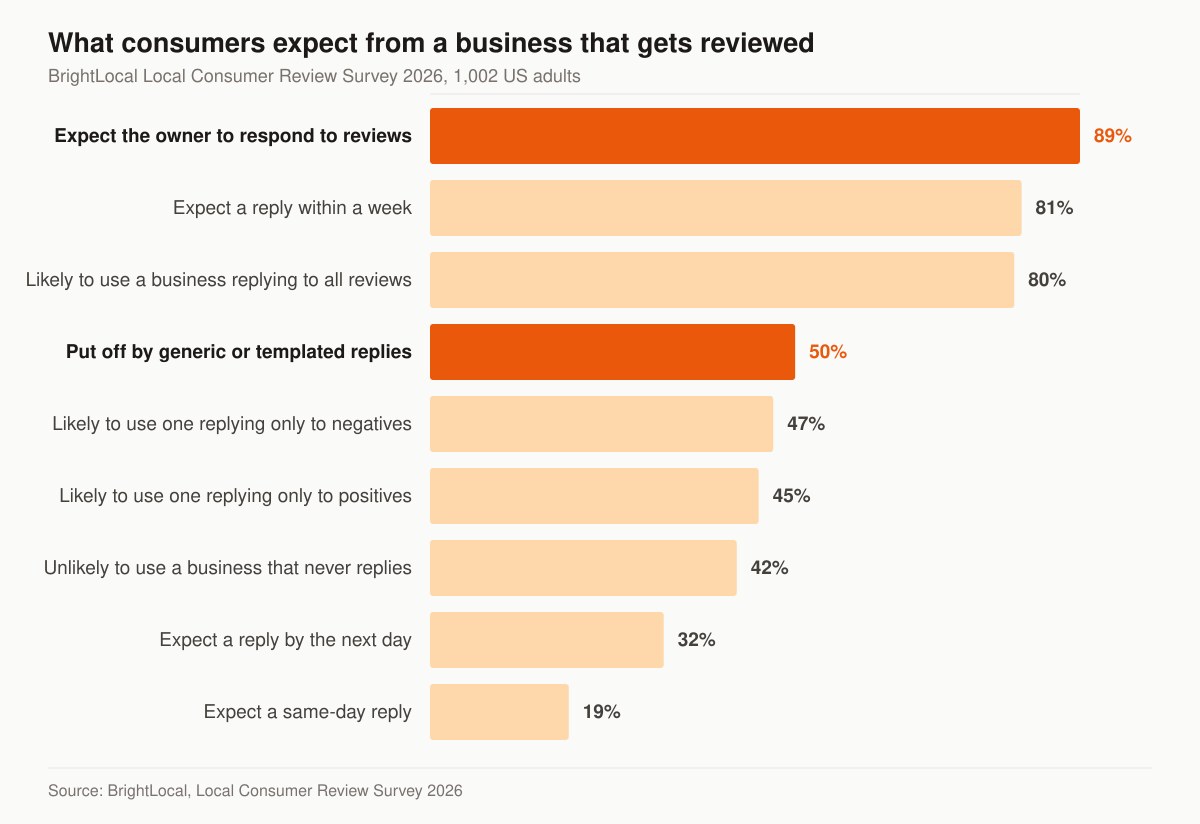
Response rate is the most visible trust signal you control, because it sits on the profile itself where every prospect can read it. In the same BrightLocal 2026 survey, 89% of consumers said they expect business owners to respond to the reviews they leave. The chart below shows what that same panel expects once it has left a review.
Source: BrightLocal, Local Consumer Review Survey 2026, a representative panel of 1,002 US adult consumers.
Three of those bars change how a reply gets written. The speed expectation moved hard in a single year: 19% now expect a response the same day they post, up from 6% the year before, 32% want one by the following day, and 81% expect to hear back within a week. Half of consumers — 50% — are put off by generic or templated replies, so a rotation of stock sentences under every five-star review does damage rather than nothing. And partial coverage earns less than partial credit: 80% say they are likely to use a business that responds to all of its reviews, but that reads 47% for a business that answers only negative reviews and 45% for one that answers only positives. Answering only the complaints scores 33 points below answering everything, and only 2 points above answering nothing but the compliments.
That is the case for treating response rate as a standing operating number rather than a task. It is also why a reply queue with a named owner beats good intentions in a multi-producer agency: a review that lands on a Friday and gets answered ten days later has already missed the window 81% of readers expected.
The guidance we hold agents to:
- Respond to every review, positive and negative — a profile where only complaints get answers reads worse than silence.
- Never confirm the reviewer is a client or reference their policy, health, or claim. Thank them generically; privacy obligations do not pause for marketing.
- Keep positive replies short and specific — one line that sounds like a person, not a rotation of the same template.
- For negatives: acknowledge, de-escalate, move offline. One calm reply with a direct phone number. No arguing, no essays, no blaming the client.
- Never offer anything to remove a review — it crosses the same policy line as paying for one.
- Reply within days, not months — the response timestamp is public, and a fast reply on a negative review often matters more to the reader than the review itself.
Can you get a bad Google review removed?
Sometimes, and only on grounds Google publishes. A review describing a genuine bad experience is not removable, and treating it as removable is how an agency ends up on the wrong side of the FTC’s suppression rule. What Google acts on is content that breaks a named policy. This table maps the grounds in Google’s prohibited and restricted content policy to the versions an insurance agency actually meets.
| Policy ground | Google’s wording | What it looks like on an agent profile |
|---|---|---|
| Fake engagement | Content “that is not based on a real experience or does not accurately represent the location or product in question” | A one-star from someone who never contacted your agency |
| Rating manipulation | Content “based on a conflict of interest,” which “may include current or former employment, a contractual or consultory relationship, or other professional or personal affiliations that demonstrate a conflict of interest” — with “industry competitors, familial relationships” given as examples | A competing agent down the road, or the producer who left last quarter |
| Off-topic | Content “which contains general, political, or social commentary or personal rants” | A one-star about Medicare premiums in general rather than about you |
| Offensive content | “Unsubstantiated allegations of unethical behavior or criminal wrongdoing” | An accusation of fraud with nothing behind it |
| Personal information | Another person’s personal information posted without consent, including “medical information” | A review that names a spouse’s diagnosis |
| Advertising & solicitation | “Posting email addresses, phone numbers, social media links, or links to other websites in your reviews” | A competitor leaving their phone number in your reviews |
| Impersonation | Content “posted or shared seeking to impersonate any person, group, or organization” | A review posted under your agency’s own name |
Note what is not on that list. Google states plainly that it does allow “content that describes negative experiences in a respectful manner.” A slow claim, a missed callback, a price the client did not expect — those stay up, and your reply is the lever you have on them. Pressuring the reviewer to take one down instead runs straight into 16 CFR 465.7(a) above.
The sequence when a review does break policy: flag it through the profile with the specific policy named, keep a dated record of what you flagged and why, and reply publicly in the meantime as though it will stay, because a pending flag is not a removal. The review is not the whole exposure — repeated guideline problems around a listing sit next to the issues that get a listing pulled altogether, which is the profile suspension path.
Will review schema put stars on your search result?
Not for your own reviews, and any vendor promising otherwise is selling against a rule Google has published. Google’s review snippet documentation states: “If the entity that’s being reviewed controls the reviews about itself, their pages that use LocalBusiness or any other type of Organization structured data are ineligible for star review feature.” It then gives the exact case an agency runs into: “a review about entity A is placed on the website of entity A, either directly in their structured data or through an embedded third-party widget (for example, Google Business reviews or Facebook reviews widget).” The same page adds two more constraints — “Don’t aggregate reviews or ratings from other websites” and “Ratings must be sourced directly from users.”
So the star rich result under your agency’s listing is not something markup buys. What the markup still earns is entity clarity: structured data telling a search engine and an AI assistant what your agency is, where it operates, and which lines it writes. That is the job it does on your agency website and in AI search, and it is why schema stays in the program even though the stars do not appear. It also sets the priority order: reviews are worth the most where they display natively and Google reads them as first-party — on the Business Profile — rather than inside a widget on a page you control. If you do run that widget, 16 CFR 465.7(b) applies to it, so show the feed honestly or do not imply it is complete.
Where reputation ends and local SEO begins
Reviews and ranking feed the same Google Business Profile, but they are two jobs. Reputation management builds the trust — reviews, responses, and an active listing — that converts the searcher who sees you. Getting the profile to appear for a nearby search is local SEO for insurance agents: categories tuned for rank, citation cleanup, and city landing pages. We run both, and a strong profile with steady reviews also strengthens the prominence signal local SEO depends on, so the two compound. Reviews also back your broader insurance SEO on YMYL pages, and profile calls land in the same lead generation engine and follow-up cadence as paid leads. Agents on a single line can go deeper with final expense SEO.
Survey data like BrightLocal’s sets the industry-wide stakes, but for your agency we measure your own profile calls, review velocity, and star trend rather than leaning on borrowed numbers.
How much does insurance agency reputation management cost?
Reputation management is not sold as a standalone line item — it runs inside a monthly tier. The published tiers are Foundation $2,500/mo, Growth $3,500/mo, and Full-Funnel $5,500/mo. Foundation covers the Business Profile itself: local SEO and the profile build, on-page SEO, and monthly reporting. The review engine — the compliant request flow, response templates, monitoring, and the monthly reputation report — starts at Growth, which is the tier this program maps to. Full-Funnel adds managed paid ads, landing-page CRO, and marketing automation on top of everything in Growth. If your current site cannot carry review schema, a one-time build runs $2,500–$8,000. Full breakdown on the pricing page.
How long does reputation management take to show results?
Three clocks run at different speeds. Response rate moves immediately — it is the one number you can fix in an afternoon, and it is visible on the profile where every prospect reads it. Review velocity moves next: once the request flow is wired into the bind and claims-resolution steps, reviews start arriving inside the first month, because you are asking clients you already have. Map-pack visibility is the slow one — we plan around a 60-to-120-day window for it, and proximity to the searcher is a ranking factor you cannot control at all. Set categories and finish video verification in summer so none of that clock runs during AEP.
What you get in the reputation management program
Four standing pieces of work, run every month rather than set up once:
- A verified profile built and video-verified before AEP
- A compliant review-request system with response templates
- Ongoing profile activity — posts, Q&A, and photos kept current
- Reputation monitoring across the platforms seniors read
Want to see how your reviews and profile compare with the agents seniors are calling instead? Start with a free marketing audit — we pull your review velocity, star average, response rate, and profile activity, then show you the fixes that build trust first. If you would rather talk it through, reach the team here.
Guides that go deeper
Frequently asked questions
Do insurance agents need a Google Business Profile?
What category should a Medicare or final expense agent use on Google Business Profile?
Is asking clients for Google reviews compliant for Medicare agents?
How long does it take to rank in the local map pack?
How should an insurance agent respond to a negative Google review?
How many Google reviews does an insurance agency need?
Can I get a bad Google review removed?
Can I ask my staff or my family to leave reviews for my agency?
See exactly where your agency is leaking leads.
15 minutes. We screen-share our own live lead dashboard and tear down your funnel line by line — no pitch deck, just numbers.
- Site speed & conversion
- Local + AI-search visibility
- Ad efficiency
- Your cost per lead vs ours
No obligation · no pitch deck