Who we serve
Annuity Facebook Ads for Agents
Annuity Facebook ads for agents run inside Meta's Financial products and services Special Ad Category, which fixes age at 18 through 65+ and removes ZIP and lookalike targeting, so the creative selects the pre-retiree. The angles that clear review protect a nest egg, question market risk near retirement, and address rollover timing — never a guaranteed return.
Free · 15-minute teardown · no pitch deck
- We run our own final-expense book
- No pitch deck — we screen-share real numbers
- TCPA-aware · CMS/AEP-compliant · Meta Special Ad Category
- Core Web Vitals < 2.0s LCP
Annuity Facebook advertising is a different game from most insurance lines, but not for the reason the old briefings give. The story used to be that annuity ads escaped Meta’s Special Ad Category because an annuity is not credit. That stopped being true in October 2024, when Meta replaced the Credit category with Financial products and services and named insurance and investment services among the examples of what belongs in it. US annuity advertisers now declare the category, lose most of the audience panel, and fight on two fronts instead of one: the claims Meta reviews, and the qualification the targeting no longer does for you. Annuity Facebook ads for agents succeed or fail on whether the ad sells a safe idea Meta will approve, then qualifies hard enough to be worth the click.
This is the paid-social spoke under our annuity marketing pillar. The broader channel mechanics live in our insurance social media advertising service, the money page this spoke feeds.
Below: which category Meta puts you in and what declaring it costs, the verification Meta may run before an annuity ad serves at all, the angles that clear review, who the ad is actually talking to, what an instant form is forbidden to ask, which audiences survive the category, the insurance and securities advertising rules that sit on top of Meta’s, how to read a competitor’s live ads, what a rejection actually costs, and the cost figure that decides whether the channel is worth running.
Which Special Ad Category do annuity ads fall under?
Financial products and services, for any US advertiser. Meta states that “Starting January 21, 2025, using the Special Ad Category designation is required for advertisers based in the United States or reaching audiences in the United States running financial products and services campaigns. Ads may be rejected if the advertiser does not choose an appropriate Special Ad Category.” The examples Meta gives on that page are insurance, bank accounts, investment services and payment services. Meta prints the hedge on its category examples on a different page, How to choose a Special Ad Category: “This is not a comprehensive list of examples and does not constitute legal advice.” So confirm the classification for your own campaigns and with your own counsel rather than inheriting it from a blog post.
One wrinkle worth knowing before you argue with a rep about it: Meta’s own documents carry two different start dates. The Business Help Center page and the milestones list in the Marketing API developer documentation both say January 21, 2025, while the opening note on that same developer page says January 14, 2025. The requirement is not in dispute; the date printed depends on which Meta page you opened.
Table: what declaring the category costs an annuity campaign, in Meta’s own wording.
| Audience lever | What Meta says | What it means for annuity ads |
|---|---|---|
| Age | Options “generally fixed to include ages 18 through 65+” | The 55-70 pre-retiree window is no longer selectable |
| Gender | “Specific gender cannot be chosen.” | Household-role angles have to live in the copy |
| ZIP / postal code | subcity, neighborhood and zips are “not supported” |
No targeting affluent ZIPs as an assets proxy |
| Metro area | metro_area and small_geo_area are also on the unsupported list |
A DMA-shaped buy has to be rebuilt from cities |
| Location exclusion | “Location exclusion is not supported.” | You cannot carve out a county you are not licensed in |
| City or pin-drop radius | Must cover “15 mile or 25 kilometer radius” in the US and Canada | A metro-office producer buys the whole metro |
| Detailed targeting | Behavior and demographic targeting are not permitted, and “Supported targeting interests have to be part of a previously approved list.” | Interest stacks built for other lines will not save |
| Lookalike audiences | “Lookalike audiences are unavailable” | Your book of actual clients can no longer be modelled |
| Bid multipliers | “You cannot use bid multipliers under a Special Ad Category.” | No bidding up the age band you actually want |
These are not warnings you can spend past. Meta’s developer documentation states that if you select the category, “all audience restrictions will be enforced with a hard error”, and that sending an incorrect category means “there is a risk your ads will be paused until the campaign is adjusted.”
The declaration itself is a build step, not a checkbox you discover after spend starts; how we handle it across every line is on our insurance Facebook ads service. The platform then reviews your message just as aggressively. The lines that get ads rejected — or worse, flag the ad account — are all claim-based:
- No guaranteed or projected returns. “Earn 8% tax-free” states a return the contract does not guarantee, which is what the nonguaranteed-element rules below prohibit. Annuities have caps, floors, and conditions; the ad cannot imply upside without them.
- No “get rich” or market-beating framing. Sell protection and income, not wealth-building fantasy.
- No misleading urgency or fake scarcity. “Government secret,” countdown gimmicks, and manufactured panic get pulled.
- No “DM me for the guide.” Meta’s advertising standards state that for ads targeting the United States, ads can’t “Promote investment products or opportunities that suggest user interaction with the advertiser via on-platform or off-platform direct messaging services”. The comment-bait mechanic that works in other niches is off the table here.
- Disclose who you are. A licensed insurance producer inviting a conversation, not an anonymous “retirement authority.”
Treat compliance as a filter that also improves quality. An ad that sells a conversation instead of a return attracts the serious pre-retiree and repels the tire-kicker, which is exactly the trade a high-ticket product wants.
Does Meta verify you before an annuity ad runs?
It can, and it is a step that is easy to discover too late. Meta states that “To help prevent fraud and impersonation in financial products or services advertising, and in some cases to comply with regulatory authorities, Meta may ask you to verify information about yourself or your organization in order to publish ads that promote financial products or services.” The United States is on the list of regions where financial ads require verification.
The US requirement is written around securities and investments, and annuities are named in it. Meta states that “Advertisers that would like to promote financial securities and investments to people in the United States will need to complete advertiser verification and disclose their verified advertiser and payer details.” Meta describes a two-step process: verify the advertiser and payer of the ad, then “Select advertiser and payer information to disclose on the ad” in the Ad info section and in Meta’s Ad Library. On the same page, Meta defines investments as “products and services where an individual invests money with the expectation of a potential return on their investment” and gives a non-exhaustive list of examples that includes annuities alongside stocks, bonds, derivatives, mutual funds and investment management services.
Read that carefully rather than panicking about it. Meta’s list is a platform classification for its own review purposes; it is not a determination that a fixed indexed annuity or a MYGA is a security under federal or state law, and a fixed annuity’s actual regulatory status is a question for your counsel and your carrier. What it does mean operationally is that an ad account with no verified advertiser and payer on file may not be able to publish, and that your firm’s name and payer details become publicly visible in the Ad Library.
This table sorts what Meta says needs verification against what it says can run without it, and marks the two rows where Meta says neither and we have to read across the gap.
| Ad you want to run | Meta’s wording, where it has any | Practical read |
|---|---|---|
| An offer to review someone’s rollover or income plan | Not addressed in these words; we read it as a financial products and services ad on the US securities and investments verification path | Verify before you build the campaign, not after |
| A brand ad for the agency itself | Listed among ads that can run “without verification” as brand ads for banks and insurance companies | Useful for warming an audience while verification clears |
| A “what is a MYGA” explainer with no way to enquire | Listed as “Information about financial education” and as educational ads that do “not provide the ability to obtain or connect with that product or service” | Content-first traffic, not a lead engine |
| A guide download that captures a name and phone number | Not addressed in these words; the educational carve-out is written for ads that cannot connect the person with the product, which a contact-capture download does | Run it under the verified account |
Two more lines from Meta’s financial and insurance advertising standard belong on the pre-launch checklist. Meta states that “Advertisers may be required to be licensed in the country they are targeting if they wish to run ads for financial products or services.” It also states that “Advertisers are required to comply with all applicable laws and regulations, including any licensing or disclosure requirements.” Meta is telling you plainly that platform approval is not the same thing as regulatory compliance, and that it may ask for the licence.
The safe-money angles that clear review and convert
The winning creative names the prospect’s fear and offers education, never a product spec. These angles pass Meta review because they raise a legitimate question and route to a guide or a review call:
- Protect the 401(k). “Worried a market drop could hit your retirement savings right before you need them?”
- Sequence-of-returns risk, in plain words. “A big loss in your first retirement years is the one you cannot wait out.”
- Rollover timing. “Leaving your employer? Your 401(k) is briefly liquid — here is what your options actually are.”
- The CD alternative. “Your CD matured. Before you renew, compare the guaranteed options for safe money.”
- RMD and income. “Turning your savings into predictable retirement income, explained without the jargon.”
Angle four carries a condition the other four do not. The NAIC’s model advertising rule states that an annuity advertisement “shall not refer to an annuity as a CD annuity, or deceptively compare an annuity to a certificate of deposit.” A comparison is not banned; a comparison that hides the differences is. If the ad or the page it lands on puts a guaranteed annuity rate next to a bank rate, it has to carry the differences a buyer needs — surrender schedules, who guarantees the money, and the tax treatment — with the same prominence as the number. That is a content problem, and it is solved on the page rather than in the ad.
Each angle leads with the worry and offers a low-commitment next step — a downloadable guide or a free income review — instead of asking a cautious 60-year-old to buy on the first click. For the messaging discipline behind the safe-money and tax angle specifically, see our guide on marketing tax-free retirement to clients.
Who the ad is actually talking to
Because you cannot select the pre-retiree any more, it helps to know what the wider audience believes about its own money. The Federal Reserve asks a question that maps almost exactly onto an annuity offer: how comfortable are you choosing and managing your investments?
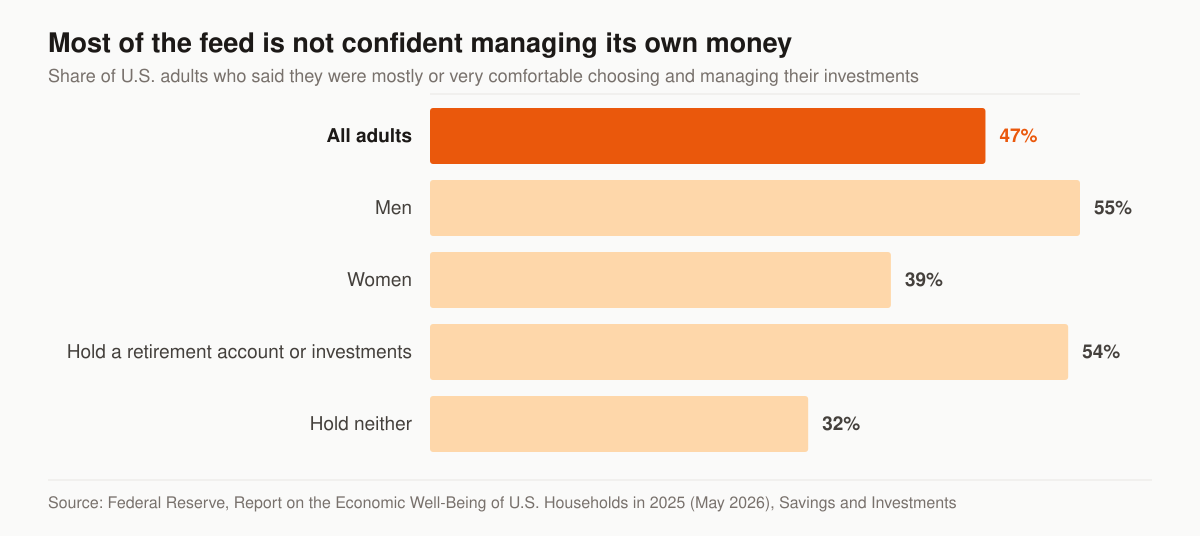
Share of U.S. adults mostly or very comfortable choosing and managing their investments. Source: Federal Reserve, Report on the Economic Well-Being of U.S. Households in 2025, published May 2026.
The Fed reports that “Forty-seven percent of adults said they were mostly or very comfortable choosing and managing their investments, while 53 percent of adults said they were not comfortable or only slightly comfortable.” It also reports that “Fifty-five percent of men said they were mostly or very comfortable choosing and managing their investments, while 39 percent of women gave these responses,” and that among people holding a tax-preferred retirement account or investments outside one, “54 percent expressed confidence, compared with 32 percent of those who did not have these accounts.”
Three things follow for the ad.
- The offer that fits the majority answer is a review, not a product. Fifty-three percent of adults told the Fed they were not comfortable or only slightly comfortable choosing and managing their investments. An ad that offers to explain a decision is speaking to that group; an ad that names a contract feature is speaking past it.
- The copy has to work across a confidence gap you cannot target around. Gender selection is unavailable in this category and the Fed puts comfort at 55 percent among men and 39 percent among women, so a single ad set is serving both. Copy that assumes financial fluency is written for one half of that split.
- Account ownership is the qualifier, and you can see it in the Fed’s asset table. Among adults aged 55 to 64, the Fed reports 73 percent held a tax-preferred retirement account such as a 401(k) or IRA and 67 percent held a savings or money market account or CD. Those are the two pools an annuity conversation is usually about, and naming the account in the ad does the filtering the panel used to do.
Lead form versus landing page
This table is the structural choice that shapes everything downstream in an annuity campaign: it trades volume against qualification.
| Factor | Meta instant lead form | Landing page |
|---|---|---|
| Cost per lead | Lower | Higher |
| Lead intent | Lower | Higher |
| Qualification | Minimal, and capped by Meta’s prohibited-question list | Age, money in motion, situation detail |
| Speed to launch | Fast | Needs a built page |
| Best for | Volume, retargeting fuel | High-ticket, suitable prospects |
Given how large an annuity case is, we lean toward the landing page for this line — or a hybrid where lead forms carry the volume and the landing page converts the qualified subset. Whichever you choose, the page it points to has to convert; that is the job of a purpose-built annuity website and funnel and dedicated insurance landing pages.
What an annuity instant form is not allowed to ask
This is the part that quietly breaks annuity campaigns built on advice written for other lines. Meta publishes a list of questions that cannot appear on an instant form, and several entries on it sit directly on top of annuity qualification.
Meta prohibits questions or text requesting “Financial information including, but not limited to, credit or debit card numbers, bank account numbers, routing numbers, credit score, net worth, income, bankruptcy status and debt status”. It also prohibits “Insurance information including, but not limited to, insurance company name, plan details, usage or policy numbers”, and “Health information including, but not limited to, current or previous physical or mental ailments either directly or within the family, medical treatments or side effects experienced from medication, or information about medical conditions or disabilities”. Meta states the consequence plainly: “If your instant form includes any questions that are found to violate the Advertising Standards, your lead ad will not run.”
This table maps the questions an annuity producer wants answered before the call against what Meta’s list permits on the form.
| What you want to know | Meta’s prohibited-question list | Where the question can live instead |
|---|---|---|
| Investable assets or net worth | “net worth” is named in the financial-information entry | The landing page, or the first call |
| Household income | “income” is named in the same entry | The landing page, or the first call |
| Size of the rollover in dollars | Not named, but we treat a dollar-amount question as financial information and keep it off the form | A range question on your own page, where you control the fields |
| Their current carrier or contract | “insurance company name, plan details, usage or policy numbers” are named | The suitability intake, once the conversation has started |
| Health, for a rider or care conversation | Health information is prohibited outright | The application stage |
| The trigger — retiring, rolling over, a CD maturing | Not restricted | A custom multiple-choice question on the form |
The workable version is narrower than advice written for other lines assumes: on the instant form you can ask what is happening in their life, not what is in their accounts. That constraint is why we default to the landing page for this line, because on your own page the fields are yours. It is also a reason to treat form volume as the top of a process rather than a lead count — the screening you skipped has to happen on the phone, which is where annuity appointment setting earns its place.
More volume, higher intent, or rich creative
If you do run instant forms, Meta gives three form types and the default is the loosest of them. Meta describes “More volume (default)” as an option that “Makes it easy for people to quickly submit the form on a mobile device, as this option is designed to generate a larger number of leads.” It describes “Higher intent” as focusing “on securing very intentional leads for people who may be interested in a specific product or service”, and “Rich creative” as creating “a more flexible and personalized instant form”.
The higher-intent form adds two things Meta names specifically. The first is “Inline context under contact fields to indicate that your business may follow up.” The second is “An additional review screen that gives people a chance to confirm their information.” For a cautious 62-year-old who is about to hand over a phone number, being told a call is coming and being shown what they typed is a feature, not friction.
It also has a delivery cost that is easy to miss. Meta notes that “A higher intent instant form will only be delivered to Facebook Feed and Instagram feed on mobile devices. It will not appear on desktop computers.” That narrows your placements to two, so run it against the default rather than assuming it is the upgrade. Judge both on kept appointments rather than on form fills.
Which audiences survive after you declare the category
The 55-70 window is now something the ad has to earn, not something you can select. Everything that used to happen in the audience panel moves into the creative, the form, and the conversion signal.
- Name the moment, not the demographic. “Leaving your employer this year?” or “Your CD just matured” finds the same person an age filter used to, and bores everyone else into scrolling past.
- Let the qualifying happen where it is allowed — the trigger on the instant form, the money-in-motion detail on your own page, and the suitability picture on the call.
- Plan geography by state and metro, knowing a city or pin-drop audience covers everyone within a 15-mile radius of it, and that Meta’s unsupported location list includes
metro_areaas well aszips. - Keep your first-party audiences. Meta’s developer documentation lists custom audience inclusion, custom audience exclusion, custom audience expansion, Advantage+ audience and detailed targeting expansion among the features that survive the category, while saved audiences and lookalike audiences are removed. Meta’s Help Center describes exclusion targeting in blunter terms, so verify what actually saves in your own account before you design around it — and note Meta’s aside that “Certain audience options such as custom audiences may only be available via Meta Ads Manager.”
- Feed conversions back via the Conversions API so the algorithm learns what a real annuity buyer looks like — with lookalikes gone, that signal is the only teacher left.
That fourth point is the practical replacement for the modelling you lost. A seminar registration list, a newsletter file and your website visitors are audiences you own, and they still load. The pipeline that keeps them growing is our insurance lead generation service; the sequences that work them are in our insurance email and SMS automation service and the insurance lead follow-up cadence.
Ads generate the interest; they do not close it. Pair this with annuity appointment setting so a lead that comes in at 9pm gets contacted and booked before it cools, and with annuity lead generation to see how paid social sits next to seminars and SEO.
The advertising rules that sit on top of Meta’s
Meta approving an ad is not the same as the ad being compliant. Two more layers apply to annuity creative, and which ones bind you depends on your licences and your appointments.
Your state’s insurance advertising rule. Life and annuity advertising is regulated at state level, and the NAIC publishes a model text states can adopt: the Advertisements of Life Insurance and Annuities Model Regulation (#570). A model regulation is not law until a state enacts its own version, and states amend what they adopt, so the text that binds you is your state’s — the NAIC publishes a state-by-state adoption chart as the starting point. The model’s definition of an advertisement covers material used in “direct mail, newspapers, magazines, radio and television scripts, telemarketing scripts, billboards and similar displays, and the Internet or any other mass communication media”, which is a description a Facebook ad fits without argument. Provisions that bear directly on paid social:
- Responsibility runs to you, not only the carrier. The model states that “All advertisements, regardless of by whom written, created, designed or presented, shall be the responsibility of the insurer, as well as the producer who created or presented the advertisement”, and requires insurers to maintain a system of control including procedures for company approval before a producer uses an advertisement the insurer did not supply.
- Say what the product is. “An advertisement shall prominently describe the type of policy advertised.”
- Do not dress a rate as a guarantee. “An advertisement shall not state or imply that the payment or amount of nonguaranteed elements is guaranteed”, and for deferred annuities, any statement based on nonguaranteed interest rates “shall likewise set forth with equal prominence comparable illustrations or statements containing or based upon the guaranteed accumulation interest rates.”
- Do not look like the government. The model prohibits words, symbols or materials so similar to those of a governmental program or agency that they tend to mislead people into believing the solicitation is connected to one — which is the rule underneath the “government secret” framing warned against above.
- Watch the title in your ad. The model restricts a producer’s use of terms such as “financial planner,” “investment adviser,” “financial consultant,” or “financial counseling” where they imply an advisory business whose compensation is unrelated to sales.
- Cite your own numbers. “The source of any statistics used in advertisement shall be identified” — which applies to the market statistic you were about to put in an image.
- Manufactured deadlines are named. The model bars describing an enrollment period as special or limited where the insurer uses successive enrollment periods as its usual marketing method.
The model also sets an advertising file requirement — insurers keep specimen copies at the home office, and “All advertisements shall be maintained in the file for a period of five (5) years after discontinuance of its use or publication” — and a penalty provision of “a fine up to $1000 for each violation and suspension or revocation of its certificate of authority or license.” Keep your own dated archive of every creative, form and landing page version; you will need it long before a regulator does, the first time a carrier asks what the prospect actually saw.
FINRA Rule 2210, if you are also registered. The obligations in FINRA Rule 2210 run to FINRA member firms, and a firm’s supervisory procedures are what carry them to the registered people who work through it. An insurance-only producer selling fixed products is outside it; a dually registered producer generally is not, and should assume the broker-dealer’s procedures apply to a paid ad. The rule’s own definitions make that unavoidable: a “retail communication” is any written or electronic communication “distributed or made available to more than 25 retail investors within any 30 calendar-day period”, a threshold any funded Facebook campaign passes quickly. Rule 2210(b)(1)(A) then states that an “appropriately qualified registered principal of the member must approve each retail communication before the earlier of its use or filing with FINRA’s Advertising Regulation Department”.
Three content standards bear directly on annuity creative. Rule 2210(d)(1)(B) states that “No member may make any false, exaggerated, unwarranted, promissory or misleading statement or claim in any communication.” Rule 2210(d)(1)(F) states that “Communications may not predict or project performance, imply that past performance will recur or make any exaggerated or unwarranted claim, opinion or forecast”, subject to carve-outs the rule lists for hypothetical illustrations of mathematical principles, investment analysis tools meeting Rule 2214, and price targets in research reports. And Rule 2210(d)(4)(B) states that communications “may not characterize income or investment returns as tax-free or exempt from income tax when tax liability is merely postponed or deferred, such as when taxes are payable upon redemption” — the exact trap in a “tax-free retirement” hook.
The comparison rule is the one that governs a MYGA-versus-CD ad. Rule 2210(d)(2) requires that “Any comparison in retail communications between investments or services must disclose all material differences between them, including (as applicable) investment objectives, costs and expenses, liquidity, safety, guarantees or insurance, fluctuation of principal or return, and tax features.” Read that next to the NAIC provision above and the design brief writes itself: the comparison lives on a page with room for the differences, and the ad’s job is to earn the click to it.
This table stacks the layers so you can see who is actually approving what.
| Layer | Who it binds | What it does to the ad |
|---|---|---|
| Meta Advertising Standards | Every advertiser on Meta | Rejects claim-based creative and prohibited form questions |
| Special Ad Category | US financial products and services advertisers | Removes age, gender, ZIP, exclusions and lookalikes |
| Meta advertiser verification | US securities and investment advertisers | Can block publishing until advertiser and payer are verified and disclosed |
| Your state’s version of NAIC Model #570 | The insurer and the producer who created the ad | Governs guarantees, comparisons, titles, urgency and records |
| Carrier or IMO advertising approval | Appointed producers | Pre-approval of creative the carrier did not supply |
| FINRA Rule 2210 | FINRA member firms, and their people through firm procedures | Principal approval before use; no projections; comparison disclosure |
Read the competitor ads before you write your own
Every live annuity ad on Meta is public, and it is free research. Meta states that “The Ad Library contains all active ads that are shown across Meta technologies” and that “Anyone can view and search the Ad Library.” Search a competitor’s page name and you can see the creative, the copy, the page it runs from, and — per Meta’s table of what the library shows — the special ad category designation for housing, employment and financial products and services ads. Meta also notes that clicking See ad details gives “additional information, such as details from the About section or more information about the lead form for a lead generation ad format”, which means a rival’s instant-form questions are readable.
Be equally clear about what the library will not tell you for an ordinary commercial ad. Meta’s own table lists amount spent, impression ranges, total reach, estimated audience size and targeting selections as not shown for active ads that are not about social issues, elections or politics and do not deliver to the EU; archival is listed as no for those ads; and the date field “Only includes the date in which the ad started to run”. So you can see what is running and how long it has been running. You cannot see what it costs or whether it works, and treating a long-running ad as proof of profit is a guess dressed as research.
Use it for three concrete jobs: check whether the competitors in your state declared the category, note which angles are still live after months rather than days, and read their form questions to find the qualifier you are missing. Then write something that is not a paraphrase of the four ads already in the feed — the reasoning behind that positioning work is in how to get annuity clients with marketing.
What a rejection actually costs you
An annuity ad can be approved and then stopped, and knowing why changes how you manage a winner. Meta states that it relies “primarily on automated technology to apply our Advertising Standards to the millions of ads that run on our platforms,” with human reviewers who train that technology and in some cases review ads manually. It also states that “Previously approved ads can be selected for another review for various reasons, including if people hide, block, report or otherwise provide negative feedback about an ad.”
Two operational consequences follow, and both argue for calm creative.
First, negative feedback is a re-review trigger. We treat alarmist market-crash imagery as a re-review risk on that basis: hides and reports are the feedback Meta names, and they are what can put an approved ad back in front of review. The educational version is not only the compliant one; it also gives that trigger less to work with.
Second, editing is republishing. Meta states that “If you edit an ad that is already running, it will go through another review. If your ad is going through another review, you won’t be notified unless it’s found to violate our Advertising Standards.” A working annuity ad is a compliance asset, so do not sharpen its headline in place — duplicate it, test the variant, and leave the approved original alone. Keep a record of what each version said, because your state’s advertising rule expects the file to exist.
What the click costs, and the number that decides the channel
Published benchmarks will not price your campaign, but they set expectations for the vertical, and the vertical is expensive.
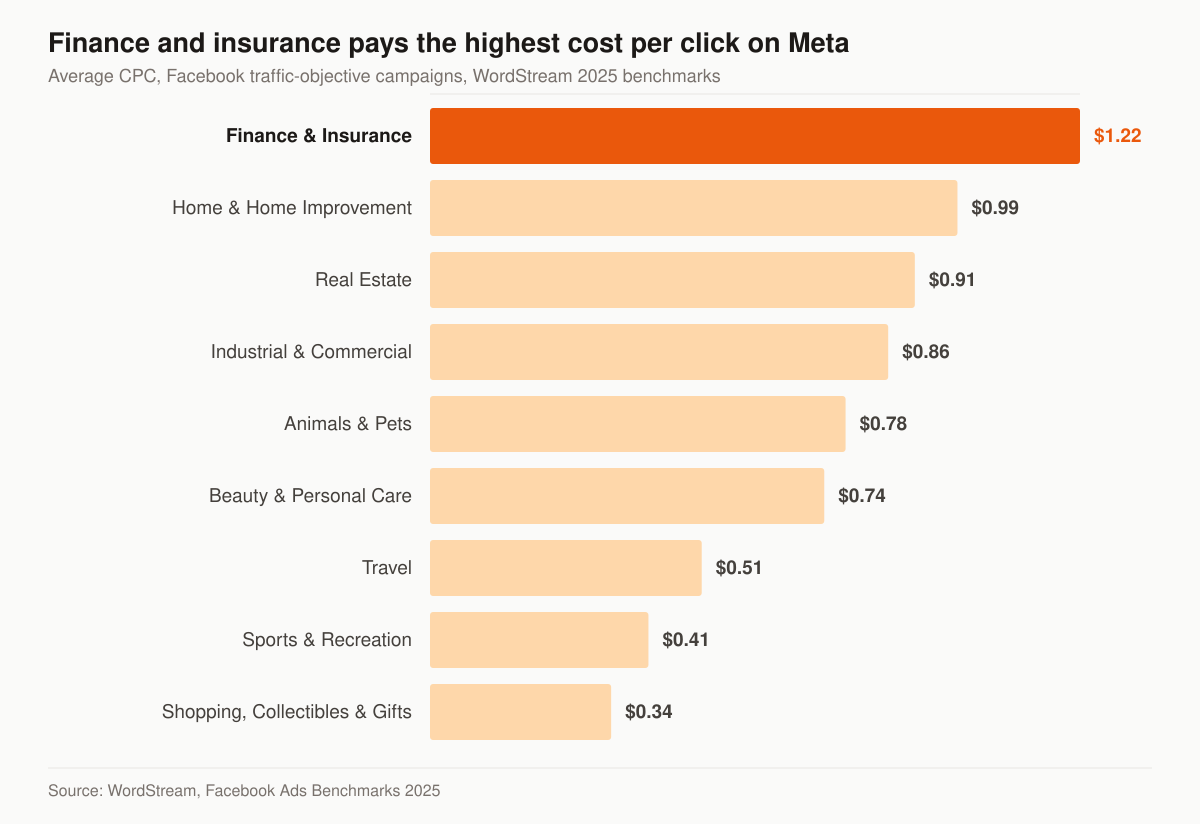
Average cost per click, Facebook traffic-objective campaigns. Source: WordStream, Facebook Ads Benchmarks 2025, last updated September 15, 2025.
In WordStream’s 2025 report, Finance and Insurance recorded the highest average cost per click of any category in the traffic-objective table at $1.22, and the third-lowest click-through rate at 0.98 percent. For the leads objective the report publishes no Finance and Insurance row at all, so the closest published figure is the all-industry one: an average cost per lead of $27.66, an average cost per click of $1.92 and an average conversion rate of 7.72 percent. WordStream states the traffic figures come from 554 US campaigns and the leads figures from 726 US campaigns running between April 1, 2024 and June 30, 2025, and that its “averages” are technically median figures to account for outliers.
Read those as a floor for a general advertiser, not a forecast for you. An annuity campaign is buying clicks in the priciest category in the table, from an audience it cannot target, with a form it cannot fully qualify on. The honest expectation is that your cost per lead sits above a cross-industry median and your cost per appointment matters more than either number.
This is the measurement chain we track on an annuity paid-social account, and what each step tells you.
| Metric | What it tells you | Where it usually breaks |
|---|---|---|
| Cost per click | Whether the creative earns attention in a costly category | Judged before the ad has left the learning phase |
| Cost per lead | Channel input price | Compared across form types that are not comparable |
| Contact rate | Whether the record is real and you were fast | A lead sitting in an inbox overnight |
| Cost per qualified conversation | Whether the trigger question did any filtering | Volume forms with no qualifying step after the click |
| Appointment set rate | Whether the offer was a review rather than a pitch | Asking for the sale on the first call |
| Kept appointment rate | Whether the booking was warm and close in time | Long gaps and generic confirmations |
| Cost per issued case | The channel verdict that survives an audit | Rarely tracked, because it needs carrier data back |
Our managed programs are published rather than quoted: Foundation at $2,500 per month, Growth at $3,500, Full-Funnel at $5,500, plus a one-time website build of $2,500–$8,000. The pricing page lists what sits inside each tier, and paid social is one row of a system rather than a standalone product — if search is the better first dollar for your book, we will say so. The head-to-head reasoning is in Facebook ads versus Google ads for insurance agencies.
Buying versus running your own annuity ads
Running your own campaigns builds an exclusive, branded pipeline and lowers cost per sale over time, but it demands creative testing and fast follow-up. If you would rather buy annuity leads or transfers as a finished product while you build that engine, you can buy leads direct from getinsureleads, our sister brand. We run marketing systems on this site; we do not sell leads here.
Whichever route you take, the calling rules are the same and buying a record does not create permission to dial it. That ground is covered in TCPA compliance for insurance agents buying leads.
Get your creative checked before you spend
Before you put budget behind annuity Facebook ads, get the creative reviewed for compliance flags and the funnel modeled from click to booked, suitable appointment. A free marketing audit does both — and tells you honestly whether paid social or search is the better first dollar for your book. If you already know what you want built, tell us about your book and we will scope it against the published tiers.