Who we serve
Final Expense Facebook Ads, Built for a Panel That Lost Age Targeting
Final expense Facebook ads sell a senior product on a platform that no longer lets you target seniors. Meta classifies insurance under its Financial products and services Special Ad Category, which limits age selection and removes ZIP targeting, so the ad creative and the form questions have to do the qualifying instead.
Free · 15-minute teardown · no pitch deck
- We run our own final-expense book
- No pitch deck — we screen-share real numbers
- TCPA-aware · CMS/AEP-compliant · Meta Special Ad Category
- Core Web Vitals < 2.0s LCP
Every other line can absorb the loss of age targeting. Final expense cannot pretend to. This is a product bought almost entirely by people past 50, sold on a platform that will no longer let you ask for them — which makes the creative, the form, and the follow-up the entire campaign. This page is the Meta half of our final expense marketing engine.
Which Special Ad Category do final expense Facebook ads fall under?
Financial products and services. Meta introduced that category in October 2024, replacing the old Credit category, and its examples of ads that belong in it are “those promoting insurance, bank accounts, investment services and payment services.” Meta also states that “Starting January 21, 2025, using the Special Ad Category designation is required for advertisers based in the United States or reaching audiences in the United States running financial products and services campaigns.”
For a senior product, the consequences are unusually harsh.
Table: what a final expense campaign loses to the category, and why it hurts more here than on other lines.
| Restriction | Meta’s wording | Why final expense feels it hardest |
|---|---|---|
| Age | Listed among the options “limited or unavailable” for US advertisers | The buyer is 50–85; the one demographic that defines the product is the one you cannot ask for |
| ZIP / postal code | Target by city or state, “but not by ZIP code or postal code” | State-level licensing and rural/urban price gaps get blunt fast |
| City radius | 15-mile (25-km) minimum in the US and Canada | A small-town agent buys three surrounding towns whether or not they want them |
| Advantage+ lookalike | “Advantage+ lookalike is unavailable.” | The seed list of past FE buyers can no longer be modelled |
| Detailed targeting | “Some demographic, behavior and interest options are unavailable.” | Life-stage and financial-interest proxies thin out |
Meta notes its category guidance “does not constitute legal advice,” so confirm the classification against your own campaigns rather than assuming a category you saw on a forum.
What declaring the category actually does to the ad set
Declaration is not an optional checkbox at the top of the build. Meta states that “When you create a campaign, you are required to specify if you are running an ad to promote a Special Ad Category,” and the path in Ads Manager is four steps: open the campaign, select Special Ad Categories, choose the category, then choose the countries. Meta describes the point of the category as “Limited audience selection tools for ads about employment, housing opportunities or financial products and services to help protect people from unlawful discrimination across our platforms.”
The declaration changes more underneath the build than a checkbox suggests.
Table: what Ads Manager does to each audience control once the category is declared, in Meta’s own words — the audiences page unless a row links elsewhere.
| Control | What Meta says happens | What it means for a final expense build |
|---|---|---|
| Saved audience | It “will be updated to comply with housing, employment or financial products and services Special Ad Category audience restrictions” | An audience saved before January 2025 is rewritten rather than rejected, so it can look intact and behave differently |
| Gender | “Audiences must include all genders. You can’t edit this option.” | Gender skew in a final expense book cannot be bought; it has to be earned by the creative |
| Location exclusion | “You also can’t exclude locations.” | You cannot carve out a state you are not licensed in — the geography has to be built by inclusion |
| Detailed targeting exclusion | “Excluding any detailed targeting selections is also unavailable.” | No suppressing the interests that drag in the wrong reader |
| City or pin drop | An audience for Seattle “will also include people within a 15-mile radius of Seattle’s city center” | A city buy is a metro buy, whether the agent works that far out or not |
| Advantage+ catalog ads | On the category-selection page, they “will be subject to the same limitations” | The automated formats inherit every restriction above |
Read the age paragraph in full before deciding what it covers. On that page, under the heading Age, Meta writes: “Options are generally fixed to include ages 18 through 65+ for housing, employment and credit ads. However, advertisers running credit ads in Europe can select a different age range in order to meet their industry and local requirements for this Special Ad Category.” The page as a whole is titled for housing, employment or financial products and services campaigns; that particular sentence names housing, employment and credit. The same page’s opening list, though, names age among the options “limited or unavailable” for advertisers based in or reaching the US, so what that sentence scopes and what the panel offers you are two different questions. Meta also says its list of category examples “is not a comprehensive list of examples and does not constitute legal advice.” What your own account is offered in Ads Manager is the answer that matters, and it is worth screenshotting the ad set at build time so a later change is visible.
One line in Meta’s guidance sets the strategy for the whole channel: “We encourage you to broaden—not restrict—your audience.” Agents who spend their optimization hours hunting for a targeting workaround are working against the delivery system rather than with it.
How do you reach seniors when the panel is locked?
You move the filtering into the parts of the campaign Meta does not restrict. Four of them, in the order they matter:
- Creative that names the situation, not the demographic. A photo of a grandmother is a demographic signal. “So your kids aren’t the ones paying for the funeral” is a situational one — and it filters far harder, because nobody outside that situation stops scrolling.
- Form questions that qualify before submit. Date of birth and state are two prefill questions that strip out a good share of what an instant form otherwise collects — and Meta’s prohibited-questions list decides which of the rest you are allowed to ask at all. Fewer, better leads beat a cheaper CPL. The full list is below.
- Conversion signal, fed properly. With lookalikes gone, the Meta Pixel and Conversions API are how the algorithm learns what a real final expense buyer looks like. Optimize toward a qualified lead event or a booked call, never toward a raw form fill.
- Speed-to-lead measured in minutes. A Meta lead was not looking for you; they were looking at their phone. Contact rate falls off a cliff after the first few minutes, which is why the CRM routing is part of the ad build, not an afterthought.
Notice what is absent from that list: audience settings. Under this category they are close to a constant, and constants do not deserve optimization time.
The reason the channel still works despite that is where the audience actually is. Pew Research Center’s Social Media Fact Sheet, drawn from a survey of 5,022 US adults conducted 5 February to 18 June 2025, reports that 57% of adults 65 and older say they ever use Facebook, against 74% at ages 50 to 64 and 68% at ages 18 to 29.
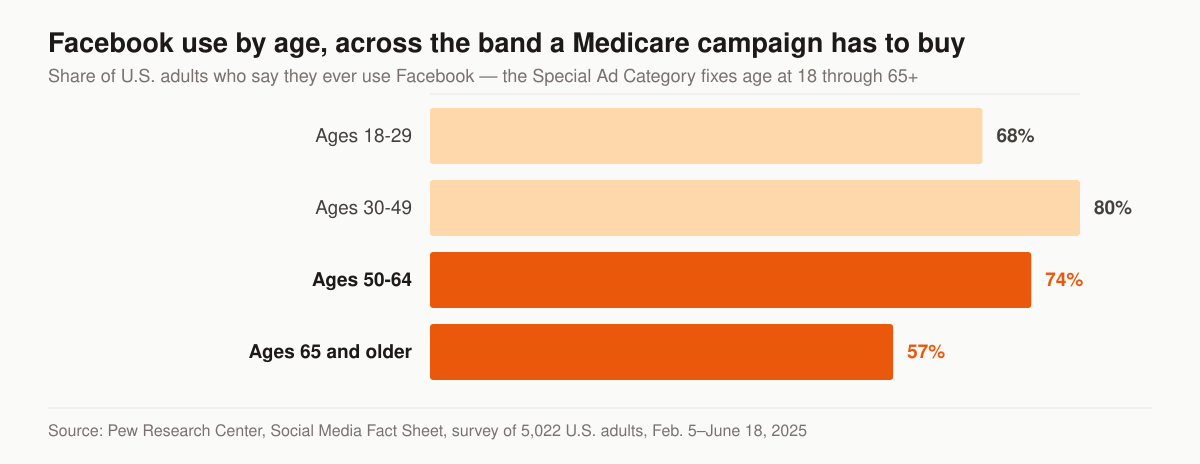
Facebook use by age across the band the Special Ad Category forces a final expense campaign to buy. Source: Pew Research Center, Social Media Fact Sheet, survey of 5,022 U.S. adults, Feb. 5–June 18, 2025.
The 65-and-older bar is the lowest of the four and still covers more than half of the age group. The band you are paying to reach is wider than the band that buys, and the creative is what closes that distance.
The line between speaking to seniors and asserting they are seniors
Every guide to this topic says the same thing: let the creative do the targeting. What they leave out is that Meta puts a boundary on how. Its Advertising Standards on privacy violations and personal attributes state that ads “must not contain content that asserts or implies personal attributes,” and the list that follows includes “direct or indirect assertions or implications about a person’s race, ethnicity, religion, beliefs, age, sexual orientation or practices, gender identity, disability, physical or mental health (including medical conditions), vulnerable financial status, voting status, membership in a trade union, criminal record, or name.”
Three items on that list — age, health, and vulnerable financial status — are exactly the three a final expense ad reaches for by instinct. Meta’s stated reason is not legal boilerplate: “Ads that make assumptions about people could be perceived as intrusive, unsettling or inaccurate. For this reason, we don’t allow advertisers to run ads that assert or imply the personal attributes of their audience. Instead, ads should focus on the benefits of the product or service being advertised.”
The policy publishes worked examples, and they are more useful than any paraphrase.
Table: Meta’s published examples of the same attribute handled two ways.
| Attribute | Meta lists as allowed | Meta lists as not allowed |
|---|---|---|
| Age | “Meet seniors” | “Meet other seniors” |
| Age | “A service for teens” | “Are you 18 years old?” |
| Age | “Age is just a number. Anyone can now learn coding with our C program.” | “Ready to upgrade your skin to look younger?” |
| Health | “New diabetes treatment available” | “Do you have diabetes?” |
| Name | “We print customizable t-shirts and stickers with your name.” | “Billy Taylor, get this t-shirt with your name in print!” |
Two grammatical patterns recur down the failed column. The word “other” turns a description of the audience into an assertion about the reader. The interrogative turns it into an accusation. Under vulnerable financial status, Meta’s prohibited example follows the same shape: “Are you bankrupt? Check out our services.”
The policy permits more than the failed column suggests. Ads can “Broadly reference personal attributes that aren’t listed above,” can “Contain passing reference to a personal attribute. This includes gender, age groups or age ranges,” and can “Use ‘you/your’ language without a personal attribute.” So a headline may name who the product is for and describe what it does. It may not tell the reader what it knows about them.
That is a compliance rule and a copywriting rule at the same time. A 74-year-old who is quietly worried about a funeral bill does not want to be told, in a feed her grandchildren can see, that an advertiser has worked out she is old and short of money. The ad that survives review is usually the one she would not resent. The broader creative mechanics we apply across every account — rotation, format mix, testing cadence — sit on the insurance Facebook ads service, and the same policy shapes copy in adjacent lines we run, including mortgage protection Facebook ads.
What a final expense instant form is not allowed to ask
Before an instant form runs, Meta requires you to accept its Lead Ads Terms, and it publishes a list of information a form must never request. Meta’s wording is that “you must not create questions or include text that request the following types of information,” and four entries on that list govern a final expense build directly.
The consequence is stated plainly: “If your instant form includes any questions that are found to violate the Advertising Standards, your lead ad will not run.”
Table: where each final expense qualifying question can actually live, against Meta’s prohibited-questions list.
| Qualifying question | Allowed on the instant form? | Meta’s wording, or where the question belongs instead |
|---|---|---|
| Date of birth | Yes, as a prefill question | Listed under prefill demographic questions, alongside gender, marital status, relationship status and military status |
| State | Yes, as a prefill contact field | Listed with email, phone number, street address, city, country and ZIP code |
| A typed “what is your date of birth?” custom question | No | Prohibited: “The same or substantially similar information to the questions available in the prefill questions field” |
| Any health condition, medication or treatment | No | Prohibited: health information “including, but not limited to, current or previous physical or mental ailments either directly or within the family, medical treatments or side effects experienced from medication” — ask on the licensed call |
| Current carrier, plan or policy number | No | Prohibited: insurance information “including, but not limited to, insurance company name, plan details, usage or policy numbers” — ask on the call |
| Household income, debts or bankruptcy status | No | Prohibited: financial information “including, but not limited to, credit or debit card numbers, bank account numbers, routing numbers, credit score, net worth, income, bankruptcy status and debt status” |
One detail in the prefill documentation is the one we build the form around. Meta notes: “People can edit any prefill information except for their date of birth.” On a product where age drives both eligibility and rate, the date-of-birth prefill is the single answer a prospect cannot round down before submitting — which is why it belongs on the form as the prefill question rather than as a typed field, and why a custom duplicate of it is prohibited anyway. Meta also notes that “People will be prompted to answer a question manually if information, such as their email address and phone number, is not already included on their Facebook or Instagram profile,” so an older profile with no phone number on it still produces a usable lead, just a slower one to fill in.
Two further settings decide what arrives in the CRM. Meta offers three instant form types and describes them itself: More volume is the default and “Makes it easy for people to quickly submit the form on a mobile device, as this option is designed to generate a larger number of leads.” Higher intent adds “Inline context under contact fields to indicate that your business may follow up” and “An additional review screen that gives people a chance to confirm their information,” with the caveat that a higher intent form “will only be delivered to Facebook Feed and Instagram feed on mobile devices. It will not appear on desktop computers.” Rich creative allows a color scheme, images and extra text.
The second setting is disclosure. Meta states that “Meta requires you to inform people about why you’re collecting their contact information and how you’re going to use or share it with third parties to comply with our Lead Ads Terms,” and its examples of when that reasonably prominent notice is needed all involve passing a submitted contact on to somebody else — a manufacturer routing to dealerships, a real estate company routing to local realtors. Any final expense structure that distributes a lead to more than the advertiser named on the ad falls into the same shape. The consent language that has to sit beside it is a separate question governed by the TCPA rather than by Meta, and we cover that ground from the purchased-lead side in our guide to TCPA compliance for agents buying leads.
What a Meta lead ad costs, and what the published data leaves out
Nobody publishes a cost per lead for final expense on Meta. WordStream and LocaliQ publish one for the objective and the category it sits inside, and reading exactly what that report covers is more useful than the headline number.
For leads-objective campaigns across all industries, the 2025 report puts average cost per lead at $27.66, up from $22.87 the year before — an increase it states as 20.94%. Average cost per click for the same objective is $1.92, against $1.88 the prior year. Average click-through rate is 2.59%, effectively flat against 2.58%. Average conversion rate is 7.72%, down from 8.67%.
The gap in that report is the part an insurance advertiser needs to notice. Its leads-objective breakdown runs to fifteen business categories, and Finance and Insurance is not one of them. Its traffic-objective breakdown runs to twenty-one, and Finance and Insurance is there: average cost per click of $1.22, which WordStream names first among the highest CPCs in that table, against $0.70 across all industries; and average click-through rate of 0.98%, which it names among the three lowest, against 1.71% across all industries.
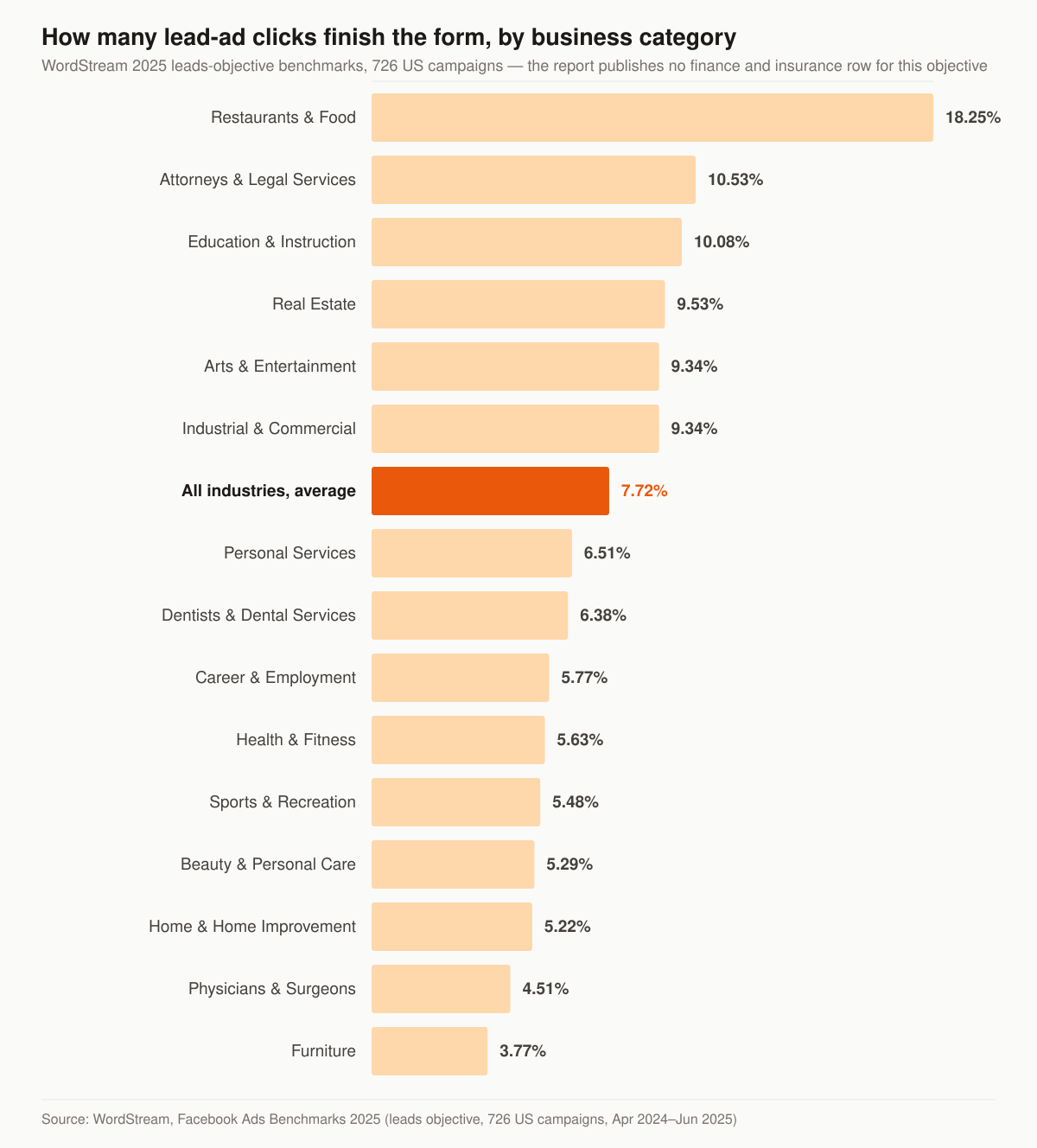
Average conversion rate for Facebook leads-objective campaigns, by business category. Source: WordStream, Facebook Ads Benchmarks 2025, leads objective, 726 US campaigns running April 1, 2024 to June 30, 2025.
Table: the published Meta benchmarks a final expense advertiser can plan against, and the ones that do not exist.
| Benchmark | Figure | What the report says about it |
|---|---|---|
| Leads objective, cost per lead, all industries | $27.66 | Up 20.94% year over year from $22.87; no finance and insurance row is published for this objective |
| Leads objective, conversion rate, all industries | 7.72% | Down from 8.67%; 12 of 15 categories fell year over year |
| Leads objective, cost per click, all industries | $1.92 | Up from $1.88 |
| Traffic objective, cost per click, finance and insurance | $1.22 | Named first among the highest CPCs listed; all industries average $0.70 |
| Traffic objective, click-through rate, finance and insurance | 0.98% | Named among the three lowest listed; all industries average 1.71% |
The methodology matters as much as the figures. The traffic sample is 554 US campaigns and the leads sample is 726 US campaigns, both running April 1, 2024 to June 30, 2025, and WordStream notes that “For both objectives, ‘averages’ are technically median figures to account for outliers.” So these are medians of a modest sample, not a rate card.
Two things follow for a final expense budget. First, there is no published finance-and-insurance cost per lead-form lead to plan against, so the all-industry median is a placeholder you replace with your own account’s number as soon as the account has one — not a target to negotiate a management fee against. Second, the traffic rows describe the shape of the problem on this platform: in that table, insurance buys the most expensive click and sits among the three least-clicked categories. When the click is dear and rare, creative testing is not a refinement of the work. It is the work. The same benchmark report underpins our channel-level comparison in Facebook ads vs Google Ads for insurance agents.
How long before a final expense ad set can be judged
Meta describes the learning phase as “the period when the delivery system still needs to learn about how an ad set may deliver and perform,” and says the Delivery column reads “Learning” while it lasts. The exit condition is specific. In Meta’s wording, ad sets “exit the learning phase as soon as they can deliver stably. This usually occurs after about 50 results in the week after the ad set’s last significant edit.” Meta adds that “During the learning phase, ad sets are less stable and usually have a higher CPA.”
That single sentence resolves the argument that tends to arrive in week two. A cost per lead read on day nine is a reading of the learning phase, not of the campaign.
Meta publishes four practices for getting through it, and each one lands differently on a category-restricted account:
- Wait to edit. Meta’s wording: “By editing an ad, ad set or campaign during the learning phase, you reset learning and delay our delivery system’s ability to optimize.” Because the audience panel is fixed, the only levers left are creative, form and budget — which means every available change is also a change that can reset learning.
- Avoid unnecessary edits. Meta says to “Only edit your ads or ad set when you have reason to believe that the edit should improve performance.” One change at a time, with a reason written down before it is made.
- Avoid high ad volumes. Meta: “When you create many ads and ad sets, the delivery system learns less about each ad and ad set than when you create fewer ads and ad sets.” The instinct to spin up one ad set per state fragments the learning that the fixed audience already makes scarce.
- Use realistic budgets. Meta: “If you set a very small or inflated budget, the delivery system has an inaccurate indicator of the people for whom the delivery system should optimize.”
The budget question is therefore not “what is a normal monthly spend for final expense” but “how many optimization events a week can this budget buy at whatever this account’s own cost per event turns out to be,” measured against the roughly 50 results Meta names. An ad set that never gets there earns the status Meta calls “Learning limited,” which is the platform telling you the structure is too thin rather than the creative being wrong.
There is a second reason to optimize toward a qualified event rather than a raw submit. If the event you feed the system is a form fill, fifty of those will teach it to find people who fill in forms. On a product sold by phone to people who were not shopping, that is a different population from the one that answers the call. The routing that turns a submitted form into a contacted lead is covered on our insurance lead generation service, and the cadence that follows it in our insurance lead follow-up cadence guide.
What gets a final expense ad account restricted
The first failure is the cheapest one: Meta states that ads “may be rejected if an appropriate category is not chosen.” A rejection costs a day. The enforcement above it costs the account.
Meta lists what an advertising restriction can include: “Limits on the amount an advertiser can spend per day or a lower payment threshold,” “Loss of access to some payment features,” “Loss of access to some advertising features,” and “Loss of the ability to advertise on Meta platforms.” It also lists what a restriction can be applied to, and the four levels are not interchangeable. At ad account level, Meta says, “your ad account, its ads and some of its advertising assets are disabled.” At user account level: “If a user account is restricted from advertising, that user can’t advertise or create new ads. Any ad accounts where they’re the only attached user may also be disabled.”
For a solo agent that last sentence is the one to read twice, because on a one-person shop the personal profile can be the only attached user. Adding a second admin to the business portfolio is the first thing we change on an account we inherit.
There is also a clock. Meta’s note reads: “If your ad account is disabled for a policy violation and remains ineligible for reinstatement for 6 months, any unused prepaid services may be forfeited where allowed by law. After this timeframe, the account can’t be reinstated.” Among the scenarios Meta lists for applying restrictions is an advertiser who “doesn’t meet our two-factor authentication requirements for account security” — an administrative failure with the same consequence as a policy one.
None of that argues for timidity in the creative. It argues for the boring version of the build being correct before the interesting version is tested: category declared, personal-attributes policy read, form questions checked against the prohibited list, two admins on the portfolio, two-factor on. That is the same order of operations we use on every paid social account, and it is why our social media work for final expense agents starts with the asset structure rather than the calendar.
Instant form or landing page for final expense?
Both work. They fail differently, which is the useful part.
Table: how the two entry points trade off for a final expense campaign specifically.
| Factor | Meta instant form | Dedicated landing page |
|---|---|---|
| Volume | High — a senior never leaves the app | Lower — an extra tap loses some of this audience |
| Lead quality | Softer; auto-fill does the typing | Harder; they read the offer first |
| Disclosure and consent | Cramped inside Meta’s form UI | Full room for consent language and disclaimers |
| Signal to the algorithm | In-platform event | Your own pixel event, tied to the page |
| Best fit | Volume dialers with a same-minute callback | Agencies qualifying for health and budget up front |
For an older audience, the friction of a page load is real and worth respecting — which is why when we do send final expense traffic to a page, we build it as a purpose-built conversion page rather than a homepage with a form bolted on.
The prohibited-questions list gives that trade-off a second edge. Health and carrier questions cannot be asked inside Meta’s form at all, so an agency that wants to qualify on health before the first dial has to route to its own page — where the question is governed by its own privacy policy and consent language rather than by Meta’s list. That is a real reason to accept the lower volume, and it is a different reason from the usual volume-versus-quality one.
Meta or Google for final expense leads?
Different jobs. Search captures the person already typing “burial insurance for seniors”; Meta creates the thought in someone who was not looking. Meta usually produces more leads per dollar and fewer of them per hundred that close without follow-up, so the channels are not really competing — they fill different parts of the same pipeline.
The search side, with its own keyword structure, negative lists, and call tracking, lives on our final expense PPC management page. The channel mechanics that sit under every Meta campaign we run — category declaration, creative rotation, pixel and Conversions API setup — are documented on the insurance Facebook ads service.
The restriction sets are also not symmetrical, which is the part agents get backwards because the Meta changes were the ones that made the news. Google’s restricted targeting policy sorts its limits into sensitive interest categories and “Access to opportunities categories (US and Canada only)”, and the second group holds exactly three entries: consumer finance, employment and housing. Inside those three, Google says, “In the United States and Canada, you can’t target audiences using: Gender, Age, Parental status, Marital status, ZIP codes” — while radius, city and country targeting stay available, with radius “requires setting at least 1 km around any given location.” Campaigns outside those three categories keep their demographic controls. Meta’s restrictions apply to every advertiser in the financial products and services category, with no equivalent carve-out. Whether a given final expense campaign is classified into Google’s consumer finance category is Google’s call on your account, not a table’s; Google’s own line is that “You are responsible for ensuring your ads comply with policy where required.” The side-by-side is on the PPC management page, and it is the reason the two channels get built by different playbooks rather than the same one twice.
Where this stops, and where lead-buying starts
What we build here is a campaign you own: your ad account, your brand, your exclusive leads, your data when the retainer ends. That is a different thing from buying a lead, and we keep the two apart on purpose.
- Own the pipeline — this page, plus the rest of the final expense lead generation system it feeds.
- Rent the volume — if you want finished final expense leads, live transfers, or aged data as a product, buy leads direct from getinsureleads, our sister brand. It is not sold here.
We treat the two as complementary rather than competing: owned campaigns as the base, purchased volume when the calendar or the dialer gets ahead of the funnel. The build-versus-buy arithmetic, including what an owned campaign costs before it produces anything, is worked through in how to generate final expense leads.
Start with the account, not the pitch
Before any budget moves, the useful first step is opening the account and checking three things: whether the campaign is declaring the right Special Ad Category, whether the pixel is firing a qualified-lead event or just a form fill, and how many minutes pass between submission and first dial. Those three explain most broken final expense ad accounts on their own.
Add a fourth now that the policy detail is on the page: read the live ad copy against Meta’s personal-attributes examples, and read the instant form against the prohibited-questions list. Those two checks are the difference between an account that scales and an account that gets a rejection it cannot explain.
Get a free marketing audit and we will read all four and show you the leak, see how managed campaigns are priced if you would rather know the commercial shape first, or tell us what you are running now.
The services behind it