Who we serve
Final Expense PPC Management That Runs on Our Own Numbers
Final expense PPC management is the done-for-you running of paid search (Google) and paid social (Facebook) campaigns that put your name in front of seniors searching for burial and final-expense coverage. You write the policies; the managed service owns keyword targeting, compliant creative, bid strategy, and cost-per-lead.
Free · 15-minute teardown · no pitch deck
- We run our own final-expense book
- No pitch deck — we screen-share real numbers
- TCPA-aware · CMS/AEP-compliant · Meta Special Ad Category
- Core Web Vitals < 2.0s LCP
Plenty of agencies will sell you “final expense PPC management” without ever having spent a dollar of their own money on a final expense lead. We have. We run our own final-expense lead campaigns every day, and that operation is the credential behind everything on this page — the same playbook we hand to the agents we manage.
This page is the paid-search half of our final expense marketing engine. The Meta half, and the reason age targeting no longer works the way agents remember, lives on the final expense Facebook ads page.
What final expense PPC management covers
Final expense PPC management means we build, run, and optimize your paid ad accounts so you get exclusive leads under your own brand instead of renting someone else’s list. Concretely, that’s:
- Account build — Google Ads and Facebook (Meta) campaigns structured for the senior market, with conversion tracking and call tracking wired in from day one.
- Targeting — search keywords for high-intent burial/final-expense queries on Google. On Meta the audience panel is heavily restricted for insurance advertisers, so self-selecting creative and qualifying form questions do the job it used to. That build is detailed on our final expense Facebook ads page.
- Creative and landing pages — ad copy and a dedicated landing page tuned to convert, not just collect clicks. The page is where paid search for this product is usually lost.
- Daily optimization — negative keywords, bid adjustments, audience pruning, and budget shifted toward whatever is actually placing policies.
- Weekly reporting — CPL, cost per acquisition, and lead-to-app numbers, so you see the trend instead of a vague monthly summary.
What does a final expense search lead cost?
Nobody publishes a cost per lead for final expense specifically. Somebody does publish one for the category it sits inside, and it is the honest place to start a budget conversation.
LocaliQ’s 2026 search advertising benchmarks report an average cost per lead of $74.44 for Finance & Insurance across Google and Microsoft search ads, against an all-industry average of $66.69. The same report puts the category’s average cost per click at $3.39 where all industries average $5.42.
Table: the four search benchmarks LocaliQ publishes for finance and insurance, next to the all-industry figure for each.
| Benchmark | Finance & insurance | All industries |
|---|---|---|
| Average cost per click | $3.39 | $5.42 |
| Average click-through rate | 9.83% | 6.64% |
| Average conversion rate | 2.64% | 8.18% |
| Average cost per lead | $74.44 | $66.69 |
Read the four rows together and the shape of the problem appears. Insurance buys clicks below the all-industry average, and earns them at a click-through rate well above it — then converts 2.64% of those clicks, a lower rate than any of the other 22 business categories LocaliQ lists. A cheap click that does not convert is exactly how a below-average cost per click turns into an above-average cost per lead.
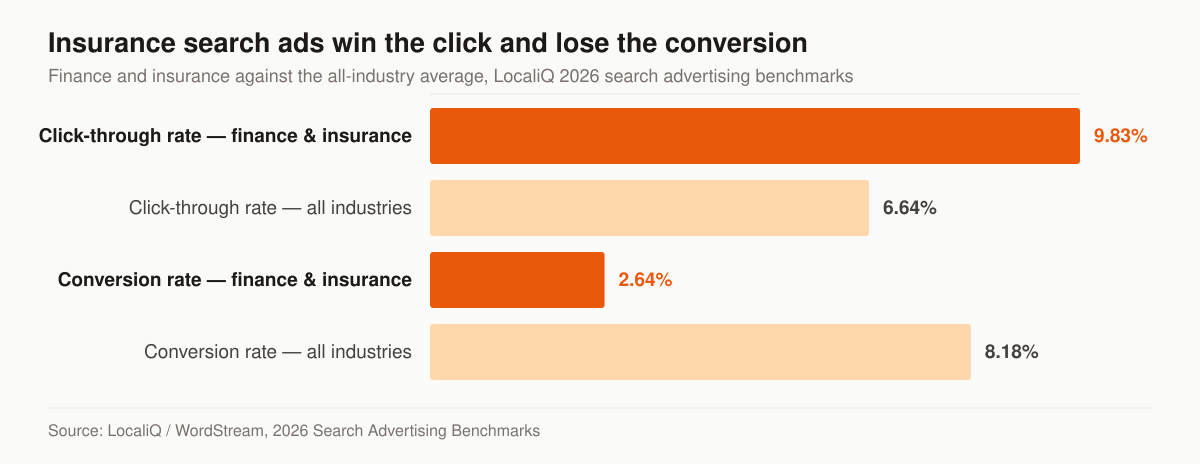
Click-through rate and conversion rate, finance and insurance against the all-industry average. Source: LocaliQ / WordStream, 2026 Search Advertising Benchmarks.
That gap between the click and the conversion is where a manager earns the fee. Nothing about the auction is broken for insurance — seniors and their adult children click these ads readily. What happens after the click is the whole job: the page, the offer, the form, and whether a licensed human picks up the phone.
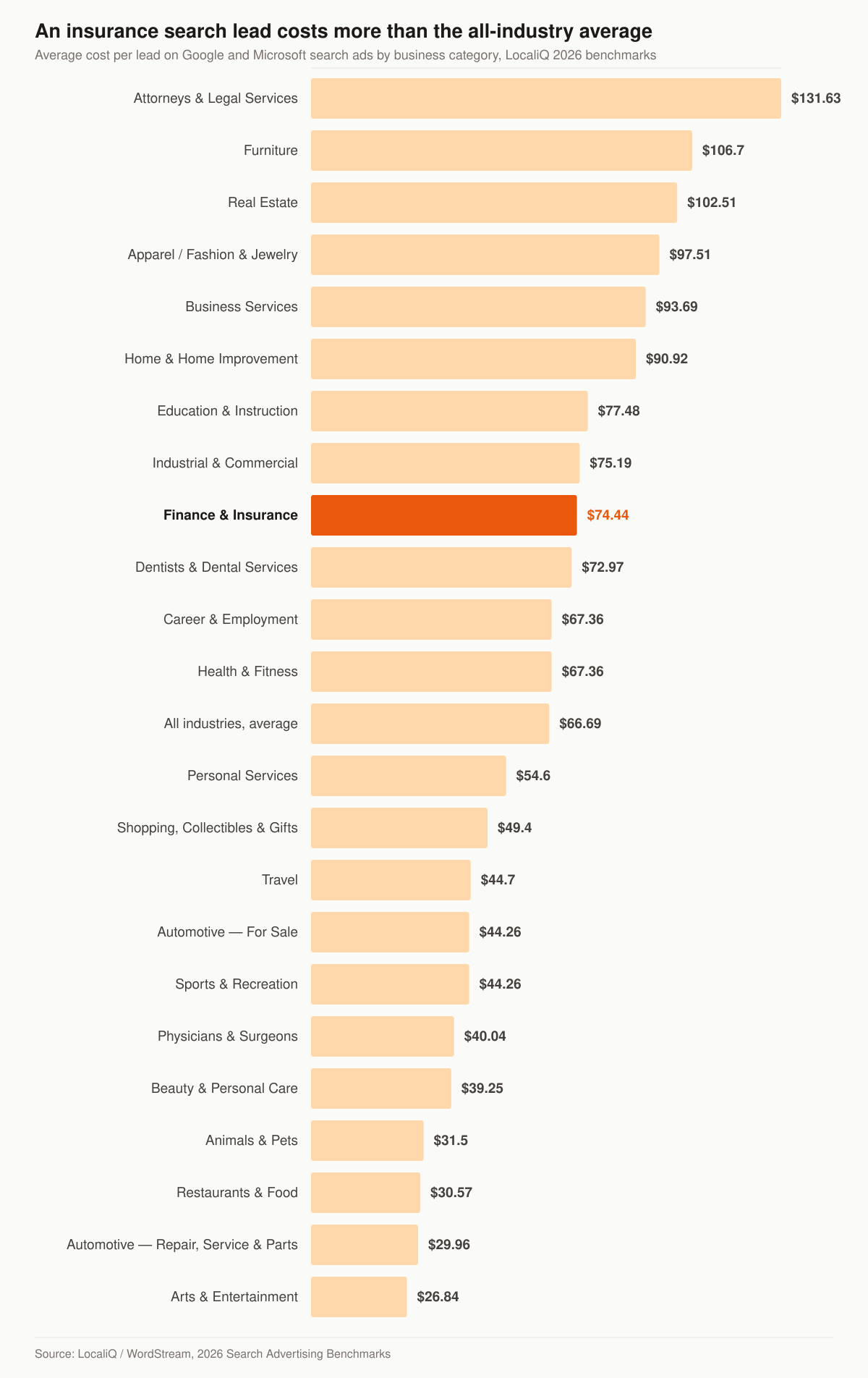
Average search-advertising cost per lead by business category. Source: LocaliQ / WordStream, 2026 Search Advertising Benchmarks.
Treat both figures as a category benchmark, not a quote. Final expense keywords, senior-market geography, and the state mix you are licensed in all move the number, which is why the first thing we do is model it for your account rather than repeat a national average back to you.
Google vs. Facebook for final expense
The two channels solve different problems. We usually run both and weight budget by what’s producing placed business.
Table: how the two paid channels behave differently on a final expense book.
| Channel | What it does | Typical CPL | Best for |
|---|---|---|---|
| Google Ads (final expense google ads) | Captures people searching right now | Higher, but higher intent | Agents who close fast on the phone |
| Facebook / Meta | Creates demand in a cold audience the creative has to filter | Lower, needs nurture | Agents with a follow-up system |
| Both, managed together | Balances cost vs. intent | Blended toward | Agencies scaling beyond referrals |
Mature accounts with dialed-in landing pages drive blended CPL down; new accounts start higher and come down as conversion data accumulates — that calibration window is the work, and it’s what you’re paying a manager to get through quickly.
The targeting Google still allows that Meta restricts
Agents usually have this backwards, because the Meta restrictions were the ones that made the news. Both platforms restrict something. They restrict different things, and the difference decides how each channel gets built.
On Meta, insurance campaigns run in the Financial products and services Special Ad Category, required since January 2025 for advertisers based in the United States or reaching US audiences. Meta’s audience documentation for that category lists age, gender, ZIP or postal code, audience exclusion, lookalike audiences, saved audiences and some interests as limited or unavailable for those advertisers. Geography can be set by “country, region, state, province or city” but “not by ZIP code or postal code”, a 15-mile (25-kilometer) radius is required for specific audience locations in Canada and the United States, and, in Meta’s words, “Advantage+ lookalike is unavailable.” The exact wording, and what it does to a senior-market build, is on our final expense Facebook ads page.
Google restricts a narrower list. Its personalized advertising policy sorts restricted categories into Sensitive interest categories and “Access to opportunities categories (US and Canada only)”. The second group is the one that strips demographics, and it holds exactly three entries: Consumer finance, Employment and Housing. Google’s Consumer finance page describes that category as covering “offers relating to credit, banking products and services, or certain financial planning and management services”, and gives non-exhaustive examples of “Credit cards and loans”, “Banking and checking accounts” and “Debt management products”.
For campaigns outside those three categories, Google’s demographic targeting documentation lists what a Search campaign can still narrow on: age buckets of “18-24,” “25-34,” “35-44,” “45-54,” “55-64,” “65+,” and “Unknown”; gender; and household income in the United States, banded “Top 10%,” “11-20%,” “21-30%,” “31-40%,” “41-50%,” “Lower 50%,” and “Unknown”.
Table: the levers a final expense advertiser actually has on each platform.
| Lever | Google Search | Meta, financial products and services category |
|---|---|---|
| Age | Search campaigns expose 55-64 and 65+ as separate buckets | Listed among the options limited or unavailable for US advertisers |
| ZIP / postal code | Not on Google’s restricted list outside consumer finance, employment and housing | Geography by country, region, state, province or city, but not by ZIP code or postal code |
| Location radius | Radius targeting is standard; the 1 km minimum is a restricted-category rule | 15-mile (25-kilometer) radius required in the US and Canada |
| Household income | US bands from “Top 10%” down to “Lower 50%” | Not offered |
| Seed-list modelling | Customer Match and lookalike segments, subject to the sensitive-category rules | “Advantage+ lookalike is unavailable.” |
Two cautions before anyone treats that table as permission. Google’s own line on this is “You are responsible for ensuring your ads comply with the policy”, and it provides an appeal route when an ad is flagged, so how your specific account gets classified is Google’s decision and not a table’s. And do not reflexively exclude the “Unknown” bucket: Google states that “Google Ads can’t know or infer the demographics of all people”, and that when you target by a demographic, the Unknown category “is selected by default because you can reach a significantly wider audience.” On a product sold to people who tend to be the least tracked users on the internet, excluding Unknown removes part of the audience you were paying to find.
The negative keyword list a final expense account needs
Final expense is a phrase with an unusual amount of non-buyer traffic attached to it. The same three words are typed by people looking for a job, people looking for a government benefit, people arranging a funeral this week, and people writing a school assignment. Every one of them costs you the same as a click from a buyer.
One mechanic quietly defeats a negative list that otherwise looks complete. Google’s documentation states that “Negative keywords won’t match to close variants or other expansions”. Its own worked example uses the negative broad match keyword flowers: the ad is blocked on a search for red flowers and still eligible on a search for red flower. Singular and plural are two separate exclusions. Misspellings are separate again. A list written once, in one form of each word, is a list with holes in it.
Table: the search intents a final expense account pays for, and what belongs on the exclusion list.
| Intent behind the search | Why the click is wasted | What to exclude |
|---|---|---|
| Employment | Recruiting content for agents outranks nothing; the searcher wants a contract, not a policy | job, jobs, career, hiring, salary, commission, leads for agents, IMO, FMO |
| Government benefit | Social Security’s lump-sum death payment is fixed at $255 by regulation, so anyone hunting a federal funeral benefit is not shopping for coverage | social security, medicaid, medicare, VA burial benefit, government, free |
| Funeral logistics | Someone booking a service this week has already passed the point the product serves | funeral home, cemetery, casket, obituary, cremation prices, flowers |
| Existing policyholder service | Login and payment queries reach people who already bought | login, log in, pay bill, customer service, claim form, cancel |
| Definition and research | Real demand, wrong channel — answer it with content, not with a paid click | what is, meaning, definition, wiki, pros and cons, worksheet |
| Adjacent life products | Term and IUL shoppers are a different funnel with a different offer | term life, IUL, whole life quotes, annuity, mortgage protection |
That $255 figure is not folklore. It is written into 20 CFR 404.390: “If a person is fully or currently insured when he or she dies, a lump-sum death payment of $255 may be paid to the widow or widower of the deceased if he or she was living in the same household with the deceased at the time of his or her death.” It is worth knowing precisely, because it is both the reason the government-benefit searches exist and the reason the product does.
Build the list at the account level rather than per campaign. Google states that an account-level negative keyword list “will automatically apply to all eligible search and shopping inventory in relevant campaign types”, which means one list maintained once instead of four drifting copies. The broader mechanics of match types, Quality Score and account structure are covered on our insurance PPC management service page.
Call ads and call reporting for a senior audience
Paid search for this product is a phone business wearing a web interface. Pew Research Center’s Mobile Fact Sheet, drawn from a survey of 5,022 US adults conducted 5 February to 18 June 2025, reports smartphone ownership of 78% among adults 65 and older, against 90% at ages 50-64 and 97% at ages 18-29. The same table reports that 16% of adults 65 and older have a cellphone but not a smartphone. A funnel that only works if the prospect fills in a form on a phone screen is a funnel that quietly drops part of the audience it was built for.
Google’s call mechanics are specific enough to be worth quoting rather than paraphrasing:
- Call campaigns are their own campaign type. Google notes that “Clicks on your number are the same cost as headline clicks (a standard CPC)”. Routing a searcher to the phone does not carry a premium price.
- The number has to be verifiable. When you create a call ad, Google says, “we’ll ask for a verification URL, which should lead to page that displays your phone number.” The number in the ad and the number on the landing page must be the same number.
- Attribution runs through forwarding numbers. Google’s call assets documentation states that call reporting is “Only available on the Search Network,” and that it “uses Google forwarding numbers to give you detailed conversion information.”
- There is no display equivalent. Google states that call campaigns “are not yet available for campaigns targeting the Display Network.”
- Dayparting is a compliance-adjacent setting, not a nicety. Google notes you “can set numbers to show only when your business can take calls.” An ad that rings an empty office at 8pm is buying voicemails at a standard CPC.
How we keep cost per lead honest
We report on what a placed policy costs you, not what a click costs. We track every lead to its source and report cost per acquisition, so a “cheap” lead that never closes gets cut. This is the same ad discipline running across our final expense marketing operation, and it ports directly to your account.
For the channel mechanics underneath this — bidding, Quality Score, account structure — see our broader insurance PPC management service. If your funnel leaks before the call, the fix is usually the page, which is where our final expense PPC and landing page work overlaps with paid search, and where a purpose-built conversion page does more for cost per lead than another round of bid tweaks.
Tracking a click through to a placed policy
The 2.64% conversion rate above counts a form fill or a call. It does not count a policy. Final expense closes days or weeks after the click, on the phone, sometimes after an underwriting decision. If Google never learns which of those clicks became placed business, Smart Bidding optimizes toward whichever lead was cheapest to collect — which is how an account gets busier and less profitable at the same time.
Google’s answer is enhanced conversions for leads, which it describes as “an upgraded version of offline conversion import that uses user-provided data, such as email addresses, to supplement imported offline conversion data to improve accuracy and bidding performance.” For anyone building this now rather than migrating, Google’s own recommendation is explicit: “If you have not already adopted offline conversion import, we recommend starting with enhanced conversions for leads instead.”
Three operational facts to build around:
- The data is hashed before it leaves you. Google specifies “a secure one-way hashing algorithm called SHA256”, applied after normalization — remove leading and trailing whitespace, lowercase the text, and format phone numbers to the E.164 standard.
- The pipe is changing. Google’s notice on the offline conversions article reads: “Starting June 15, 2026, offline conversions import and enhanced conversions for leads uploads will be migrated to the Data Manager API and blocked in the Google Ads API.” An account whose upload runs through a legacy integration needs that migration on the calendar.
- Your CRM is the bottleneck, not Google. The upload can only be as good as the fields your agents actually fill in.
Table: what has to exist in the CRM before offline conversion data means anything.
| Field | Why it has to be captured | Where it comes from |
|---|---|---|
| GCLID or user-provided data | The join key between the click and the eventual sale | Hidden form field, or the email captured on the lead form |
| Lead timestamp | Google matches the conversion back to a click within its lookback window | Set automatically on form submit |
| Disposition | Distinguishes a contacted lead from a submitted application from a placed policy | The agent, on the call, in the same session |
| Placed date and premium | Turns “a conversion” into a value the bidding can rank | Carrier confirmation, entered on issue |
| Source campaign | Lets you kill a campaign on cost per policy rather than cost per lead | Passed through from the ad click |
Getting the disposition field filled in reliably is a sales-process problem, not an ads problem, and it is usually the real reason an account cannot report cost per placed policy. Our insurance lead generation service covers the routing and follow-up side of that same loop.
What Google requires of the page you send final expense traffic to
Google’s Financial products and services policy defines its scope as “products and services related to the management or investment of money and cryptocurrencies, including personalized advice”. It sets disclosure requirements for advertisers inside that scope. Those requirements are short and specific. If you are promoting financial products or services, Google says, you are required to provide “The physical address for the business offering the financial product or service”, “All associated fees”, and “Links to third-party accreditation or endorsement where affiliation is asserted or implied, like proof of any government affiliation or third-party ratings”. Google adds that disclosures “can’t be posted as roll-over text or made available through another link or tab” and “must be clearly and immediately visible without needing to click or hover over anything.”
Whether a specific final expense campaign is classified into that policy is Google’s call on your account; the product-specific guidance in that article runs to loans, credit repair, debt services and speculative products rather than life insurance. We build the landing page as though it applies, because the cost of being cautious is a footer carrying your address and license details, and the cost of being wrong is a policy review on a live account. Google also notes that for the policies in that article, “Violations of the policies below will not lead to immediate account suspension without prior warning. A warning will be issued at least 7 days prior to any suspension of your account” — a warning window, not an amnesty.
Google’s general policy language also puts the compliance burden where the law puts it: “you must comply with state and local regulations for any location that your ads target”, and “Advertisers are expected to do their own research on the local regulations for any location their ads target.” For an agent licensed in several states, that means the disclosures on one landing page have to satisfy the strictest state in the targeting list.
Consent language on a final expense lead form
The lead form is the point where a marketing asset becomes a legal record. The TCPA rules that govern what happens next are at 47 CFR 64.1200, and two paragraphs of it decide how the form has to be built.
The first is the definition. Under 64.1200(f)(9), prior express written consent means “an agreement, in writing, bearing the signature of the person called that clearly authorizes the seller to deliver or cause to be delivered to the person called advertisements or telemarketing messages using an automatic telephone dialing system or an artificial or prerecorded voice, and the telephone number to which the signatory authorizes such advertisements or telemarketing messages to be delivered.” The regulation then requires the written agreement to disclose, clearly and conspicuously, that signing authorizes those calls and that “The person is not required to sign the agreement (directly or indirectly), or agree to enter into such an agreement as a condition of purchasing any property, goods, or services.” An electronic signature counts: the rule says “signature” includes “an electronic or digital form of signature, to the extent that such form of signature is recognized as a valid signature under applicable federal law or state contract law.”
The second is revocation, at 64.1200(a)(10): “All requests to revoke prior express consent or prior express written consent made in any reasonable manner must be honored within a reasonable time not to exceed ten business days from receipt of such request.” The same paragraph adds that “Callers or senders of text messages covered by paragraphs (a)(1) through (3) and (c)(2) of this section may not designate an exclusive means to request revocation of consent” — so within the paragraphs that sentence names, a reply of “stop” to a text, or a spoken request on a call, is as valid as a form you would prefer they used.
Read the scope clause rather than the headline. That consent definition attaches to calls and texts that include or introduce an advertisement or constitute telemarketing using an automatic telephone dialing system or an artificial or prerecorded voice; how much of it bites depends on how your team actually dials. This page is not legal advice and your counsel should read the section against your own dialing setup. What it does mean for the ad build is concrete: the consent text, the checkbox behaviour, the timestamp and the stored copy of the page the prospect saw all have to be part of the landing-page spec, not bolted on afterwards. Our guide to TCPA compliance for agents buying leads covers the same ground from the purchased-lead side.
What final expense PPC management costs
Two line items, always kept apart on the invoice.
Table: the two budgets in a managed final expense PPC program, and who each is paid to.
| Line item | Paid to | How it is set |
|---|---|---|
| Ad spend | Google and Meta, directly | Your budget, billed at cost and never marked up by us |
| Managed paid ads | Insurance Marketing Co | Full-Funnel tier, $5,500 per month |
| One-time build | Insurance Marketing Co | $2,500–$8,000 depending on scope |
Managed paid ads sit in the Full-Funnel tier because that is the tier that also carries landing-page CRO, marketing automation and full-funnel reporting — the parts of the system that move the 2.64% rather than the click price. Foundation at $2,500 a month and Growth at $3,500 a month cover the organic and reputation side and do not include managed ads. Programs run month to month with no long lock-in. The full breakdown of what sits in each tier is on the pricing page.
What we look at in the first ninety days
Judging a new final expense account on its first month’s cost per lead judges the calibration period rather than the campaign. Here is the sequence we actually work through, and what each stage is allowed to be judged on.
- Weeks 1 to 2 — search terms and waste. The search terms report is read daily and the negative list grows fastest here, in both singular and plural forms. Nothing about cost per lead is meaningful yet; the useful question is what share of spend went to searches you would not have bid on deliberately.
- Weeks 3 to 6 — conversion signal. Enough conversions should exist for the bidding to have something to learn from, and for the difference between a form fill and a contacted lead to show up in the data. Landing-page changes get made here, one at a time, because two at once tells you nothing.
- Weeks 7 to 12 — cost per placed policy. Offline conversions start closing the loop, and campaigns get ranked on placed business rather than lead count. This is the first honest read on whether the account works.
Across all three stages the report you get is weekly, and it names cost per lead, cost per acquisition, and lead-to-app. If a campaign is not going to work, the weekly cadence is how you find out in week five instead of month six.
Where this fits — and where it doesn’t
PPC management is for agents who want to own their pipeline: your brand, your exclusive leads, your data. It is not lead-buying. If you’d rather purchase final expense leads, live transfers, or aged data as a product, that’s a different model — go buy leads direct from getinsureleads, our sister brand built for exactly that. Keeping the two clean is deliberate: one channel you own, one you rent.
The two models also sit on different payback curves, which is why plenty of stable books run both. Purchased volume fills the dialer this week; an owned campaign gets cheaper as its conversion data compounds. We go through the tradeoff in detail on the exclusive final expense leads page, and the site that has to catch all of this traffic is covered under final expense agent website design.
Start with the math, not a pitch
Before you spend a dollar, we’ll model your market: realistic CPL for your states, expected lead-to-app, and what a placed policy should cost. If the numbers don’t work, we’ll tell you.
- Step 1: Grab a free marketing audit — we look at your current spend and funnel.
- Step 2: We project CPL and break-even for your final expense campaigns.
- Step 3: If it pencils, we build the accounts and you start getting exclusive leads.
Want the full picture on the senior-market side first? Start at the final expense marketing hub, see how we price managed campaigns, or just tell us what you’re running now.
Final expense ad management is simple to describe and hard to do well: get the right offer in front of the right senior, at a cost that leaves room to profit. We’ve already proven the model on our own dollars. Let’s point it at yours.
The services behind it
Guides that go deeper