How to Run Facebook Ads for Insurance Agents (Step by Step)
To run Facebook ads for insurance agents, flag campaigns under Meta's financial products and services Special Ad Category, which strips age, gender, ZIP, sub-15-mile radius, and lookalike targeting. You win on creative, fast lead-form follow-up, and a tracked cost per sale. Expect higher volume at lower intent than search, so speed decides profit.
Facebook ads for insurance agents put your offer in front of seniors at a price search traffic cannot match, and they drain a budget faster than search when you treat them like Google. The mechanics are different. On search, someone is already looking. On Facebook, you interrupt a scroll. That changes everything about targeting, creative, and follow-up.
This is a step-by-step walkthrough of how to run Facebook ads for insurance agents — not a list of tips. It covers the rule that decides your entire targeting setup (Special Ad Category), the creative that actually pulls, the lead-form vs. landing-page trade-off, and how to stay on the right side of compliance.
The Special Ad Category rule that changes your whole strategy
Insurance advertising runs under Meta’s financial products and services Special Ad Category — the category Meta introduced in October 2024 to replace the old Credit ads bucket, and the one whose examples Meta explicitly lists as including “those promoting insurance.” Since January 21, 2025, the designation is required for advertisers based in the United States or reaching audiences in the United States, and Meta says ads may be rejected if you don’t choose an appropriate category. If your playbook still tells you to look for a “credit” category, it predates this change.
The moment you flag a campaign, Meta strips out the targeting levers agents instinctively reach for:
- Age is fixed to 18 through 65+ — no age-band targeting
- Specific gender cannot be chosen
- ZIP, neighborhood, and sub-city locations are unsupported
- Location must be at least a 15-mile (25 km) radius in the US and Canada
- Lookalike audiences are unavailable
That sounds like a handicap. It isn’t, if you adjust. You stop trying to hand-pick “65+ in this county who like Medicare” and instead let the algorithm find buyers based on who actually fills out your form. Your creative becomes the filter. A final expense ad that opens with “Did your rates go up again?” self-selects the right person far better than a demographic checkbox.
Two practical consequences:
- Broad beats narrow. You have no choice, so make it a strategy: feed Meta a wide audience and a sharp creative, then let conversion data train delivery.
- Skipping the category is not an option. Meta’s own guidance says ads may be rejected if the advertiser doesn’t choose an appropriate Special Ad Category. Flag it from the start.
For the deeper buyer-targeting playbook on the senior market specifically, our breakdown of how agents source final expense leads at scale walks through audience structure under these constraints.
What you can still target once the category strips your audience
Losing lookalikes reads like losing everything. It isn’t. Meta’s help page on audiences for housing, employment or financial products and services campaigns names each restricted lever, and the levers it does not name are the ones a working agency book already hands you.
Every row below is Meta’s own description of what the category does to an ad set, taken from that page.
| Audience lever | Status | What Meta’s page says |
|---|---|---|
| Age | Fixed | “Options are generally fixed to include ages 18 through 65+” |
| Gender | Fixed | “Audiences must include all genders. You can’t edit this option.” |
| ZIP or postal code | Unavailable | Target by “country, region, state, province or city” but “not by ZIP code or postal code” |
| Location exclusions | Unavailable | “You also can’t exclude locations.” |
| City, address or pin drop | Radius expanded | 15-mile (25-kilometer) radius required in Canada and the United States |
| Detailed targeting | Partly unavailable | “Some demographic, behavior and interest options are unavailable.” |
| Detailed-targeting exclusions | Unavailable | “Excluding any detailed targeting selections is also unavailable.” |
| Saved audiences | Rewritten for you | A saved audience “will be updated to comply with” the restrictions |
| Advantage+ lookalike | Unavailable | “Advantage+ lookalike is unavailable.” |
| Custom audiences | Available | “Certain audience options such as custom audiences may only be available via Meta Ads Manager.” |
Two of those rows change how you plan a campaign, not just how you fill in a form.
The radius is wider than agents expect, and it is not optional. Meta’s own example: target the city of Seattle and “your audience will also include people within a 15-mile radius of Seattle’s city center.” A one-county footprint therefore buys impressions across several counties. Either accept the overspill as the price of the category and let conversion data pull delivery back toward buyers, or stop pretending you can fence a service area and target the state outright. What you cannot do is exclude the surrounding area, because location exclusions are gone too.
Custom audiences survive the category, and they do most of the work people expect from lookalikes. They are absent from Meta’s unavailable list, and the page’s only note about them is that they “may only be available via Meta Ads Manager.” That leaves four audiences an agency book can build this week: a hashed upload of current and past policyholders for cross-sell and referral campaigns, website visitors captured by the Meta Pixel, people who watched your video or engaged with your Page, and people who opened your instant form and never submitted it. Pair those with the Conversions API so the server-side event — the booked appointment, the issued policy — goes back to Meta and delivery optimizes toward the action that pays you instead of the click that doesn’t.
One trap to note: Meta’s Special Ad Category page adds that Advantage+ catalog ads “will be subject to the same limitations,” so an Advantage+ setup does not route around the restrictions. Meta’s own instruction on the same page is the one to follow: “We encourage you to broaden—not restrict—your audience.”
Build the campaign: objective, budget, and the learning phase
Keep the structure boring on purpose so the data stays readable. One campaign, one ad set, three ads. The instinct to build six ad sets to “test audiences” is the instinct the category already made pointless, and it fragments your conversion data at the exact moment the delivery system needs it concentrated.
The order of operations:
- Special Ad Category — financial products and services. Set it before anything else. Meta’s flow puts it in campaign creation, under Special Ad Categories, with a Countries selector under it.
- Objective. Leads with an instant form, or Leads with a website conversion event if you are sending traffic to a page you control.
- One broad ad set. Geography plus the fixed 18-to-65+ age band. Let the creative and the form do the qualifying.
- Budget sized to the learning phase, not to comfort. The arithmetic is below.
- Pixel and Conversions API installed before launch, optimizing on the event closest to revenue you can actually fire.
We treat the learning phase as the first place a test budget leaks, and Meta’s documentation is specific about how it works. Its help page says the delivery system “is exploring the best way to deliver your ad set when you either create a new ad or ad set or make a significant edit to an existing one,” that ad sets “exit the learning phase as soon as they can deliver stably,” and that this “usually occurs after about 50 results in the week after the ad set’s last significant edit.” If an ad set cannot get there, the Delivery column reads “Learning limited.”
That single number sets your test budget. Fifty results per ad set per week, times the cost per result you expect, is the weekly floor for one ad set — and if that floor is more than you want to spend, the honest answer is to run one ad set instead of three rather than to underfund all of them. Meta’s own best-practice list says as much — “Use realistic budgets” — and warns that “If you set a very small or inflated budget, the delivery system has an inaccurate indicator of the people for whom the delivery system should optimize.”
Three more instructions from that page are worth following literally, because each one describes a habit agents have:
- “Wait to edit your ad set until it’s out of the learning phase.” Meta’s stated reason is that during learning “performance is less stable, so your results aren’t necessarily indicative of future performance.” Editing on day three resets the clock and buys you another learning period at learning-phase CPAs.
- “Avoid unnecessary edits that cause ad sets to re-enter the learning phase.” Meta’s guidance is the full sentence: “Only edit your ads or ad set when you have reason to believe that the edit should improve performance.”
- “Avoid high ad volumes.” More ads and ad sets means “the delivery system learns less about each ad and ad set,” which is the mechanical argument against the six-ad-set audience test.
Ads Manager will tell you where you stand if you add two columns: Last significant edit and Results. Meta’s help page walks through both. Read them together before you judge a campaign, because a campaign you keep resetting has never actually been tested.
What Facebook ads cost an insurance agent right now
Published benchmarks are not your numbers, but they are the only public floor you can plan against. WordStream’s 2025 Facebook Ads Benchmarks report is the most usable one for this purpose: it is drawn from 554 US traffic-objective campaigns and 726 US leads-objective campaigns running between April 1, 2024 and June 30, 2025, and it notes that its “averages” are technically median figures to account for outliers.
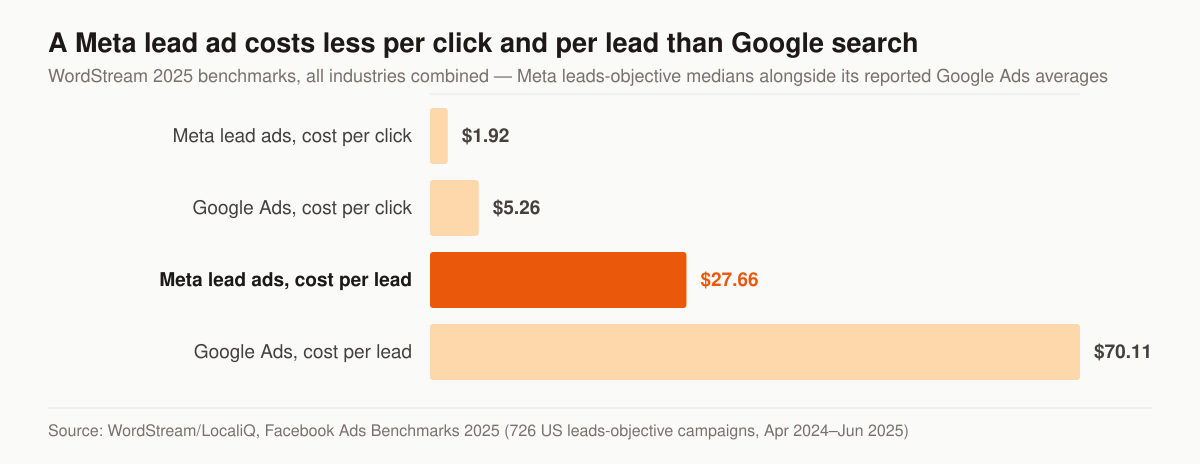
Cost per click and cost per lead, all industries combined. Source: WordStream/LocaliQ, Facebook Ads Benchmarks 2025, 726 US leads-objective campaigns, April 2024 to June 2025, shown alongside the Google Ads averages reported in the same article.
The figures below are the ones an insurance advertiser should actually plan against, with the insurance-specific rows separated from the all-industry ones.
| Metric | Figure | Scope |
|---|---|---|
| Cost per click, Finance & Insurance | $1.22 | Traffic objective; the highest CPC of the categories reported |
| Click-through rate, Finance & Insurance | 0.98% | Traffic objective; among the three lowest CTRs reported |
| Cost per click, all industries | $0.70 | Traffic objective, down from $0.77 |
| Click-through rate, all industries | 1.71% | Traffic objective, up from 1.57% |
| Cost per click, all industries | $1.92 | Leads objective, up from $1.88 |
| Conversion rate, all industries | 7.72% | Leads objective, down from 8.67% |
| Cost per lead, all industries | $27.66 | Leads objective, up 20.94% from $22.87 |
| Cost per lead, Google Ads | $70.11 | Reported for comparison in the same article |
Read that table honestly and one gap jumps out: there is no published Finance and Insurance cost per lead in that report. The leads-objective tables list fifteen business categories — Arts and Entertainment through Sports and Recreation — and Finance and Insurance is not among them. So the $27.66 is the all-industry median, not an insurance number, and the only insurance-specific signals published are on the traffic side, where Finance and Insurance carries the highest cost per click and one of the lowest click-through rates in the report. Both of those point the same way: this audience is expensive to move and slow to click, so the creative has to earn its click and the follow-up has to earn the sale.
The comparison that matters more than either figure is the platform trade. WordStream reports Meta lead-ads CPC at $1.92 against $5.26 on Google Ads, and Meta lead-ads CPL at $27.66 against $70.11 on Google Ads. Facebook is cheaper per lead and lower in intent; search is dearer per lead and higher in intent. Neither is “better” until you multiply by close rate, which is the whole argument in our head-to-head on Facebook ads vs Google ads for insurance agencies and the reason we publish insurance PPC cost per click by line rather than a single blended number.
On management cost: our managed paid ads sit in the Full-Funnel tier at $5,500/mo, and media budget is never inside that fee — it is a pass-through billed straight to Meta. The full breakdown is on our pricing page, including what moves an agent between tiers.
Creative that converts skeptical seniors
The targeting is blunt, so the creative does the work. Across senior-market accounts, a few patterns hold up.
| Element | What works | What to avoid |
|---|---|---|
| Hook | A plain question or a number (“Plans from $X/mo”) | Stock “happy retiree” hype |
| Format | Single image or 15-second talking-head video | Busy carousels, fine print |
| Voice | One specific benefit, one specific ask | “Comprehensive coverage solutions” |
| Proof | A real number or mechanism | Vague “trusted by thousands” |
A few rules we follow:
- Show a face or a phone screen. Senior audiences respond to a real agent talking plainly more than to polished brand imagery.
- Lead with the problem, not the product — but describe the problem, never ask the reader about it. We write “Burial coverage that pays the funeral home directly” rather than “Final Expense Insurance Available,” and we do not run the question form (“Worried about leaving funeral costs to your kids?”) at all, for the policy reason set out in the next section.
- Refresh before fatigue. Creative on a senior audience burns out fast because the addressable pool is small. Have the next three variations ready before CPL climbs.
- Match the line to the moment. Medicare creative lives and dies by the calendar; align it with Medicare AEP marketing windows so you aren’t paying peak CPMs out of season.
Creative is also where an agency relationship quietly stalls, because writing 30 senior-market variations a month is grind work. That grind is exactly what our insurance Facebook ads management service exists to run, so the queue never goes empty. Need hook patterns to start from? Our teardown of insurance advertising examples breaks down the famous campaigns and gives copy formulas by line.
The hook rule Meta enforces: don’t imply what you know about the reader
One Meta policy rules out a large share of the second-person hooks that senior-market copy reaches for first. Meta’s Advertising Standard on Privacy Violations and Personal Attributes says ads “must not contain content that asserts or implies personal attributes,” and the list of attributes it names includes “age,” “physical or mental health (including medical conditions),” and “vulnerable financial status.” The policy adds that ads can’t “Imply that the advertiser is aware of someone’s personal attributes,” can’t “Imply knowledge of personal or organizational financial information of a user or user’s family,” and can’t “Imply knowledge of Medical information of a user or user’s family.”
What the standard does allow is narrower than it sounds but wide enough to work in: ads may “Contain passing reference to a personal attribute,” may “Use ‘you/your’ language without a personal attribute,” and may run “Ad creative that describes or shows the promoted product or service.” Meta’s own published examples make the line concrete — under AGE, “Meet seniors” is marked acceptable while “Meet other seniors” and “Are you 18 years old?” are marked unacceptable; under PHYSICAL OR MENTAL HEALTH AND DISABILITY, “New diabetes treatment available” is acceptable while “Do you have diabetes?” is not; under VULNERABLE FINANCIAL STATUS, the unacceptable example is “Are you bankrupt? Check out our services.”
The pattern is consistent: describing the offer is fine, and asking the reader to confirm something about themselves is not. So the second-person hooks are exactly the ones that need rewriting before review.
These are the same insurance angles, written to describe the product instead of the reader.
| Angle | Framing that asserts an attribute | Framing that describes the offer |
|---|---|---|
| Rate increase | “Did your rates go up again?” | “Final expense plans with a locked-in rate, from $X/mo” |
| Final expense | “Worried about leaving funeral costs to your kids?” | “Burial coverage that pays the funeral home directly” |
| Turning 65 | “Are you turning 65 this year?” | “Medicare plan reviews for people turning 65” |
| Health status | “Have a health condition and been declined?” | “Guaranteed-issue whole life, no medical exam” |
| Budget | “Can’t afford your current premium?” | “Plans starting at $X a month” |
Nothing in the right-hand column loses the qualifying power of the left. “Burial coverage that pays the funeral home directly” still filters to people who want burial coverage; it just stops telling them what Meta thinks you know about them. We treat that rewrite as the default for every hook we ship, and we keep the question-form variants out of the account entirely rather than gambling an ad account on a review decision. For the compliance-side version of this problem on the life and IUL lines, see our guide to marketing IUL compliantly.
Lead forms vs. landing pages: pick by cost per sale
This is the decision that determines your unit economics. Both have a place.
Facebook lead forms (instant forms) open inside the app, pre-fill name and contact info, and cost the least per lead. They are ideal for final expense, where the audience is mobile and a one-tap form beats a page load. The downside: low friction means low intent. Some leads forget they filled it out by the time you call.
Landing pages send the prospect off Facebook to a page you control. Higher friction, higher intent, better data, and room to set expectations before the call. They cost more per lead and convert at a lower form rate, but the leads close better.
Most disciplined agents run both and let cost per sale decide the budget split, not cost per lead. A lead form at $9 that closes at 1-in-12 is more expensive than a landing-page lead at $18 that closes at one-in-six. If you only watch CPL, you optimize toward the wrong number. We unpack that math in why true cost per sale beats headline lead price.
Whichever you choose, speed-to-lead is the whole game. A Facebook lead that sits 30 minutes is a different prospect than one called in 60 seconds. Wire the form to your CRM and dial immediately, then work a structured cadence; our insurance lead follow-up cadence gives a sequence that fits Facebook’s lower-intent traffic.
Wire the lead form to your CRM before you spend a dollar
Here is what “wire it to your CRM” actually involves. Meta’s developer documentation on retrieving leads spells out the two real options and three failure modes that cost agents leads they already paid for.
The two retrieval paths are a webhook and a bulk read. The webhook fires on lead creation and delivers a leadgen payload carrying leadgen_id, page_id, form_id, ad_id and created_time, which your CRM exchanges for the lead’s field data. Meta’s own note is that “On success, real-time pings occur on events with a delay of up to a few minutes.” The bulk path is a CSV export from the /ads/lead_gen/export_csv/ endpoint, or a read of the leads edge on an ad or form. If your setup depends on someone logging in to download a CSV, your speed-to-lead is however long it takes that person to remember — and the section above already explained what a 30-minute delay does to a Facebook lead. Our comparison of the best CRM for insurance agents covers which systems take the webhook natively, and our email and follow-up automation service exists for agents who would rather not own the plumbing.
Three specifics from Meta’s documentation are worth writing on the wall:
- Consent checkbox answers do not arrive with the rest of the lead. Meta states plainly that the
field_data“does not contain the responses to optional custom disclaimer check boxes that the user would have filled out,” and that you retrieve them with thecustom_disclaimer_responsesfield, which returns eachcheckbox_keyand whether itis_checked. If your TCPA consent lives in an optional checkbox and your integration only readsfield_data, you are storing leads with no record of the consent you asked for. - A form can outlive the ad that filled it. Meta warns that “Because a form can be re-used for many ads, your form could contain far more leads than an ad using it.” Reporting on the form and reporting on the ad are different numbers. Attribute at the ad level or your cost per lead is fiction.
- Organic submissions are flagged, not hidden. In the export, “the lead is generated from organic reach” shows as
is_organicvalue1, otherwise0. Leads with no ad ID attached are usually organic, not broken tracking.
One access gotcha rounds it out. Meta notes that if the Page admin “did not customize leads and has not granted access permission with the Leads Access Manager, then all Page admins will have leads access permission,” but once a business admin customizes it, whether “a Page basic admin has leads access permission or not” is what “depends on the business admin’s configuration.” Sort that out before launch, not on the morning the leads stop arriving.
Compliance: the trust signal, not the afterthought
Compliance is where Facebook insurance advertising gets agents in trouble, and where doing it right becomes a competitive edge. A few non-negotiables:
- TCPA still governs your calls and texts. Your lead-form consent language and your opt-out handling are what protect you. The FCC’s one-to-one consent rule was vacated in January 2025, but that did not repeal TCPA, so keep clear consent and clean records.
- CMS rules govern Medicare marketing. If you advertise Medicare Advantage or Part D, your creative and disclaimers fall under CMS marketing guidelines. Read the specifics in our guide to CMS Medicare marketing rules for agents before you launch a single AEP ad.
- Meta will reject misleading claims. “Free money,” “government benefits you’re owed,” or guaranteed-approval language without qualifiers gets ads disapproved and accounts restricted. Say what you can prove.
Because “stay TCPA compliant” is advice nobody can act on, here is what the federal rule at 47 CFR 64.1200 actually requires, with the conditions intact. Note the scope before the substance: the written-consent requirement in paragraph (a)(2) attaches to a call “that includes or introduces an advertisement or constitutes telemarketing, using an automatic telephone dialing system or an artificial or prerecorded voice” placed to the lines described in (a)(1), which include “any telephone number assigned to a paging service, cellular telephone service, specialized mobile radio service, or other radio common carrier service.” Those two conditions — the dialing technology and the message being an advertisement or telemarketing — are the whole scope, and dropping them is how people end up with a rule that sounds stricter than the one on the books.
The do-not-call rows in the table carry their own scope: paragraph (d) is written for “any call for telemarketing purposes to a residential telephone subscriber,” and paragraph (e) then makes “the rules set forth in paragraph (c) and (d) of this section … applicable to any person or entity making telephone solicitations or telemarketing calls or text messages to wireless telephone numbers.”
Each obligation below is quoted from the section of 47 CFR 64.1200 named in the last column.
| Obligation | What the rule says | Citation |
|---|---|---|
| Written consent, in writing and signed | “an agreement, in writing, bearing the signature of the person called that clearly authorizes the seller to deliver or cause to be delivered … advertisements or telemarketing messages using an automatic telephone dialing system or an artificial or prerecorded voice, and the telephone number to which the signatory authorizes” delivery | 64.1200(f)(9) |
| Two disclosures inside the consent | The written agreement must clearly and conspicuously disclose that signing authorizes the seller to place such calls, and that “The person is not required to sign the agreement (directly or indirectly), or agree to enter into such an agreement as a condition of purchasing any property, goods, or services” | 64.1200(f)(9)(i) |
| Electronic signatures count | “The term ‘signature’ shall include an electronic or digital form of signature, to the extent that such form of signature is recognized as a valid signature under applicable federal law or state contract law.” | 64.1200(f)(9)(ii) |
| Opt-outs, any reasonable method | A called party may revoke consent “by using any reasonable method to clearly express a desire not to receive further calls or text messages”; replies of “stop,” “quit,” “end,” “revoke,” “opt out,” “cancel,” or “unsubscribe” are reasonable per se | 64.1200(a)(10) |
| Opt-out deadline | Revocation requests “made in any reasonable manner must be honored within a reasonable time not to exceed ten business days from receipt of such request” | 64.1200(a)(10) |
| No single required opt-out channel | Callers “may not designate an exclusive means to request revocation of consent.” | 64.1200(a)(10) |
| Internal do-not-call list | On a request, you “must record the request and place the subscriber’s name, if provided, and telephone number on the do-not-call list at the time the request is made” | 64.1200(d)(3) |
| How long the request lasts | “A do-not-call request must be honored for 5 years from the time the request is made.” | 64.1200(d)(6) |
| Written policy and training | You must have “a written policy, available upon demand, for maintaining a do-not-call list,” and personnel engaged in telemarketing “must be informed and trained in the existence and use of the do-not-call list” | 64.1200(d)(1)–(2) |
Two operational reads of that table. First, the ten-business-day clock starts on receipt, not on the day someone gets around to processing it, which makes the custom_disclaimer_responses gap in the previous section a compliance problem and not merely a data problem. Second, “may not designate an exclusive means” rules out the common setup where the only documented way to opt out is a reply to a text — an email or a phone call to your office has to work too. We build the suppression step into the follow-up sequence rather than leaving it to whoever answers the phone; the buying-side version of the same discipline is in our guide to TCPA compliance when you buy insurance leads.
We provide marketing services, not licensed insurance advice, and none of the above is legal advice. You are the licensed party; we keep the funnel clean and let your compliance counsel sign off on scripts, disclosures, and which state rules stack on top of the federal floor.
What to fix first when the numbers go wrong
Facebook campaigns fail in a small number of recognizable shapes, and each shape points at a different fix. This is the order we work through them, symptom first.
The right-hand column is what we change, not a claim about what causes any given account’s numbers.
| Symptom | What to check | The change we make first |
|---|---|---|
| Delivery reads “Learning limited” | Whether the ad set can reach roughly 50 results a week at your current budget and number of ad sets | Consolidate ad sets and concentrate the budget on one |
| CPL climbed after week two | Whether anything was edited mid-flight, resetting learning | Stop editing; hold the ad set untouched for a full week |
| Leads answer but don’t remember opting in | Lead-form friction and the promise in the creative | Add a qualifying question, or move the offer to a landing page |
| Ad rejected without an obvious reason | Special Ad Category selection, and whether the hook asks the reader about themselves | Re-select the category; rewrite the hook to describe the offer |
| Leads never reach the CRM | Whether the integration reads webhooks or waits on a CSV | Move to the webhook path and alert on failures |
| Good CPL, no policies | Cost per issued policy, not cost per lead | Change the optimization event to the one closest to revenue |
None of that is exotic. It is the same loop every month: read the delivery status, read the last-significant-edit column, read cost per issued policy, change one thing. If you would rather have that loop run without you, that is the job our insurance Facebook ads management does.
A simple launch checklist
Before you spend a dollar:
- Flag the campaign as Special Ad Category.
- Build one broad audience; resist narrowing it.
- Write three creative variations, problem-first — and check each hook against the personal-attributes rule above.
- Choose lead form (volume) or landing page (quality) by your close rate.
- Connect the form to your CRM with instant lead alerts, and confirm the consent checkbox response is being stored.
- Add consent language and an opt-out path that isn’t limited to one channel.
- Fund the ad set for at least 50 results a week and leave it alone.
- Track cost per issued policy, not cost per lead.
Run that for two weeks, then judge by closed business. Most accounts need a creative refresh and a cadence fix, not a budget increase.
Where Facebook fits in the full mix
Facebook is a volume engine. It fills the top of the funnel cheaply, but it needs disciplined follow-up and tight tracking to pay off. Pair it with search for high-intent buyers, a converting site, and reviews that close the trust gap. For how these channels stack, start at our insurance marketing services overview and PPC playbook for high-intent insurance buyers. Deciding where to put the first dollar? Our head-to-head on Facebook ads vs Google ads for insurance agencies breaks the choice down by line and buyer.
If you want a second set of eyes on your current Facebook spend, our free marketing audit shows you, line by line, where your cost per sale is leaking, before you commit another month of budget. Selling auto specifically? The playbook shifts — see how to run Facebook ads for auto insurance agents.
- Social Media for Final Expense Agents: Organic, Paid, and Compliant
Social media for final expense agents: which platform the 65-plus buyer uses, what Meta's Special Ad Category removes, and the TCPA and FTC posting rules.
- Facebook Ads vs Google Ads for Insurance Agencies: Which Wins?
Facebook ads vs Google ads for insurance agencies: intent, cost, lead quality, and which channel fits final expense, Medicare, and auto — plus how to run both.
- The Final Expense Sales Funnel: From Click to Issued Policy
A practitioner's map of the final expense sales funnel from click to issued policy: a stage table, checkpoints, and the math that decides the profit.
- Insurance Advertising Examples: 6 Famous Campaigns, Torn Down
Six famous insurance advertising examples — GEICO, Flo, Mayhem, Aflac — broken down, plus copy formulas for auto, life, final expense, and Medicare ads.