How to Set Up Google Ads for Insurance Agents: Step by Step
To set up Google Ads for insurance agents, separate high-intent search campaigns from Local Services Ads, mirror keyword intent in tightly themed ad groups, and track conversions down to issued policy rather than form fills. Spend follows the data, not the dashboard's vanity clicks.
Plenty of insurance agents try Google Ads and quit inside a quarter. Rarely because the channel doesn’t work — because they judged it on clicks and form fills instead of issued policies, and the gap between those numbers is where the money disappears.
This is a step-by-step guide to how to set up Google Ads for insurance agents — the structure we actually use to run paid search for senior-market agents. The framing here is “operator showing the books,” not theory. Where a number appears, it comes from a published source you can open and check: Google’s own advertiser documentation, LocaliQ’s 2026 benchmark report, or the Code of Federal Regulations.
The two-channel reality: search vs. Local Services Ads
There are two Google products agents conflate, and they behave differently.
Standard search campaigns charge per click. You bid on keywords, write ads, send traffic to your landing page, and control everything. Local Services Ads (LSAs) charge per lead, show the Google Guaranteed badge, sit above the regular ads, and require a background/license check to activate. You give up keyword control; you gain a pay-only-for-contacts model. For the LSA-specific mechanics — screening, ranking, and disputing bad leads to protect your cost per lead — see our dedicated guide to Google Local Service Ads for insurance agents.
The two channels differ on six things that decide which one you build first.
| Factor | Search campaigns | Local Services Ads |
|---|---|---|
| Billing | Per click | Per lead (call/message) |
| Position | Below LSAs | Top of page |
| Keyword control | Full | None |
| Setup gate | Account + tracking | License + background check |
| Best for | Scalable, trackable volume | Phone leads, local trust signal |
| Landing page | Yours | Google profile |
Run both where you can and compare on one metric: cost per issued policy. LSAs can look cheaper on raw cost per lead while feeding you less context per lead; search gives you control and tracking. Let the close data decide. One planning caveat that trips agents up: insurance agency LSAs are not available nationwide, so for a large share of the country the choice is made for you and search is the channel. We go deeper on bidding and account architecture in our insurance PPC management service.
What insurance agents should expect from Google Ads
Before you build anything, calibrate. LocaliQ and WordStream publish annual benchmarks drawn from thousands of their customers’ Google Ads and Microsoft Ads campaigns. In the 2026 search advertising benchmarks, the Finance and Insurance category posts the numbers below.
Insurance buys clicks cheaply and cheaply gets clicked — then loses them at the form.
| Metric | Finance & Insurance | All industries |
|---|---|---|
| Average cost per click | $3.39 | $5.42 |
| Average click-through rate | 9.83% | 6.64% |
| Average conversion rate | 2.64% | 8.18% |
| Average cost per lead | $74.44 | $66.69 |
Read the pattern rather than the individual cells. Insurance clicks in that dataset cost less than the all-industry average and are clicked more often than average — the searcher is motivated and the ad copy lands. Then the conversion rate collapses to 2.64%, the lowest of the 23 business categories LocaliQ reports, and the cost per lead ends up above average anyway. The auction is not what is beating agents. The page after the click is.
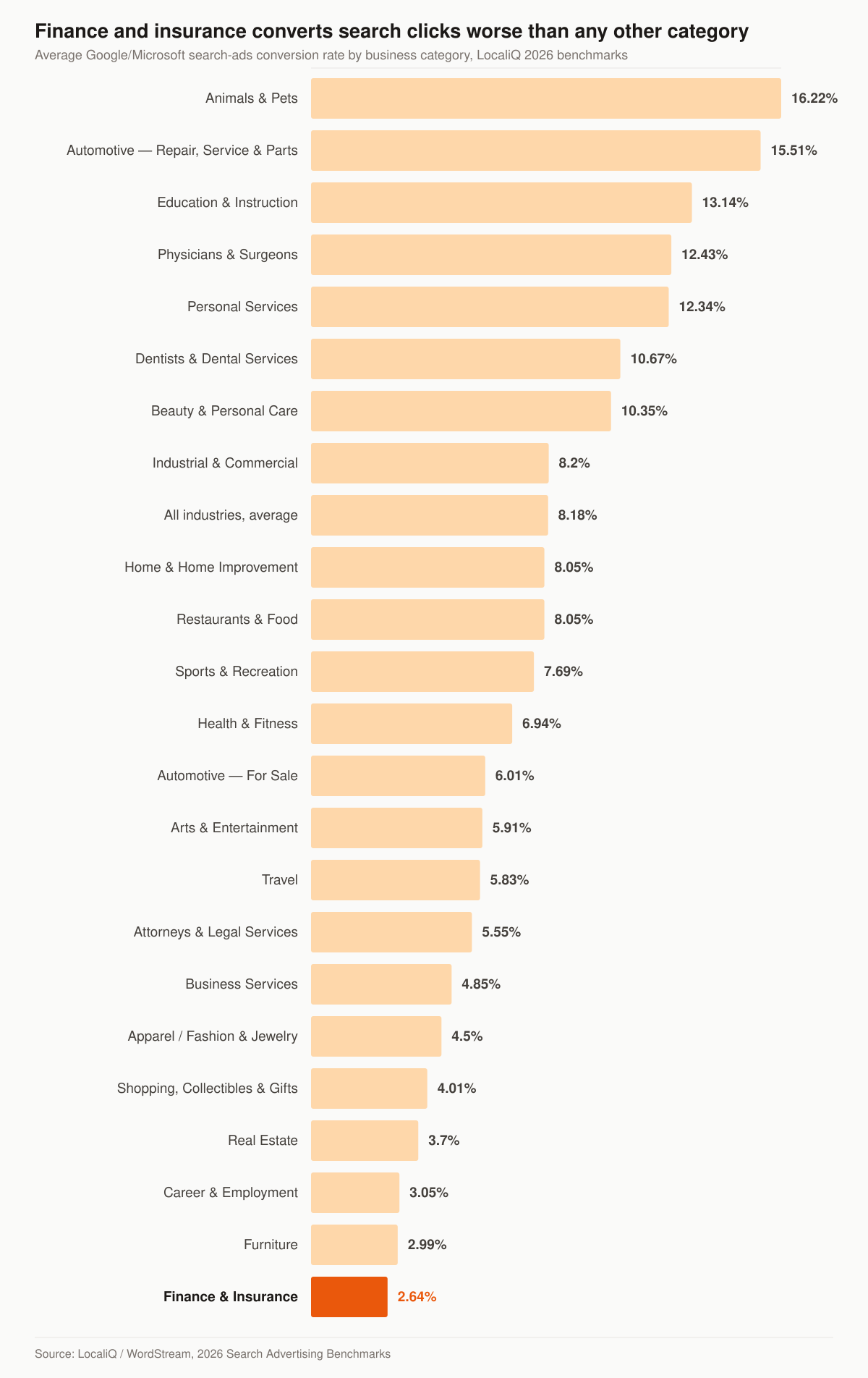
Average search-ads conversion rate by business category. Source: LocaliQ / WordStream, 2026 Search Advertising Benchmarks.
Three caveats before you plan a budget around any of this. These are blended account averages across every keyword an advertiser runs, including cheap brand and long-tail terms, which is why $3.39 sits so far below the head-term rate cards in our breakdown of insurance PPC cost per click by line. “Finance and Insurance” also bundles banks, lenders and fintech in with agencies. And it is one agency’s account data, not a Google-published figure. Use it to sanity-check the shape of your account, not to forecast your own cost per policy.
Campaign structure that doesn’t waste spend
The first structure error we look for in an agent account is one campaign, one ad group, fifty keywords. That mixes intents and starves every keyword of data.
Structure by intent, then by line:
- Brand/competitor — your name and competitor names. Cheap, high-converting, defensive.
- High-intent transactional — “final expense insurance quote,” “Medicare advantage agent near me.” These pay your bills.
- Research/informational — “how much is burial insurance.” Lower intent; keep separate or pause until the core works.
Within each, build tight ad groups (3-5 closely related keywords) so your ad copy can literally echo the search. Be precise about why this helps, because the folklore here is wrong. Google’s own documentation says of Quality Score: “This score is measured on a scale from 1-10 and available at the keyword level,” and then, plainly, “Quality Score is not an input in the ad auction. It’s a diagnostic tool to identify how ads that show for certain keywords affect the user experience.” Its three components are “Expected clickthrough rate (CTR),” “Ad relevance” and “Landing page experience.”
So the 1-10 number in your keyword column is a readout, not a lever. What the auction uses is Ad Rank, which Google says is “calculated based on many factors, including your bid amount, the quality of your ads and landing page, the Ad Rank thresholds, the competitiveness of an auction, the context of the person’s search” and “the expected impact of assets and other ad formats”. Tight ad groups are still worth building — they are how you make the ad and the landing page match the query — but chase the match, not the score.
The campaign settings screen: what to change before you launch
The settings page is where a first insurance campaign quietly loses a month of budget. Four items deserve a deliberate decision rather than a default.
Location targeting. Google’s advanced location options offer “Reach people in, regularly in, or who’ve shown interest in your targeted locations” (Presence or Interest) and “Reach people in or regularly in your targeted locations” (Presence). Google calls the first “This default and recommended option”. For a licensed agent who can only write business in specific states, that default sells clicks to people researching Florida coverage from Ohio. Switch to presence unless you are licensed and want the interest traffic.
Budget mechanics. Google Ads Help is explicit that an average daily budget is an average, not a cap: “on some days you might not reach your average daily budget, and on others you might exceed it.” Two limits bound it. Google defines the daily spending limit as “two times your average daily budget for most campaigns” and the monthly spending limit as “30.4 times your average daily budget for most campaigns”. Agents who set $50 a day and panic at a $100 Monday are watching the system work as documented.
Networks. A search campaign can be extended onto the Display Network and search partners. Both spend from the same budget and neither behaves like search intent. Leave them off for a first insurance build so the data you collect is about one thing.
Ad schedule and call handling. If your conversion is a phone call, running ads at hours nobody answers converts a paid click into a voicemail. Decide the hours before launch, not after the first invoice.
Four defaults, four decisions — this is the checklist we run before any agent account goes live.
| Setting | What Google offers | What we set for a licensed agent | Why |
|---|---|---|---|
| Location targeting | Presence or interest (default, recommended) | Presence | You can only write business where you are appointed |
| Average daily budget | Averages up to 2x on a day, 30.4x in a month | Set the monthly number first, divide by 30.4 | Stops the daily-spike panic |
| Display Network / search partners | Available inside a search campaign | Off at launch | Keeps the first month’s data interpretable |
| Ad schedule | All hours | Hours your phone is answered | A missed call is a paid click with no conversion |
Keywords and match types
Match type is where budgets quietly bleed. A starting framework:
- Phrase and exact match for your proven money keywords — control first.
- Broad match only after you have conversion data feeding the algorithm; without it, broad match spends on noise.
- A negative keyword list from day one. Block “jobs,” “careers,” “license,” “training,” “reviews of [competitor],” and existing-policyholder service terms. For senior-market lines, also block “free,” “calculator,” and claim-status searches that never buy.
Google’s own broad match documentation agrees with the sequencing: “Broad match extends its reach beyond exact and phrase match by identifying related queries,” and “It’s critical to use Smart Bidding with broad match.” Broad match without a conversion signal is broad match without a steering wheel.
There is one limitation of the search terms report that changes how you build a negative list. Google says the report shows “search terms that a significant number of people have used, and that resulted in your ad being shown,” and that “Some search terms that don’t have enough query activity are omitted from the search terms report in order to keep with our standards on data privacy.” Your report is a sample, not a ledger. That is why a negative list built up front from what you already know about insurance searchers — job seekers, licensing students, existing policyholders looking for a claims number — beats waiting to see waste appear in a report that is designed not to show you all of it.
A focused negative list is the first thing we change in a leaking account, ahead of any bid. If your leads feel junk-heavy, the fix usually starts with negatives plus a landing page that asks one qualifying question, not a new keyword.
Choosing a bidding strategy before you have conversion data
Every bidding guide assumes you already have conversions. A new insurance account does not, and at a 2.64% category conversion rate it will take a meaningful volume of clicks to get them.
Google defines the automated options this way: “Google Ads Smart Bidding refers to bidding strategies that use Google AI to optimize for conversions or conversion value in every auction, a feature known as ‘auction-time bidding’,” and names the members of the family: “Target CPA, Target ROAS, Maximize conversions, and Maximize conversion value are all Smart Bidding strategies.”
That definition contains the constraint. Auction-time bidding optimizes toward conversions, so it needs conversions to optimize toward. The practical sequence for a new agent account:
- Phase one — buy data. Manual or click-focused bidding on exact and phrase match, tight geography, a small keyword set. The goal is a clean sample, not profit.
- Phase two — switch to Maximize conversions. Once the conversion action is firing reliably and the account has real conversion history, hand over auction-time bidding.
- Phase three — add a target. Target CPA once you know what a lead is actually worth to you, derived from your own close rate and commission, not from a benchmark table.
- Phase four — open the match types. Broad match, with Smart Bidding steering it, on the themes that already convert.
Skipping to phase three on day one is the classic new-account mistake: you hand a target to a system with nothing to learn from, and it either underspends into invisibility or spends into noise.
Writing the ads: responsive search ads and call tracking
Responsive search ads have fixed, published limits, and knowing them stops the guesswork. Google’s documentation says “you can provide up to 15 headlines and 4 descriptions for a single responsive search ad”, and its build instructions are equally specific: “You’ll need to enter a minimum of 3 headlines, but you can enter up to 15. Enter your descriptions. You’ll need to enter a minimum of 2 descriptions, but you can enter up to 4.” On length: “The headline fields for responsive search ads support up to 30 characters. The description fields support up to 90 characters each, and the path fields support up to 15 each.” Its own tip is to “Implement at least 2 responsive search ads (RSA) with ‘Good’ or ‘Excellent’ Ad Strength per ad group and a unique final URL for each RSA.”
These are the numbers to build your ad-writing template around.
| Field | Minimum | Maximum | Character limit |
|---|---|---|---|
| Headlines | 3 | 15 | 30 characters each |
| Descriptions | 2 | 4 | 90 characters each |
| RSAs per ad group | Google recommends at least 2 with Good or Excellent Ad Strength | — | — |
For an insurance agent, that headline budget is where the licensed-professional advantage shows up. Thirty characters is enough for “Licensed agent, no call center,” for the line you actually write, for the state you serve, and for the thing a lead aggregator’s ad can never say honestly. Write headlines that would be false coming from an aggregator.
If the phone is your conversion, turn on call reporting. Google’s call reporting assigns a forwarding number to your ad so you can track details such as call duration, call start time and whether the call connected, and it lets you count phone calls of a specified duration as conversions and use automated bidding toward them. Setting that duration threshold is a judgment call about your own sales process: pick the length at which a call stops being a wrong number and starts being a conversation.
Should insurance agents run Performance Max?
Build the search campaign first, and Google’s own documentation explains why. It describes Performance Max as “a goal-based campaign type that allows you to access all Google Ads inventory” from a single campaign, serving across “YouTube, Display, Search, Discover, Gmail, and Maps”, and positions it as something “you can use Performance Max to complement your keyword-based Search campaigns” with.
The detail that settles the sequencing for an agent is this one: “Search campaigns containing an exact match keyword are prioritized to serve over Performance Max when a query hits an exact match keyword.” Own your money keywords in a search campaign with exact match and you keep them; leave them to Performance Max and you have handed away the queries you understand best in exchange for reach across surfaces you have not tested.
The honest reading: Performance Max is a volume play for an account that already has a working conversion signal. An agent still figuring out which keywords produce issued policies should not start there. When search is profitable and you want more surface area, test it alongside — and compare it on cost per issued policy like everything else. If you are weighing paid social in the same breath, we compare the two channels head to head in Facebook Ads vs Google Ads for insurance agencies.
Compliance is a trust signal, not a checkbox
Google Ads is a traffic channel; compliance lives in your forms, copy, and call handling.
- TCPA consent. Lead forms need clear consent language before you call or text. The FCC’s one-to-one consent rule was vacated in January 2025, but TCPA itself still governs how you contact leads — treat consent as real, not decorative. The specifics are in the next section.
- CMS Medicare rules. If you market Medicare, AEP marketing is governed by CMS rules on what you can claim and how you collect permission to contact. We cover specifics in our breakdown of CMS Medicare marketing rules for agents.
- Honest ad copy. No fabricated stats, no “free” if it isn’t, no implied government affiliation.
- Google’s own policy layer. Google’s financial products and services advertising policy tells advertisers “You’re required to complete a verification process to advertise financial services in some locations,” and lists disclosure requirements including “The physical address for the business offering the financial product or service” and “All associated fees.” Whether a given insurance ad falls inside that policy is a question for the policy page and the signup flow, not a blog post — check it before you assume you are exempt.
We provide marketing services, not licensed insurance advice — you are the licensed party. But clean compliance also performs better: Google approves your ads faster and your landing pages convert because skeptical buyers trust clear disclosures. For the broader picture, see our guide to insurance marketing compliance for agents.
What the TCPA actually requires of the lead your ad just bought
A Google Ads click becomes a phone number in your CRM, and at that moment the FCC’s rules at 47 CFR 64.1200 start to matter more than your ad copy. Four provisions do most of the work. Read them with their conditions attached — the conditions are where agents get this wrong.
Prior express written consent has a definition, and it is narrower than “they filled out my form.” Under 47 CFR 64.1200(f)(9), the term “means an agreement, in writing, bearing the signature of the person called that clearly authorizes the seller to deliver or cause to be delivered to the person called advertisements or telemarketing messages using an automatic telephone dialing system or an artificial or prerecorded voice, and the telephone number to which the signatory authorizes such advertisements or telemarketing messages to be delivered.”
Note the scope limiter in that sentence: it is the consent standard for messages delivered “using an automatic telephone dialing system or an artificial or prerecorded voice.” The rule then specifies what the disclosure must say. The written agreement “shall include a clear and conspicuous disclosure informing the person signing that: (A) By executing the agreement, such person authorizes the seller to deliver or cause to be delivered to the signatory telemarketing calls using an automatic telephone dialing system or an artificial or prerecorded voice; and (B) The person is not required to sign the agreement (directly or indirectly), or agree to enter into such an agreement as a condition of purchasing any property, goods, or services.” A signature here includes “an electronic or digital form of signature, to the extent that such form of signature is recognized as a valid signature under applicable federal law or state contract law.”
Calling hours are a hard rule, not a courtesy. 64.1200(c)(1) prohibits initiating a telephone solicitation to “Any residential telephone subscriber before the hour of 8 a.m. or after 9 p.m. (local time at the called party’s location).” Speed to lead is real, and it stops at 9 p.m. in the lead’s time zone, not yours.
The do-not-call registry applies to your web lead. 64.1200(c)(2) prohibits soliciting “A residential telephone subscriber who has registered his or her telephone number on the national do-not-call registry,” and adds that “Such do-not-call registrations must be honored indefinitely, or until the registration is cancelled by the consumer or the telephone number is removed by the database administrator.” One of the safe harbors is written permission: the rule excuses a caller who “has obtained the subscriber’s prior express invitation or permission,” where “Such permission must be evidenced by a signed, written agreement between the consumer and seller which states that the consumer agrees to be contacted by this seller and includes the telephone number to which the calls may be placed.”
Revocation is easy for the consumer and binding on you. Under 64.1200(a)(10), a called party may revoke consent “by using any reasonable method to clearly express a desire not to receive further calls or text messages from the caller or sender,” and replying with words including “stop,” “quit,” “end,” “revoke,” “opt out,” “cancel,” or “unsubscribe” is a reasonable means per se. The rule also says that “All requests to revoke prior express consent or prior express written consent made in any reasonable manner must be honored within a reasonable time not to exceed ten business days from receipt of such request,” and that callers “may not designate an exclusive means to request revocation of consent.”
Here is what each provision changes about the form your Google Ads traffic lands on.
| Rule | What it governs | What it means for your landing page or CRM |
|---|---|---|
| 64.1200(f)(9) | Definition of prior express written consent for ATDS and prerecorded-voice telemarketing | Consent language sits next to the signature, names the seller, and carries the two required disclosures |
| 64.1200(f)(9)(i)(B) | The no-condition disclosure | The form cannot make consent a condition of getting the quote |
| 64.1200(c)(1) | Calling hours | 8 a.m. to 9 p.m. in the lead’s local time, not the agent’s |
| 64.1200(c)(2) | National do-not-call registry | Scrub, or rely on a signed written permission that names your agency and the number |
| 64.1200(a)(10) | Revocation | Honor an opt-out expressed any reasonable way, within ten business days, by any channel |
This is a summary of published rules, not legal advice, and it is not a complete account of the section — state mini-TCPA statutes add their own requirements on top. Read the section yourself at eCFR 47 CFR 64.1200, and if you also buy leads from vendors, our guide to TCPA compliance for insurance agents buying leads covers where vendor consent records fit.
Tracking: the part everyone skips and shouldn’t
Here is the mechanism that separates agents who scale from agents who quit. Google optimizes toward whatever you tell it is a conversion. If you call a “form submit” a conversion, Google finds you people who love submitting forms — not people who buy policies.
The fix is offline conversion import: pass a click identifier (GCLID) into your CRM with the lead, then send the “policy issued” event back to Google when the deal closes. Now the algorithm bids toward revenue, not form-fillers.
Judge the account on the left column; the right column is what the dashboard shows you by default.
| Track this | Not just this |
|---|---|
| Cost per issued policy | Cost per click |
| GCLID → CRM → issued | Form submissions |
| Keyword-level close rate | Keyword-level CTR |
| Phone calls (with call tracking) | Web form only |
Two documented settings decide whether that import actually works, and insurance sales cycles collide with both.
The conversion window. Google defines it as “the period of time after an ad interaction (such as an ad click or video view) during which a conversion, such as a purchase, is recorded in Google Ads,” and states that “If you don’t customize the click-through conversion window when you create a new conversion, the default window is 30 days”, with a settable range: “You can set the conversion window anywhere from 1 to 90 days, depending on the source of conversions.” A final expense application that takes six weeks to underwrite and issue falls outside a 30-day default. The conversion happened; Google never hears about it, and it keeps bidding as though that keyword never produced revenue. Set the window against your real time-to-issue before you launch, not after you notice the gap.
The import requirements. Google’s GCLID setup documentation requires that “You’ve enabled auto-tagging. This lets you import offline conversions,” and describes a click-to-conversion cycle “that is less than 14 days or 90 days, depending on the data source.” Google spells out which is which: “For Google Cloud Storage (GCS), Amazon S3, HTTP, SFTP, and gSheets, Google Ads Data Manager imports conversions from 90 days ago in every run.” For Salesforce and HubSpot, Data Manager “imports the last 14 days of data in the first successful run”. It also advises that “After creating a new conversion action, wait 4-6 hours before uploading conversions for that conversion action.”
Translated into build steps: turn auto-tagging on before the first click is ever bought, store the GCLID on the lead record the moment the form posts, and confirm your CRM’s connector actually looks back far enough for your sales cycle. A GCLID captured but never stored is a paid-search account paying for attribution it then throws away at the form handler.
At minimum: conversion tracking on the form, call tracking on the phone number, and a weekly look at which keywords produce closed deals. A keyword with cheap clicks can still lose money once you price it per issued policy rather than per click.
A 30-day launch sequence
- Week 1 — Account structure, conversion tracking, negative list, one tight search campaign per line. Apply for LSAs in parallel (the license check takes time).
- Week 2 — Collect 30-50 clicks per ad group. Don’t touch bids yet. Watch search terms; add negatives daily.
- Week 3 — Pause losing keywords, shift budget to closers, tighten ad copy to top performers.
- Week 4 — Wire offline conversion import so issued policies feed back. This is when costs start dropping.
Each week has one thing to build and one temptation to resist.
| Week | Build | Resist |
|---|---|---|
| 1 | Auto-tagging, conversion actions, conversion window set to your time-to-issue, presence-only geography, negative list | Turning on broad match |
| 2 | Daily search-terms review; negatives added same day | Changing bids on a two-day sample |
| 3 | Budget shifted toward the ad groups producing leads; second RSA per ad group | Adding new campaigns before the first one is clean |
| 4 | GCLID stored on every lead record; first offline import | Judging the account on form fills |
We treat structure and tracking as the first two suspects in an underperforming account, and the ad copy as the third. Fix the first two and a few-thousand-dollar test tells you the truth fast.
The operating rhythm after launch
Paid search is weekly work, not quarterly work. The rhythm that keeps an insurance account honest is short:
- Weekly — search terms report, negatives added, budget nudged toward the ad groups that produced leads a human actually spoke to.
- Monthly — offline conversion import reconciled against issued policies in the CRM, conversion window checked against your real time-to-issue, ad copy tested against the queries that converted.
- Seasonally — Medicare bids and budgets restructured around AEP, since the auction you built in June is not the auction you face in October. Our Medicare AEP marketing strategies covers that calendar.
Nothing on that list is clever. All of it is the difference between an account that compounds and one that gets abandoned in month three.
What it costs to have someone else run this
Our managed programs are productized. Foundation is $2,500 per month, Growth is $3,500, and Full-Funnel is $5,500 — managed paid ads across Google and Meta sit in the Full-Funnel tier, alongside landing-page CRO and marketing automation, because paid traffic without a converting page and a follow-up system is the expensive way to learn the lesson at the top of this page. A one-time website build runs $2,500 to $8,000. Ad spend is billed separately, straight to the platforms, so what you pay Google stays visible to you. The full breakdown is on our pricing page, and the scope of the paid-search work itself is on the insurance PPC service page.
If the landing page is the constraint the benchmark data says it usually is, that is a smaller and faster project than a full ads engagement — see insurance landing pages for what that looks like on its own.
Where this fits in your funnel
Google Ads buys you intent — people actively searching. But intent expires if your follow-up is slow, so pair it with a real lead follow-up cadence and compare paid search against your other channels in our insurance lead generation overview. If Facebook is also on your radar, the trade-offs differ — we lay them out in Facebook Ads for insurance agents. Where search and social have to answer to one cost-per-policy number, that is the job of the wider insurance advertising program.
Want a second set of eyes on your current account before you spend more? Grab a free marketing audit and we’ll show you, with numbers, where the spend is leaking. Running search for a specific personal line? See how auto insurance agents win clients online and the marketing playbook for home insurance agents.
- Insurance PPC Cost Per Click by Line: What You Actually Pay, and How to Pay Less
Insurance PPC cost per click by line: 2026 published benchmarks, how Google prices each click, the enrollment calendar, and levers that cut cost per sale.
- Facebook Ads vs Google Ads for Insurance Agencies: Which Wins?
Facebook ads vs Google ads for insurance agencies: intent, cost, lead quality, and which channel fits final expense, Medicare, and auto — plus how to run both.
- The Final Expense Sales Funnel: From Click to Issued Policy
A practitioner's map of the final expense sales funnel from click to issued policy: a stage table, checkpoints, and the math that decides the profit.
- Google Local Services Ads for Insurance Agents (2026)
Google allows insurance agency Local Services Ads in California and Florida only. Get the 2026 rules: screening, cost, Google Verified badge, alternatives.