Who we serve
Facebook Ads for Medicare Advantage Agents
Facebook ads for Medicare Advantage agents sit under two rulebooks. Meta requires US insurance advertisers to declare the Financial products and services Special Ad Category, which fixes age at 18 through 65+ and removes ZIP targeting, so the creative qualifies. CMS separately treats your agency as a Third-Party Marketing Organization, governing what the ad and call script may say.
Free · 15-minute teardown · no pitch deck
- We run our own final-expense book
- No pitch deck — we screen-share real numbers
- TCPA-aware · CMS/AEP-compliant · Meta Special Ad Category
- Core Web Vitals < 2.0s LCP
Most Medicare agents who run Facebook ads get one of two things wrong: they either build the account as if Meta still let them ask for seniors by age and ZIP, or they write ad copy that quietly violates CMS marketing rules. Both are expensive, and the first one is now the more common. This page is the operator version — what we actually configure when we run senior-market campaigns, including the Medicare marketing systems this page sits under.
Do Medicare Advantage Facebook ads fall under a Special Ad Category?
Yes, and this is the part most agency playbooks still have not updated. In October 2024 Meta introduced a Special Ad Category called Financial products and services, which replaced the previous Credit ads category. Meta’s examples of ads that belong in it are “those promoting insurance, bank accounts, investment services and payment services,” and the designation is not optional: “Starting January 21, 2025, using the Special Ad Category designation is required for advertisers based in the United States or reaching audiences in the United States running financial products and services campaigns. Ads may be rejected if the advertiser does not choose an appropriate Special Ad Category.”
Declaring it costs you exactly the two levers senior-market campaigns were built on. Per Meta’s developer documentation, age options are “generally fixed to include ages 18 through 65+”, specific gender cannot be chosen, ZIP-level location is unsupported, a city or pin-drop audience must cover at least a 15-mile (25-kilometer) radius in the US and Canada, and lookalike audiences are unavailable.
So Medicare Advantage now answers to two rulebooks instead of one, and CMS is still the stricter of the two.
This table sorts the five constraints on a Medicare campaign by which rulebook imposes them.
| Constraint | Source | What it controls |
|---|---|---|
| Financial products and services category | Meta | Targeting — age, ZIP, radius, lookalikes |
| TPMO disclaimer | CMS | What the ad + landing page must say |
| AEP / OEP windows | CMS | When and how you can market enrollment |
| Permission to contact | CMS | When you may call a lead back |
| Scope of Appointment | CMS | What you may discuss on the call |
Meta prints its own hedge on those category examples: “This is not a comprehensive list of examples and does not constitute legal advice.” So confirm the classification against your actual campaigns and your compliance counsel rather than inheriting it from a forum post. If you run mortgage-protection ads too, that line can pick up a second category on top: ads built around home ownership are routinely classified under Housing. We cover that on the mortgage-protection Facebook ads page.
What the category removes from the ad account, feature by feature
It is easy to read the category as deleting every audience tool. It does not. Meta’s developer documentation publishes the split as a table of supporting versus removed features when you apply tune_for_category, and the two capabilities usually written off — website retargeting and customer-list audiences — are on the surviving side. What disappears is the modelled layer built on top of them.
This table restates Meta’s own supporting-versus-removed list for the housing, employment and financial products and services categories.
| Ads Manager capability | Status under the category |
|---|---|
| Custom audience inclusion and exclusion | Supported |
| Custom audience expansion | Supported |
| Advantage+ audience | Supported |
| Detailed targeting expansion | Supported |
| Saved audiences | Removed |
| Lookalike audiences | Removed |
| Custom age selection | Generally fixed to ages 18 through 65+ |
| Gender selection | Changes to all genders |
| Location radius | Raised to the required minimum |
| Location exclusion | Not supported |
| Behaviour and demographic targeting | Not permitted |
| Interest and detailed-targeting exclusion | Not permitted |
Two details in that documentation are worth knowing before a launch stalls. Supported targeting interests, per Meta, “have to be part of a previously approved list”, so an interest that autocompletes in the picker is not proof it will clear. And the unsupported location categories are named explicitly — subcity, neighborhood, metro_area, small_geo_area, subneighborhood, electoral_district and zips — which is why a county-level Medicare build has to be expressed as cities or pins with a radius, not as a ZIP list.
Meta also publishes the exact errors the category throws, and they read as instructions. On radius, the platform returns: “You must include a radius of at least 15 miles (or 25 kilometers) from any selected city, address, or dropped pin.” On age: “Custom age selection is unavailable when running ads in this Special Ad Category. You must select the age range 18-65+ for your audience.” There is also a certification gate — error code 2859024, “Certification Required” — whose message reads: “A business admin must review and accept our non-discrimination policy before you can run ads.” That acceptance happens in Business Settings, and an account that has never done it can fail its first Medicare campaign for a reason that looks nothing like a Medicare problem. Before you rebuild a campaign around an uploaded client list, Meta exposes an is_eligible_for_sac_campaigns field so you can check that specific audience against the category first.
How do you reach Medicare-eligible seniors when the panel is locked?
You move the filtering into the parts of the campaign Meta does not restrict. In the order they matter:
- Creative that names the situation, not the age. “Turning 65 this year?” and “Your plan’s card changed in January — here’s what that means” select the right reader harder than a demographic checkbox ever did, because everyone outside the situation keeps scrolling. Naming the county in the copy does the geographic filtering the ZIP radius used to.
- Form questions that qualify before submit. Date of birth, ZIP, and current coverage status are three questions that remove most of the junk an instant form collects — and the same questions CMS wants answered before you talk plans.
- Conversion signal, fed properly. With lookalikes unavailable, the Meta Pixel and Conversions API are how the algorithm learns what a real Medicare lead looks like. Optimize toward a qualified lead or a booked call, never a raw form fill.
- Speed-to-lead in minutes. A Meta lead was not searching for you. Contact rate collapses after the first few minutes, which is why CRM routing is part of the ad build.
The reason this still works on a locked panel is that the age band Meta forces you to buy is not empty at the top. Pew Research Center’s Social Media Fact Sheet, from a survey of 5,022 U.S. adults conducted February 5 to June 18, 2025, puts Facebook use at 57% among adults 65 and older and 74% among adults 50 to 64 — the aging-in pipeline your T65 program is built on.
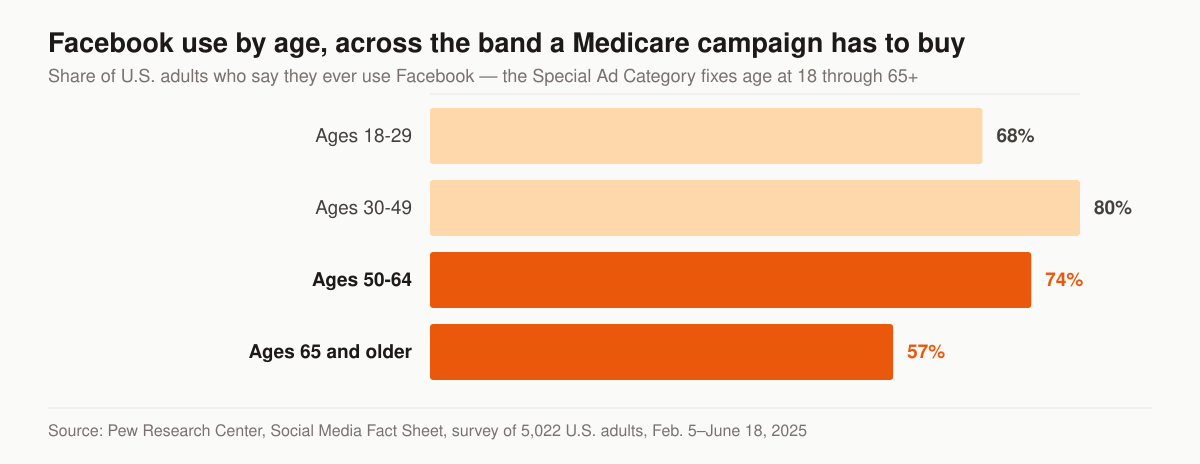
Facebook use by age group. Source: Pew Research Center, Social Media Fact Sheet, survey of 5,022 U.S. adults, Feb. 5–June 18, 2025.
The channel mechanics underneath all of this — category declaration, creative rotation, pixel and CAPI setup — are documented on our insurance Facebook ads service.
Is your ad “marketing” or a “communication” under CMS?
This is the question that decides how much of Subpart V lands on your campaign, and it has a written test. CMS defines an advertisement at 42 CFR 422.2260 as “a read, written, visual, oral, watched, or heard bid for, or call to attention”, then adds: “Advertisements can be considered communications or marketing based on the intent and content of the message.” Marketing is a subset of communications, and a material is marketing only when it meets both an intent standard and a content standard.
This table splits the two-prong test in the regulation; a Facebook ad has to clear both prongs to be marketing.
| Prong | What the regulation covers |
|---|---|
| Intent | Draw a beneficiary’s attention to a MA plan or plans; influence a beneficiary’s decision-making process when making a MA plan selection; influence a beneficiary’s decision to stay enrolled in a plan |
| Content | The plan’s benefits, benefits structure, premiums, or cost sharing; measuring or ranking standards, for example Star Ratings or plan comparisons; rewards and incentives as defined under § 422.134(a) |
The practical consequence is the whole reason we keep benefits off the ad and behind the landing page. An ad reading “Turning 65 in Lake County this year? Get the enrollment-timeline checklist” names no benefit, no premium, no cost sharing and no Star Rating, so it does not satisfy the content prong. It is still a communication and still governed by § 422.2262, which opens by prohibiting MA organizations from misleading, confusing or providing materially inaccurate information. But it is not marketing.
Do not treat that as a loophole to design around. The regulation anticipates the manoeuvre: “In evaluating the intent of an activity or material, CMS will consider objective information including, but not limited to, the audience of the activity or material, other information communicated by the activity or material, timing, and other context of the activity or material and is not limited to the MA organization’s stated intent.” Audience, timing and surrounding context are all things a Meta campaign leaves a record of. The plain-English walkthrough of that boundary lives in our guide to CMS Medicare marketing rules for agents.
The CMS/TPMO rules that govern your ad creative
Your agency is a Third-Party Marketing Organization (TPMO) the moment you generate or market Medicare leads. § 422.2260 defines a TPMO as “organizations and individuals, including independent agents and brokers, who are compensated to perform lead generation, marketing, sales, and enrollment related functions as a part of the chain of enrollment (the steps taken by a beneficiary from becoming aware of an MA plan or plans to making an enrollment decision).” That carries obligations into the ad and the funnel:
- The TPMO disclaimer, whose text is fixed by § 422.2267(e)(41). For a TPMO that does not sell for all MA organizations in the service area it reads: “We do not offer every plan available in your area. Currently we represent [insert number of organizations] organizations which offer [insert number of plans] products in your area. Please contact Medicare.gov or 1-800-MEDICARE to get information on all of your options.” For a TPMO that does sell for all MA organizations in the service area, the second variant applies instead. The regulation requires it to be used by any TPMO that sells plans on behalf of more than one MA organization, verbally conveyed during sales calls prior to the discussion of any benefits, electronically conveyed in email or online chat, prominently displayed on TPMO websites, and included in the TPMO’s marketing materials.
- No misleading superlatives. “Best plan,” “free money,” or implying government affiliation are flags. § 422.2262 prohibits claiming the plan is recommended or endorsed by CMS, Medicare, the Secretary or HHS, and restricts use of the Medicare name, the CMS logo and the Medicare card image, which is permitted only with authorization from CMS.
- Capture clear permission to contact before you call a lead — the form has to ask, not assume.
- Don’t promise benefits you can’t confirm for that consumer’s specific plan and ZIP.
Four more creative rules sit in the regulation that agency checklists rarely carry, and each one is a thing you set inside Ads Manager rather than a thing you remember on a call.
This table maps four Subpart V requirements onto the specific field in a Facebook ad they govern.
| Creative element | The rule | Citation |
|---|---|---|
| Naming the plan | Marketing may not reference products, plans, benefits or costs unless the MA organization or its HPMS marketing name is identified in the material. For online or social media the name must be “either read at the same pace as the phone number or must be displayed throughout the entire advertisement in a font size equivalent to the advertised phone number, contact information, or benefits” | § 422.2263(b)(9) |
| Boosting a testimonial | For social media, “the use of a previous post, whether or not associated with or originated by the MA organization, is considered a product endorsement or testimonial.” The speaker must name the product or company, a beneficiary must have been an enrollee when it was created, paid endorsements must say so, and an actor portrayal must be labelled | § 422.2262(b) |
| Saying “free” | The term may not describe a $0 premium, a reduction in premium, a reduction in deductibles or cost sharing, a low-income subsidy, or cost sharing for dual eligibles. It is permitted for mandatory, supplemental and preventive benefits at zero cost share for all enrollees | § 422.2262(a) |
| Mentioning Star Ratings | A reference to an individual measure must also reference the overall Star Rating for MA-PDs, or the summary rating for MA-only plans; must be clear the rating is out of 5 stars; must identify the Star Ratings contract year; and may only be marketed in the service areas the rating applies to, unless the Star Ratings are being used to convey overall MA organization performance | § 422.2263(c) |
One line in § 422.2262 catches ad copy that reads as harmless: MA organizations may not “State or imply plans are only available to seniors rather than to all Medicare beneficiaries.” A headline addressed to “seniors in [County]” is the exact phrasing that rule describes, and under-65 Medicare beneficiaries are a real part of the population it protects.
The cleanest way to stay inside these lines is to keep the ad simple (“See Medicare options in [County] for 2026”) and let a compliant landing page do the disclaiming and qualifying. Our build approach lives on the Medicare agent website page, and the page mechanics themselves are the insurance landing pages service.
The service-area rule that collides with Meta’s minimum radius
Here is where the two rulebooks actively fight each other, and it is the collision we design around first on every Medicare build. § 422.2263(b)(8) prohibits advertising “benefits that are not available to beneficiaries in the service area(s) where the marketing appears, unless the advertisement is in local media that serves the service area(s) where the benefits are available and reaching beneficiaries who reside in other service areas is unavoidable.”
Now set that against the platform. Meta will not accept ZIP-level targeting under the category, will not accept location exclusion, and forces any city or pin-drop audience out to at least a 15-mile radius. MA benefits are set per plan service area; Meta’s smallest permitted geography is a circle around a city, address or dropped pin. Those two shapes do not line up, and the ad has no way to stop at a service-area boundary.
The resolution is not a clever targeting trick, because Meta has removed the levers a trick would use. It is an editorial decision: keep plan-specific benefits out of the ad entirely, and put the benefit detail on a landing page that asks for a ZIP before it shows anything plan-specific. That way the thing crossing the boundary is a checklist offer, not an advertised benefit. It also means the ad clears the content prong of the marketing definition, which reduces the compliance surface twice over.
Which objective and format to run, and what each one triggers
Format choice is usually argued as a conversion question. For Medicare it is also a compliance question, because each format hands the consumer to a different regulated step.
This table pairs the five formats worth running with the specific obligation each one turns on.
| Format | What it does | What it triggers |
|---|---|---|
| Instant form | Collects contact details in-platform | The lead-generation disclosure must be given electronically when you communicate through email, online chat or other electronic messaging platform — so it belongs in the form, not only on the thank-you screen |
| Website conversion | Sends traffic to your landing page | The TPMO disclaimer must be prominently displayed on TPMO websites, so the page carries it before the form does |
| Click-to-call | Routes straight to a phone | The call is a sales call: recorded and retained in its entirety, and the disclaimer read before any discussion of benefits |
| Video | Educates before the ask | Endorsement and testimonial rules apply to anyone who speaks on camera, including the actor-portrayal label |
| Event promotion | Fills a seminar or workshop | Advertising for events under § 422.2264(c) carries the accommodations disclaimer, and the meal prohibition applies |
Retargeting sits alongside these rather than competing with them. Because custom audiences survive the category, a website-visitor audience built from your own pixel is warm inventory you have already paid for once, and it is the one audience the category does not take away. What you cannot do any more is model outward from that list, which is the practical difference between a Medicare account before the category and one after it.
Offers that clear CMS, and the popular ones that do not
The free-lunch seminar invitation is a fixture of Medicare marketing advice, including on pages currently ranking for this query. Read § 422.2263(b) and the picture changes. In marketing, MA organizations may not “Provide meals to potential enrollees regardless of value.” There is no nominal-value carve-out on meals the way there is on gifts, and “regardless of value” is doing the work in that sentence.
The neighbouring paragraphs draw the rest of the line. Cash or other monetary rebates as an inducement for enrollment are prohibited outright. Gifts are allowed only when they are of nominal value as governed by HHS OIG guidance, are offered to similarly situated beneficiaries without regard to whether the beneficiary enrolls, and are not cash or monetary rebates — and § 422.2267(e)(37) requires a promotional give-away disclaimer making clear there is no obligation to enroll. Savings claims get their own prohibition: marketing may not include savings figures “based on a comparison of typical expenses borne by uninsured individuals, unpaid costs of dually eligible beneficiaries, or other unrealized costs of a Medicare beneficiary.” If you run a refer-a-friend ad, § 422.2274(f) caps referral payments at $100 for a referral into an MA or MA-PD plan and $25 for a referral into a PDP plan.
What survives is the offer set we build campaigns around anyway: an educational guide or enrollment-timeline checklist, a no-obligation plan review appointment, a seat at an event, and a phone consultation with a licensed agent. We favour those because they select for someone who wants the coverage conversation rather than the prize. If events are your channel, the room-filling mechanics are on the Medicare seminar marketing page.
Run the CMS calendar as your media calendar
Spend follows enrollment windows, not the other way around:
- AEP (Oct 15 – Dec 7): plan-comparison and enrollment messaging. Highest competition, highest CPL.
- OEP (Jan 1 – Mar 31): restricted for existing MA enrollees — see the next section before you build anything for this window.
- Turning 65 / SEP, year-round: newly eligible and special-enrollment audiences. Cheaper clicks, longer nurture. See our T65 marketing system.
One date sits earlier than the AEP window suggests. § 422.2263(a) provides that MA organizations “may begin marketing prospective plan year offerings on October 1 of each year for the following contract year”, and allows current and prospective year marketing to run simultaneously provided the materials clearly indicate which year is being discussed. October 1 is therefore the earliest a next-plan-year Facebook campaign can go live, which makes late September the build window rather than the launch window. Our Q4 sequencing is set out in the AEP marketing strategies guide.
Marketing the wrong action in the wrong window wastes budget and creates a compliance trail. Match message to window every time.
What you may and may not run during OEP
The Open Enrollment Period is where well-meaning Q1 campaigns go wrong, because the instinct — market a plan review to everyone who just enrolled — is the specific behaviour the regulation names. § 422.2263(b)(7) prohibits MA organizations from knowingly targeting or sending unsolicited marketing materials to any MA enrollee during the OEP, and the paragraph then lists what is and is not allowed with unusual precision.
This table reproduces the permitted and prohibited OEP activities set out in § 422.2263(b)(7).
| Permitted during OEP | Prohibited during OEP |
|---|---|
| Marketing activities focused on other enrollment opportunities, including marketing to age-ins who have not yet made an enrollment decision | Sending unsolicited materials advertising the ability or opportunity to make an additional enrollment change, or referencing the OEP |
| Marketing by 5-star plans regarding their continuous enrollment special election period | Specifically targeting beneficiaries who are in the OEP because they made a choice during AEP, by purchase of mailing lists or other means of identification |
| Marketing to dual-eligible and LIS beneficiaries who may generally make changes once per calendar quarter during the first 9 months of the year | Engaging in or promoting agent or broker activities that intend to target the OEP as an opportunity to make further sales |
| Sending marketing materials when a beneficiary makes a proactive request, one-on-one meetings at the beneficiary’s request, and OEP information through the call center at the beneficiary’s request | Calling or otherwise contacting former enrollees who have selected a new plan during the AEP |
| Educational information, excluding marketing, on the organization’s website about the existence of OEP | — |
Read as a media plan, that leaves a clear Q1 lane: age-ins, dual-eligible and LIS audiences where you are appointed, 5-star continuous enrollment where it applies, and inbound response to people who raised their hand. It rules out the retargeting audience of last quarter’s enrollees, which is exactly the audience an unattended account would keep spending on in January. The rule-by-rule version is in our Medicare OEP marketing rules guide.
What happens the second the form is submitted
Everything above governs the ad. § 422.2274(g) governs what the agency does with the lead, and these are written as requirements MA organizations must build into their contracts with TPMOs — so they reach your agency through the plan or the plan’s first tier entity, not as a rule you can adopt at your own pace.
- Say where the data is going. A TPMO conducting lead-generating activities must “Disclose to the beneficiary that his or her information will be provided to a licensed agent for future contact”, verbally by telephone, in writing on mail or paper, and electronically through email, online chat or other electronic messaging platform. On a Meta instant form, that is the electronic channel, so the disclosure belongs in the form.
- Say what a transfer is. The TPMO must also “Disclose to the beneficiary that he or she is being transferred to a licensed agent who can enroll him or her into a new plan.”
- Record the call. All marketing and sales calls, including the audio portion of calls conducted via web-based technology, must be recorded and retained in their entirety for a minimum period of 6 years, kept in audio format for the first 3 years and in audio or complete and accurate transcript form for years 4, 5 and 6. A click-to-call ad creates that obligation the moment it connects.
- Get consent before sharing the lead. Since October 1, 2024, personal beneficiary data a TPMO collects for marketing or enrolling into an MA plan may only be shared with another TPMO with the beneficiary’s prior express written consent, obtained “through a clear and conspicuous disclosure that lists each entity receiving the data and allows the beneficiary to consent or reject to the sharing of their data with each individual TPMO.” A single checkbox agreeing to contact from unnamed “trusted partners” does not describe that.
- Scope of Appointment before the plan talk. § 422.2274(b)(3) requires agents and brokers to “Secure and document a Scope of Appointment prior to a personal marketing appointment.” The mechanics are in our Scope of Appointment and TPMO compliance guide.
Read together, those five turn the follow-up into an engineering problem rather than a memory problem, which is how we prefer it: the form field, the recording rule and the consent language get built once into the funnel and the lead-generation system behind it.
Who files the ad with CMS, and what is exempt
Agent-built creative does not go to CMS directly. Under § 422.2274(c)(7), MA organizations must “Submit agent or broker marketing materials to CMS through HPMS prior to use, following the requirements for marketing materials in this subpart.” The route runs agent to carrier to HPMS, which is why the marketing-versus-communication question earlier is a scheduling question as well as a legal one: a piece that meets the marketing definition needs carrier lead time, and a piece that does not can ship on your own timeline.
A few social-specific exemptions are worth knowing, because they explain why a Facebook ad looks lighter than a mailer. The standardized material identification code is required on most materials but not on “Envelopes, radio ads, outdoor advertisements, banners, banner-like ads, and social media comments and posts”, nor on agent-developed communications materials that are not marketing. The Federal Contracting Statement, which conveys that the plan has a Medicare contract and that enrollment depends on contract renewal, is required on all marketing materials with named exceptions for banners and banner-like advertisements, outdoor advertisements, text messages, social media and envelopes. None of that touches the TPMO disclaimer, which the regulation attaches to TPMO websites and marketing materials without a social carve-out.
What this costs, and where the leverage is
CPL swings with the calendar. For reference, we run our own senior-market lead book, so we read CPL as operators, not resellers. Medicare MA leads usually price higher during AEP because every agency is bidding the same audience.
But CPL is the vanity number. The metric that pays you is cost per enrolled member, and that’s won on the back end: speed-to-lead, a script that completes the Scope of Appointment, and a funnel that doesn’t leak. That’s the same conversion discipline behind our final-expense lead operation, which is where our paid-social playbook was hardened.
The ladder we report against runs form submit, contact, Scope of Appointment on file, application, and effectuated enrollment. Each step has its own failure mode — a bad phone number, a slow call, a plan discussion that started before the SOA, an application that never effectuates — and reporting only the first and last of them hides which one is actually costing you. It also reframes the CPL argument: a lead that costs more but reaches SOA more often can be the cheaper enrollment, and you cannot see that from the Ads Manager column.
On our side of it, managed paid social sits in the Full-Funnel tier at $5,500 per month, with Foundation at $2,500 and Growth at $3,500; ad spend is billed at cost straight to the platforms rather than marked up. The full breakdown, including the one-time build, is on the pricing page. If you are still deciding between paid social and search for a Medicare book, we compare the two economics side by side in Facebook ads vs Google ads for insurance agents.
Build your own pipeline, or buy volume
Two valid paths, often run together:
- Owned generation gives you TPMO control, better contact rates, and a list you keep — that’s the system we build and the broader insurance social media capability behind it. It is also the path that compounds, because the custom audiences the Special Ad Category leaves you are built from traffic you paid for once.
- Purchased volume fills AEP surges your funnel can’t ramp into fast enough. When the topic is buying leads or live transfers as a product, that’s not us — buy leads direct from getinsureleads and keep your marketing funnel clean.
Whichever mix you land on, the § 422.2274(g)(4) consent rule sits underneath it: a purchased lead can only reach you as a second TPMO if the consumer gave prior express written consent naming the entities receiving the data. That is a question to ask a vendor before the invoice, not after a call recording gets pulled. The lead-source comparison for this market is on our Medicare leads page.
Nothing here is legal advice, and we are not the licensed party: we provide the marketing services, and the agent makes the recommendation and owns the compliance sign-off. What we do is make the compliant path the default one, so the disclaimer, the disclosure and the consent language are things the funnel does rather than things you remember.
Want a read on whether your current Medicare Facebook setup is compliant and converting? Get a free marketing audit and we’ll show you where the money is leaking — using the same scoring we run on our own campaigns. If you would rather talk it through first, contact us.