Who we serve
Health Insurance Agent Website Design That Stays Compliant and Converts
Health insurance agent website design builds a fast, CMS-compliant site that turns visitors into booked enrollment calls. It bakes in required TPMO disclaimers and avoids 'free' or 'government' framing and unsupported plan claims, while giving every page one obvious next step, a quote request or a scheduled call, instead of a disclaimer wall.
Free · 15-minute teardown · no pitch deck
- We run our own final-expense book
- No pitch deck — we screen-share real numbers
- TCPA-aware · CMS/AEP-compliant · Meta Special Ad Category
- Core Web Vitals < 2.0s LCP
Your website is the only part of your marketing that works while you’re on an enrollment call. For ACA and health insurance agents, that makes health insurance agent website design a compliance decision and a revenue decision in the same breath. Get the disclaimers wrong and you risk a complaint. Get the page flow wrong and the paid traffic you bought during Open Enrollment never books a call.
We approach it the way we approach our own lead operation: every element on the page earns its place by either keeping you compliant or moving a visitor one step closer to a quote request.
This page works through what the regulation actually requires of an agent’s site, what changes when the site is used to complete an Exchange application, what the consent record on your form has to contain, how the enrollment calendar shifts in 2027, how fast the page has to load in published numbers, what the page set looks like, and what the two ways of buying a site cost.
What a compliant health insurance agent website actually needs
CMS and Marketplace rules don’t ban marketing — they ban misleading marketing. The fixes are mostly structural, not creative.
This table pairs the framing that draws complaints with the framing we build instead, element by element.
| Element | Risky / non-compliant | What we build |
|---|---|---|
| Headline framing | “Free government health plans” | “See if you qualify for a premium tax credit” |
| Identity | Looks like HealthCare.gov | Clear “licensed independent agent” labeling |
| TPMO disclaimer (if Medicare lines) | Missing or buried | Present, accurate plan/org count, visible |
| Plan claims | “Best plan,” “all plans” | Factual, no superlatives you can’t back |
| Call to action | Vague “Learn more” | One path: quote request or booked call |
| Mobile load | Untested on a phone | Built to the published Core Web Vitals thresholds |
| Consent capture | Name and phone, nothing stored | Scope, purpose, duration, date, names, rescission path |
For Medicare-adjacent work, the CMS TPMO disclaimer and Medicare marketing rules in 42 CFR part 422 apply; for ACA Marketplace work the governing text is 45 CFR 155.220. We map your exact lines of business so the site discloses what it must and nothing it shouldn’t.
What federal law actually says about an ACA agent’s website
Agents hear “CMS rules” and picture the Medicare marketing manual. For Marketplace business the operative section is 45 CFR 155.220, the standards for agents, brokers and web-brokers assisting with QHP enrollment. Three of its paragraphs land directly on the website.
Paragraph (j)(1) sets the entry conditions. An agent, broker or web-broker that assists with or facilitates enrollment through a Federally-facilitated Exchange must have executed the required agreement under § 155.260(b), be registered with the Federally-facilitated Exchanges under paragraph (d)(1), and comply with the standards of conduct in paragraph (j)(2). Registration and training under paragraph (d) are a precondition of the business, not a website feature — but the site is where a consumer checks whether you are who you say you are, so the licensure line belongs on the page.
Paragraph (j)(2)(i) is the one that constrains design directly. It requires the agent to refrain from conduct that is misleading, and the parenthetical names the failure mode: “(including by having a direct enrollment website that HHS determines could mislead a consumer into believing they are visiting HealthCare.gov)”. Read that as a design brief. Blue-and-white federal palettes, eagle-adjacent seals, a masthead that reads like a portal rather than an agency, an enrollment form styled as a government application — each of those moves the page toward the thing the paragraph describes.
Paragraph (j)(3)(ii) governs the copy. Marketing must provide “consumers with correct information, without omission of material fact, regarding the Federally-facilitated Exchanges, QHPs offered through the Federally-facilitated Exchanges, and insurance affordability programs, and refrain from marketing that is misleading, materially inaccurate, coercive, or discriminates based on race, color, national origin, disability, age, or sex.” Two words in that sentence do real work on a website. Omission means a true headline can still fail if the qualifier is missing. Discriminates on the basis of disability is why an inaccessible page is a compliance question and not only a usability one.
Note the scope honestly: none of this is legal advice, and it is written for the Federally-facilitated Exchange. If you operate in a state-based Exchange, your state’s own agent standards sit on top. You are the licensed party; we build the marketing.
The seven marketing practices CMS lists as prohibited
Paragraph (j)(3)(iii) does something unusually useful for a marketer: it enumerates examples rather than gesturing at a standard. The list is prefaced “Examples of prohibited misleading marketing practices agents, brokers, and web-brokers may not include in their marketing of FFE plans include, but are not limited to:” — so it is a floor, not a ceiling.
This table quotes each listed practice and names the website element it usually shows up in.
| § 155.220(j)(3)(iii) | The regulation’s words | Where it appears on a site |
|---|---|---|
| (A) | “Providing cash, monetary rebates, gift cards, travel vouchers, or cash equivalents as an inducement for enrollment or otherwise.” | “$50 gift card when you enroll” banners and referral offers |
| (B) | “Offering gifts to consumers, unless the gifts are of nominal value, are offered to similarly situated consumers without regard to whether or not the consumers enroll, and are not in the form of cash or cash equivalents.” | Lead-magnet giveaways gated behind an enrollment |
| (C) | “Falsely asserting or suggesting that consumers will always qualify for zero-dollar insurance/zero-dollar premiums.” | “$0 health plans” hero headlines and ad-matched landing copy |
| (D) | “Falsely using identical or facsimiles of government or other official logos and notations.” | Seals, shields and “official” badges in the header or footer |
| (E) | “Miscommunicating enrollment timelines and deadlines.” | A hardcoded OEP date line nobody updated |
| (F) | “Misconstruing legislation, regulations, or Executive Orders, including listing fake or incorrect references or citations.” | Blog posts and FAQ answers citing a rule that says something else |
| (G) | “Utilizing the image or likeness and/or utilize a quote from a notable figure, such as a celebrity or politician, in an advertisement claiming that figure has endorsed you or your agency when that endorsement is not truthful.” | Stock celebrity imagery, “as seen on” strips |
Item (C) is the one that reaches the “$0 plan” headline, and the qualifier matters: what is prohibited is falsely asserting or suggesting that consumers will always qualify. A page that says a plan may cost nothing after the premium tax credit for households at certain incomes, and shows the eligibility check, is making a different statement than one that promises zero-dollar coverage to whoever arrives.
Item (F) is the reason we cite section numbers on our own pages. And two more paragraphs sit behind the list: (j)(3)(iv) requires you to produce marketing material on request within the timeframe HHS mandates, and (j)(3)(v) makes you responsible for material produced “on their behalf” — which reaches your web designer, your ad agency and any vendor writing copy under your name. Keep a dated archive of every published version of the site. We hand one over as a deliverable.
For the wider view of how these rules interact with ads and outbound, our ACA marketing compliance guide to the CMS rules covers the channels this page does not.
When your site becomes a web-broker site, and what changes
There are two very different things an agent calls “my website,” and the regulation treats them differently.
The first is a marketing site: it explains who you are, answers plan questions, and captures a lead so you can call back and enroll the consumer through the Exchange or a platform. The second is a site that a consumer uses to complete the QHP selection or the Exchange eligibility application itself. Paragraph (c)(3)(i) opens with that trigger — “When an internet website of a web-broker is used to complete the QHP selection” — and then attaches a long list of duties.
This table lists what § 155.220(c)(3)(i) requires of that second kind of site, in the regulation’s order.
| Requirement | What it means for the build |
|---|---|
| (A) Disclose and display QHP information: premium and cost-sharing, the summary of benefits and coverage, metal level, enrollee satisfaction survey results, quality ratings, and the provider directory | Six data surfaces, each fed by the Exchange or the issuer, each needing a template |
| (B) “Provide consumers the ability to view all QHPs offered through the Exchange” | No filtered-down plan shelf |
| (C) “Not provide financial incentives, such as rebates or giveaways” | Rules out most conversion-rate tactics borrowed from ecommerce |
| (D) “Display all QHP data provided by the Exchange” | Nothing suppressed for tidiness |
| (E) “Maintain audit trails and records in an electronic format for a minimum of ten years” | A retention decision made at build time, not later |
| (F) Let consumers withdraw and use the Exchange website instead at any time | A visible exit, on every step |
| (G) Prominently display the HHS-provided standardized disclaimer and link to the Exchange website | Placement, not a footer afterthought |
| (H) Prominently display HHS information on eligibility for advance payments of the premium tax credit or cost-sharing reductions | Subsidy messaging is supplied, not written by you |
| (K) No advertisements, recommendations or favored placement based on issuer compensation | Ordering logic has to be defensible |
| (L) “Prominently display a clear explanation of the rationale for QHP recommendations and the methodology for its default display of QHPs” | If you sort plans, you publish how |
If your plan is a marketing site that hands off to an approved enrollment platform, none of that list is your build. If your plan is to run enrollment on your own domain, it all is. And if the site also completes the Exchange eligibility application, paragraph (c)(3)(ii) stacks four further duties on top of that list, including (B): “Use exactly the same eligibility application language as appears in the FFE Single Streamlined Application required in § 155.405, unless HHS approves a deviation.” The application wording is not yours to optimize. Deciding which of the two you are building is the first architectural question, and it is cheaper to answer before design than after.
Where the Medicare TPMO disclaimer fits, and where it does not
Agents selling both ACA and Medicare Advantage routinely put the TPMO disclaimer everywhere, or nowhere. Neither is right, because the disclaimer is a Medicare Advantage instrument.
42 CFR 422.2267(e)(41) makes it standardized content. Where a TPMO does not sell for all MA organizations in the service area, the disclaimer is: “We do not offer every plan available in your area. Currently we represent [insert number of organizations] organizations which offer [insert number of plans] products in your area. Please contact Medicare.gov or 1-800-MEDICARE to get information on all of your options.” Where the TPMO does sell for all MA organizations in the area, the text changes to: “Currently we represent [insert number of organizations] organizations which offer [insert number of plans] products in your area. You can always contact Medicare.gov or 1-800-MEDICARE for help with plan choices.”
The placement rules are in the same paragraph. The disclaimer must be “Used by any TPMO, as defined under § 422.2260, that sells plans on behalf of more than one MA organization”, “Verbally conveyed during sales calls prior to the discussion of any benefits”, “Electronically conveyed when communicating with a beneficiary through email, online chat, or other electronic means of communication”, “Prominently displayed on TPMO websites”, and included in marketing materials the TPMO develops, uses or distributes.
Three build consequences follow. Prominently displayed rules out the footer-only pattern. Online chat means the chat widget needs the text too, not just the page. And the bracketed counts are variables — an organization count and a plan count that change with your contracts — so they belong in a single editable field, not retyped across twenty pages. On a site that sells both lines, we scope the disclaimer to the Medicare templates and keep it off the ACA templates, where it would be a claim about a program the page is not selling. The Scope of Appointment and TPMO compliance guide goes further into the Medicare side.
Consent capture: what the record your form has to produce
A form is usually designed as a lead capture. Under the FFE standards of conduct it is also a records system, and we scope it as one.
Paragraph (j)(2)(iii) requires you to obtain and document the receipt of consent before assisting with enrollment or with an application for advance payments of the premium tax credit and cost-sharing reductions. Paragraph (A) says the documentation must require the consumer to “take an action that produces a record that can be maintained and produced”, and lists acceptable forms for plan years ending before January 1, 2028: a signature, electronically or otherwise; verbal confirmation captured in an audio recording; a response to an electronic or other communication; or other similar means specified by HHS in guidance.
Paragraph (B) sets the fields. The documentation must include “a description of the scope, purpose, and duration of the consent provided by the consumer or their authorized representative designated in compliance with § 155.227, the date consent was given, name of the consumer or their authorized representative, and the name of the agent, broker, web-broker, or agency being granted consent, as well as a process through which the consumer or their authorized representative may rescind the consent.” Six fields and a rescission path. A form that posts to an inbox produces none of them.
Paragraph (C) changes the mechanism for plan years beginning on or after January 1, 2028: the documentation must be collected by having the consumer execute an HHS-approved and -created consumer consent form, and the paragraph is explicit about what will no longer count — “A signature that is simply typed on the documentation or a filled-in check box does not properly indicate consent was provided by the consumer or the consumer’s authorized representative.” Paragraph (D) requires the documentation be kept for a minimum of 10 years and produced on request.
We treat that as a design constraint rather than a legal footnote. The form writes a timestamped record with the six fields, the rescission link is a real URL rather than a sentence, and the capture path is built so it can carry a signature or a recording when the 2028 mechanism lands, instead of needing a rebuild. Consent for calls and texts is a separate obligation with its own rules; our TCPA compliance guide for agents covers that layer, and the same discipline shapes our ACA landing page funnels.
Two figures put the retention rule in proportion. Under 45 CFR 155.285(c)(1)(i), failing to provide correct information under section 1411(b) of the Affordable Care Act carries a maximum civil money penalty of $25,000 as adjusted annually under 45 CFR part 102 for each application; under (c)(1)(ii), knowing and willful provision of false information carries a maximum of $250,000 per application on the same adjusted basis; and under (c)(2)(i), a knowing or willful improper use or disclosure carries not more than $25,000 per use or disclosure. Those attach to application information and to the handling of personally identifiable data — not to a headline — which is exactly why the form and its storage deserve more design attention than the hero.
Enrollment dates on the page: the window shortens for 2027
Prohibited practice (E) is “Miscommunicating enrollment timelines and deadlines.” That makes the dates on your site a compliance surface, and the dates are about to move.
45 CFR 155.410 sets them. For benefit years beginning January 1, 2022 through January 1, 2026, paragraph (e)(4)(i) provides that the annual open enrollment period “begins on November 1 of the calendar year preceding the benefit year and extends through January 15 of the benefit year”, subject to the state-Exchange variations in (e)(4)(ii) and (iii). For benefit years beginning on or after January 1, 2027, paragraph (e)(5) replaces that: “The annual open enrollment period for all Exchanges must begin no later than November 1 and must end no later than December 31 of the calendar year preceding the benefit year,” and “The annual open enrollment period must not exceed 9 weeks in duration.” Paragraph (f)(4) matches the effective-date rule to it — coverage effective January 1 for QHP selections received on or before December 31.
This table sets the two regimes side by side as § 155.410 writes them.
| Benefit years 2022–2026 | Benefit years 2027 onward | |
|---|---|---|
| Governing paragraph | § 155.410(e)(4)(i) | § 155.410(e)(5)(i) and (ii) |
| Start | November 1 of the preceding calendar year | No later than November 1 of the preceding calendar year |
| End | Through January 15 of the benefit year | No later than December 31 of the preceding calendar year |
| Maximum length | Not capped in (e)(4) | Must not exceed 9 weeks |
| State-Exchange latitude | Later end date permitted under (e)(4)(ii) | (e)(5)(i) applies to all Exchanges |
| Coverage effective date | Per (f)(3) | January 1 for selections received on or before December 31, per (f)(4) |
Three consequences for the build. First, any site carrying “November 1 – January 15” as static text becomes inaccurate for the 2027 benefit year, and inaccurate deadlines are the named practice in (j)(3)(iii)(E). Dates belong in one dated, editable field the page reads from, with the paragraph cited beside it. Second, the January tail disappears, so the traffic that used to arrive after the holidays arrives before them — the site has to be finished, indexed and converting well before November 1 rather than patched during the window. Third, a shorter window raises the cost of a slow page, because there are fewer weeks in which to recover a lost form-start. Our guide to filling an ACA pipeline during OEP works through the seasonal plan around that.
Who actually lands on the site: returning enrollees, not first-timers
A first-time buyer is the easy person to write for: no plan, no history, every question still open. The enrollment data says that person is the smaller share of the market.
CMS reported cumulative 2026 Open Enrollment plan selections of 22,973,219 across all Exchanges, of which 3,382,189 were new consumers and 19,591,030 were returning consumers. The split holds on both platforms: 15,771,397 selections in the 30 states using HealthCare.gov, made up of 2,517,617 new and 13,253,780 returning; and 7,201,822 across the state-based Exchanges, made up of 864,572 new and 6,337,250 returning.
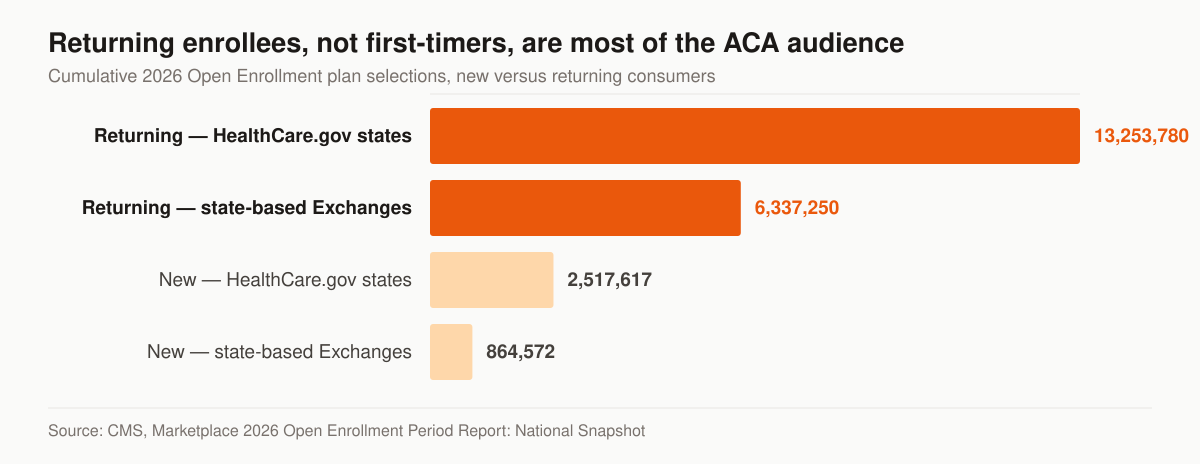
New versus returning consumers in the 2026 Open Enrollment Period. Source: CMS, Marketplace 2026 Open Enrollment Period Report: National Snapshot.
A returning enrollee arrives with a different question. Not “how does the Marketplace work” but “my plan changed, my doctor left the network, my premium moved — should I switch, and will you handle it.” So the site needs a second entry path beside the first-timer path: a re-shop page that speaks to plan changes and network checks, a switching explainer, and a form that asks whether the visitor is currently covered. We build both paths and route them separately, because the follow-up script is different and the volume behind the second one is larger.
How fast the site has to be, in numbers
“Fast” is not a design opinion; Google publishes the thresholds. Largest Contentful Paint, the loading metric, “should occur within 2.5 seconds of when the page first starts loading.” Interaction to Next Paint, the responsiveness metric, should be 200 milliseconds or less. Cumulative Layout Shift, the visual-stability metric, should be 0.1 or less. Each is assessed at the 75th percentile of page loads, segmented across mobile and desktop — so a page that is quick on your laptop and slow on a mid-range phone fails, and the phone is where enrollment traffic lands.
Clearing all three at once is the part sites miss. The 2024 Web Almanac reports these by device, and mobile is the device that matters here: 79% of mobile sites have a good CLS score, 74% of mobile websites had good INP, and 59% of mobile pages achieved a good LCP score — but only 43% of websites had good Core Web Vitals overall on mobile once INP replaced FID in the assessment. Desktop is unaffected by that swap and sits at 54%.
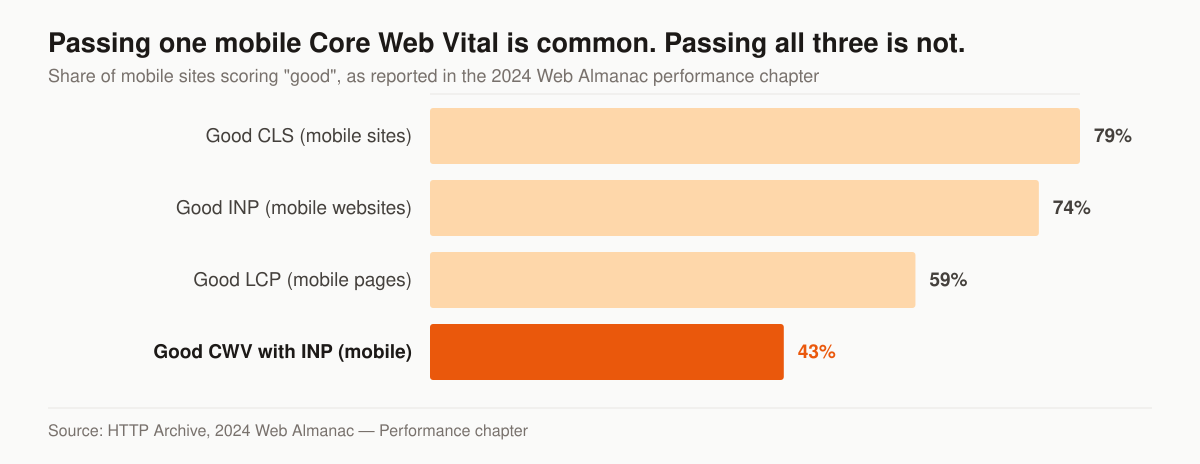
Mobile Core Web Vitals pass rates in 2024. Source: HTTP Archive, 2024 Web Almanac — Performance chapter.
On an ACA site the usual offenders are predictable: a hero image shipped at desktop resolution to phones, a chat widget and three tracking scripts loading before the form, and a form that reflows when a validation message appears — the last one being a layout-shift problem measured in dropped submissions rather than milliseconds. We build to the thresholds and hand over the field measurement, not a lab score screenshot. The same standards run through our insurance web design service and are half of what makes a page rankable at all, as our guide to ranking an insurance agency website sets out.
The page set an ACA agent site needs
A site is a set of answers, and the set is short. Everything past it is usually a distraction competing with the form.
This table is the page set we build for an ACA agent, with the job and the compliance element each page carries.
| Page | The question it answers | What it must carry |
|---|---|---|
| Home | Who you are and whether you are licensed here | Licensure, service area, one primary action |
| Subsidy / premium tax credit check | Am I eligible for help paying | Accurate conditional framing, no “always qualify” |
| Plan comparison explainer | How the metal levels and networks differ | Factual descriptions, no unsupported superlatives |
| Re-shop / plan switching | My plan changed, what now | Current-coverage question on the form |
| Special Enrollment Period | I lost my job or had a baby, can I enroll now | Qualifying-event list, cited |
| Service-area pages | Do you cover my county | Genuinely local signals, not a city swap |
| About and licensure | Are you real | NPN, carriers, a real photo, no borrowed authority |
| Contact and booking | How do I reach a human | One booking path, phone if you take calls |
| Privacy and consent | What happens to my data | Rescission process, retention statement |
Two rules govern the set. One job per page: an enrollment page asks for a quote or a call, not a newsletter signup and a blog click competing for the same eyeball. And one editable source for anything that changes — enrollment dates, plan counts, organization counts, carrier lists — because duplicated facts are how a site drifts into (j)(3)(iii)(E) and (F) without anyone deciding to. Service-area pages carry their own local-search work, which we cover under insurance local SEO, and the ranking layer sits in ACA insurance agent SEO.
What it costs: platform subscription versus a built site
Two products share the name “insurance agent website,” and comparing their prices without naming the difference is how agents end up disappointed by both.
A platform subscription licenses a template with insurance content in it, hosted and maintained by the vendor. Prices are published. BrightFire, for instance, lists Insurance Agency Websites at $170 per month with no setup fees, alongside Local Listings Management at $50, Social Media Marketing at $100, Reviews & Reputation Management at $110, Search Engine Marketing at $160, and an Ultimate SEO Bundle at $290 per month. Some vendors in this category publish nothing — AgentMethods’ pricing page carries no figures and routes to a demo booking instead.
A built site is a project: your architecture, your copy, your consent record, your performance budget, and code you own.
This table sets the two purchases against each other on the terms that decide which one you want.
| Platform subscription | Built site | |
|---|---|---|
| Published example | BrightFire Insurance Agency Websites, $170/mo, no setup fee | Our one-time build, $2,500–$8,000 |
| What you get | A template with insurance content, hosted | Architecture, copy and code specific to your book |
| Consent record | Whatever the vendor’s form stores | The six § 155.220(j)(2)(iii)(B) fields plus a rescission path |
| Page set | The vendor’s set | The set your lines of business need |
| Performance | The template’s, shared across customers | Built and measured against the Core Web Vitals thresholds |
| Ownership | Ends when the subscription ends | Yours |
| Ongoing traffic work | Bought per product | Foundation $2,500/mo, Growth $3,500/mo, Full-Funnel $5,500/mo |
The honest version: if you need a presence and a phone number, a subscription template is a reasonable purchase and the published price is the price. If the site is meant to convert paid traffic during a nine-week window and hold a consent record for ten years, it is a build. Our full tiers, and what each one includes, are on the pricing page — published, month to month, ad spend billed at cost.
How we build one
The sequence matters more than the tooling, and it starts with a scope question rather than a design.
- Decide which site you are building. Marketing site handing off to an approved enrollment platform, or a site used to complete QHP selection or the eligibility application. That answer sets whether § 155.220(c)(3)(i) is in scope, and it changes the budget.
- Map lines of business to disclosures. ACA only, ACA plus Medicare Advantage, ACA plus ancillary. This produces the disclaimer matrix, including where the TPMO text belongs and where it must not appear.
- Write the page set before the design. Nine pages, one job each, real copy with nouns and numbers. Design decisions made against real copy survive; ones made against placeholder text get rewritten.
- Build the consent record first. The six fields, the timestamp, the rescission path, the retention plan. Retro-fitting a records system into a live form is the expensive version.
- Set a performance budget, then build to it. LCP under 2.5s, INP under 200ms, CLS under 0.1, measured on a mid-range phone at the 75th percentile.
- Wire measurement before launch, not after. Form starts, form completions, booked calls, and which page produced each.
- Archive every published version. Paragraph (j)(3)(iv) can ask for marketing material within an HHS-specified timeframe, and (j)(3)(v) makes you responsible for what a vendor produced on your behalf.
Steps one and two are where a build goes wrong quietly. Everything after them is craft.
What to measure once it is live
A site that cannot be measured cannot be improved, and an analytics install left on its defaults reports vanity metrics.
We instrument four things and ignore the rest. Form starts versus completions, because the gap between them is a form problem you can fix this week, not a traffic problem. Booked calls by source page, because it tells you which of the nine pages earns its place. Field-measured Core Web Vitals on mobile at the 75th percentile, because the lab score on your laptop is not the number Google uses. And consent records written, as a completeness check on the thing the regulation actually asks you to produce.
Notice what is missing: sessions, bounce rate, and time on page. None of them survive contact with a nine-week enrollment window. If your current site cannot report the four above, that is the first fix, and it is usually a one-day job. AI assistants are becoming a route to the same pages, which is a separate measurement question we handle under AI search visibility.
Compliance is a trust signal, not a tax
Agents treat disclaimers like a penalty. Consumers read them as evidence you are a real business. A page that states plainly that you are a licensed agent, that using your services costs nothing, and that you do not represent the government is answering the question a shopper burned by a “$0 health plan” ad is already asking. We treat accurate framing as conversion framing rather than a compliance overhead — it is the same sentence doing two jobs. We are a marketing company; you are the licensed party, and the site reflects that cleanly.
The conversion mechanics under the hood
A compliant site still has to do the selling. The parts that move the number:
- One job per page. An enrollment landing page asks for a quote or a call — not a newsletter signup, a blog click, and a phone number competing for the same eyeball.
- Mobile-first, fast. ACA traffic spikes on phones during OEP and SEP windows. We build to the published Core Web Vitals thresholds so form-starts survive the load.
- A form that respects the shopper. Short, plain-language, no surprise fields — and every field justified by either a callback need or a § 155.220(j)(2)(iii)(B) consent element.
- Proof and licensing visible. Your NPN, carriers, and a real photo are the assets a shopper can check. A stock-image hero is not.
- A second path for re-shoppers. Returning consumers were 19,591,030 of the 22,973,219 selections in the 2026 OEP; a site with only a first-timer path is talking to the smaller group.
Why trust us with the build
We don’t theorize about insurance conversion — we run it. We operate our own senior-market lead book, so our conversion methods come from live campaigns, not theory. ACA is a different vertical, but the same conversion systems and ad-to-page discipline that work for our senior-market clients are exactly what an ACA agent site needs. We build the page we’d point our own ad spend at.
Where the website fits in your marketing
The site is the engine, not the fuel. It converts traffic; it doesn’t create it. To fill the funnel around it, link the build to the broader plan:
- Start with the ACA agent marketing pillar for the full strategy across ads, SEO, and enrollment seasons.
- For the technical build standards behind every site we ship, see our insurance web design service.
- Pair the site with ACA-specific landing pages for each ad campaign, and search visibility so the site ranks between enrollment windows.
- The full scope of what we run for ACA agents is on our ACA marketing services overview.
- Our own final-expense lead operation is the proof behind the conversion methods we apply here.
If your goal is to buy ACA leads or live transfers rather than generate them, that’s a separate product — buy leads direct from getinsureleads instead of expecting this site to sell them.
Next step for your ACA agent website
If your current site is slow, off-brand, or carrying language that could trigger a complaint, start with a free marketing audit. We’ll review the page against the § 155.220 standards of conduct, the Core Web Vitals thresholds, and the consent-record fields, and show you exactly what’s leaking — before you spend another dollar driving traffic to it. If you’d rather talk through scope first, get in touch and we’ll tell you which of the two builds you actually need.
The services behind it