Who we serve
Home Insurance Agent Website Design Built to Generate Quote Requests
Home insurance agent website design starts with one job, turning a homeowner shopping for coverage into a quote request you can work. That means an address or ZIP field above the fold, a short quote form, fast page loads, and proof that lets a stranger trust you in seconds, a funnel, not a brochure.
Free · 15-minute teardown · no pitch deck
- We run our own final-expense book
- No pitch deck — we screen-share real numbers
- TCPA-aware · CMS/AEP-compliant · Meta Special Ad Category
- Core Web Vitals < 2.0s LCP
From our own book
- Target mobile LCP
- <2.5s
Illustrative
A home insurance agent website design only matters if it produces quote requests. We do not build sites to win design awards; we build them to convert the homeowner who is comparing three agents in one browser session. That discipline comes from running our own lead operation: across live campaigns, we have watched exactly where forms get abandoned and where they get filled. We are an agency built by people who actually generate insurance leads, and the same conversion systems that run our senior-market book are what we apply to a homeowners insurance website.
What a converting home insurance agent website design actually does
A homeowner shopping for coverage has one question: can this agent get me a better rate without wasting my time? Your site answers it in the layout, not the copy. The mechanism is simple — every page points at one action, the quote request, and removes everything that competes with it.
- Above the fold: a ZIP-code or address field and a single sentence on what you do. No carousel, no stock handshake photo.
- The form: we include a field only when we will act on the answer. Name, ZIP, phone, current carrier — then follow up by phone.
- Trust in ten seconds: carrier logos, a real Google review count, your license number, and a local phone number that a stranger can verify.
- Speed: a Largest Contentful Paint under 2.5 seconds on mobile, because we build phone-first and a slow page loses the shopper before the form appears.
Brochure site vs. conversion site
The gap between a site that “looks professional” and one that books quotes is structural. Here is what we change.
| Element | Typical agent site | Conversion-built site |
|---|---|---|
| Above the fold | Slider + agency mission | ZIP field + one-line offer |
| Quote form | 11 fields, two pages | 4 fields, one screen |
| Mobile load | 5–8 seconds | Under 2.5 seconds |
| Pages | One homepage | Coverage + location pages |
| Proof | “Trusted since 1998” | Live Google reviews, carrier logos |
| Primary goal | Inform | Capture a quote request |
A single homepage cannot rank for homeowners, condo, landlord, and flood coverage across several towns. Dedicated coverage and service-area pages give Google — and AI assistants like ChatGPT and Perplexity — discrete, citable pages to surface when a local homeowner asks for an agent.
What the results for this search are actually selling
Search the term and the first page splits in two. One half is insurance-specific website platforms — AgentMethods, Zywave, EZLynx, BrightFire — selling a monthly subscription. The other half is galleries: Dribbble, Pinterest, Colorlib, roundups of screenshots. Neither half answers the two questions an agent arrived with, which are what it costs and what it has to do.
On price, one vendor publishes and one does not, and the contrast is the useful part. BrightFire’s pricing page, read in September 2026, lists an Insurance Agency Website at $170 per month, Reviews & Reputation Management at $110 per month, Local Listings Management at $50 per month, Social Media Marketing at $100 per month, Search Engine Marketing at $160 per month per campaign with ad spend excluded, and an Ultimate SEO Bundle of website, reviews and listings at $290 per month against $330 bought separately. The commercial terms sit on the same page: “No Contracts. No Setup Fees. No User Fees. 30-Day Money Back Guarantee.”
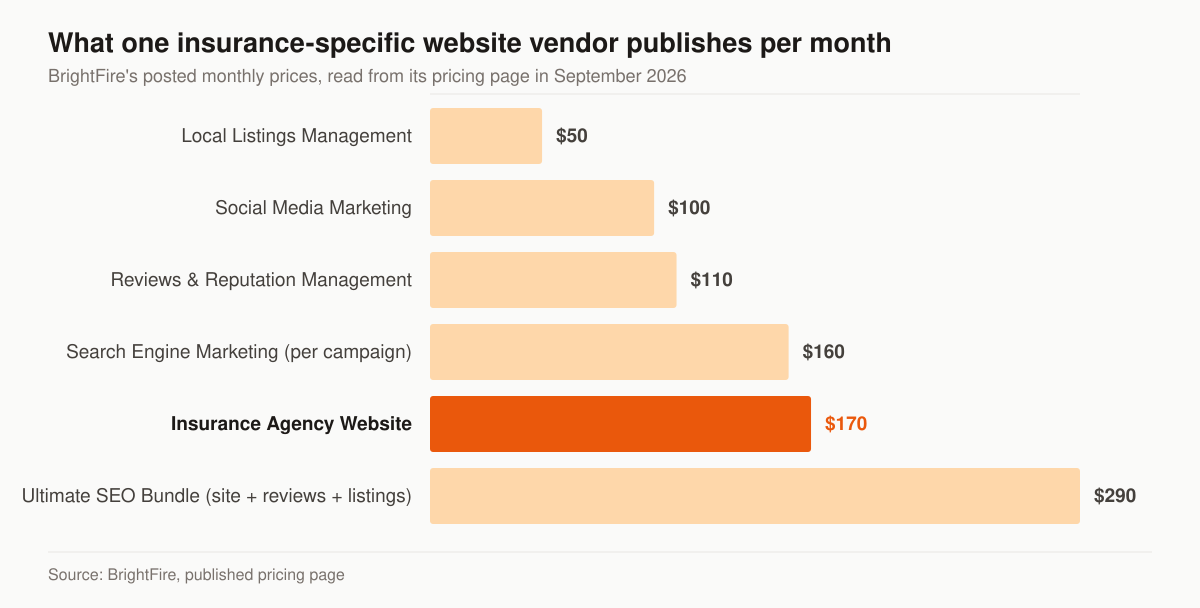
Published monthly prices from one insurance-specific website vendor. Source: BrightFire, pricing page, read September 2026.
AgentMethods takes the other route. The page at its /pricing URL, read the same week, carries a demo request form, a phone number and a feature list, with no rate on it. That is a legitimate way to sell, but it moves the price discovery into a call, which is worth knowing before you book one.
The table below separates what a website subscription is buying from what it leaves on your desk, because the second column is where agency programs actually get won or lost.
| What you are buying | Subscription platform | What still has to be decided |
|---|---|---|
| Design and hosting | Included in the monthly fee | Whether the layout points at one action |
| Insurance copy | Supplied, shared across customers | Whether any of it is specific to your county |
| Page count | Template set | Which coverage and town pages you need |
| Speed | Depends on the template and add-ons | The performance cost of a rate quoter |
| Quote path | A contact form | The fields, the follow-up, the tracking |
| Rankings | Not a deliverable of a website alone | Traffic strategy, links, reviews |
Screenshot galleries have the opposite problem: they show finished surfaces with no information about what happened after launch. Our own walk-through of insurance agent website examples reads them for structure rather than styling, which is the part you can copy.
What a home insurance agent website costs, three ways
The cost question has three honest answers, and which is right depends on what the site has to survive.
The table below sets the three shapes side by side with the trade each one makes, so the choice is made on constraint rather than on brochure quality.
| Route | Cost shape | Fits when |
|---|---|---|
| Subscription platform | Low hundreds per month, cancellable | You need a credible site quickly and are not fighting for rankings yet |
| One-time custom build | $2,500–$8,000 with us, paid once | You want to own the asset and the pages, and can run it yourself after |
| Managed program | $2,500–$5,500 per month with us | The site is one part of a traffic and conversion engine that needs maintaining |
Our prices are published rather than quoted. A one-time website or landing-page build is $2,500–$8,000. Foundation is $2,500 per month and covers the optimized website or landing pages, local SEO and Google Business Profile, on-page SEO and monthly reporting. Growth is $3,500 and adds the ongoing SEO and content engine, AI-search visibility and reputation work. Full-Funnel is $5,500 and adds managed paid ads on Google and Meta, landing-page CRO and marketing automation. Ad spend sits outside the retainer, billed at cost straight to the platforms. The full breakdown is on the pricing page.
Set against a $170-per-month subscription, our numbers are far apart, and the difference deserves naming rather than hiding. A subscription buys a template plus hosting. A build buys the page set, the quote path and the performance budget described below, on a domain you own. For an agent with no traffic, no appointments in contested counties and no ad budget, the subscription is the rational purchase and we will say so on the call. For an agency being outranked in a county where it holds real carrier appetite, the template is the constraint.
The page set a home insurance agent website needs
We start a homeowners rebuild at the sitemap rather than the stylesheet. A single page cannot answer a condo owner, a landlord, a buyer under a closing deadline and a homeowner who has just been non-renewed, because each of those needs a different first sentence.
Each row below is a page with one job, one question it answers, and one action it ends in — which is the test for whether it deserves to exist at all.
| Page | The question it answers | Where it sends the visitor |
|---|---|---|
| Homepage | Can this agent quote me, and where | ZIP or address field |
| Homeowners coverage | What a policy here covers and costs | Quote form |
| Condo and renters | Why an HO-6 or HO-4 is a different product | Quote form |
| Landlord / dwelling fire | Whether a rental is even eligible | Call or quote form |
| Flood | Why it is a separate policy, and the waiting period | Quote form, flagged as flood |
| Town page, one per town | Which carriers you can bind in that county | Local phone plus quote form |
| Claims help | What to do in the first hour after a loss | Phone, prominently |
| Producer bio | Who is answering the phone, and their licence | Call or booking link |
| Reviews | Whether other homeowners were treated well | Quote form |
Town pages are the row we scope down most often. The trap and the two Google spam policies that catch it are covered on our home insurance agency SEO page; the short version is that six pages carrying real carrier appetite beat forty carrying a swapped city name. The structural standards for all of the above live on the insurance web design service, and the conversion mechanics for paid traffic sit on insurance landing pages.
Speed is a budget, and the median site has already spent it
Performance on an insurance site is not an abstraction; it is a fixed allowance you spend on images, scripts and embeds. The pass marks are published. Web.dev’s Core Web Vitals guide sets them, and adds the measurement rule that catches people out: “a good threshold to measure is the 75th percentile of page loads, segmented across mobile and desktop devices.” A page that feels quick on your laptop can still fail, because a quarter of loads are allowed to be worse than the value that passes, and those are the loads on older phones over cell data.
The table below is the passing bar for each Core Web Vital, which is the standard any third-party rate quoter has to fit inside.
| Core Web Vital | What it measures | Threshold for “good” |
|---|---|---|
| Largest Contentful Paint (LCP) | Loading performance | Within 2.5 seconds |
| Interaction to Next Paint (INP) | Responsiveness to a tap or click | 200 milliseconds or less |
| Cumulative Layout Shift (CLS) | Visual stability while loading | 0.1 or less |
Where the allowance goes is measurable. The HTTP Archive’s 2024 Web Almanac reports that in October 2024 the median page weight was 2,652 KB on desktop and 2,311 KB on mobile, and that the median mobile page made 66 requests, including 16 images and 22 JavaScript files.
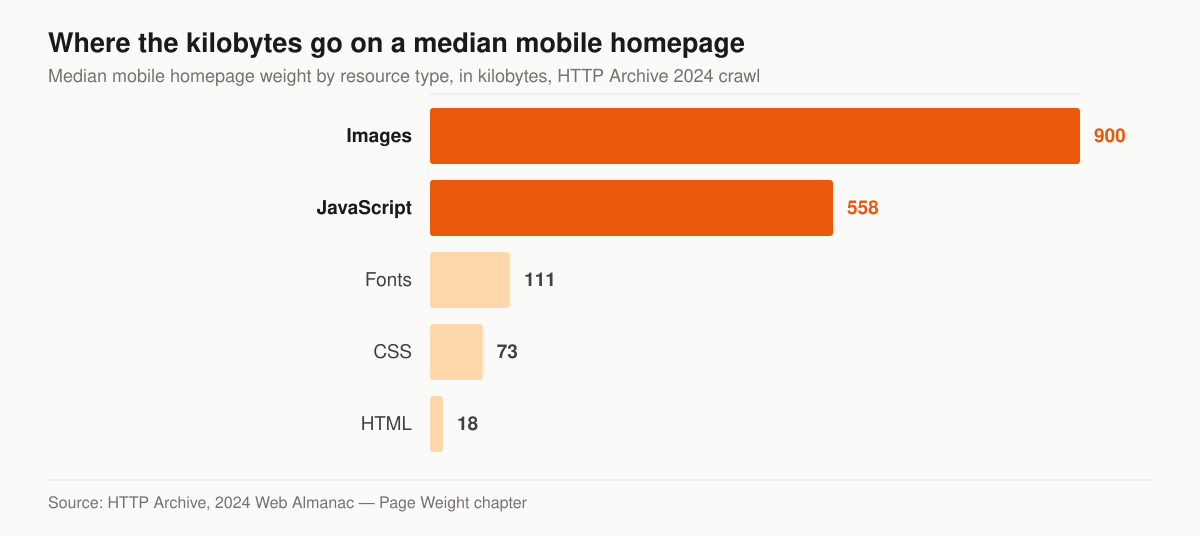
Median mobile homepage weight by resource type. Source: HTTP Archive, 2024 Web Almanac — Page Weight chapter.
Images account for 900 KB of the median mobile homepage and JavaScript for another 558 KB. The chapter draws the JavaScript comparison itself, citing Alex Russell’s Performance Inequality Gap 2024 study, which sets a three-second first-load target at the 75th percentile this way: “the budget shrinks to ~730KiB, with no more than 365KiB of compressed JavaScript.” The median mobile homepage is already past the JavaScript half of that budget, and the images are counted on top of it.
On a home insurance site the spenders are specific and each one is a decision with a price:
- A carrier comparative rater in an iframe. It is a third-party embed pulling its own scripts and styles. Load it on interaction, behind a button, rather than on every page view.
- A chat widget sitewide. The 2024 Web Almanac’s third-parties chapter reports that 92% of pages carry at least one third party, and lists customer success — chat and contact tools — among its top third-party request categories. One chat script on ten pages is ten pages paying for it.
- A hero photograph sized for a desktop. At the 90th percentile the Almanac records mobile JPEGs at 266 KB against AVIF at 46 KB, which is a format decision, not a design one.
- A tag manager loading further tags. The same chapter notes that 14% of third-party inclusion chains run more than five deep, so the script you approved is rarely the only one that arrives.
None of that means shipping a plain page. It means the quote widget is a line item with a number next to it, argued before launch instead of discovered in Search Console afterwards.
The quote form, field by field
The form is the part of the site that produces revenue, and it is also where a build’s defects are cheapest to prevent and dearest to leave in. WebAIM’s 2026 WebAIM Million, an evaluation of the top 1,000,000 home pages run in February 2026, found home pages averaging 6.9 form inputs, and reports that “One third (33.1%) of those form inputs were not properly labeled” via a label element, aria-label, aria-labelledby or title. Missing form input labels were detected on 51% of home pages in the same run.
An unlabeled field is not only a screen-reader problem. It breaks browser autofill, which is the mechanism that lets a homeowner fill a form on a phone without typing every field. On a home insurance quote form, autofill is doing real work on name, address, email and phone.
What we ask for, and why each one earns its slot:
- Property address, with autocomplete. The address is the risk. It determines the carrier, the county, the flood zone and whether you can write it at all. We put it ahead of a ZIP field because it is the input that answers eligibility.
- Name and phone. Enough to call back. We treat the call as the closing step, not the form receipt.
- Current carrier and renewal date, optional. These decide urgency and re-shop viability, and a shopper who knows them will supply them.
- One qualifying question you can act on. We use roof age, because it decides eligibility before price does.
What we leave off: a “how did you hear about us” dropdown, a marketing-consent checkbox pre-ticked, a CAPTCHA on a four-field form, and any field whose answer you will re-ask on the phone anyway. Where the form promises a call, the promise on the page and the consent language under the button have to describe the same thing, and the record of that consent has to be retrievable later. Our insurance landing pages service covers how that record is captured and stored.
Accessibility is the homeowner audience, not a compliance chore
Homeowners skew old, and the Census Bureau publishes the shape. In its release CB26-116 of 28 July 2026, the U.S. Census Bureau reports that the second quarter 2026 homeownership rate “was highest for those householders aged 65 years and over (78.6 percent) and lowest for those householders under 35 years of age (35.2 percent).” The national rate was 65.0 percent, covering 86,985,000 owner-occupied units out of 133,811,000 occupied units.
That is the audience your contrast ratio is being read by. The 2026 WebAIM Million found detected WCAG 2 A/AA failures on 95.9% of the million home pages tested, an average of 56.1 detected errors per page, and low-contrast text on 83.9% of pages, with an average of 34 distinct instances of low-contrast text per page. It also found 16.2% of home page images missing alternative text.
Six categories account for 96% of all errors WebAIM detected: low contrast text, missing image alternative text, missing form input labels, empty links, empty buttons and missing document language. Every one of those is a build-time decision on an agency site of thirty pages, not a retrofit project. Body text at a comfortable size, real labels on the quote form, alt text on the carrier logos, a document language attribute and buttons with words in them cost nothing at build and are expensive to add later.
The bundle path a home insurance site rarely builds
If you write auto as well as home, the site is where account rounding either starts or does not. The JD Power 2026 U.S. Insurance Shopping Study, based on 12,437 customers who requested an auto quote and fielded from January 2025 through January 2026, reports that among recent customers actively shopping an auto policy, 45% say they have a homeowners policy, but only 20% received a homeowners quote while shopping for auto insurance. The same study reports customers now receive an average of 3.5 quotes, the highest in the study’s history, and that 48% of new auto policies are purchased digitally, up from 36% five years earlier.
Read as a website instruction, that gap is one field. An auto quote form that asks whether the visitor owns or rents, and a thank-you page that offers the home quote rather than filing it for a later call, converts a shopper who was already in the building. The mechanics of running both lines as one book are on the P&C insurance agency marketing page and in our guide to cross-selling and account rounding; the auto-side build is covered on auto insurance agent website design.
Where the website fits in your marketing
The site is the conversion engine; it is not the traffic source. To make it pay, point qualified homeowners at it. That usually means search visibility through home insurance SEO plus paid traffic, all measured against the rate at which the site turns clicks into quote requests. This page is one spoke of our broader home insurance agent marketing approach, and it builds on the conversion principles in our core insurance web design service.
If your goal is buying homeowner leads, live transfers, or aged data as a channel — that is a separate decision and a different product. You can buy leads direct from getinsureleads (https://getinsureleads.com); your website’s job is to generate the requests you own outright.
How we build it
- Map the funnel. We define the one action per page and strip the rest.
- Build for speed and mobile. Core Web Vitals are a ranking and conversion factor, not a nice-to-have.
- Instrument everything. Form starts, completions, and call clicks are tracked so we optimize on data, not opinion.
- Launch coverage and location pages. Each one is a separate entry point for organic and AI search.
- Set the performance budget before the first template. The rate quoter, the chat widget and the hero image get a byte allowance in writing.
- Label the form and check the contrast. The six WebAIM error categories are a build checklist, not an audit finding.
The same approach we use for clients in other lines — see the life insurance agent case study for how conversion-first design moved booked appointments — transfers directly to home insurance.
What to instrument before launch day
A site with no measurement cannot be improved, only redesigned on opinion. Four things go in before traffic does. Form starts and form completions as separate events, so you can tell a traffic problem from a form problem. Click-to-call taps, because a share of home insurance quote requests arrive as a phone call rather than a submission. Field-level Core Web Vitals from real visits rather than a lab score, since the 75th-percentile rule above only means something on field data. And a source parameter on every quote request, so an organic town page and a paid campaign are not sharing credit.
Two of those are worth arguing over. Where call tracking is skipped to avoid a monthly fee, the paid channel gets judged on form fills alone while part of its output rings the desk phone. And field data takes weeks to accumulate, which is the argument for switching analytics on at launch rather than at the first review.
Where home insurance agent websites stall
Each row below is a build or process failure rather than a design opinion, and each has a fix that does not require a redesign.
| Where it stalls | What it looks like | The fix |
|---|---|---|
| Carrier-supplied microsite | Pages sit on a shared carrier domain as one of many near-identical templates | Own the domain and the pages; write content specific to your book |
| One page for the whole book | Home, auto, umbrella and commercial share a services page | A page per line, each with its own intent and quote path |
| Quote widget bolted on last | A third-party rater pushes LCP past 2.5 seconds | Budget the widget; load it on interaction |
| Form asks the phone call’s questions | Eleven fields, two screens, then a callback that re-asks them | Four fields, then the call does the qualifying |
| Unlabeled inputs | Autofill fails on mobile; screen readers announce nothing | Real label elements on every field |
| Reviews shown as a badge | A static “5 stars” graphic with no source | A live count and a link a stranger can verify |
| No analytics installed | Every conversion on the site is invisible | Analytics and call tracking before launch, not after |
| Town pages differ by city name | Forty pages, one template, no local detail | Six pages carrying carrier appetite and local peril detail |
Questions to ask before you sign anything
Whether the answer is a subscription, a freelancer or us, four questions decide whether you are buying an asset or renting one. Who is the registrant on the domain, and can you move it without a support ticket? If you cancel, what do you leave with — the content, the images, the page URLs? Is the analytics property in your account or the vendor’s? And what does cancellation actually require, in writing?
Published terms are the shape of a good answer. BrightFire states on its pricing page that there are no contracts and that customers “are never under contract and are free to cancel at any time,” with a 30-day money back guarantee on each service. That is a checkable commitment, which is the standard to hold any vendor to, including us. Ours is on the pricing page: month to month, no lock-in, ad spend billed at cost.
Want a candid read on your current site before you spend a dollar on traffic? Start with a free marketing audit and we will show you, field by field, where quote requests are leaking out. Prefer to talk through the page set and the budget first? Get in touch.