Best Final Expense Agent Website Examples: What Actually Converts
The best final expense agent websites do one job: turn a senior or their adult child into a booked call. They load fast on a phone, lead with a single clear offer, carry a state-licensed trust signal, and put a quote form or click-to-call above the fold. Everything else is decoration.
Most “final expense agent websites” are brochures. They have an About page, a stock photo of a couple on a porch, a list of carriers, and a contact form nobody fills out. They cost a few hundred dollars and return nothing, because they were never built to do a job.
A site that earns its keep does exactly one thing: it turns a senior, or more often their adult child, into a booked call or a submitted quote. That is the only scoreboard that matters. This page lays out the criteria the best final expense agent websites share, the patterns that drive conversions, and a checklist you can run against your own site today. If you would rather not assemble it yourself, the same criteria are what the done-for-you final expense site build ships against — sub-2.5-second load, visible licensing, plain language, and one lead-capture path.
What separates the best final expense agent websites from brochures
The difference is not how the site looks. It is what the site is built to do.
A brochure site says “here is who I am and here are the products I sell.” A converting site says “here is the one thing you came for, and here is how to get it in one tap.” When we audit agent sites, the winners share four traits:
- Single offer per page. One product, one audience, one action. No menu of nine services competing for attention.
- Mobile-first, genuinely fast. The form and the call button work on a five-year-old Android over LTE, not just on the designer’s MacBook.
- Trust before the ask. State licensing, years writing final expense, and a real face — placed where a skeptical senior or their kid sees it before they’re asked for a phone number.
- One clear action above the fold. A short quote form or a click-to-call button visible without scrolling.
Everything else — the carrier logos, the blog, the FAQ — supports those four or it gets cut.
Who actually shows up on a final expense website
Layout arguments get settled faster once you know what the visitor is holding. Pew Research Center’s Mobile Fact Sheet, built on a survey of 5,022 U.S. adults fielded February 5 to June 18, 2025, puts smartphone ownership at 78% among adults 65 and older, 90% among adults 50 to 64, 96% among adults 30 to 49 and 97% among adults 18 to 29. The same table reports that 95% of adults 65 and older own a cellphone of some kind, and that 16% own a cellphone but not a smartphone.
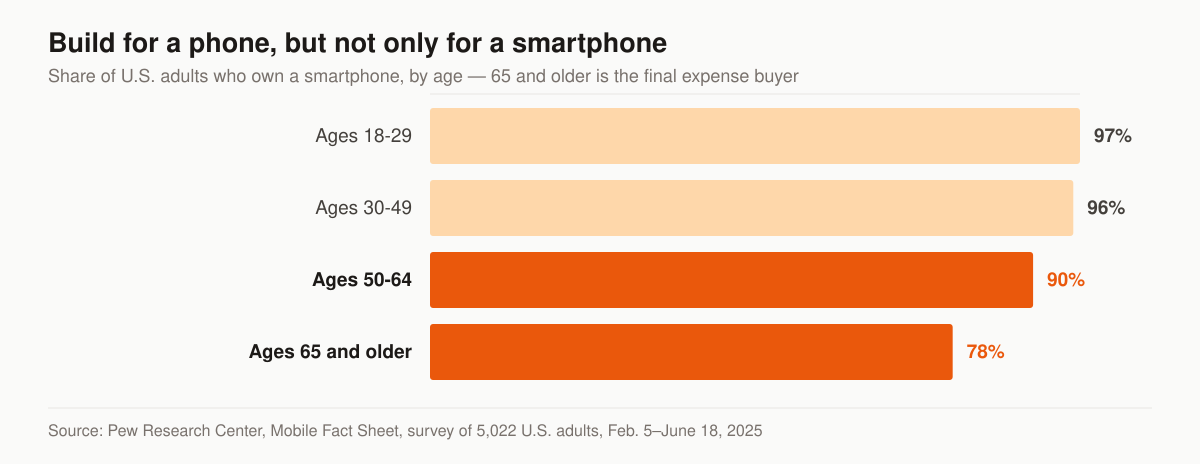
Chart: smartphone ownership by age, from the Pew Research Center Mobile Fact Sheet, survey of 5,022 U.S. adults conducted February 5 to June 18, 2025.
Two design consequences follow, and they pull against each other.
The first is the one everyone already accepts: build the page for a phone screen, because 78% of the 65-and-older audience owns one. Hero, proof and form all get designed at 390 pixels wide before anyone opens a desktop mockup.
The second is the one agent sites skip. A tel: button is not a phone number. For the 16% of adults 65 and older who own a cellphone that is not a smartphone, and for anyone reading on a desktop where a tel: link does nothing useful, the page also has to render the number as plain, selectable, high-contrast text somebody can key in by hand. Put the button in the hero for the tappers and the digits underneath it for everyone else. That costs one line of markup and covers the 16% of that age group who are not carrying a smartphone at all.
There is a third consequence worth naming, because it resolves the recurring argument about whether the senior or the son is the real visitor. You do not have to pick. Smartphone ownership sits at 90% or higher in every age band under 65 in that Pew table, so a phone-first page serves the adult child by construction. The copy is where the two audiences diverge — plain language and no jargon for the buyer, specifics about carriers and underwriting for the researcher — and that is a writing decision, not a layout one.
The final expense website criteria checklist
Here is the scorecard — run your current site against it before you read the layouts, because the rows you cannot check are the ones deciding which archetype you should rebuild toward.
| Criterion | What good looks like | Why it matters |
|---|---|---|
| Mobile load speed | LCP under 2.5s on a phone; passes Core Web Vitals | 78% of adults 65 and older own a smartphone (Pew), so the phone is the screen your page is judged on |
| Above-the-fold action | Quote form or tap-to-call visible without scrolling | Every scroll before the ask leaks intent |
| Single clear offer | One product, one audience per page | A generic agency homepage converts worse than a focused page |
| Trust signal | State license #, years in FE, real photo of you | Seniors and their kids are screening for legitimacy |
| Click-to-call on mobile | tel: button, thumb-reachable |
Older buyers prefer calling over typing |
| Short form | Name, phone, ZIP — not 11 fields | Each extra field drops completion |
| Consent language | Clear, accurate opt-in copy near the form | Protects you under TCPA; a trust cue, not just legal cover |
| Page speed assets | Compressed images, no autoplay video | Heavy media is the #1 cause of slow FE sites |
| Schema markup | LocalBusiness / agent schema in the code | Helps Google and AI engines understand and surface you |
| Clear next step after submit | “We’ll call you within X” confirmation | Sets expectations, cuts no-shows |
This is the same frame we apply on our own book. We run our own final-expense and senior-market lead operation, so this checklist comes from live campaigns, not theory — and the landing page is a big part of why the cost-per-sale math works.
We treat three or more failing rows as a rebuild rather than a patch. That’s the job our insurance web design service exists to do: pages built to this checklist from the first wireframe.
Final expense website examples: 5 layouts that convert
You don’t need to copy anyone’s site — you need one of five proven layouts. Each final expense website example below is an archetype, not a real client site: a teardown of where the hero, proof, and quote form sit, and which traffic the layout fits.
Example 1: the one-form lander
Hero: a benefit headline naming the state and age band, nothing else competing. Form: a three-field quote form (name, phone, ZIP) is the hero — right column on desktop, directly under the headline on mobile. Proof: license number and years-writing-FE line sit beside the form, not in the footer. Nav is stripped to a logo. Best for paid traffic from Facebook ads or mailer QR codes, where the visitor already saw the offer.
Example 2: the click-to-call card
Hero: one sentence (“Final expense quotes for [State] seniors 50–85”) above a thumb-sized tel: button. Proof: the agent’s real photo and license number directly under the button. Form: a small fallback link for people who won’t call. Best for older mobile visitors who would always rather dial than type — the whole page fits on one phone screen.
Example 3: the local trust page
Hero: a city-or-state headline with the agent’s photo, positioned as the local specialist. Proof: a review strip pulled from the Google Business Profile plus the license line — placed before the ask. Form: short quote form immediately after the proof block. Best for local search and GBP traffic, where the visitor is comparison-screening agents for legitimacy.
Example 4: the multi-step quote wizard
Hero: a single low-friction question (“What’s your ZIP code?”) that opens a three-to-four-step form, with the phone number asked last. Proof: a persistent trust line (license, secure-form note) on every step. Small early commitments carry cold visitors through to the contact fields. Best for colder digital traffic that would abandon an eleven-field form on sight.
Example 5: the education hub
Hero: a direct answer to the question that brought the visitor (cost, qualifying, graded vs. level), with a sticky call button that follows the scroll. Proof: an author box with the agent’s license and market focus. Form: a short inline form repeated after each major section, so the ask is always one scroll away. Best for SEO and AI-referral traffic arriving mid-research rather than ready to buy.
Five examples, one rule: the layout changes with the traffic source, but the hero names the offer, the proof sits beside the ask, and the form or call button is reachable without scrolling. If you write other lines too, the all-lines companion piece — insurance agent website examples by line — covers the P&C, Medicare, life, and commercial layouts the same way.
Conversion patterns the best examples share
Patterns, not pixel-perfect copies. These are the structural moves that repeat across every example above — describing the pattern lets you apply it to your own brand instead of cloning a competitor.
- The headline names the product and the person. For example, “Final expense coverage for [State] seniors 50–85” beats “Welcome to my agency.” The visitor confirms they’re in the right place in under two seconds.
- The form is the hero, not an afterthought. On the strongest pages, the quote form sits in the hero block on the right or directly under the headline on mobile — not buried on a separate Contact page.
- Proof sits next to the ask. A license number, a years-in-business line, and one honest testimonial placeholder go beside the form, not three scrolls down.
- One path, no dead ends. The best examples strip the nav down. A senior shouldn’t be able to wander into a five-page “our philosophy” essay. Every link points toward the call.
- The thank-you page does work. After submit, it confirms a callback window and, ideally, offers an instant calendar slot. Dead-end “thanks!” pages waste the highest-intent moment you’ll ever get.
For a deeper teardown of how these elements fit together on a page built for one job, our guide to building a high-converting final expense website walks through the full structure block by block.
Designing for the eyes and thumbs that arrive
No screenshot gallery tells you whether a 74-year-old can read your disclaimer or land a tap on your call button. The W3C’s Web Content Accessibility Guidelines 2.2 turn that into numbers a developer can check, and on a page built for the senior market they read less like a compliance chore and more like a conversion spec.
Four criteria do most of the work on a final expense page. Success Criterion 2.5.8 Target Size (Minimum), Level AA, sets the floor for anything you tap: “The size of the target for pointer inputs is at least 24 by 24 CSS pixels, except when:” — followed by five exceptions covering spacing, an equivalent control elsewhere on the page, targets inline in a sentence, sizing the user agent controls, and cases where a particular presentation is essential or legally required. Success Criterion 1.4.3 Contrast (Minimum), also Level AA, states that “The visual presentation of text and images of text has a contrast ratio of at least 4.5:1, except for the following:” — large-scale text at 3:1, incidental text such as inactive controls or pure decoration, and text that is part of a logo or brand name. Success Criterion 3.3.2 Labels or Instructions, Level A, is one sentence: “Labels or instructions are provided when content requires user input.” And Success Criterion 1.4.4 Resize Text, Level AA, covers text being resized up to 200% without losing content or functionality, excepting captions and images of text.
Here is where each of those lands on an actual final expense page, so the accessibility pass becomes a punch list rather than an abstraction.
| WCAG 2.2 criterion | Level | Where it lands on a final expense page | What to build |
|---|---|---|---|
| 2.5.8 Target Size (Minimum) | AA | The tap-to-call button, the ZIP field, the step buttons in the multi-step wizard | 24 by 24 CSS pixels is the floor the criterion sets, not a design goal — we size the primary call button far past it and keep it clear of other targets |
| 1.4.3 Contrast (Minimum) | AA | Body copy, the consent line under the form, any text sitting on a hero photo | 4.5:1 for normal text against the background it actually renders on; 3:1 for large-scale text |
| 1.4.4 Resize Text | AA | The whole page for a visitor whose phone is already set to large text | Layout that reflows at 200% without clipping the form or hiding the call button |
| 3.3.2 Labels or Instructions | A | Every quote-form field, and the consent checkbox | A visible label bound to the input — placeholder text alone disappears the moment someone starts typing |
Two of those are worth spelling out because they get skipped in a way that costs money rather than just conformance. A consent line set in grey too pale to clear 4.5:1 is both a 1.4.3 failure and the exact sentence a suspicious buyer wants to read before typing a phone number into your form. And a phone whose owner has already turned the system text up is a configuration to design for in this market rather than treat as an edge case, which makes 1.4.4 a hero-layout constraint instead of a QA item.
Whether the ADA reaches a private agent’s marketing site, and under which standard, is a legal question rather than a design one — ask your own counsel before publishing an accessibility statement.
Speed and AEO: the parts agents skip
Two things separate a site that looks fine from one that performs.
Speed. Google’s Core Web Vitals are real ranking and conversion factors, and the thresholds are published rather than folklore. Google’s own Web Vitals article states that “To provide a good user experience, LCP should occur within 2.5 seconds of when the page first starts loading,” that pages should have an INP of 200 milliseconds or less, and that pages should maintain a CLS of 0.1 or less. It also names the measurement rule agents get wrong: “To ensure you’re hitting the recommended target for these metrics for most of your users, a good threshold to measure is the 75th percentile of page loads, segmented across mobile and desktop devices” (web.dev). A fast run on your own phone proves nothing; the 75th percentile of real visits is the bar.
How hard is that bar? The HTTP Archive’s 2024 Web Almanac performance chapter reports that in 2024, 59% of mobile pages achieved a good LCP score, 74% of mobile websites had good INP, and 79% of mobile sites had a good CLS score — but only 43% of websites had good Core Web Vitals on mobile once all three metrics had to pass together. Clearing every threshold at once is where the field thins out, and it is a place a small, deliberately built page can beat a national brand’s site.
The usual culprits on final expense sites are uncompressed hero images, autoplay video, and bloated page builders. Fix those three, then re-measure rather than assuming.
Answer-engine readiness. Seniors’ adult children increasingly ask ChatGPT or Google’s AI Overviews “how do I find a final expense agent in [state].” Sites with clean headings, schema markup, and direct answers get surfaced; brochure sites don’t. If you want to be the agency an AI recommends, structure matters as much as it does for traditional insurance agency SEO. We covered the mechanics in how to get your agency recommended by ChatGPT.
The markup that tells Google who you are
Schema markup is the row on the checklist agents nod at and never ship, usually because nobody says which properties matter. Google’s local business structured data documentation is specific: the required properties are address and name, and the recommended list includes telephone, url, geo with latitude and longitude, openingHoursSpecification and priceRange (Google Search Central). The same table lists aggregateRating and review, but annotates each of them “only recommended for sites that capture reviews about other local businesses” — which is not what an agency site is. The same page carries the caveat to read before anyone promises you a rich result: “Google does not guarantee that features that consume structured data will show up in search results.”
Two of those properties are a decision rather than a copy-paste for a final expense agent. address is required, and plenty of agents work from a home office they have no interest in publishing — which is a business call about how you present your location, not something to fake with a mail drop. And the review properties are the ones to leave out. Google’s review snippet guidelines state that “If the entity that’s being reviewed controls the reviews about itself, their pages that use LocalBusiness or any other type of Organization structured data are ineligible for star review feature”, and give as the example a review about entity A placed on the website of entity A, whether in the structured data directly or through an embedded third-party widget (Google Search Central). So the reviews you collect are worth collecting — they are what a family reads before dialling, and our guide to getting more Google reviews covers the ask that works — but they do their work on the Google Business Profile, not as stars you mark up on your own pages.
The markup also has to agree with the rest of your footprint. Whatever name, address and phone number the schema block asserts, the Google Business Profile, the footer and the contact page have to assert identically, which is the plumbing our local SEO service exists to keep consistent across a market.
The consent line that sits under the quote form
Every quote form on a final expense site collects a phone number so somebody can call it. The federal definition of what your consent language has to accomplish is published, and it is worth reading in the original rather than copying whatever a competitor put on their page.
Under 47 CFR 64.1200(f), the term prior express written consent “means an agreement, in writing, bearing the signature of the person called that clearly authorizes the seller to deliver or cause to be delivered to the person called advertisements or telemarketing messages using an automatic telephone dialing system or an artificial or prerecorded voice, and the telephone number to which the signatory authorizes such advertisements or telemarketing messages to be delivered” (eCFR). Note the scope carried in that sentence: it is the definition used for calls delivered with an automatic telephone dialing system or an artificial or prerecorded voice, and it is tied to the specific telephone number the signer authorizes.
The rule then says what the writing itself must disclose. The written agreement “shall include a clear and conspicuous disclosure informing the person signing that: (A) By executing the agreement, such person authorizes the seller to deliver or cause to be delivered to the signatory telemarketing calls using an automatic telephone dialing system or an artificial or prerecorded voice; and (B) The person is not required to sign the agreement (directly or indirectly), or agree to enter into such an agreement as a condition of purchasing any property, goods, or services.” The same paragraph resolves the question agents ask about web forms, providing that the term signature “shall include an electronic or digital form of signature, to the extent that such form of signature is recognized as a valid signature under applicable federal law or state contract law.”
Read together, that is a design brief as much as a legal one. The disclosure has to be clear and conspicuous, which rules out grey micro-type under the submit button and lands you back on the 4.5:1 contrast criterion from the section above. The authorization in that definition runs to a seller and to the specific telephone number the signer gives, not to a generic permission to be contacted by anyone. And whatever your form records has to be retrievable later, because consent you cannot produce is consent you did not get. What the exact wording should be, and whether your dialing setup even puts you inside that definition, is a question for your own compliance counsel rather than for a marketing page. The wider rulebook on what an agent may publish and claim sits in our guide to insurance marketing compliance for agents.
What a final expense website costs, and what the price is buying
The galleries that rank for website examples rarely mention money, and the vendors are not much more forthcoming. AgentMethods, which sells websites to insurance agents, publishes a page at agentmethods.com/pricing titled “Pricing for Our Insurance Websites and Email Campaigns” whose body is a live-demo request form — first name, last name, email, phone, product focus — plus a phone number and three averaged customer claims: that agents using it “Spend 47% less time on marketing each month”, “Get 60% more referrals” and “Have 78% more customers buying multiple policies from them.” Those are the vendor’s own figures for its own customers, published without a methodology; treat them as marketing copy, and note that the page named Pricing quotes no price. Read in September 2026.
The same pattern shows up elsewhere in this category, which is why we mapped what the vendors that do publish charge in the companion piece on insurance agent website examples, which lays out a general site builder’s plan ladder against an insurance-specific vendor’s monthly services.
Our own numbers, so you can place them: the one-time website build runs $2,500–$8,000 depending on scope, and the monthly programs that can run behind it are $2,500 Foundation, $3,500 Growth and $5,500 Full-Funnel, with ad spend billed at cost straight to the platforms. The full breakdown is on the pricing page. The distinction that matters when you compare a monthly subscription against a one-time build is not the first invoice — it is what happens when you want to move the form above the fold. On a rented template that is a support ticket in somebody else’s queue. On a page you own it is an edit, which is the whole point of reading a list of layout archetypes in the first place.
The pre-launch test pass
A final expense page is finished when it survives a test pass, not when it looks right in the design tool. This is the sequence we run before any traffic touches a page, and every row of it can be done by the agent who owns the site.
Run these in order, because the cheap tests catch the failures that make the expensive ones pointless.
| Test | How to run it | Pass bar |
|---|---|---|
| Real-device check | Open the live URL on your own phone, on cellular data, not office wi-fi | Headline, proof line and the call button are visible without scrolling |
| Speed | PageSpeed Insights or Search Console’s Core Web Vitals report, reading field data | LCP within 2.5s, INP 200ms or less, CLS 0.1 or less at the 75th percentile of real visits |
| Tap target | Measure the call button and the form’s step controls | At least 24 by 24 CSS pixels per SC 2.5.8, and well past it for a thumb |
| Contrast | Run a contrast checker on body copy, the consent line and any text over the hero photo | 4.5:1 for normal text, 3:1 for large-scale text |
| Text zoom | Set the browser or phone text size to 200% | Nothing clips, the form still submits, the call button is still reachable |
| Keyboard | Tab through the form and submit it empty | Every field reachable, each error names the problem and the fix |
| Plain-number check | Load the page on a desktop | The phone number appears as selectable text, not only inside a tap target |
| Live lead test | Submit a real test lead through the form | It reaches the inbox and the CRM, the autoresponder fires, and the thank-you page states a callback window |
| Consent copy | Read the checkbox text against your counsel’s approved wording | It matches, it is legible, and the submission is stored where you can retrieve it |
| Markup | Run the URL through Google’s Rich Results Test | LocalBusiness carries name and address, and no rating is marked up that does not exist |
Nine of those ten cost nothing but an hour. The tenth — the live lead test — is the one that gets skipped, and the one whose failure is invisible, because a form posting to a dead inbox looks exactly like a form that works. Run it again after every redesign, and after any change to the CRM or the notification email.
How the website fits the rest of your funnel
A great website is the conversion layer, not the whole machine. We plan the site as one stage of a traffic system rather than as a standalone asset:
- Paid traffic lands on a focused page, not a generic homepage — pair the site with final expense lead generation so the page has something to convert.
- The page captures consent cleanly, which keeps your dialing compliant and protects the leads you paid for.
- Follow-up is fast, because the thank-you page already told the prospect when you’d call.
If you’re not sure where your current site is leaking, that’s the whole point of a free marketing audit — we score your page against the checklist above and show you the two or three fixes that move the number most.
The bottom line
The best final expense agent websites aren’t the prettiest ones. They’re the ones built around a single offer, loaded fast on a phone, stacked with real trust signals, and pointed at one action. Score your site against the checklist, fix the rows you can’t check, and the conversions follow. A brochure costs you money every month it’s live; a converting page pays for itself in the first booked call.
- Digital Marketing for Final Expense Agents: The Channels That Actually Produce
A practitioner's guide to digital marketing for final expense agents: which channels produce leads, what each costs, and how to sequence them by budget.
- How to Grow a Final Expense Insurance Agency: The Four Levers
How to grow a final expense insurance agency on four levers: lead flow, recruiting, systems, and marketing assets, with numbers and tables for each.
- Marketing for Final Expense Agents: A Working Playbook
A practitioner's playbook for marketing for final expense agents — lead sources, compliant ads, follow-up, and the numbers that decide whether you profit.
- How to Evaluate the Best Final Expense Carriers for Agents
How to evaluate the best final expense carriers for agents: underwriting niches, issue ages, graded wording, ratings and a scoring framework.