Digital Marketing for Final Expense Agents: The Channels That Actually Produce
Digital marketing for final expense agents is the set of paid and organic channels — Facebook lead ads, Google search, landing pages, SEO, email, and reviews — that put your offer in front of seniors and their adult children, then convert clicks into priced, contactable leads you can work on the phone.
Final expense is a phone-sale product bought by people who don’t shop online the way younger buyers do. That changes what “digital marketing” means for you. You aren’t building brand awareness. You’re buying contactable, priced leads and then converting them on the phone. Every channel below earns its place by that standard, or it gets cut.
This is the overview. Each section links to the deeper playbook for that channel. If you want the full picture of how these fit a final expense practice specifically, start with our final expense marketing hub and come back here.
This guide is the channel map — which digital channels produce leads and how to sequence them by budget. For the lead-sourcing and phone-sales side that works those leads (buying vs. direct mail, speed-to-lead, and a telesales dialer cadence), read marketing for final expense agents.
The two numbers that decide everything
Before any channel, fix two numbers in your head:
- Cost per lead — what you pay to get one contactable person.
- Cost per sale — cost per lead divided by your close rate.
We run our own final-expense book, so we read these channels the way an operator does, not a vendor. The math is what matters: a cheap lead at a strong close rate keeps your lead cost per issued policy low, and a channel is “working” only when its cost per sale fits inside your commission and persistency. A cheap lead you never reach is more expensive than a pricey one you close. We break this down in final expense leads: cost vs true cost per sale.
Who is on the other side of a final expense ad
Every channel choice is a bet about a device, and the device data for this age band is published. Pew Research Center’s Mobile Fact Sheet, built on a survey of 5,022 US adults conducted February 5 to June 18, 2025, reports that 95% of adults 65 and older own a cellphone of some kind, 78% own a smartphone, and 16% own a cellphone that is not a smartphone.
That last row is the one that changes a media plan. Roughly one in six people inside the age band you sell to cannot open a landing page at all. They reach you by voice or they do not reach you.
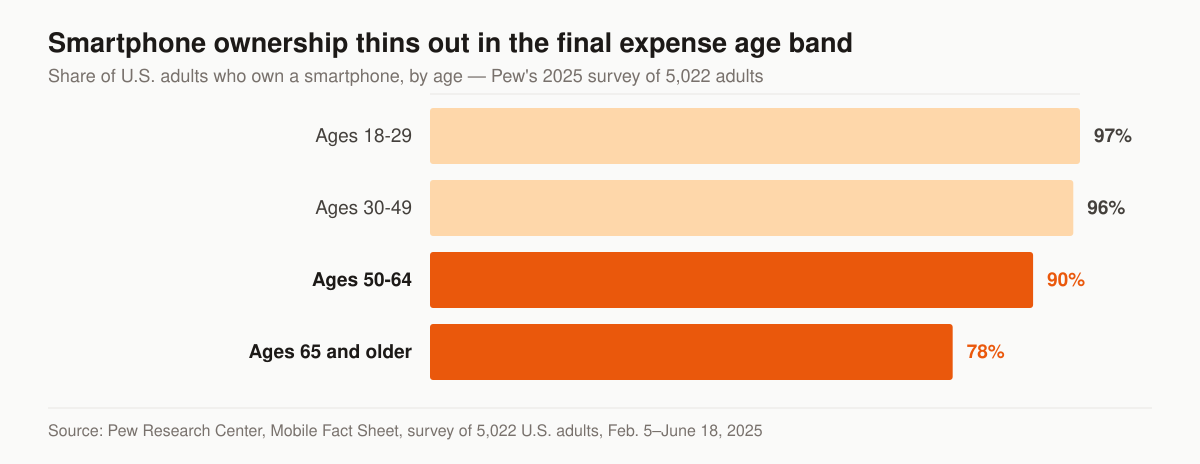
Smartphone ownership by age. Source: Pew Research Center, Mobile Fact Sheet, survey of 5,022 U.S. adults, Feb. 5–June 18, 2025.
Two further cuts from the same survey matter if your book skews toward lower household incomes. Among adults in households under $30,000 a year, smartphone ownership is 82% and 13% carry a cellphone that is not a smartphone; among adults whose education stopped at high school or less, the figures are 84% and 13%. Pew also reports that 17% of adults 65 and older are “smartphone dependent” — they own a smartphone but do not subscribe to a home broadband service — against 3% in 2013. A phone-only household on a metered connection is not going to wait out a slow page.
There is a second buyer here who does not appear in any of those rows: the adult child. Burial costs are a family conversation, and the person who clicks the ad is often not the person who will sign the application. That is why a final expense ad frequently has to speak past the prospect to a son or daughter, and why the follow-up call sometimes has three people on it.
The channel map
Here’s how the main digital channels stack up for final expense. Volume and intent matter more than vanity reach.
Read this table as a map of jobs, not a ranking — the column that decides your sequence is “what it does,” not “typical cost.”
| Channel | What it does | Typical cost | Lead intent | Best for |
|---|---|---|---|---|
| Facebook / Instagram lead ads | High-volume lead capture | Low CPL | Lower — wasn’t searching | Volume, scaling fast |
| Google search ads | Capture active searchers | Higher CPC per line | High — typing the query now | Higher-intent, ready buyers |
| SEO / organic search | Compounding free traffic | Time, not cash | Mixed | Long-term lead flow |
| Landing pages | Convert clicks to leads | Build once | N/A — multiplier | Every paid channel |
| Email / SMS automation | Work leads you already paid for | Low | Warmed | Follow-up, no-shows |
| Reviews / reputation | Trust before the call | Low | N/A — closer | Close rate lift |
| AI / GEO search | Get cited by ChatGPT, AI Overviews | Time | High — researching | Future-proofing |
No single channel is the answer. The leverage is in how they feed each other.
What the paid channels cost, in published numbers
“Low CPL” and “higher CPC” are directions, not budgets. Two published benchmark sets cover this territory, and neither is a final expense figure — read them as the floor you plan against, then measure your own account.
Here are the four rows that bound a final expense media plan, drawn from the two reports anyone can open and check.
| Channel and objective | Average cost per click | Average click-through rate | Average conversion rate | Average cost per lead |
|---|---|---|---|---|
| Google and Microsoft search, Finance and Insurance | $3.39 | 9.83% | 2.64% | $74.44 |
| Google and Microsoft search, all categories | $5.42 | 6.64% | 8.18% | $66.69 |
| Meta traffic ads, Finance and Insurance | $1.22 | 0.98% | not reported | not reported |
| Meta lead ads, all industries | $1.92 | 2.59% | 7.72% | $27.66 |
Sources: LocaliQ / WordStream, 2026 Search Advertising Benchmarks and WordStream, Facebook Ads Benchmarks 2025, whose leads-objective sample is 726 US campaigns and whose traffic-objective sample is 554 US campaigns, both running April 1, 2024 to June 30, 2025, with “averages” reported as medians to account for outliers. WordStream’s leads-objective tables carry no Finance and Insurance row, so the $27.66 is the all-industry figure.
Read the search row twice. The insurance click is cheaper than the $5.42 all-category average and gets clicked more often — 9.83% against 6.64%. Then conversion falls to 2.64%, the lowest of the 23 business categories LocaliQ reports, and cost per lead still lands at $74.44 against a $66.69 average. The auction is not the problem. What happens after the click is.
Paid social: where the volume is
For most final expense agents, Facebook ads for insurance agents are the front door. The platform reaches seniors and — just as important — their adult children, who often start the conversation about a parent’s burial costs. Lead ads keep the form inside Facebook, so cost per lead stays low.
Two constraints you must respect. First, Meta’s Special Ad Category for insurance-adjacent financial services restricts age, ZIP, and detailed targeting, so you can’t narrow as tightly as a normal campaign — your creative and your offer have to do the filtering. Second, these leads weren’t searching for you; they raised a hand on impulse. That means speed and cadence decide your close rate, not the lead itself. Build a follow-up system before you build the ad. Our insurance lead follow-up cadence lays out the call-and-text sequence that turns cheap leads into issued policies.
If you want this built and managed end to end, that’s our insurance social media service.
What the Special Ad Category removed, and what it left
The rule is worth reading in Meta’s own words rather than in summary, because the scope clause is where agents get caught. Meta’s help centre states: “Starting January 21, 2025, using this category is required for financial products and services campaigns for advertisers based in the United States or showing ads to audiences in the United States. Ads may be rejected if an appropriate category is not chosen.”
The cost is your targeting. Meta’s guidance on audience selection for these ads says that “Certain audience options are limited or unavailable for these ads for advertisers based in or reaching the US and advertisers reaching Canada and certain countries in Europe: age, gender, ZIP code or postal code, exclusion targeting, lookalike audiences and saved audiences.” Some interests become unavailable too, “Audiences based on city or pin drop locations will include an expanded radius,” and Advantage+ catalog ads carry the same limitations. Meta’s own instruction is to “broaden—not restrict—your audience.”
For final expense that removes the standard setup: an age band starting at 50, a tight ZIP radius, and a lookalike built off your buyer list. Note what the published list does not name — custom audiences built from your own site traffic or customer file are absent from it. That is Meta’s list, not a guarantee, and it changes; confirm what your account actually offers before you plan a retargeting layer on it.
What is left to qualify with is the ad and the form. Creative that reads as senior-facing, plain language about coverage that pays for a funeral, and screening questions inside the lead form rather than inside the audience. We build these under final expense Facebook ads, and the organic side of the same platform sits in social media for final expense agents.
Paid search: fewer leads, higher intent
Google flips the equation. Someone typing “final expense insurance near me” is further down the funnel than anyone on Facebook. You pay more per click than on Meta — $3.39 against $1.22 on the Finance and Insurance rows above — but the leads convert at a higher rate because intent is already there.
Run search when your follow-up is tight enough to justify the higher cost per lead. Start narrow: exact-match terms, tight geo, click-to-call extensions. The structured walkthrough lives in Google Ads for insurance agents, and the done-for-you version is our insurance PPC service. Whether the arithmetic clears against a first-year commission is worked through in is final expense PPC worth it.
Landing pages: the multiplier on every dollar
This is the channel agents skip and shouldn’t. Sending ad traffic to a homepage with five menu tabs leaks conversions. A dedicated landing page does three things:
- Matches the ad — same headline, same offer, no surprise.
- Loads fast — Google’s Core Web Vitals thresholds aren’t optional; a slow page costs you both rank and conversions.
- Captures consent cleanly — TCPA-compliant language on the form, so the leads you generate are legally callable.
Double your landing page conversion rate and you’ve effectively halved your cost per lead across every paid channel at once. See insurance landing pages for how we build them.
Build the page for the buyer’s eyes and thumbs
“Loads fast” has published numbers behind it. Google’s Web Vitals guidance sets Largest Contentful Paint at 2.5 seconds or less from when the page first starts loading, Interaction to Next Paint at 200 milliseconds or less, and Cumulative Layout Shift at 0.1 or less, each judged at “the 75th percentile of page loads, segmented across mobile and desktop devices.” A page that passes on your laptop and fails at the 75th percentile on cellular has not passed.
This is the specification we hand a designer for a final expense landing page, with the reason attached to each line rather than left as taste.
| Page decision | Why, in one line |
|---|---|
| Largest Contentful Paint at or under 2.5 seconds | Google’s published “good” threshold for loading |
| Interaction to Next Paint at or under 200 ms | Google’s published “good” threshold for interactivity |
| Cumulative Layout Shift at or under 0.1 | Google’s published “good” threshold for visual stability; a shifting page moves the button out from under a thumb |
| Tap-to-call number above the fold | 16% of adults 65 and older own a cellphone that is not a smartphone, and voice is their whole path in |
| Measured at the 75th percentile on mobile | Google’s own instruction for judging whether a page passes |
| One offer, one form, no navigation menu | Our build standard: every extra exit on a paid page is a lead you already paid for and let leave |
| Consent language inside the form, not behind a link | The record you will need if a call is ever questioned |
The accessibility side of this is not a separate project. Larger type, high-contrast text and generous tap targets serve the same buyer that the Pew numbers describe, and they cost nothing at build time when they are decided at build time. Examples of what this looks like finished are collected in best final expense agent website examples, and the build service is insurance landing pages.
The channels that compound: SEO, email, reviews
Paid traffic stops the moment you stop paying. These three keep working.
- Insurance SEO builds organic rankings for terms like “final expense insurance [your city].” Slow to start, but the traffic is free once it ranks. Stuck on what to publish? Our content ideas for final expense agents list 40 angles mapped to search intent.
- Email and SMS automation works the leads you already paid for — no-shows, “call me next month,” aged leads. This is the cheapest sale you’ll ever make because the lead cost is already sunk.
- Reputation management stacks Google reviews so prospects trust you before the call connects. On a phone sale to a cautious senior, that trust is worth real points on your close rate.
Local search: the profile rules that decide whether you can appear at all
Before local SEO is a ranking question it is an eligibility question, and Google publishes the answer. Its guidelines open with the condition: “If your business either has a physical location that customers can visit, or travels to customers where they are, you can create a Business Profile on Google.”
That second clause is the one a home-based final expense agent runs on. Google’s category for it is the service-area business, which “should have one profile for the central office or location with a designated service area,” and the instruction is explicit: “If you’re a service-area business, you should hide your business address from customers.” The area itself is bounded — “The boundaries of your profile’s overall service area shouldn’t extend farther than about 2 hours of driving time from where your business is based,” with the note that larger areas may be appropriate for some businesses.
These are the profile decisions that decide whether a final expense agent’s listing survives, quoted from Google’s own guidelines rather than from folklore.
| Decision | What Google’s guidelines say |
|---|---|
| Home-based agent who travels to clients | Service-area business: one profile for the central location, address hidden from customers |
| Rented mailing address you do not work from | A virtual office “isn’t eligible for a Business Profile” |
| Co-working desk | Not allowed “unless that office maintains clear signage, receives customers at the location during business hours, and is staffed during business hours by your business staff” |
| Business name | The real-world name only — marketing taglines, service or product information, phone numbers and URLs are all listed as not permitted |
| Service area size | Should not extend “farther than about 2 hours of driving time from where your business is based” |
| Category | Chosen to complete “This business IS a” rather than “this business HAS a” |
Two more rules land squarely on this niche. Google names “insurance or real estate agents” among individual practitioners eligible for their own profile — but it also states that “Sales associates or lead generation agents for corporations aren’t individual practitioners and aren’t eligible for a Business Profile.” And a solo practitioner working under a carrier’s brand is told to share one profile named in the format “[brand/company]: [practitioner name],” with “Allstate: Joe Miller” as the worked example.
Getting any of this wrong is how listings disappear, which we cover in Google Business Profile suspended. The ongoing work — categories, service area, posts, reviews — is our insurance local SEO service, and the review engine that feeds it is in how to get more Google reviews for insurance agents.
What CAN-SPAM requires of every marketing email you send
Email is the cheapest channel in the stack and the one with a per-message federal penalty attached, which is an odd combination to leave to a template.
The FTC’s compliance guide is direct about scope. CAN-SPAM “covers all commercial messages,” which the law defines as “any electronic mail message the primary purpose of which is the commercial advertisement or promotion of a commercial product or service,” and “The law makes no exception for business-to-business email.” Each separate email in violation “is subject to penalties of up to $53,088.”
Here is the checklist in the FTC’s own terms, which is short enough that there is no excuse for a drip sequence to miss a line.
| Requirement | What the FTC guide says |
|---|---|
| Header information | “From,” “To,” “Reply-To,” and routing information “must be accurate and identify the person or business who initiated the message” |
| Subject line | “The subject line must accurately reflect the content of the message” |
| Advertising disclosure | You “must disclose clearly and conspicuously that your message is an advertisement” |
| Postal address | “Your message must include your valid physical postal address” — a street address, a registered PO box, or a registered private mailbox |
| Opt-out notice | Must include “a clear and conspicuous explanation of how the recipient can opt out of getting marketing email from you in the future” |
| Opt-out processing | The mechanism must work “for at least 30 days after you send your message,” and you must honor a request “within 10 business days” |
| Vendors | “even if you hire another company to handle your email marketing, you can’t contract away your legal responsibility to comply with the law” |
The postal-address line is the one that catches home-based agents, because it forces a decision before the first send: a registered PO box or a commercial mailbox, not a blank field. Policy-service messages sit differently — the FTC’s transactional or relationship category covers messages that facilitate, complete or confirm a transaction the recipient already agreed to — but the guide warns that “the law views these categories narrowly,” so a renewal notice with an offer stacked on top of it is a commercial message. Sequences that respect all of this are what we build under insurance email automation, with worked copy in insurance email marketing examples.
The new front: AI search
A growing share of research now happens inside ChatGPT, Perplexity, and Google’s AI Overviews. If those engines don’t cite you, you’re invisible to that audience. Generative engine optimization — structuring content so AI can extract and quote it — is early enough that getting in now is cheap. We cover the mechanics in how to get your insurance agency recommended by ChatGPT and run it as insurance AI search / GEO.
Compliance is a marketing function, not a footnote
TCPA governs how you contact every lead these channels produce. You need consent language on each form, records of who opted in and when, and disclosures naming your agency. The FCC’s one-to-one consent rule was vacated in January 2025, but TCPA itself still applies, and Meta’s Special Ad Category limits stand. Treat compliant consent capture as part of the build. It also signals to prospects that you operate cleanly. Full breakdown in insurance marketing compliance for agents, with the lead-buying side in TCPA compliance for insurance agents buying leads. Note: we provide marketing services, not licensed insurance advice — you’re the licensed party.
What to measure, and in what order
An account that reports leads and stops there cannot tell you which channel to fund next month. LocaliQ’s own benchmark write-up puts it in one line from Katia Hausman, its Vice President of Paid Media Products: “If you’re only tracking how many leads your campaign drove, you’re missing the point. You need to know which of those leads actually turned into customers, and that needs to feed into how you’re bidding—not just how you’re reporting.”
Build the measurement chain in this order, because each link is useless without the one before it:
- Conversion tracking on the form and the call. A tap-to-call from a phone is a conversion; if it is not tracked, the channel that serves the 16% who cannot use your form looks like it produces nothing.
- Lead source stamped on the record. Campaign, ad set and keyword written to the CRM at creation, not typed in later from memory.
- Contact rate. Of the leads a channel produced, how many did you actually speak to. This is where cheap leads and expensive leads separate.
- Appointment and issued-policy rate. The two numbers that convert a cost per lead into a cost per sale.
- Offline conversions fed back to the platform. Once issued policies flow back into Google and Meta, bidding optimizes toward policies rather than form fills.
Steps one and two cost an afternoon. Steps three through five are where the decisions live. Cost per click across every insurance line, for comparison against your own account, is broken out in insurance PPC cost per click by line.
How to sequence it by budget
You don’t run all seven channels at once. You stage them.
- Start: one paid channel (usually Facebook) plus a dedicated landing page and a follow-up cadence. Prove the cost-per-sale math first.
- Stabilize: add email/SMS automation and reviews to lift conversion on leads you’re already paying for.
- Scale: layer in Google search and begin SEO and GEO for compounding, lower-cost flow over time.
The question each stage raises is how much media it takes before the numbers mean anything. Google answers that for its own bidding: advertisers “can start using Target CPA with no conversion history,” but for evaluation it recommends you “measure performance for the last 30 days, including at least 30 conversions,” and repeats elsewhere that “it’s recommended to measure performance over periods that have at least 30 conversions.”
Thirty conversions is the read threshold, and priced at the published benchmarks it converts straight into a monthly media floor: 30 × $27.66 is $829.80 on Meta lead ads, and 30 × $74.44 is $2,233.20 on search. Both are arithmetic on a published average rather than a quote for your market — a cheaper lead lowers the floor, a costlier one raises it. What the arithmetic settles is that a $400 test does not produce a verdict. It produces noise, and noise read as a verdict is how a channel gets switched off before anyone measured it.
The order also has a reason behind it beyond cost. Facebook first because the lead is cheap enough to expose a broken follow-up cadence quickly; email and reviews second because they raise conversion on traffic you have already bought; search and SEO last because both charge a premium — search in cash, SEO in months — and neither rewards an agency that cannot yet answer the phone. The funnel those stages assemble is drawn end to end in the final expense sales funnel.
What it costs to hand the build to someone else
If you would rather buy the stack than assemble it, our rates are published rather than quoted on a call. Managed programs run at $2,500 a month for Foundation, $3,500 for Growth, and $5,500 for Full-Funnel, and a one-time website build is $2,500–$8,000 depending on scope.
The tier you need is decided by which of the channels above you want run for you, not by the size of your agency.
| Tier | Monthly | What it covers |
|---|---|---|
| Foundation | $2,500 | Optimized insurance website and landing pages, local SEO and Google Business Profile, on-page SEO, monthly reporting |
| Growth | $3,500 | Everything in Foundation, plus the ongoing SEO and content engine, AI-search visibility (GEO/AEO), reputation and reviews |
| Full-Funnel | $5,500 | Everything in Growth, plus managed paid ads on Google and Meta, landing-page CRO, marketing automation and CRM, full-funnel reporting |
Ad spend is a pass-through billed at cost straight to the platforms, not marked up into the fee, and programs run month to month with 30 days’ written notice rather than an annual lock-in. The full breakdown, including what moves a build toward the top of its range, is on our pricing page.
Want a read on which of these will move your numbers first? Get a free marketing audit and we’ll show you where your cost per sale is leaking — with our own figures on the table, not a generic pitch. If you would rather just describe the situation and get a straight answer, contact us.
- Free Final Expense Leads for Agents: What They Really Cost
An operator's honest breakdown of free final expense leads: where they come from, what they really cost you in time, and how to build cheap leads instead.
- Best Final Expense Agent Website Examples: What Actually Converts
What separates the best final expense agent websites from brochure sites: a criteria checklist, conversion patterns, and a scoring table to run on yours.
- Burial Insurance Leads: When Building Your Own Funnel Beats Buying Them
Burial insurance lead generation, build vs buy: when your own funnel beats bought leads, the CPL math involved, and how to decide on your own numbers.
- Marketing for Final Expense Agents: A Working Playbook
A practitioner's playbook for marketing for final expense agents — lead sources, compliant ads, follow-up, and the numbers that decide whether you profit.